One-click brand replacement for the DSH web GUI — logo, product name, version badge, hero headline, tab title and favicon.
Install
# from GitHub (first run asks for allowBuilds approval — follow the hint, retry)
dsh plugin --profile web add github:advance-lion/dsh-brand
Any plugin you install runs third-party code with your own permissions — it can read your files, use your credentials, and reach the network, and tool approvals don’t sandbox it. GitHub-sourced plugins also run build scripts at install time — pnpm blocks those until you allow them, so an install can stop with ERR_PNPM_GIT_DEP_PREPARE_NOT_ALLOWED or ERR_PNPM_IGNORED_BUILDS; dsh prints the exact key to add under allowBuilds in your profile’s pnpm-workspace.yaml, and the install works on the next run. Allowing a build is a trust decision: only install sources you trust, and pin a commit (github:owner/repo#sha).
README
This plugin publishes its README in Chinese only.
面向 DSH Web GUI 二次开发的一键品牌插件。无需修改或重新构建 Web Shell,在 设置 → 品牌 Branding 中填写配置即可即时替换产品品牌。
宿主版本要求:DSH
>=0.1.5-rc.1 <0.3.0(见package.json的dsh.engines.dsh)。当前插件版本 0.2.0-rc.6 相对 rc.3 修复两处问题:HMR 重载后样式表被误删,以及「侧边栏操作图标 / 项目文件夹图标」因侧栏锚点依赖 DOM 形状而失效(宿主的品牌行在 Windows / Linux 上是button,在 macOS 上是span);同时内置了默认品牌。品牌主色锚点不再按平台或 DOM 形状判断,macOS / Windows / Linux 以及同一套 Web 界面的其它平台表现一致。rc.3 基线已在 DSH 0.2.0-rc.2 的 Web UI 上核查:内置侧栏品牌占单值 Slot 优先级0,本插件以-100注册侧栏 Logo 与名称,实时 Slot 检查确认两处均为活动占用;设置页与空白会话 Hero 的 Slot 亦已核查。运行状态改用宿主自带的data-chat-running标记定位:0.2.0 起产品把原来的Deep diving...shimmer 文字换成了「鲸鱼 + 用时」行,旧选择器已彻底失效,因此diving目标退休为running(旧值自动迁移),鲸鱼标记做成「启用 / 隐藏 / 替换」三态,另有运行文字的替换字段。更早基线为 DSH 0.1.5-rc.1;声明范围覆盖到 0.3.0 之前,但只有 0.2.0-rc.2 经过实测。
使用体验
下图来自实际运行界面,会话标题、正文、路径和任务内容已经脱敏。
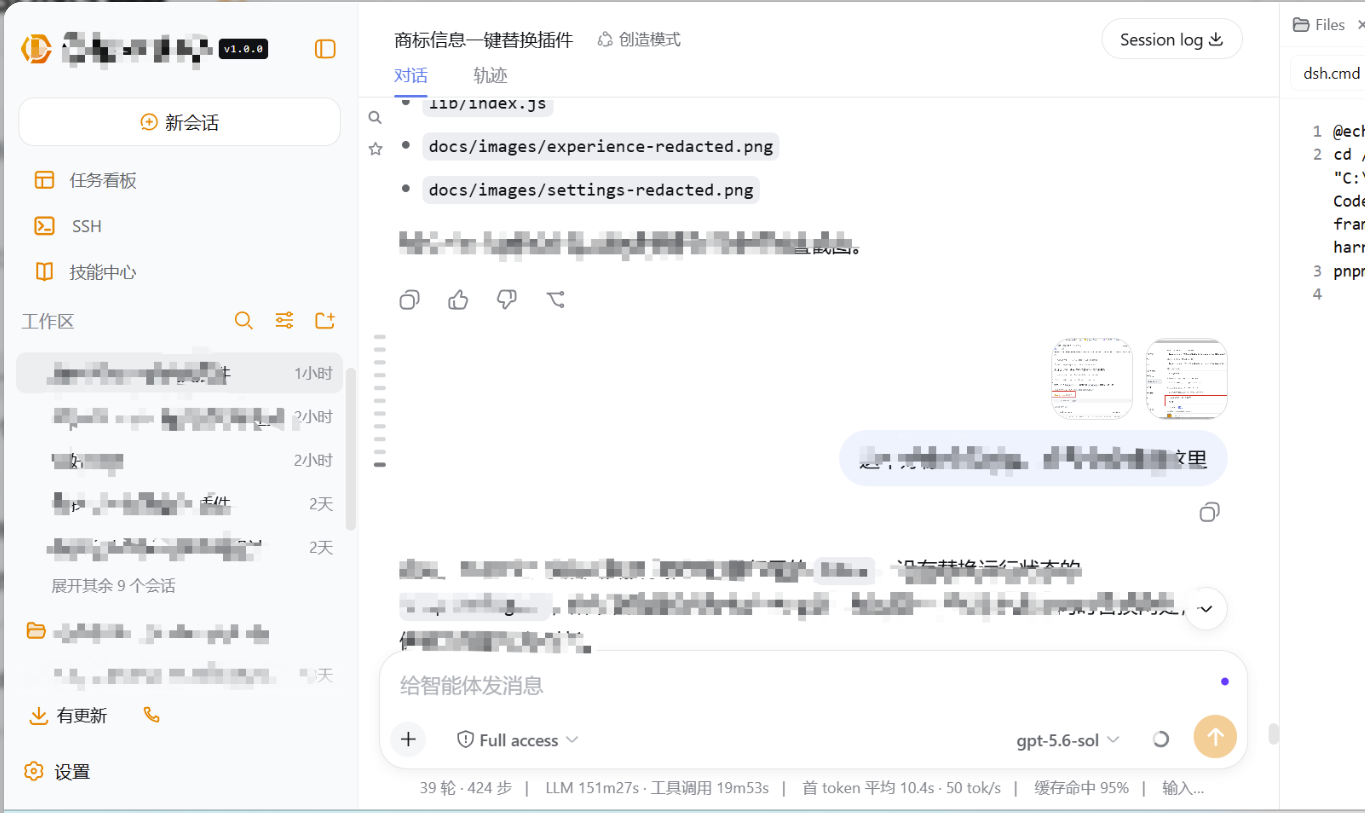
插件配置页
配置值中的 Data URL、SVG 和产品信息已经脱敏。
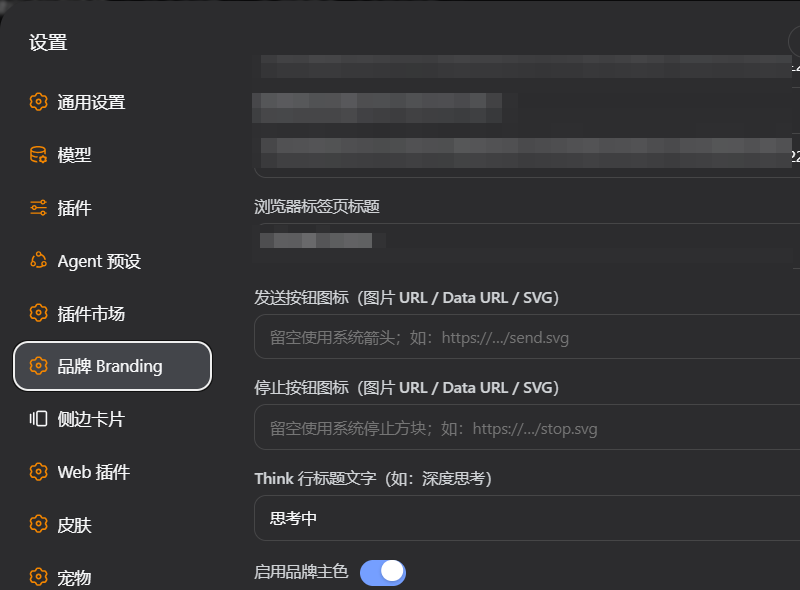
特性
- 商标 Logo:侧栏与新会话 Hero,支持文字、Emoji、图片 URL、Data URL 和原始 SVG
- 产品名称与版本徽标:支持普通文字或艺术字图片
- Hero 主标题、徽标与一句话简介
- 浏览器标签页标题与 favicon
- 思考状态文字自定义:替换
Think行标题 - 运行状态自定义:鲸鱼标记(启用 / 隐藏 / 替换三态)、鲸鱼颜色、旁边那行文字
- 发送、停止按钮支持独立自定义图标
- 品牌主色支持手动取色或从商标自动提取主色
- 可隐藏 DSH 内测声明弹窗
- 配置保存在独立 JSON 文件,便于不同厂商分发二改版本
- 内置默认品牌 lib/defaults.json:首次安装即为本发行版的商标,在设置页保存后改用用户自己的配置
- 停止或卸载插件后恢复系统界面
品牌主色作用范围
“启用品牌主色”默认开启。颜色留空时,插件会从商标图片中采样,选取非透明、非近白区域中占比最高的颜色;手动填写颜色时,以手动颜色为准。
设置页提供品牌色作用范围多选列表,默认全部勾选,也可以按需要只保留部分 UI:
- 侧边栏操作图标
- 工作区“项目”文件夹图标
- Think / 深度思考图标与标题
- 运行状态行(鲸鱼与文字)
- 发送按钮与停止按钮
每项可以独立勾选或取消,并提供“全选 / 全部取消”。关闭“启用品牌主色”总开关后,上述 UI 全部恢复系统原配色,但不会清除已填写颜色和作用范围选择。旧配置没有 colorTargets 字段时自动按全选处理。
换肤兼容说明: 商标、产品名称、版本徽标、浏览器标签页标题和 favicon 属于稳定品牌项,通常不会被 UI 换肤插件覆盖。品牌主色属于样式层增强;如果其他换肤插件使用了更高优先级规则,部分图标或文字颜色可能被覆盖,最终效果取决于样式加载顺序与选择器优先级。
安装
git clone https://github.com/advance-lion/dsh-brand.git
dsh plugin --profile web add <克隆下来的 dsh-brand 目录>
如果当前 CLI 支持 github: 规格,也可以直接安装:
dsh plugin --profile web add github:advance-lion/dsh-brand
或者下载 Releases 里的 dsh-brand-0.2.0-rc.6.tgz,按本地 tarball 安装(已用 pnpm 11 验证可解析安装):
dsh plugin --profile web add <下载路径>\dsh-brand-0.2.0-rc.6.tgz
本包为纯手写 ESM、零依赖、免构建,lib/ 即产物,无需运行 npm install 或 build。
安装后访问 http://127.0.0.1:3080。若插件未出现,重启一次 dsh web,然后使用 Ctrl+F5 硬刷新。
使用
- 打开 设置 → 品牌 Branding。
- 填写需要替换的品牌字段。
- 点击“保存并应用”。
- 使用“恢复默认”可一键清空品牌配置。
Host 字段发生变化或插件首次升级后,需要重启一次 dsh web;普通配置修改保存后即时生效。
配置字段
| 字段 | 作用位置 |
|---|---|
name |
侧栏产品名,支持文字、图片 URL、Data URL、SVG |
version |
产品名称旁的自定义版本徽标;非空时优先于 DSH 构建版本 |
useDshVersion |
自定义版本留空时显示当前 DSH 构建 Hash/包版本,默认 true |
headline |
新会话 Hero 主标题 |
badge |
Hero 徽标 |
intro |
Hero 简介 |
logoText |
旧版兼容字段:文字或 Emoji 商标 |
logoUrl |
主商标,优先于 logoText;也是自动取色来源 |
title |
浏览器标签页标题 |
favicon |
浏览器标签页图标 |
sendIcon |
发送状态图标;留空使用系统箭头 |
stopIcon |
停止状态图标;留空使用系统方块 |
thinkText |
替换 Think 行标题(旧宿主上同时替换旧的 shimmer 运行状态文字) |
runningIconMode |
鲸鱼标记三态:native 启用系统鲸鱼(默认)/ custom 替换 / hidden 隐藏 |
runningIcon |
custom 模式下替换鲸鱼用的图片 URL / Data URL / SVG;切回 native 不必清空 |
runningText |
运行状态那行文字;留空显示系统文案与「用时 X 秒」,填写默认替换整行 |
runningTextKeepTimer |
true 时 runningText 只替换前缀,系统那句「,用时 X 秒 ···」接在后面继续跳秒 |
colorEnabled |
品牌主色总开关,默认 true |
colorTargets |
品牌主色作用范围,默认 sidebar,project,think,running,composer;旧值 diving 自动迁移为 running |
color |
品牌主色;留空时自动从 logoUrl 提取 |
hideNotice |
是否隐藏 DSH 内测声明弹窗 |
首次运行时没有
dsh-brand.json,插件直接使用包内自带的默认品牌lib/defaults.json(本发行版内置 ORiSUNG 商标)。在设置页点「保存并应用」后,配置会写入$DSH_HOME/dsh-brand.json并覆盖内置默认;删掉该文件即可回到内置默认。二次分发的厂商只需替换lib/defaults.json,无需改动代码。
配置保存在 $DSH_HOME/dsh-brand.json,默认位置为:
C:\Users\<用户>\.dsh\dsh-brand.json
示例:
{
  "name": "Acme Harness",
  "version": "",
  "useDshVersion": "true",
  "headline": "探索未至之境",
  "badge": "预览版",
  "intro": "面向内部的智能体工作台",
  "logoUrl": "https://example.com/logo.svg",
  "title": "Acme Harness",
  "favicon": "https://example.com/favicon.svg",
  "sendIcon": "",
  "stopIcon": "",
  "thinkText": "深度思考",
  "runningIcon": "",
  "runningIconMode": "native",
  "runningText": "",
  "runningTextKeepTimer": "",
  "colorEnabled": "true",
  "colorTargets": "sidebar,project,think,running,composer",
  "color": "",
  "hideNotice": "true"
}
实现说明
- 使用官方品牌 Slot:
sidebar.brand.mark、sidebar.brand.name、conversation.hero.brand.mark。 - Host 提供同源
GET/PUT /api/dsh-brand/config接口读写配置。 - Host 在 HTML 首屏注入品牌配置,减少刷新时默认商标、标题与 favicon 闪现。
- Hero 接管和部分精确配色使用受限作用域选择器,不修改整个应用的全局主题变量。
- Think 标题、发送/停止状态均保留原生交互语义,仅替换显示层。
Links
More in this category
zhu1090093659/dsh-web#packages/dsh-task-board★ 9925
Task board for the dsh web GUI: a sidebar multi-column kanban whose cards run in real DSH agent sessions and can also be scheduled with cron expressions, executed host-side even with the browser closed.
zhu1090093659/dsh-web#packages/dsh-web-all★ 9925
Plugin and skin collection for the DSH Web UI: task board, Git graph, right-side panel, remote mobile UI, pet, live token stats, and a skin center.
MeteorNOX/DeepSeek-Balance-Whale-Widget★ 6712
A fixed-corner whale widget for the DSH web GUI — balance, today's usage and per-turn cost with peak/off-peak pricing, editable balance-alert and daily-budget bubbles, a module-based custom bubble queue with A/B weighted choices and random lines or images, 30+ vendor templates (OpenAI, OpenRouter, Kimi, SiliconFlow, Ark, Zhipu, MiniMax and more) with per-model balance and subscription quota, plus task-end sound, imported audio, custom roles and a resource manager. Local-only, no telemetry.
ccch1mneyyy/dsh-TUI★ 6538
Claude Code-style full-screen terminal UI: pixel-whale header, live status line, and streaming thought expansion.
omdsh-dev/DSH-better-sidebar★ 4808
Full sidebar workbench with file rendering and editing, terminal, Git, and subagents; third-party plugins can register new tabs.
Devin-AXIS/deepseek-design#deepseek-idesign★ 1672
Visual design studio for websites, app prototypes, posters, cards, reports, and magazines, with templates, direct element editing, selection-aware AI draft handoff, and export.
Community comments
Comments are public GitHub Discussions. Loading them connects to GitHub and Giscus; a GitHub account is required to post.