HUD status panel: Git status, MCP servers, skills, model and token usage in a floating side panel.
Install
# from GitHub (first run asks for allowBuilds approval — follow the hint, retry)
dsh plugin --profile web add github:a903067276-rgb/dsh-hud
Any plugin you install runs third-party code with your own permissions — it can read your files, use your credentials, and reach the network, and tool approvals don’t sandbox it. GitHub-sourced plugins also run build scripts at install time — pnpm blocks those until you allow them, so an install can stop with ERR_PNPM_GIT_DEP_PREPARE_NOT_ALLOWED or ERR_PNPM_IGNORED_BUILDS; dsh prints the exact key to add under allowBuilds in your profile’s pnpm-workspace.yaml, and the install works on the next run. Allowing a build is a trust decision: only install sources you trust, and pin a commit (github:owner/repo#sha).
README
A HUD status panel plugin for DeepSeek Harness (dsh) web: one button in the input toolbar opens a floating panel with git status, MCP servers, skills, official usage info and balance.
Unofficial project: independently developed and maintained by a community member, not an official DeepSeek product.
Screenshots

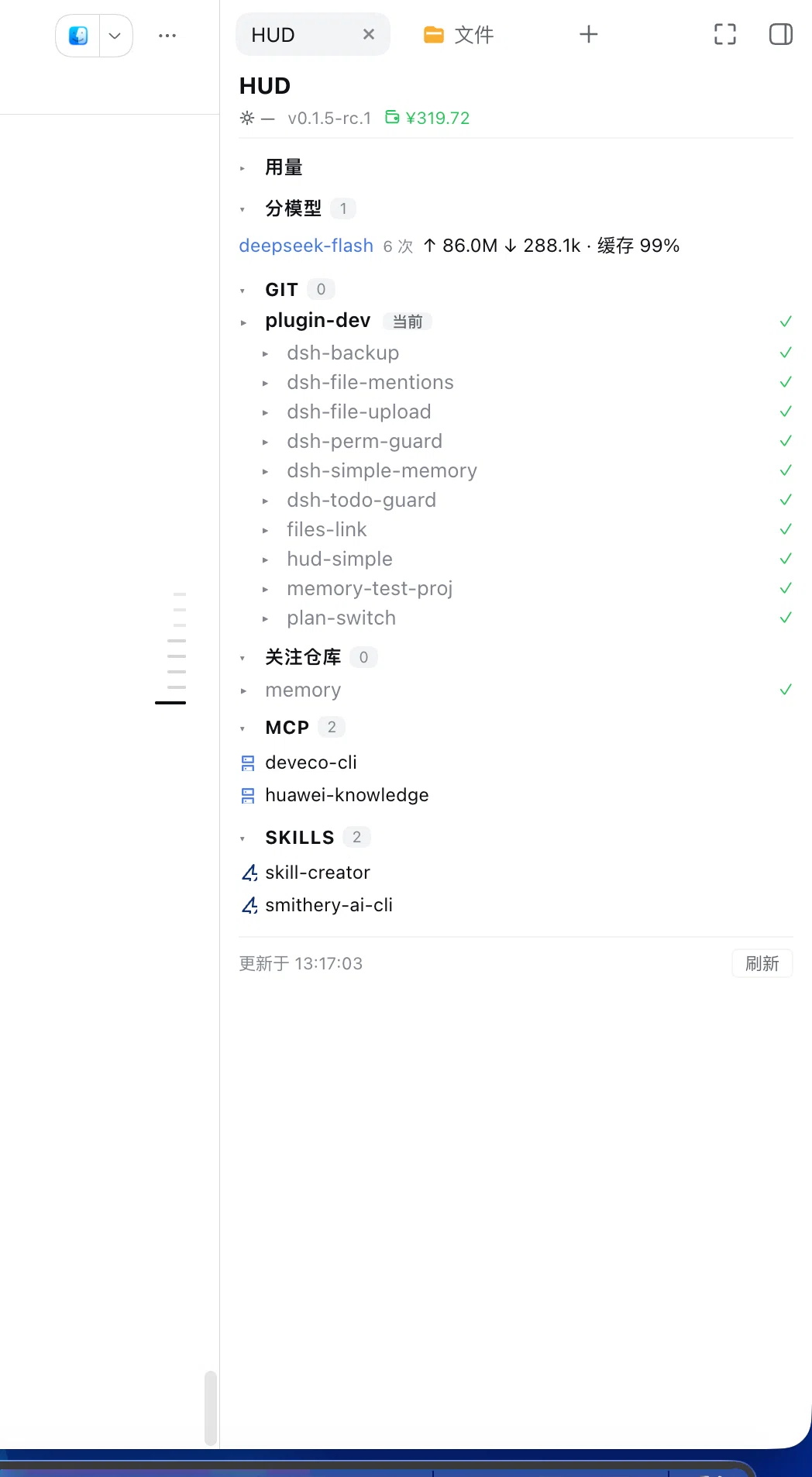
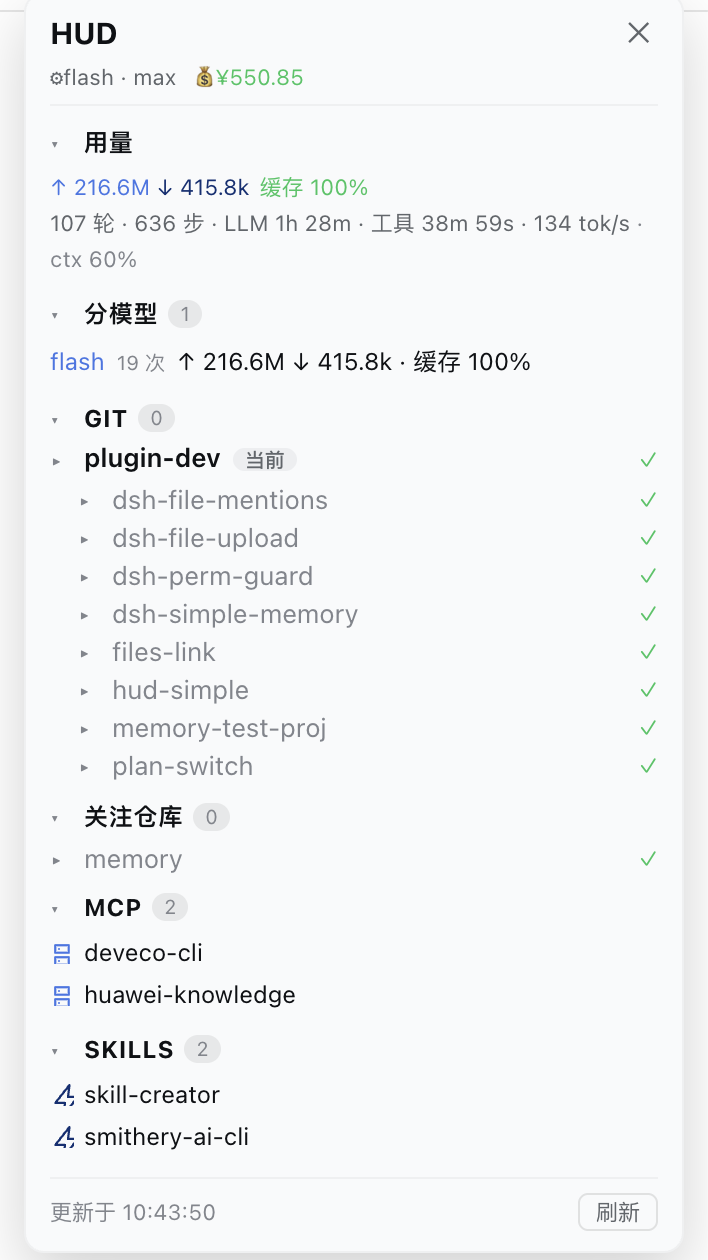
Default form: a tab in the official right sidebar (DSH 0.1.5+), toggled by the HUD button left of the composer — clicking it again collapses the sidebar. It can also run as a floating panel (older hosts fall back automatically) with drag-resizable position and width. The panel shows git status, commit history, watched repos, MCP servers, skills and official usage info (tokens in/out, cache hit rate, per-model breakdown, context usage).
Features
- Git — branch, ahead/behind, unstaged / staged / untracked files (collapsible groups),
per-file
+N/-Nsummaries, click a file to expand its full diff, last 10 commits (commitCount, 1–50; the commit list starts collapsed) - Change-driven folding (2026-09-26) — a clean repo/sub-repo collapses to a single line (with ✓ and ↑↓ unpushed counts); a dirty one auto-expands down to the file level. Once you toggle a repo yourself, your choice wins and is remembered (localStorage)
- MCP — connected MCP servers (derived from
mcp__<server>__<tool>tool names) - Skills — skills available to the current agent
- Official info — current model + reasoning effort, plan mode state, token usage (input / output / cache-hit rate), session stats (turns, steps, LLM & tool time, decode tok/s, context usage %)
- Balance — official DeepSeek account balance, auto-fetched from
GET /user/balanceusing theDEEPSEEK_API_KEYcredential (the key never leaves the host; shows--when unavailable) - Per-model usage — current session's token buckets broken down by model (requests, input, cache, output), so flash/pro usage both remain visible after switching
The button also shows a live badge with the number of uncommitted files, so you can see at a glance that a project has pending changes without opening the panel.
Install
This repository is an official bundle plugin (dsh.bundle + dsh.client in the root
package.json), installed through the official profile manager:
# DSH 0.1.7 and later:
dsh plugin --profile web add "github:a903067276-rgb/dsh-hud#main"
# DSH 0.1.5 and older (this release needs 0.1.7+):
# dsh plugin --profile web add "github:a903067276-rgb/dsh-hud#v1.4.1"
Then restart dsh web (bundle layers are composed at startup; HMR does not apply).
Requires pnpm on PATH (dsh plugin forwards to pnpm).
Manual mount fallback: see docs/install.md.
Usage
Click the gauge icon in the input toolbar (official DSH design tokens, follows
dark/light theme). The panel opens on the left side by default (240px wide), clear of the
official right-edge turn navigator; drag its title bar to move it anywhere (position
remembered in localStorage, restored on reopen); drag its left edge to resize
(200–480px, remembered in localStorage). Section headers
with count badges are clickable to collapse/expand. Data auto-refreshes every 30s (when
the panel is closed, only the lightweight git badge keeps polling).
Platform support
| Platform | Status |
|---|---|
| macOS | ✅ Fully tested (development environment) |
| Linux | ⚠️ Not yet tested — expected to work, see docs/install.md |
| Windows | ⚠️ Not yet tested — expected to work, see docs/install.md |
Requirements
- DSH web >= 0.1.1-rc.1 (run with
npx @deepseek-ai/dsh web) - Version compatibility (the per-model usage projection uses the DSH 0.1.1+ contract; 0.1.0-rc.7/rc.8 still use the old one):
- ✅ DSH 0.1.7 and later — use this release (
v1.5.1): it declarespeerDependencies: {"@deepseek-ai/dsh": ">=0.1.7-rc.1 <0.2.0"}, so a mismatched host refuses to load it with an explicit reason instead of failing quietly. Settings move to the 0.1.7 model (pluginConfig, live-editable.volatile()fields), so changes apply without a restart. - ⚠️ DSH 0.1.5 and older — install the previous tag
v1.4.1: that line keeps the old behavior and uses no 0.1.7-only API. - ⛔ Old plugin releases (up to
v1.4.1) are not supported on 0.1.7 — every git command fails (shell.runis gone) so the Git block is empty, and the right-sidebar tab form is never used. Upgrade the plugin together with the host.
- ✅ DSH 0.1.7 and later — use this release (
- Maintenance policy: this plugin keeps evolving with the latest DSH releases; compatibility with older DSH versions is best-effort only and not guaranteed going forward.
| Your DSH version | Install this | Note |
|---|---|---|
| 0.1.1-rc.1 and newer | main (v1.2.15+) |
Full features |
| 0.1.0-rc.7 – 0.1.0-rc.8 | v1.2.11 — dsh plugin add github:a903067276-rgb/dsh-hud#v1.2.11 |
Last release with the pre-0.1.1 projection contract |
| 0.1.0-rc.6 and older | rc6-compat — dsh plugin add github:a903067276-rgb/dsh-hud#rc6-compat |
Frozen, no maintenance — upgrade recommended |
gitCLI on PATH- No extra shell needed: DSH's
shellservice executes everything viabash -con all platforms (Git Bash on Windows), so if DSH runs, this plugin runs.
How it works
┌─ Host (Node, cordis plugin) ──────┐      ┌─ Browser (client bundle) ──┐
│  lib/index.js                     │      │  lib/client.js             │
│                                   │      │                            │
│  webServer.register(/api/dsh-hud) │──fetch──▶  input.left seat: button │
│    ├ /api/dsh-hud   git/mcp/...   │      │  shell.overlay seat: panel  │
│    └ /api/dsh-hud/diff  per-file  │      │                            │
└───────────────────────────────────┘      └────────────────────────────┘
The host serves JSON over the webServer prefix route and runs all git commands in a
single bash -c call with __HUD_[BHSLN]__ segment markers (fast project switches).
The client is a hand-written window.__ModuleLoader__.load(...) bundle with zero build
step, sharing state between the button and the panel through a module-level store
(useSyncExternalStore). Details and known pitfalls for maintainers:
docs/architecture.md.
Notes
- Use either the official bundle install or the manual mount — never both.
- All data is gathered locally from the running
dshinstance. The only outbound call is the balance request:balanceModepicksoff(never request, never show) /official(default, DeepSeekGET /user/balancewith theDEEPSEEK_API_KEYcredential) /custom(your own endpoint —balanceUrlplus optionalbalanceHeader(defaultauthorization: Bearer <key>),balanceTokenEnv(defaultDEEPSEEK_API_KEY),balancePath(e.g.data.balance) andbalanceCurrency). The key is only ever sent to the address you configured yourself; anything unavailable shows--instead of a guessed number. - Presets (
balancePreset):kimi/siliconflow/openrouter(total_credits − total_usage) /zai/one-api(needsbalanceScale, e.g. 500000 per unit, plus your ownbalanceUrl) /deepseek. Fields you set yourself always win over the preset. Custom URLs must be https (localhost/LAN excepted), redirects are never followed (so Authorization can't be bounced to another host), the key only ever travels in a header, and a 200 response that yields no number gets a one-time hint. DSH_HUD_NO_WATCH=1disables file watching entirely — the HUD then refreshes purely via its 30s polling + manual/focus refresh. Useful on machines with enormous directory trees (e.g. a parent folder containing dozens of repos) where macOS file watchers are unreliable; the watcher is also capped at 128 by default (deeper changes surface via polling within ~30s).DSH_HUD_BALANCE=offdisables the balance request entirely — no outbound call, no log line, the panel just shows--.- Balance only works with an official DeepSeek key. The endpoint (
/user/balance) is the official one and the credential isDEEPSEEK_API_KEY; if that variable holds a relay/gateway key, the request returns 401, so the panel shows--. Such a failure is reported once and then backed off for 30 minutes (older versions retried every 60s and logged every attempt). Support for non-official API balances is planned (#10).
Development
lib/index.js        host half — data routes (git / mcp / skills / model)
lib/client.js       client half — UI (button + panel), final bundle, no build step
cordis.patch.yml    bundle patch — single package-name mount (official bundle flow)
docs/               install guide & architecture notes
examples/           manual double-mount example (fallback install path)
To test locally: symlink (or dsh plugin --profile web link) into the web profile's
node_modules, add the two mount entries, restart dsh web.
Design philosophy
Simple by design. dsh-hud is deliberately minimal:
- Zero dependencies — no runtime packages, no build step; the client bundle is the final artifact in the repo
- Read-only — it only reads git status, MCP/skills listings and official projections; no git write operations, no file mutations
- One button, one panel — no settings pages, no config files
It is an independent community project: not an official DeepSeek product, and not affiliated with, forked from, or sharing code with any other DSH plugin project. If your workflow needs heavyweight SCM operations (commit/push UI, file trees, git graphs), other plugins cover that; dsh-hud deliberately stays a glanceable status HUD and coexists with them.
Community
This is a plugin for DeepSeek Harness. Find more plugins via the
dsh-plugin topic.
License
Links
More in this category
zhu1090093659/dsh-web#packages/dsh-task-board★ 8076
Task board for the dsh web GUI: a sidebar multi-column kanban whose cards run in real DSH agent sessions and can also be scheduled with cron expressions, executed host-side even with the browser closed.
zhu1090093659/dsh-web#packages/dsh-web-all★ 8076
Plugin and skin collection for the DSH Web UI: task board, Git graph, right-side panel, remote mobile UI, pet, live token stats, and a skin center.
omdsh-dev/DSH-better-sidebar★ 3828
Full sidebar workbench with file rendering and editing, terminal, Git, and subagents; third-party plugins can register new tabs.
ccch1mneyyy/dsh-TUI★ 3661
Claude Code-style full-screen terminal UI: pixel-whale header, live status line, and streaming thought expansion.
MeteorNOX/DeepSeek-Balance-Whale-Widget★ 3277
A fixed-corner whale widget for the DSH web GUI — balance, today's usage and per-turn cost with peak/off-peak pricing, editable balance-alert and daily-budget bubbles, a module-based custom bubble queue with A/B weighted choices and random lines or images, 30+ vendor templates (OpenAI, OpenRouter, Kimi, SiliconFlow, Ark, Zhipu, MiniMax and more) with per-model balance and subscription quota, plus task-end sound, imported audio, custom roles and a resource manager. Local-only, no telemetry.
Devin-AXIS/deepseek-design#deepseek-idesign★ 1628
Visual design studio for websites, app prototypes, posters, cards, reports, and magazines, with templates, direct element editing, selection-aware AI draft handoff, and export.
Community comments
Comments are public GitHub Discussions. Loading them connects to GitHub and Giscus; a GitHub account is required to post.