Smart calendar and checklist assistant with lunar dates, macOS/Windows native notifications, and WeCom push.
Install
# from npm (prebuilt)
dsh plugin --profile web add dsh-smart-reminder
# from GitHub (first run asks for allowBuilds approval — follow the hint, retry)
dsh plugin --profile web add github:a792883583/dsh-smart-reminder
Any plugin you install runs third-party code with your own permissions — it can read your files, use your credentials, and reach the network, and tool approvals don’t sandbox it. GitHub-sourced plugins also run build scripts at install time — pnpm blocks those until you allow them, so an install can stop with ERR_PNPM_GIT_DEP_PREPARE_NOT_ALLOWED or ERR_PNPM_IGNORED_BUILDS; dsh prints the exact key to add under allowBuilds in your profile’s pnpm-workspace.yaml, and the install works on the next run. Allowing a build is a trust decision: only install sources you trust, and pin a commit (github:owner/repo#sha).
README
Universal calendar reminder, lunar calendar dashboard, and to-do checklist plugin for DSH Web GUI.
Documentación en Español | 中文说明文档
UI Preview
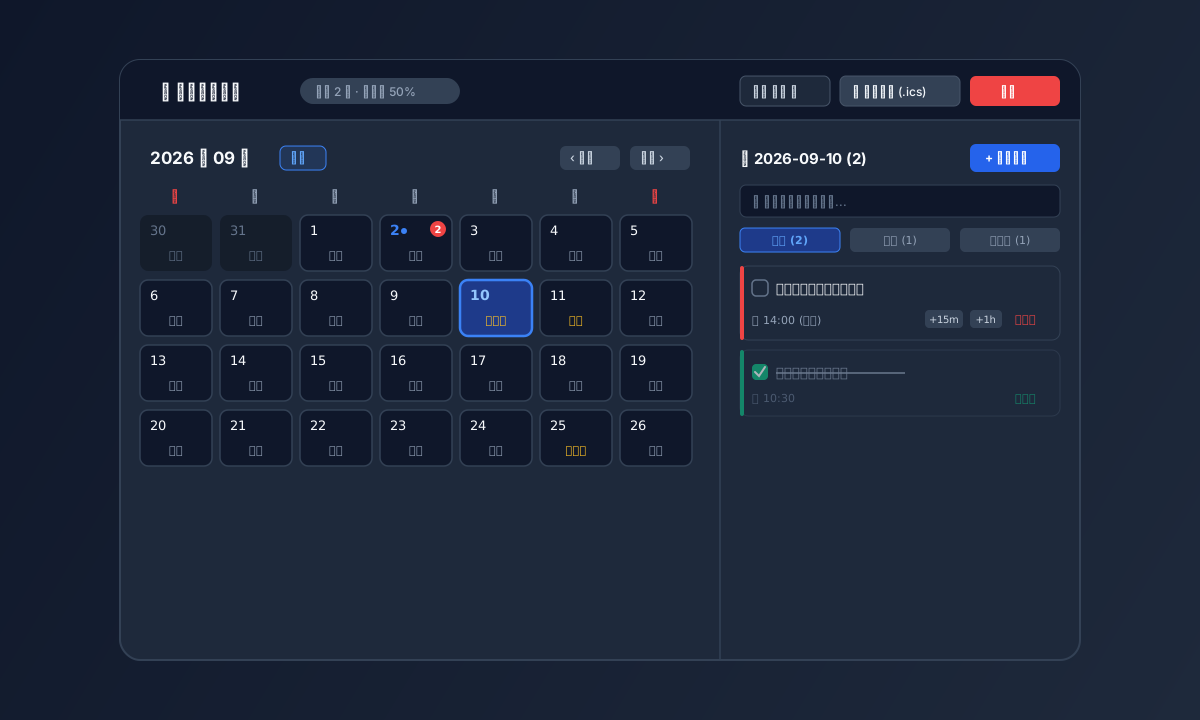
1. Fullscreen Calendar Dashboard & To-Do Workflow
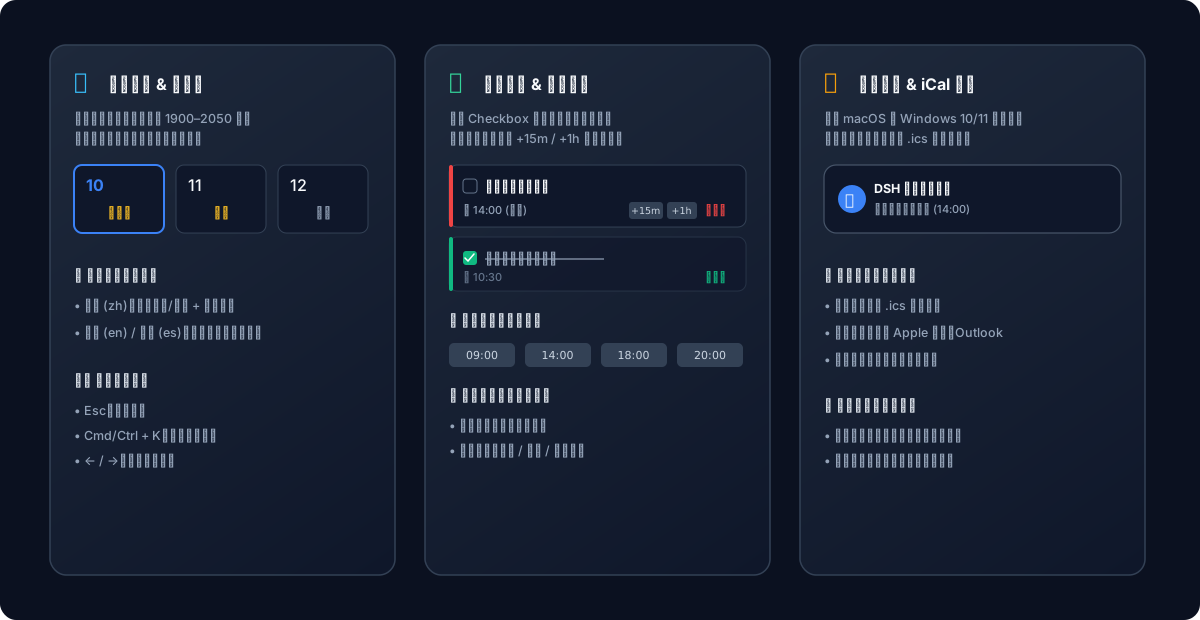
2. Feature Architecture
Key Features
- Natural Language Quick Add Bar:
- ⚡ Prominently featured top single-line input. Type naturally (e.g. "Team sync tomorrow 10am", "Submit report Friday 5pm", "Check oven in 30 mins") and hit Enter to immediately create a task with extracted title and precise due time!
- Automated Recurring Tasks:
- 🔂 Supports Daily, Weekly, and Monthly cycles. Checking off a task as completed automatically rolls forward and schedules the next recurring instance without manual entry.
- Seamless Sidebar Navigation: Sits in the "Workspaces" row, immediately left of the search icon and in line with the official search / view / add buttons; matches the official 28px (wide) and 36px (collapsed rail) circular icon specs, with a styled hover tooltip.
- Native Desktop Banners:
- 🔔 Deeply integrated with macOS native notification center banners paired with the crisp 'Glass' chime.
- 🪟 Full Windows 10/11 Toast Notification support (
scenario="reminder"+Priority=High), providing instant popup banners and sound alerts even when Focus Assist (Priority Only) is active.
- Drag & Drop Rescheduling:
- 🖱️ Directly click and drag any reminder card from the right list and drop it onto any calendar date cell to reschedule instantly!
- In-Place Reminder Editing:
- ✏️ Click the edit button on any reminder card to modify title, time, repeat rules, push platforms, and notes with one click.
- Native DSH Web Locale Sync:
- Automatically and reactively follows DSH Web language settings (English, Spanish, Chinese) across all titles, buttons, tips, and date formats.
- Interactive Checklist & Status Filtering:
- Checkbox completion with animated strikethrough.
- Quick status capsules (
All/Pending/Completed) and instant search query filter.
- Message Gateway Ecosystem Integration:
- Seamlessly detects and links with
dsh-message-gatewayto push notifications to WeCom AI Bot, Telegram, Discord, or Email. - 🔴 High (Urgent) / 🟡 Medium / 🟢 Low priority color indicators.
- Seamlessly detects and links with
- One-Click Snooze & 5-Second Undo:
- Postpone tasks by
+15mor+1hwith one tap. - Deletion includes a 5-second Undo toast to prevent accidental actions.
- Postpone tasks by
- Offline Missed Reminder Catch-up:
- Detects due tasks that occurred while offline or asleep and presents a catch-up banner.
- RFC 5545 iCal (.ics) Calendar Export:
- Export standard
.icscalendar files directly compatible with Apple Calendar, Google Calendar, and Outlook.
- Export standard
- Full Keyboard Navigation:
Esc: Close modal or overlay;Cmd/Ctrl + K: Quickly open new reminder dialog;← / →: Switch between months.
Agent Tools
set_reminder(title, dueTime, description?, repeat?, pushPlatform?, pushTarget?): Schedule reminders.list_reminders(type?: "upcoming" | "history" | "all"): Query reminders.complete_reminder(id): Mark tasks as completed or revert them.snooze_reminder(id, minutes?): Postpone reminders.cancel_reminder(id): Cancel and remove reminders.
License
MIT
Links
More in this category
xmanrui/dsh-im★ 2328
Connect IM bots to DeepSeek Harness via QR codes or bot credentials (9 channels: Feishu, WeChat, DingTalk, WeCom, QQ, Slack, Telegram, Discord, and WhatsApp).
shaobeichen/dsh-pocket★ 2244
Remote phone access to the DSH Web UI: scan a QR code for LAN or public (cloudflared tunnel) access with real-time sync, a mobile-adaptive layout, and a settings tab.
OpenPetsHQ/openpets#dsh★ 1320
Bridges DeepSeek Harness lifecycle status, errors, and approval requests to a locally running OpenPets desktop companion.
inclusionAI/Avernet#deepseek-harness-channel-bcn★ 590
Connects DeepSeek Harness to Avernet's Bot Collaboration Network over WebSocket V2, with automatic onboarding, isolated agent sessions, tool-call events, and multi-bot routing tools.
c1overzz/dsh-bili-scroll★ 423
Let your DSH agent browse Bilibili on its own, read subtitles, write a daily digest, and @ you when it finds something worth your attention.
omdsh-dev/dsh-notification★ 89
Desktop notifications for turn completions, with per-outcome controls and keyword rules.
Community comments
Comments are public GitHub Discussions. Loading them connects to GitHub and Giscus; a GitHub account is required to post.