Multi-platform message gateway and WeCom AI bot bridge with session context compression and smartsheet creation.
Install
# from npm (prebuilt)
dsh plugin --profile web add dsh-message-gateway
# from GitHub (first run asks for allowBuilds approval — follow the hint, retry)
dsh plugin --profile web add github:a792883583/dsh-message-gateway
Any plugin you install runs third-party code with your own permissions — it can read your files, use your credentials, and reach the network, and tool approvals don’t sandbox it. GitHub-sourced plugins also run build scripts at install time — pnpm blocks those until you allow them, so an install can stop with ERR_PNPM_GIT_DEP_PREPARE_NOT_ALLOWED or ERR_PNPM_IGNORED_BUILDS; dsh prints the exact key to add under allowBuilds in your profile’s pnpm-workspace.yaml, and the install works on the next run. Allowing a build is a trust decision: only install sources you trust, and pin a commit (github:owner/repo#sha).
README
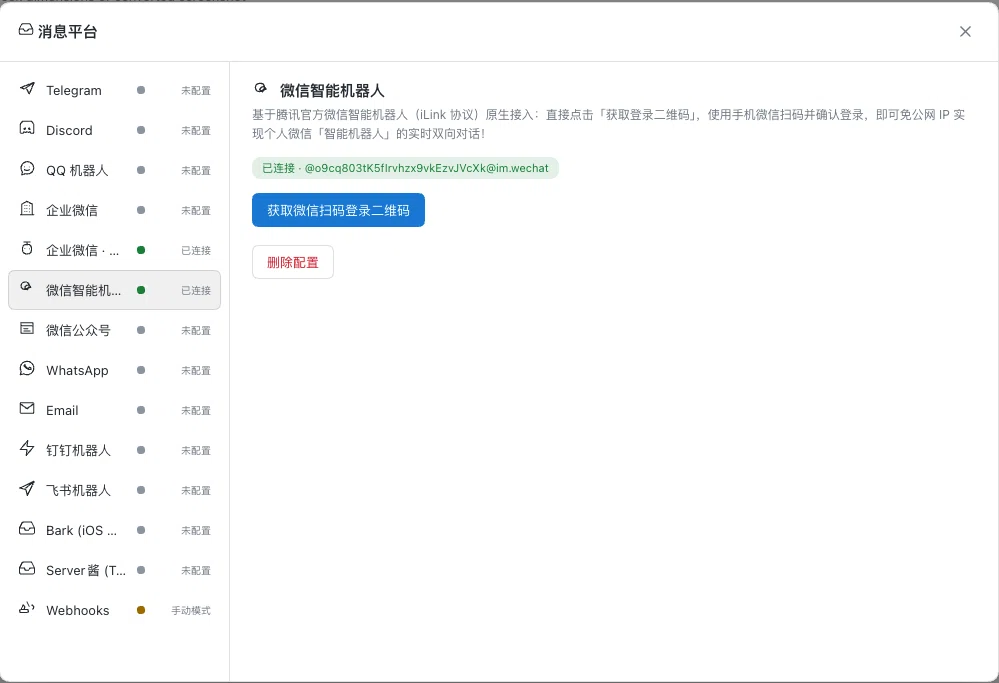
A message-platform gateway plugin for the DSH Web GUI: a "Message platforms" entry in the sidebar's "Workspaces" row, immediately left of the search icon, opens a full-screen manager for multi-platform message connectors — credential save, connection tests, status monitoring — plus a built-in persistent bridge for the WeCom AI bot: external messages drive the DSH assistant through a dedicated agent session, and replies stream back token by token. Also provides a universal proactive messaging API supporting Markdown text and native image attachments.
Features
- Sidebar entry: a "📮 Message platforms" icon button in the sidebar's "Workspaces" row, immediately left of the search icon (in line with the official search / view / add buttons), opens the full-screen manager (close with ESC or by clicking the backdrop)
- Multi-platform connectors: Telegram / Discord / QQ bot / WeCom / WeCom AI bot / WeChat (external Wechaty gateway) / WeChat Official Account / WhatsApp / Email / DingTalk / Feishu / Bark / ServerChan / Webhooks
- WeCom AI bot: fill in
botId + secretto establish an official SDK WebSocket connection; supports streaming replies, media upload, and proactive image/file push - Telegram bot: save a Bot Token to enable long polling, supporting text streaming and
sendPhotoproactive image push - Discord bot: save a Bot Token to connect via Gateway, supporting channels/DMs and
filesattachment proactive image push - DingTalk Bot: configure custom bot Webhook & optional HMAC Secret; supports Markdown text and public image URL rendering
- Feishu / Lark Bot: configure custom bot Webhook & optional Secret signature for text and card delivery
- Bark (iOS): fill in Device Key for instant push notifications with rich image banners (public URL)
- ServerChan: fill in SendKey for push notifications to WeChat / mobile channels with Markdown image URLs
- QQ bot: save appId + secret to connect to the open-platform gateway; passive replies + streaming edits
- WeCom app: fill in CorpID/AgentID/Secret plus callback Token/EncodingAESKey for auto-dialogues
- WeChat Official Account: fill in AppID/Secret plus callback Token for follower dialogues
- WhatsApp: fill in Token + Phone Number ID for WhatsApp webhook dialogues
- Email: fill in IMAP (993/143) + SMTP (465/587/25) for threaded email conversations
- WeCom AI bot: fill in
- Universal proactive push channel:
POST /gateway/push(for cron jobs, automation scripts, and pipelines):- Request body:
platform: target platform (wecom-aibot/telegram/discord/dingtalk/feishu/bark/serverchan/email)target: destination target (single-chat userid or group id forwecom-aibot; numeric chatId fortelegram; channelId fordiscord; deviceKey forbark, etc.)content: optional text content (supports Markdown)title: optional title (email subject or notification prefix)image: optional image data (Base64 data or accessiblehttp(s)://image URL)filename: optional image filename (defaults toimage.png)
- Highlights:
- Text and image can be pushed together or separately
wecom-aibot,telegram, anddiscordsupport uploading raw local binary buffers directlybark,dingtalk, andserverchanautomatically adapt to public image URLs
- Request body:
- Credential management: plaintext is persisted only to
~/.dsh/gateway.json(mode 600, atomic write);/gateway/listnever returns credential plaintext, only aconfiguredflag - Secret redaction: message content written to logs / console is automatically masked for likely secrets (
sk-prefixed keys, GitHub tokens,Bearer,password=assignments, PEM private keys, and other common patterns), so secrets in bot conversations never leak into log files - Connection tests: real per-platform checks — Telegram/Discord via Bot API, QQ via access_token, WeCom via gettoken, WeChat MP via cgi-bin/token, WhatsApp via Graph API, Email via IMAP TCP banner, WeCom AI bot via the official SDK long connection (authenticated = pass)
- WeCom AI bot persistent bridge: official SDK WebSocket long connection with exponential backoff reconnect; incoming text messages are injected into an isolated dedicated agent session that wakes the DSH driver; replies stream back as chunks and finalize via
response_url- Multi-step stream accumulation without overwrite: in multi-step/complex agent tasks, earlier reasoning paragraphs are accumulated cleanly without being overwritten by later outputs; intermediate pauses display a dynamic status hint (
⏳ Processing, please wait…) which is stripped upon completion - Graceful shutdown & instant reconnect: catches process termination signals to perform proper handshake disconnects across all platforms, eliminating 30-second zombie connection timeouts and allowing re-connections in 1–2 seconds
- Group-chat @mention stripping: the leading
@bot-nameis removed before the assistant sees the message - Slash commands:
/help//time//status//stats(Chinese aliases: 帮助/菜单/时间/状态/统计) - Enter-chat welcome: optional configuration (
welcomeReply, defaults tofalsefor zero disturbance; when set totrue, auto-replies a greeting when a user enters single chat for the first time that day) - Proactive send channel:
POST /gateway/send({"chatid": "...", "content": "..."}) sends markdown messages as the bot - Message routing rules (plugin config
routes): route messages by "platform + keyword prefix" to a specific agent preset (isolated session) with an optional dedicated model / skill - Agent push tool (
send_chat_message): automatically registers a universal message-pushing tool for DSH agents, allowing AI assistants to proactively send summaries, task results, or alerts (including screenshots and text) to WeCom, Telegram, Discord, DingTalk, etc.
- Multi-step stream accumulation without overwrite: in multi-step/complex agent tasks, earlier reasoning paragraphs are accumulated cleanly without being overwritten by later outputs; intermediate pauses display a dynamic status hint (
- Webhook receive endpoint:
POST /gateway/webhook/inaccepts messages from external systems, injects them into the dedicated agent session and returns the full reply synchronously; optional HMAC-SHA256 signature validation - Image & file attachment receiving (all platforms): each platform parses and downloads attachments according to its official documentation and hands them to the Agent
- Images → stored in the attachment store and passed to the model as multimodal content (the model can actually see the picture)
- Any other file (PDF / Excel / Word / archives …) → handed to the Agent as a handle of "file name + byte size + read-only path", which the Agent reads with its file tools
- Covered: WeCom AI bot (
image/file/video/mixed), Feishu (image/file/audio/media/ rich-textpost), DingTalk (picture/richText/audio/video/file), Telegram (photo/document/animation/video/voice/audio/video_note/sticker, includingcaption), Discord (attachments[]), QQ bot (attachments[], with quoted-message recursion and voiceasr_refer_text), WeChat iLink (item_listimage / voice / file / video, with CDN AES decryption), Email (standard MIME attachments, RFC 2231 Chinese filenames, base64 / quoted-printable decoding) - Never silently dropped: any unrecognised message type gets a user-visible notice (e.g. "received this message type, not supported yet") — you will never send something and get no response at all
- Each platform has its own official limits — see "Platform limits" below
- Multilingual: Chinese / English / Español, following the DSH Web UI language; defaults to Simplified Chinese
- Light / dark theme follows the DSH Web GUI
Usage
- Open DSH Web (
dsh web) and click the "Message platforms" button in the sidebar - Pick a platform on the left, fill in credentials on the right
- Click Save: credentials are persisted and a connection test runs automatically, refreshing the status immediately
- Click Test connection: tests the current form values without saving
- Saving
botId + secretfor the WeCom AI bot establishes the persistent bridge right away; deleting the config disconnects it
Install
# From npm (generic plugin, usable by any DSH user)
dsh plugin --profile web add dsh-message-gateway
Restart dsh web — the "📮 Message platforms" icon button appears in the sidebar's "Workspaces" row, just left of the search icon. Open the page, pick a platform, fill in credentials and click Save — for the WeCom AI bot, saving botId + secret establishes the persistent bridge immediately and you can chat with the bot in WeCom right away (same as web: per-chat sessions + automatic context compression).
Config
All options have defaults and the plugin works out of the box; tune them via dsh plugin config or the profile config file:
| Option | Type | Default | Description |
|---|---|---|---|
botLocale |
zh | en |
zh |
Bot reply language |
maxChatAgents |
number | 40 |
Max chat sessions kept per bot; oldest is evicted beyond this |
autoStartWecom |
boolean | true |
Auto-connect the WeCom AI bot from saved credentials at startup |
groupReply |
boolean | true |
Reply to group messages (false = single chats only) |
Platform limits (official — not our bug)
Every limit below comes from the official API capability boundary of the platform itself (each one can be verified in that platform's documentation). They are not bugs in this plugin, and they cannot be worked around by changing the plugin:
| Platform | Official limit | Notes |
|---|---|---|
| WeCom AI bot | Image messages are private-chat only | Official docs: image is single-chat only; in a group, @-mentioning the bot with a picture arrives as mixed (rich text + image). This plugin handles both |
| WeCom AI bot | Media URLs are valid for 5 minutes, aeskey is unique per link |
Official docs require downloading immediately; an expired URL can only be re-sent by the user |
| WeCom AI bot | File / video callback limit 100MB | Official limit |
| DingTalk | Group @-mentions cannot receive audio / video / file |
Official docs: groups only support text / picture / richText; voice, video and files work only in private chats |
| DingTalk | downloadCode expires |
Official docs require exchanging it for a download URL promptly; otherwise invalidParameter.robotCode.downloadCode |
| Feishu | Stickers (sticker) cannot be downloaded |
Official docs state sticker resources are not available; this plugin replies with a visible notice |
| Feishu | Rich-text / card resources and merged-forward sub-messages cannot be downloaded | Official limitation (returns 234043) |
| Telegram | 20MB download limit | Official docs: bots can download files up to 20MB; beyond that requires a self-hosted Local Bot API Server. This plugin reports that it did not download |
| Discord | MESSAGE_CONTENT privileged intent is required |
Official docs: without it, content / embeds / attachments are always empty arrays and the plugin cannot see attachments. Apply and get approved in the Discord Developer Portal |
| Discord | External embeds are not downloaded | By design this plugin does not fetch user-supplied external links (SSRF safety); it only passes the title and URL to the Agent as text |
| QQ bot | Request headers and validity of the inbound attachment url are undocumented |
This plugin performs a plain HTTPS GET (official docs specify no special header and no TTL) |
| WeChat iLink | No public official documentation | This protocol is an internal / semi-open Tencent interface; field names and the decryption flow here are taken from the official Tencent npm package source. Trustworthy, but not a documented contract — the platform may change silently |
| All platforms | Video / voice are not "seen" or "heard" | Models cannot natively understand audio or video. This plugin delivers them as files (name + read-only path) so the Agent can read or transcribe them with tools |
8bit / binary encoded attachments are read as text literals |
This plugin's IMAP implementation fetches parts as text literals; base64 / quoted-printable (the vast majority of real attachments) decode exactly, 8bit/binary is a rare edge case |
If what you are seeing is not in the table above, it is probably a plugin issue — please open an Issue.
Docs
- Architecture & extension guide (how to add a platform connector)
- Webhook receive endpoint contract
- WeChat (Wechaty) HTTP gateway contract
Architecture
- Host half (
lib/index.js):/gateway/*routes (list / save / delete / test / wechat-status) +BridgeManager(agent session injection and event-stream polling) +WecomBridge(SDK long-connection lifecycle) +gateway-store(credential persistence) - Client half (
lib/client.js): sidebar button mount + full-screen platform manager (React, loaded via the__ModuleLoader__closure)
Feedback
Found a bug or have a feature request? Open an issue on GitHub Issues — your feedback helps us make the plugin better.
License
MIT
Links
More in this category
xmanrui/dsh-im★ 2328
Connect IM bots to DeepSeek Harness via QR codes or bot credentials (9 channels: Feishu, WeChat, DingTalk, WeCom, QQ, Slack, Telegram, Discord, and WhatsApp).
shaobeichen/dsh-pocket★ 2244
Remote phone access to the DSH Web UI: scan a QR code for LAN or public (cloudflared tunnel) access with real-time sync, a mobile-adaptive layout, and a settings tab.
OpenPetsHQ/openpets#dsh★ 1320
Bridges DeepSeek Harness lifecycle status, errors, and approval requests to a locally running OpenPets desktop companion.
inclusionAI/Avernet#deepseek-harness-channel-bcn★ 590
Connects DeepSeek Harness to Avernet's Bot Collaboration Network over WebSocket V2, with automatic onboarding, isolated agent sessions, tool-call events, and multi-bot routing tools.
c1overzz/dsh-bili-scroll★ 423
Let your DSH agent browse Bilibili on its own, read subtitles, write a daily digest, and @ you when it finds something worth your attention.
omdsh-dev/dsh-notification★ 89
Desktop notifications for turn completions, with per-outcome controls and keyword rules.
Community comments
Comments are public GitHub Discussions. Loading them connects to GitHub and Giscus; a GitHub account is required to post.