Interactive chat table of contents with bookmarks, turn pinning, global shortcuts, and heading extraction.
Install
# from npm (prebuilt)
dsh plugin --profile web add dsh-chat-toc
# from GitHub (first run asks for allowBuilds approval — follow the hint, retry)
dsh plugin --profile web add github:a792883583/dsh-chat-toc
Any plugin you install runs third-party code with your own permissions — it can read your files, use your credentials, and reach the network, and tool approvals don’t sandbox it. GitHub-sourced plugins also run build scripts at install time — pnpm blocks those until you allow them, so an install can stop with ERR_PNPM_GIT_DEP_PREPARE_NOT_ALLOWED or ERR_PNPM_IGNORED_BUILDS; dsh prints the exact key to add under allowBuilds in your profile’s pnpm-workspace.yaml, and the install works on the next run. Allowing a build is a trust decision: only install sources you trust, and pin a commit (github:owner/repo#sha).
README
中文说明 · Documentación en Español
A native conversation navigation and table-of-contents enhancer for the DSH Web GUI: deeply supercharges the official native Turn Rail without adding redundant parallel tracks. Provides dual-layer preview popovers (User prompt + AI response), one-click bookmarks with golden glowing highlights, session-scoped persistent storage, and an ultra-clean inline top toolbar (Search / Starred filter / Markdown export).
Features
100% Native Fusion & Zero Redundancy:
- Eliminates secondary side-by-side indicator tracks to preserve clean UI breathing room.
- Directly attaches to DSH's native Turn Rail, transforming the minimal map into a flagship navigation experience.
Stable Hover Popovers (No Unexpected Dismissal):
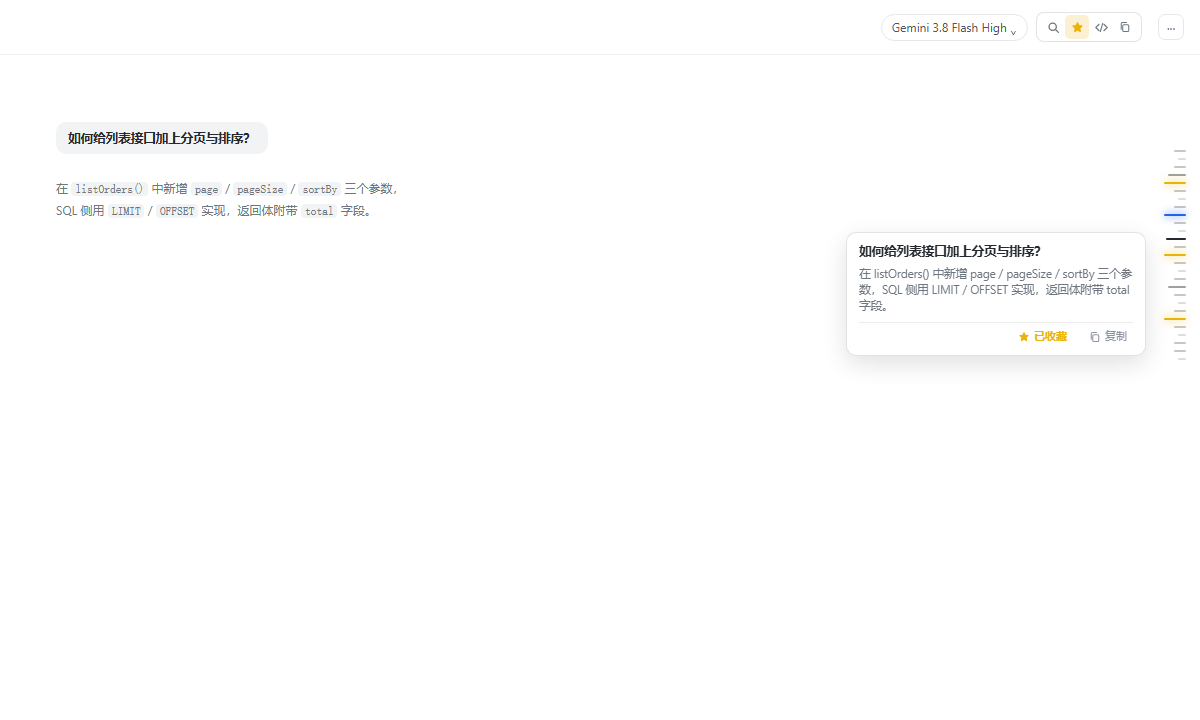
- Dual Content Display: Hovering any native rail mark reveals a clean preview card displaying both the 👤 User prompt and 🤖 AI core response.
- 300ms Hover Bridge: Keeps the card stably visible while moving the cursor leftward from the rail into the card, allowing smooth text selection and interaction without flashing dismissals.
- In-Card Actions (⭐ Bookmark & 📋 Copy): Directly embeds action buttons at the bottom of the card to star the conversation turn or copy the complete prompt and response.
Session-Scoped Persistent Storage:
- Scoped by stable Session ID + message unique anchor keys (
chatAnchorKey). - Survives page refreshes and browser restarts without losing any starred marks; clears only when the session is archived or deleted.
- Scoped by stable Session ID + message unique anchor keys (
Inline Native Top Toolbar:
- Embedded right beside the "Session Logs" action button in the native top bar; avoids sidebar collisions and never causes dual body scrollbars.
- 🔍 Instant & Deep Session History Search: Instant fuzzy highlight for current page; press Enter in long sessions to trigger Deep History Search, automatically paging through earlier turns via the official "Load earlier" action until the target is found and smooth-scrolled into view!
- 💻 Code & Tools Filter Capsules: Quick filter pills (
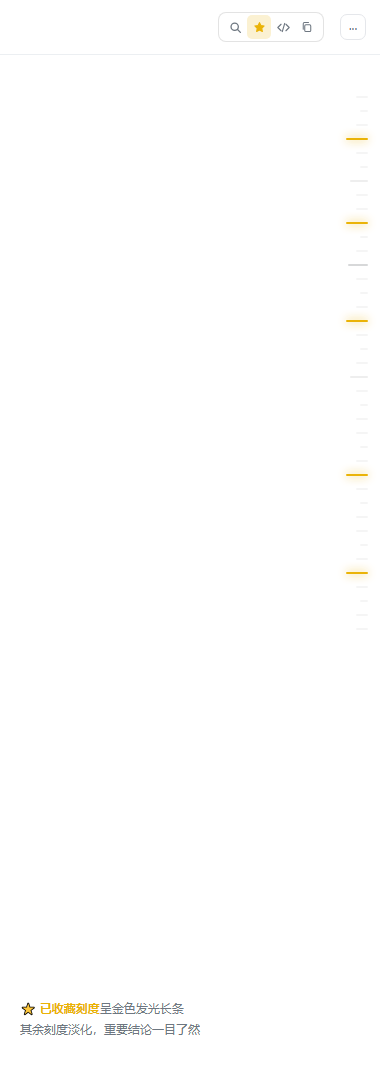
All·Code 💻·Tools ⚙️) below the search bar to isolate turns with code blocks or tool calls in long conversations. - ⭐ Starred-Only Filter: Turns unstarred marks into subtle 8% opacities, while starred marks illuminate into 22px elongated golden lines with ambient particle glows.
- 📋 Export Markdown Outline: One-click button to extract the entire conversation turn hierarchy as formatted Markdown.
Multilingual & Theme Adaptive:
- Automatically reactive to DSH Web language settings (Chinese / English / Spanish).
- 100% compatible with both Light and Dark DSH themes.
Screenshots
1. Hover Card (Prompt + AI Response Preview with Inlined Star/Copy actions, and the Inline Top Toolbar):
2. Starred Filter Active (Starred marks shine in golden glow, non-starred marks dim down):
Requirements
- Minimum version: DSH host ≥
0.1.5-rc.2(@deepseek-ai/dsh-client-runtime/dsh-client-locale/dsh-client-ui-chat≥0.1.5-rc.2).peerDependenciesdeclares>=0.1.5-rc.2 <0.3.0. This plugin relies on the following official DOM contracts, all of which exist only from0.1.5-rc.2onward:data-chat-flow-kind/data-chat-turn/data-chat-anchor-key(authoritative turn and row markers)- the
data-chat-flow-kind="text"vs"reasoning"distinction (to take the answer body and skip reasoning) - the turn number inside each mark's
aria-label(chat.turnNavigation.jump) *_bubble/*_previewPrompt/*_previewResponse(prompt text and the official-preview fallback)
- Verified on:
0.1.5-rc.2,0.1.6-alpha.1/2, and0.2.0-rc.1(current latest). - Compatible with the breaking
0.2.0-rc.1redesign: that release removed themarkPositionclass and switched the rail to virtualized rendering. This plugin now anchors on the mark button itself, which works across both generations, and re-reads the DOM every time instead of caching mark element references. - How it hooks in: it keys off official data attributes (
data-chat-*) andaria-labelrather than fragile CSS-Module hashes, using "hash prefix + underscore" class substrings only where genuinely necessary. - Dependencies: a pure client-side enhancement. No other plugins, no host-side service, no extra configuration.
Installation
dsh plugin --profile web add dsh-chat-toc
After updating, refresh your dsh web browser tab to enjoy the upgraded experience.
Feedback
Found a bug or have a suggestion? Feel free to open an issue on GitHub Issues.
License
MIT
Links
More in this category
zhu1090093659/dsh-web#packages/dsh-task-board★ 9673
Task board for the dsh web GUI: a sidebar multi-column kanban whose cards run in real DSH agent sessions and can also be scheduled with cron expressions, executed host-side even with the browser closed.
zhu1090093659/dsh-web#packages/dsh-web-all★ 9673
Plugin and skin collection for the DSH Web UI: task board, Git graph, right-side panel, remote mobile UI, pet, live token stats, and a skin center.
MeteorNOX/DeepSeek-Balance-Whale-Widget★ 6324
A fixed-corner whale widget for the DSH web GUI — balance, today's usage and per-turn cost with peak/off-peak pricing, editable balance-alert and daily-budget bubbles, a module-based custom bubble queue with A/B weighted choices and random lines or images, 30+ vendor templates (OpenAI, OpenRouter, Kimi, SiliconFlow, Ark, Zhipu, MiniMax and more) with per-model balance and subscription quota, plus task-end sound, imported audio, custom roles and a resource manager. Local-only, no telemetry.
ccch1mneyyy/dsh-TUI★ 6018
Claude Code-style full-screen terminal UI: pixel-whale header, live status line, and streaming thought expansion.
omdsh-dev/DSH-better-sidebar★ 4645
Full sidebar workbench with file rendering and editing, terminal, Git, and subagents; third-party plugins can register new tabs.
Devin-AXIS/deepseek-design#deepseek-idesign★ 1607
Visual design studio for websites, app prototypes, posters, cards, reports, and magazines, with templates, direct element editing, selection-aware AI draft handoff, and export.
Community comments
Comments are public GitHub Discussions. Loading them connects to GitHub and Giscus; a GitHub account is required to post.