Add colored tags to selected chat passages, then jump back from a left-side rail or a workspace-grouped overview that scrolls to the passage and flashes a highlight on it. Its HTTP routes have no DSH access check, so a web page open in your browser could call them.
Install
# from GitHub (first run asks for allowBuilds approval — follow the hint, retry)
dsh plugin --profile web add github:Zi-Kong/dsh-tag
Any plugin you install runs third-party code with your own permissions — it can read your files, use your credentials, and reach the network, and tool approvals don’t sandbox it. GitHub-sourced plugins also run build scripts at install time — pnpm blocks those until you allow them, so an install can stop with ERR_PNPM_GIT_DEP_PREPARE_NOT_ALLOWED or ERR_PNPM_IGNORED_BUILDS; dsh prints the exact key to add under allowBuilds in your profile’s pnpm-workspace.yaml, and the install works on the next run. Allowing a build is a trust decision: only install sources you trust, and pin a commit (github:owner/repo#sha).
README
This plugin publishes its README in Chinese only.
给 DeepSeek Harness 的聊天窗口打标签:选中一段话打个标,之后随时从侧边的标签轨道跳回去。
标签可以自己起名字、自己配色,跳转后目标文字会按标签颜色闪几下。
功能
- 划词打标:在聊天里选中任意文字,选区下方浮出「打标签」按钮,填写标题 / 备注,或直接点一个已有标签。
- 左侧标签轨道:对话区左侧有一条竖直轨道,每个标签按它在整段会话里的位置比例摆一个色块。点色块直接跳到对应内容,悬停显示备注与标题,右键可编辑或删除。
- 跳转定位:先加载到目标事件(
loadThrough),再依次尝试「轮次锚点 → 限定范围内的文本匹配 → 浏览器查找」三级定位;命中后滚动到目标并把高亮框覆盖在原文上,闪烁 5 次后退场;只能定位到轮次级时改为常亮,避免让人误以为精确命中。 - 总览面板:侧栏面板里的「标签」页,按工作区分组列出所有标记。组头可折叠、可给每个工作区单独配色(容器和边框跟着变色);条目排成两列卡片,左键跳转、右键编辑或删除,卡片右侧有跳转 / 删除两个图标按钮。顶部可按标签筛选。
- 会话行色点:侧栏会话列表每行的尾部显示该会话用到的标签颜色(最多 3 个)。
- 给 Agent 用:注册了
chat_tags_list/chat_tags_mark/chat_tags_delete三个工具,模型可以自己打标签、查标签。
界面
会话里的标签轨道
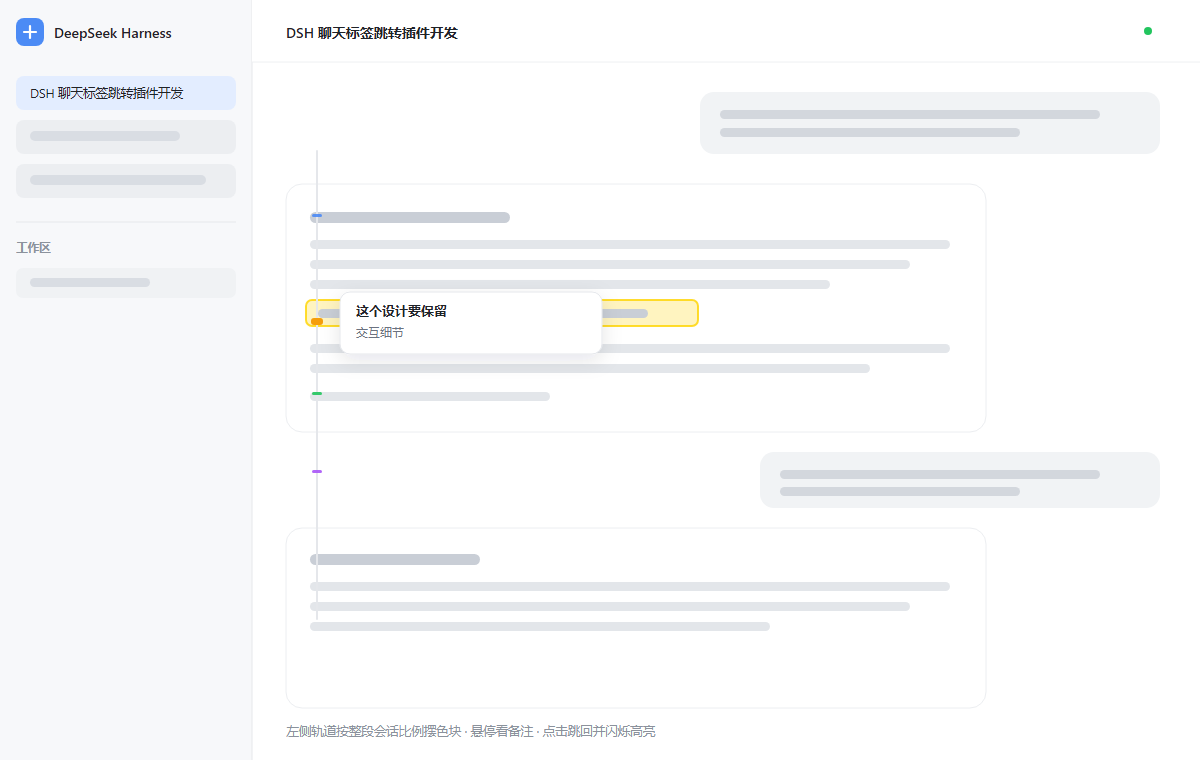
对话区左侧的竖直轨道按整段会话的比例摆放标签色块:悬停出备注与标签名,点击跳回原文并闪烁高亮。
总览面板
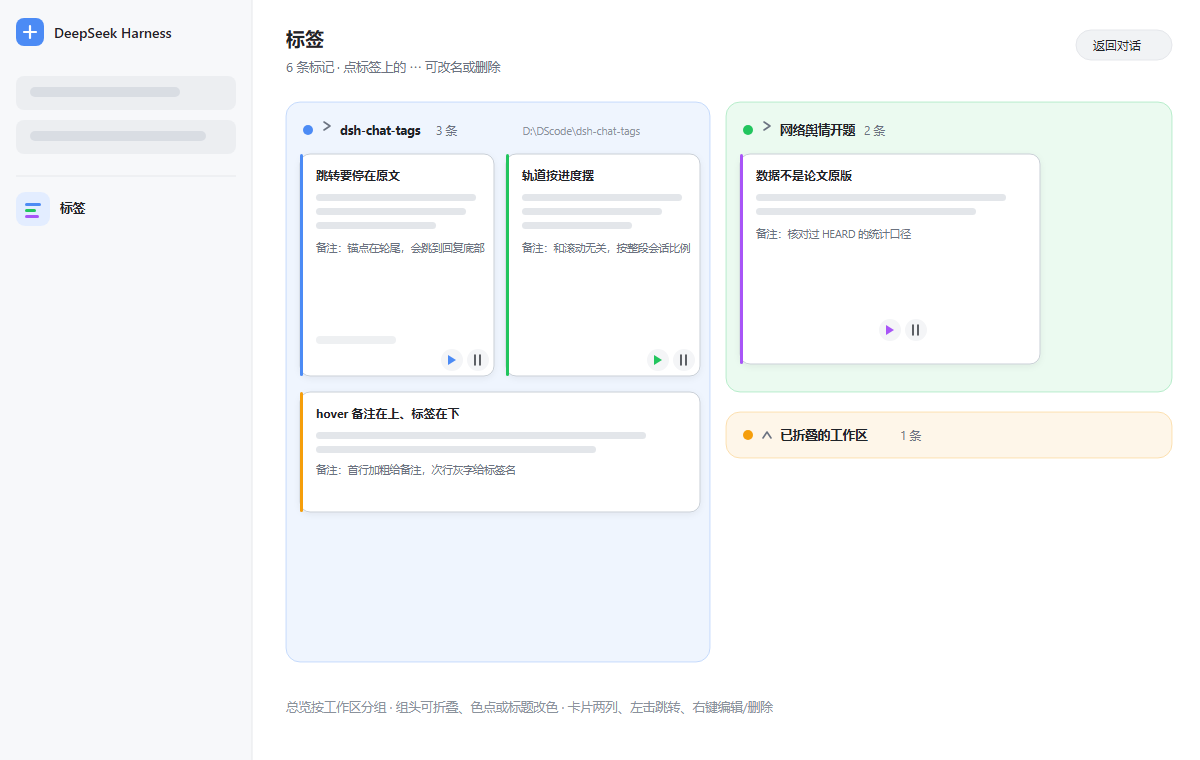
侧栏「标签」入口打开的面板:按工作区分组,组头可折叠、可配色;条目两列卡片,左键跳转、右键编辑或删除。
安装
需要 DSH 桌面版(或 dsh 服务端),要求 DSH ≥ 0.2.3-alpha.2(package.json 里的 engines.dsh),且 profile 允许加载第三方 bundle 插件。
git clone https://github.com/Zi-Kong/dsh-tag.git
然后在 DSH 的插件管理里安装这个本地 bundle,target 指向克隆下来的目录:
file:<克隆目录的绝对路径>
安装后刷新页面(Ctrl+R)即可看到侧栏多出「标签」图标,不用重启 DSH。
Host 侧代码(
index.js)的改动需要重启 DSH 才会生效,Client 侧(client.js、CSS)刷新页面即可。
使用
- 在聊天里选中一段文字 → 点选区下方的「打标签」。
- 新建一个标签(名字 + 颜色),或挑一个已存在的。
- 之后点左侧轨道上的色块就能跳回去;也可以从侧栏「标签」面板里跳。
- 想改标签名字或颜色:点面板里标签 chip 上的
⋯,或右键轨道色块。 - 面板里按工作区分组:点组头的
▸/▾折叠,点组头的色点或标题给这个工作区配色(8 色可选,也可恢复自动)。
数据
标记与标签存在本地:
$DSH_HOME/storages/dsh-chat-tags/data.json
默认 $DSH_HOME 是 ~/.dsh。结构:
{
  "tags":  [{ "id": "t_xxx", "name": "待办", "color": "#4c8bf5" }],
  "marks": [{ "id": "m_xxx", "tagId": "t_xxx", "sessionId": "session-...",
              "seq": 1257, "text": "选中的原文", "title": "标题",
              "note": "备注", "createdAt": 1764030000000 }]
}
HTTP 接口
Host 半挂载在 /chat-tags 前缀下:
| 方法 | 路径 | 说明 |
|---|---|---|
| GET | /chat-tags/state |
全部标签与标记 |
| POST | /chat-tags/tag/create |
新建标签 { name, color } |
| POST | /chat-tags/tag/update |
改名 / 改色 { id, name?, color? } |
| POST | /chat-tags/tag/delete |
删除标签及其标记 { id } |
| POST | /chat-tags/mark/create |
新建标记 |
| POST | /chat-tags/mark/update |
修改标记 { id, title?, note?, tagId? } |
| POST | /chat-tags/mark/delete |
删除标记 { id } |
写入是「先写 .tmp 再 rename」的原子写。
Agent 工具
| 工具 | 说明 |
|---|---|
chat_tags_list |
列出标记,可按 sessionId 过滤 |
chat_tags_mark |
给某段文字打标(sessionId + text 必填,tagId 或 tagName 二选一) |
chat_tags_delete |
删除一条标记 |
实现要点
- 无构建步骤:
client.js直接用window.__ModuleLoader__.load注册,纯 ES5 风格 JS +React.createElement。 - 划词气泡是自绘的:DSH 的
conversation.chat.text-interaction是独占式分发(第一个open()的消费者赢),第三方插件抢不到,所以改为在shell.overlay里监听selectionchange自己定位。 - 左侧轨道挂在
shell.overlay,只用自己注入的锚点元素算位置,不读其他插件的 DOM。 - 高亮框用
Range.getClientRects()逐行画,避免跨行 / 标题被外接矩形一整块框住。 - 浮层(右键菜单、高亮框)都挂到
document.body,避免被带transform的容器当成包含块导致定位偏移。 - 颜色全部取自 DSH 主题 token(
--dsw-alias-bg-layer-*、--dsw-alias-border-*、--dsw-alias-label-*),跟随明暗主题。
开发
node --check client.js
node --check index.js
改完 client.js 在 DSH 里 Ctrl+R 刷新;改 index.js 需要重启 DSH。
License
MIT
Links
More in this category
zhu1090093659/dsh-web#packages/dsh-task-board★ 10669
Task board for the dsh web GUI: a sidebar multi-column kanban whose cards run in real DSH agent sessions and can also be scheduled with cron expressions, executed host-side even with the browser closed.
zhu1090093659/dsh-web#packages/dsh-web-all★ 10669
Plugin and skin collection for the DSH Web UI: task board, Git graph, right-side panel, remote mobile UI, pet, live token stats, and a skin center.
ccch1mneyyy/dsh-TUI★ 8366
Claude Code-style full-screen terminal UI: pixel-whale header, live status line, and streaming thought expansion.
MeteorNOX/DeepSeek-Balance-Whale-Widget★ 7489
A fixed-corner whale widget for the DSH web GUI — balance, today's usage and per-turn cost with peak/off-peak pricing, editable balance-alert and daily-budget bubbles, a module-based custom bubble queue with A/B weighted choices and random lines or images, 30+ vendor templates (OpenAI, OpenRouter, Kimi, SiliconFlow, Ark, Zhipu, MiniMax and more) with per-model balance and subscription quota, plus task-end sound, imported audio, custom roles and a resource manager. Local-only, no telemetry.
omdsh-dev/DSH-better-sidebar★ 5362
Full sidebar workbench with file rendering and editing, terminal, Git, and subagents; third-party plugins can register new tabs.
omdsh-dev/dsh-genui★ 1070
Interactive UI components rendered inline in replies: layout, charts, forms, quizzes, mermaid, 3D scenes, and an action event loop back to the model.
Community comments
Comments are public GitHub Discussions. Loading them connects to GitHub and Giscus; a GitHub account is required to post.