Market Dog, the plugin bloodhound: locate the right plugin from a one-sentence or keyword description with bilingual (Chinese/English) semantic matching. Sort by relevance or downloads; filter by category, update time and stars.
Install
# from npm (prebuilt)
dsh plugin --profile web add dsh-market-dog
# from GitHub (first run asks for allowBuilds approval — follow the hint, retry)
dsh plugin --profile web add github:Zhang-Eli/dsh-market-dog
Any plugin you install runs third-party code with your own permissions — it can read your files, use your credentials, and reach the network, and tool approvals don’t sandbox it. GitHub-sourced plugins also run build scripts at install time — pnpm blocks those until you allow them, so an install can stop with ERR_PNPM_GIT_DEP_PREPARE_NOT_ALLOWED or ERR_PNPM_IGNORED_BUILDS; dsh prints the exact key to add under allowBuilds in your profile’s pnpm-workspace.yaml, and the install works on the next run. Allowing a build is a trust decision: only install sources you trust, and pin a commit (github:owner/repo#sha).
README
This plugin publishes its README in Chinese only.
用一句话描述你想要的插件,直接从 DSH 插件市场里找出真正匹配的那一个。
插件市场的搜索只认关键词,插件名又几乎都是英文:想找「能让我把侧边栏图标拖动成自己的顺序」的插件,输入 sidebar 会出来上百个,还得逐个点开介绍才能判断是不是自己想要的。Market Dog 把这件事反过来做——你描述要做什么,它负责翻译成市场里的说法并排序。
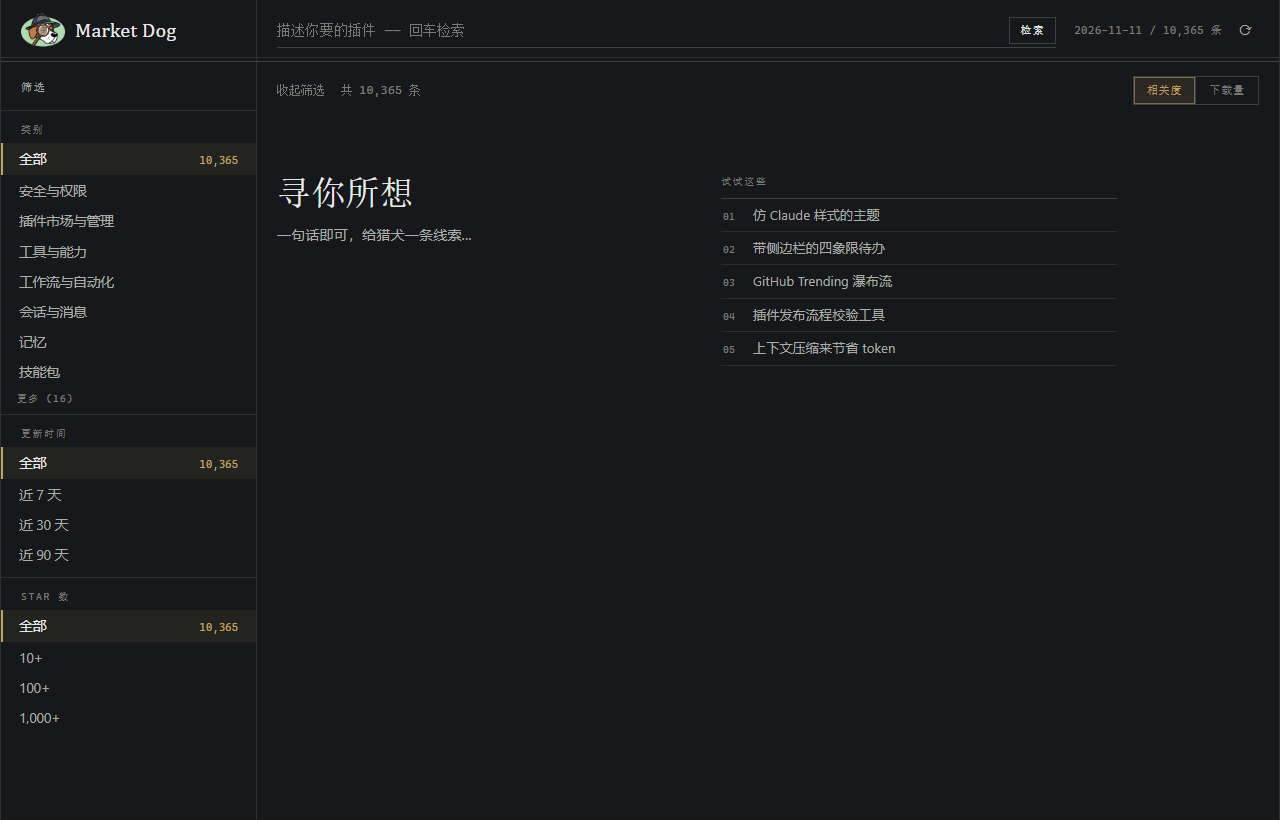
它做什么
- 一句话搜索:中文或英文写一段话,说清你想让插件帮你完成什么,不需要知道插件叫什么名字。
- 语义匹配:内置中英双语词义词典,「把很长的聊天记录总结成要点」能找到 summarize 类插件;中文描述能命中英文插件,反之亦然。泛词不顶事,罕见词与原文真实出现的词权重更高。
- 筛选栏:类别、更新时间、Star 数组合收窄,每个选项实时显示能捞到多少条;双击某个类别可直接按下载量浏览该类别的全部插件。
- 两种排序:相关度 / 下载量一键切换,同等相关时社区更常用的插件靠前。
- 行内安装:结果行直接安装,已装好的自动标记;点开一行可见安装命令、GitHub / npm 链接和插件截图画廊。
- 浅色 / 深色主题跟随 DSH 设置。
为什么比市场搜索好用
| 市场搜索 | Market Dog |
|---|---|
| 只匹配你输入的字面词 | 先从你的描述里提炼能力关键词,再做匹配 |
| 英文插件名对中文用户不透明 | 中英双向匹配:中文描述能命中英文插件,反之亦然 |
| 结果只有一堆同名/近名的条目 | 每个结果展示中文简介、分类、下载量、星标和命中的关键词 |
| 排序只有一种 | 相关度 / 下载量随时切换 |
| 得逐个点开才知道干什么 | 行内直接给出一句话简介,展开即见安装命令 |
| 只能按关键词翻页找 | 类别 / 更新时间 / Star 组合筛选,带实时命中数 |
使用
安装后在左侧边栏点「Market Dog」图标,或者直接说一句话开始:
- 让我可以把侧边栏图标拖动成自己的顺序
- 把很长的聊天记录总结成要点
- 在侧边栏显示股票行情和天气的小组件
- 把网页截图后自动 OCR 识别文字
- 记住我的编码习惯和项目约定
- 订阅 RSS 并每天推送摘要
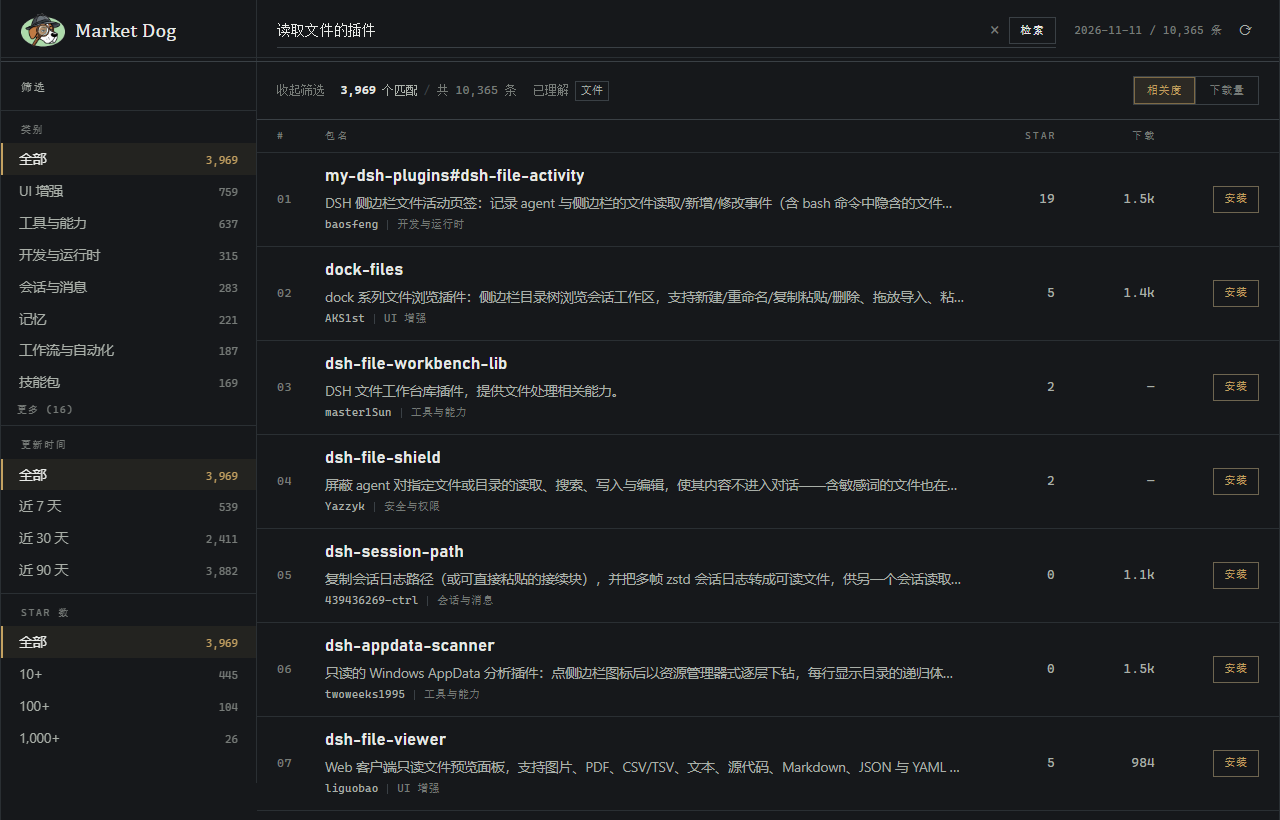
回车搜索、Shift+回车换行;描述、排序偏好、筛选条件都保存在本地,下次打开还在。目录可随时在右上角后台刷新,不卡列表。
数据与隐私
- 你的描述只发给本机的本地服务,不上传任何第三方,也不调用大模型。
- 插件目录来自公开的 awesome-dsh-plugin,首次搜索下载一次(约 14 MB),之后走本地缓存;断网时用上次下载的目录继续工作。
开发
# 本地目录安装到当前 profile
dsh plugin --profile web add <this-directory>
结构:
index.js:Host 侧。拉取并缓存插件目录,提供搜索与元数据接口。lib/search.js:纯函数评分模块(关键词提取、概念词典、相关度计算、筛选、排序)。client.js:浏览器侧。侧边栏入口与主面板。locale/{zh,en}.json:插件在市场上的标题与简介。
开发交接与设计约束见 docs/DEVELOPMENT.md。
反馈
遇到问题请到 Issues 反馈。
License
MIT
Links
More in this category
dsh-market/dsh-market★ 12640
Browse, search and install community plugins from inside DeepSeek Harness settings, with category filters, one-click updates, enable/disable, theme switching and configuration backup.
zhu1090093659/dsh-web#packages/dsh-plugin-manager★ 10458
Plugin manager tab in DSH Settings → Plugins: install from npm or git with progress, enable/disable switches effective at next startup, conflict reconciliation with undo, and one-click hand-off to a fix session.
LivXue/dsh-plugin-shop#dsh-plugin-shop★ 665
A browsable daily catalog of DeepSeek Harness plugins harvested from npm and GitHub: one-click install, enable/disable, update and uninstall, the reason dsh would refuse an install shown before you press it, prepurchase facts (engines.dsh, dependency count, bin names, install scripts), rollback and favorites.
kingOfSoySauce/dsh-skin-market★ 331
Native skin marketplace and lifecycle manager that discovers community skins, displays previews and compatibility status, and provides verified one-click or manual installation paths.
awesome-dsh-plugin/dsh-find-plugin★ 235
Find plugins without leaving the agent: search this curated registry by keyword or category, with ready-to-run install commands.
bradeGithub/DSH-Plugins-Marketplace★ 206
GitHub-topic-driven plugin & skill marketplace: a Settings page that browses the auto-collected registry (the whole dsh-plugin topic plus the skills index, CI-refreshed every 2 hours) with one-click install, type detection, install-script and host-shadow-dependency safety confirmations, env-key management, and the STANDARD.md recognition spec.
Community comments
Comments are public GitHub Discussions. Loading them connects to GitHub and Giscus; a GitHub account is required to post.