Render OpenUI Lang answers as interactive cards or reading articles in DSH chat, with maps, charts, forms, PNG export and standalone interactive HTML export.
Install
# from npm (prebuilt)
dsh plugin --profile web add @zephinel/dsh-intelligent-ui
# from GitHub (first run asks for allowBuilds approval — follow the hint, retry)
dsh plugin --profile web add github:Zephinel/dsh-intelligent-ui
Any plugin you install runs third-party code with your own permissions — it can read your files, use your credentials, and reach the network, and tool approvals don’t sandbox it. GitHub-sourced plugins also run build scripts at install time — pnpm blocks those until you allow them, so an install can stop with ERR_PNPM_GIT_DEP_PREPARE_NOT_ALLOWED or ERR_PNPM_IGNORED_BUILDS; dsh prints the exact key to add under allowBuilds in your profile’s pnpm-workspace.yaml, and the install works on the next run. Allowing a build is a trust decision: only install sources you trust, and pin a commit (github:owner/repo#sha).
README
中文 | English

Turn a model answer into a page you can actually use. The model calls the render_ui tool and writes its answer as an OpenUI Lang 1.0 program; at the end of the turn, DSH renders it into an interactive page — maps, photos, charts, checklists, forms, SVG drawings and mini-games are all real components, not screenshots.
Ported from Open Intelligent UI (MIT), with an Agent Skill (intelligent-ui) that the plugin registers automatically.
[!NOTE] Current status: published on GitHub and npm as
@zephinel/dsh-intelligent-ui@0.3.0-26-10-22(latest).
[!TIP] Want to try it now? Install with one command:
dsh plugin --profile web add @zephinel/dsh-intelligent-ui; restart the DSH process that serves the Web UI, then choose This session only from the UI control in the composer. See Quick start for the full path.
What it looks like
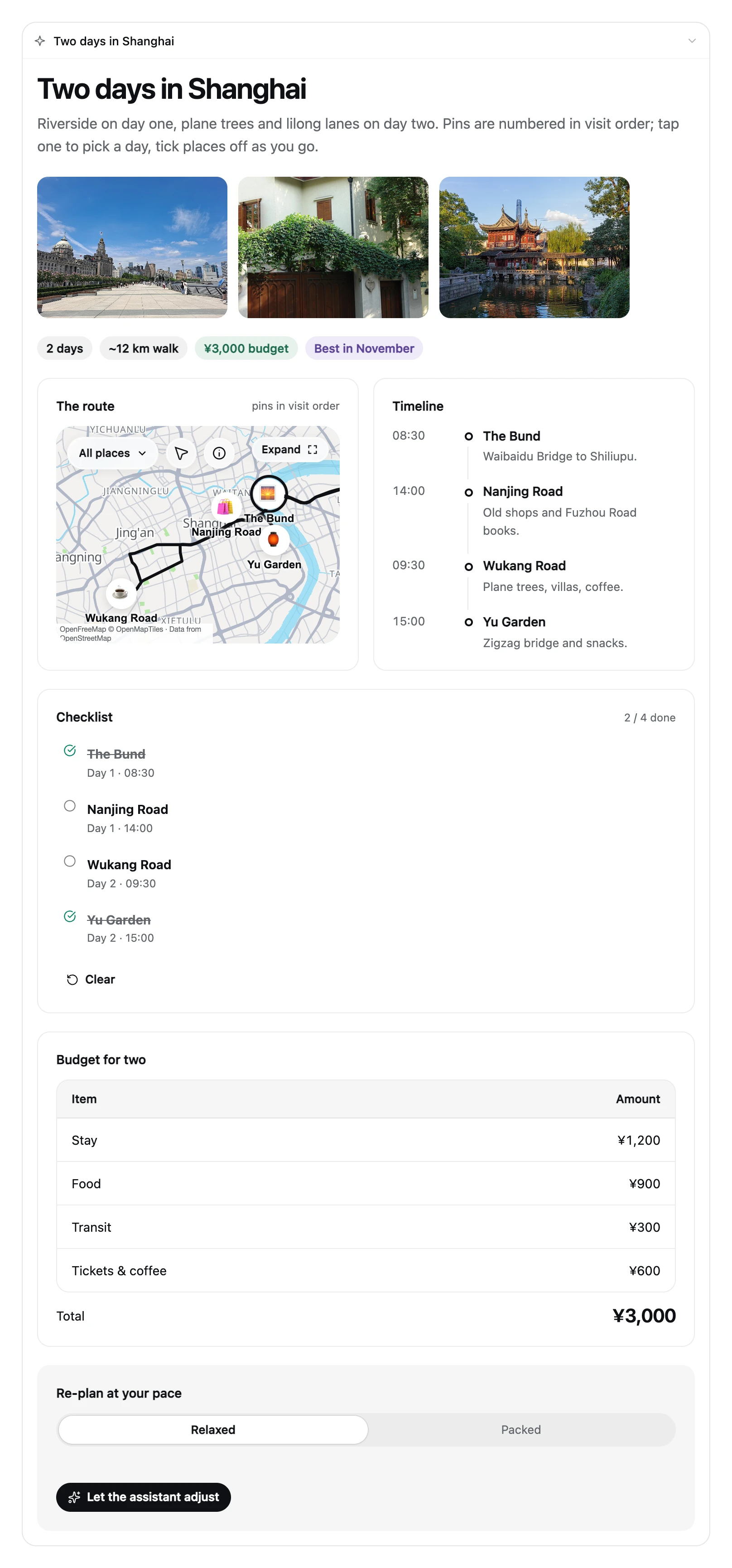
- When the user asks "plan two days in Shanghai", the model no longer replies with just a paragraph: it renders an itinerary page (map + photos + timeline + checklist + budget) at the end of the answer that can be clicked, checked off and dragged.
- The
$variables,@Setand@functionsinside the card all execute locally in the browser: checkboxes, sliders, steppers, timers and budget allocation never require another model request. - Only actions that genuinely need to continue the conversation (
@ToAssistant, such as a form submission) put a short message back into the composer and send it.
Component tour
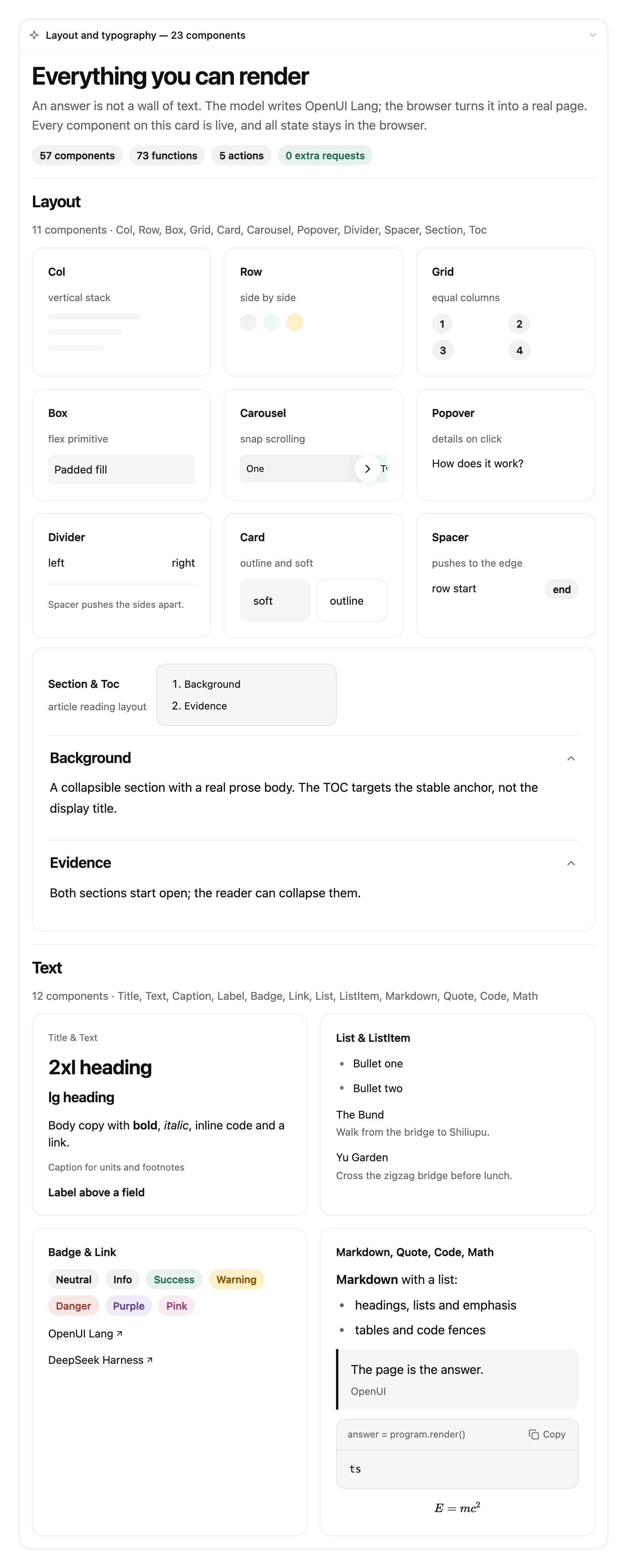
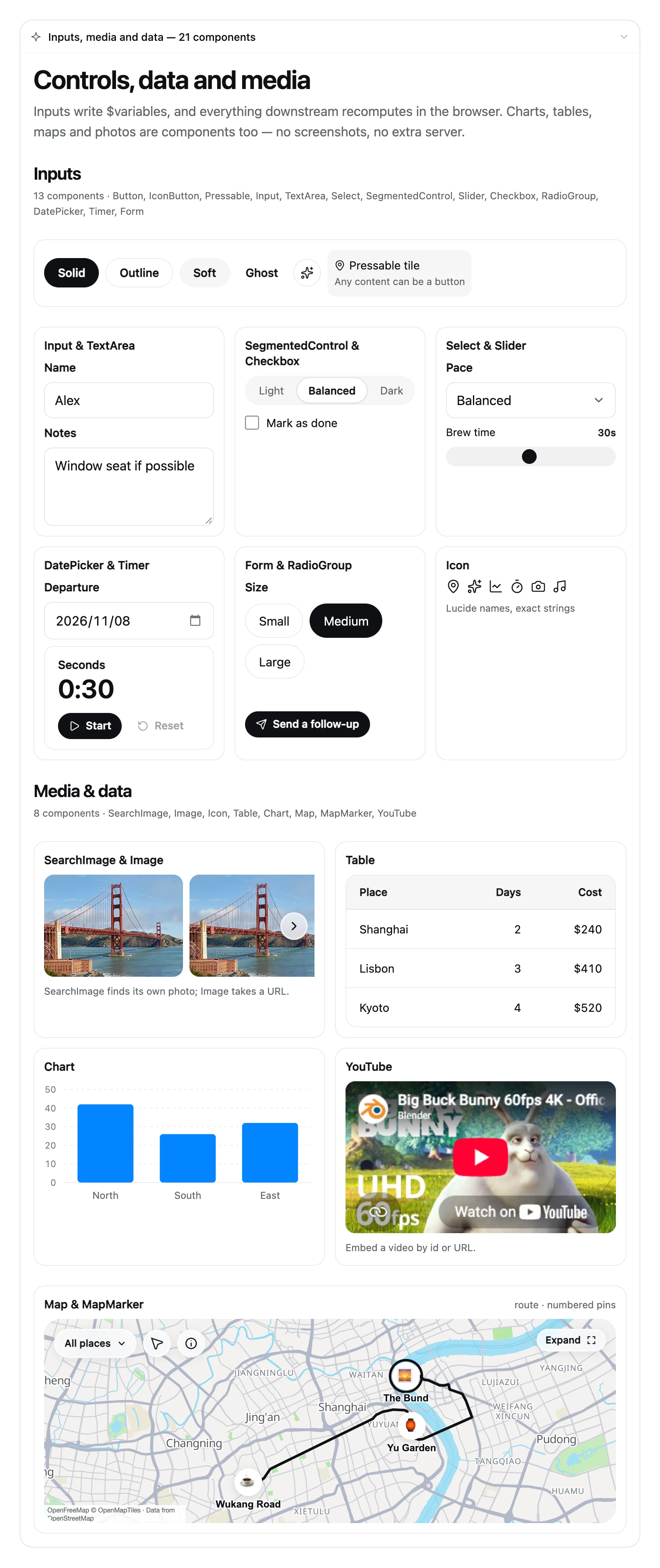
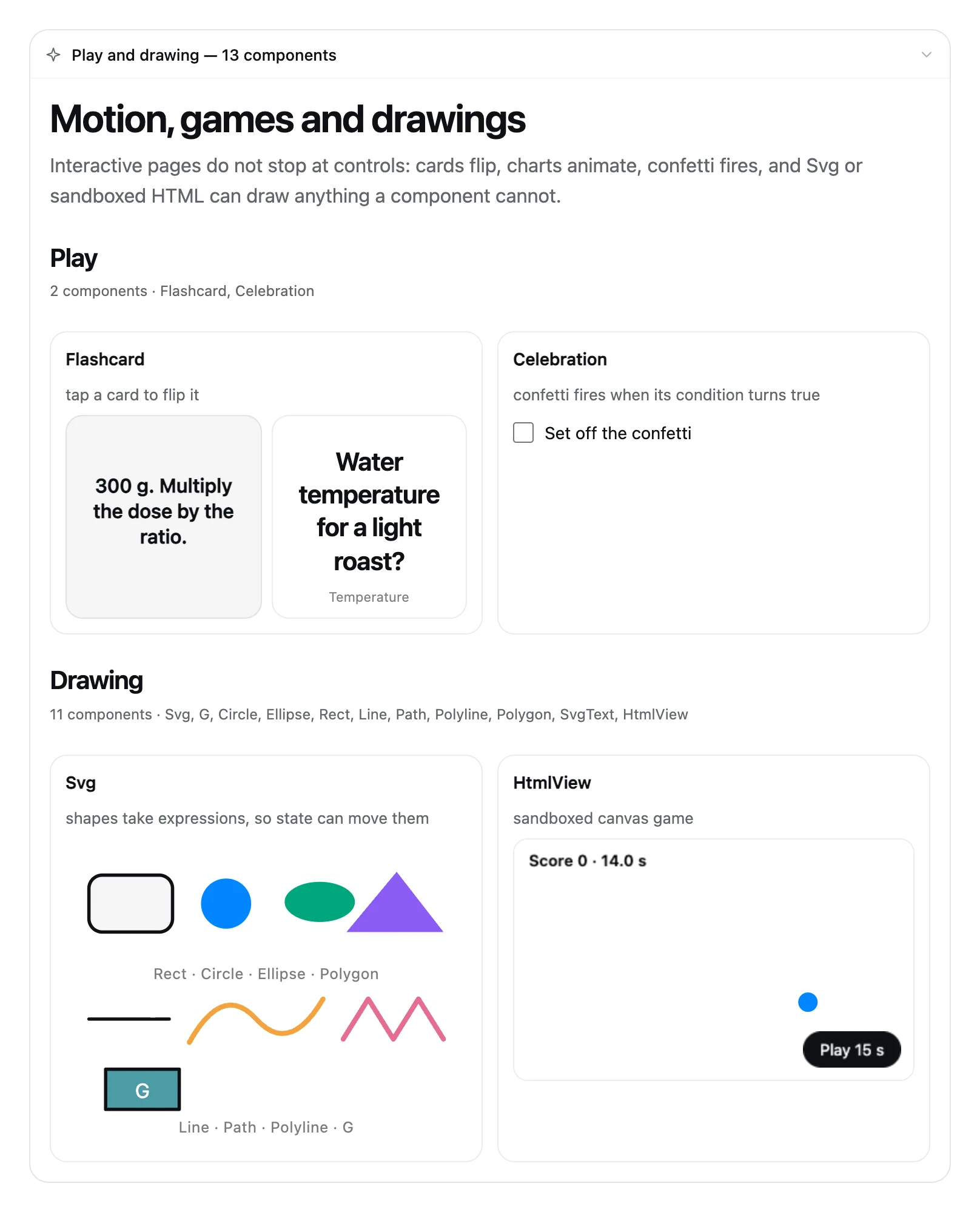
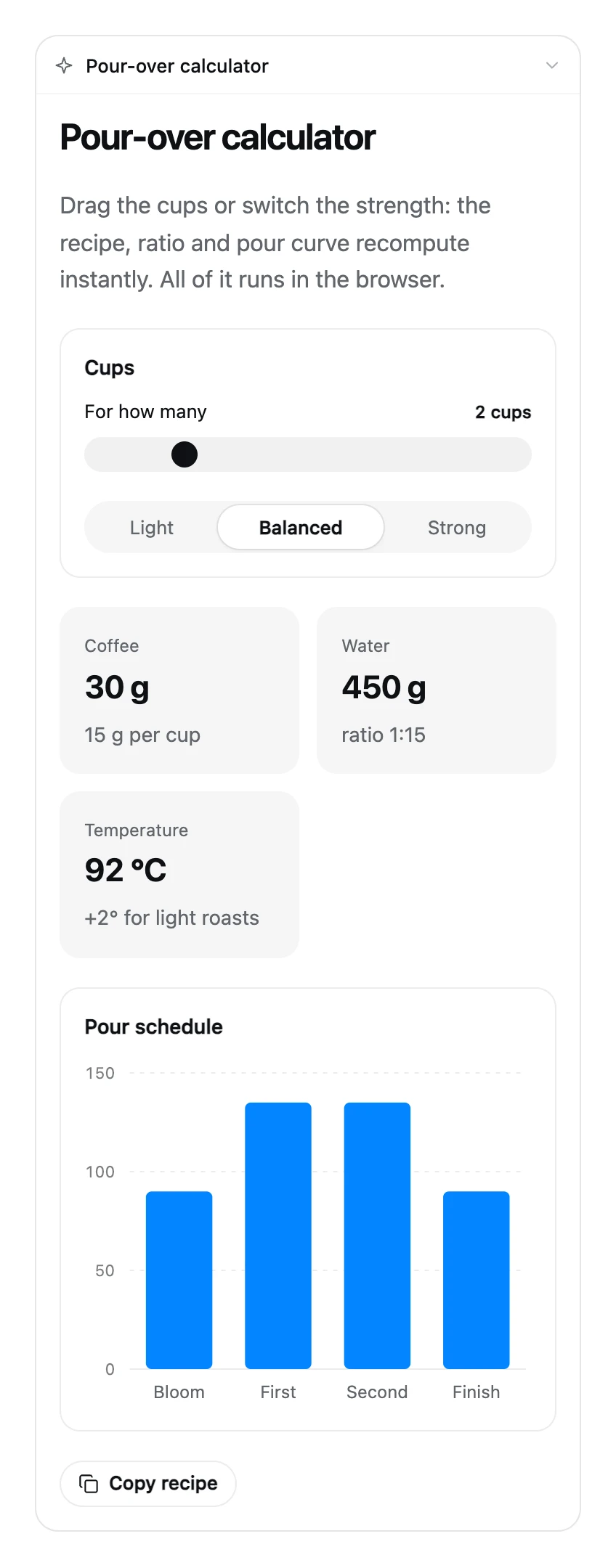
The renderer is not a chat bubble around a paragraph — it is a full component library: 57 components, 73 functions, 5 action steps. The three cards below are real renders from the extension: same renderer, same DSH theme tokens, no mockups:
More examples
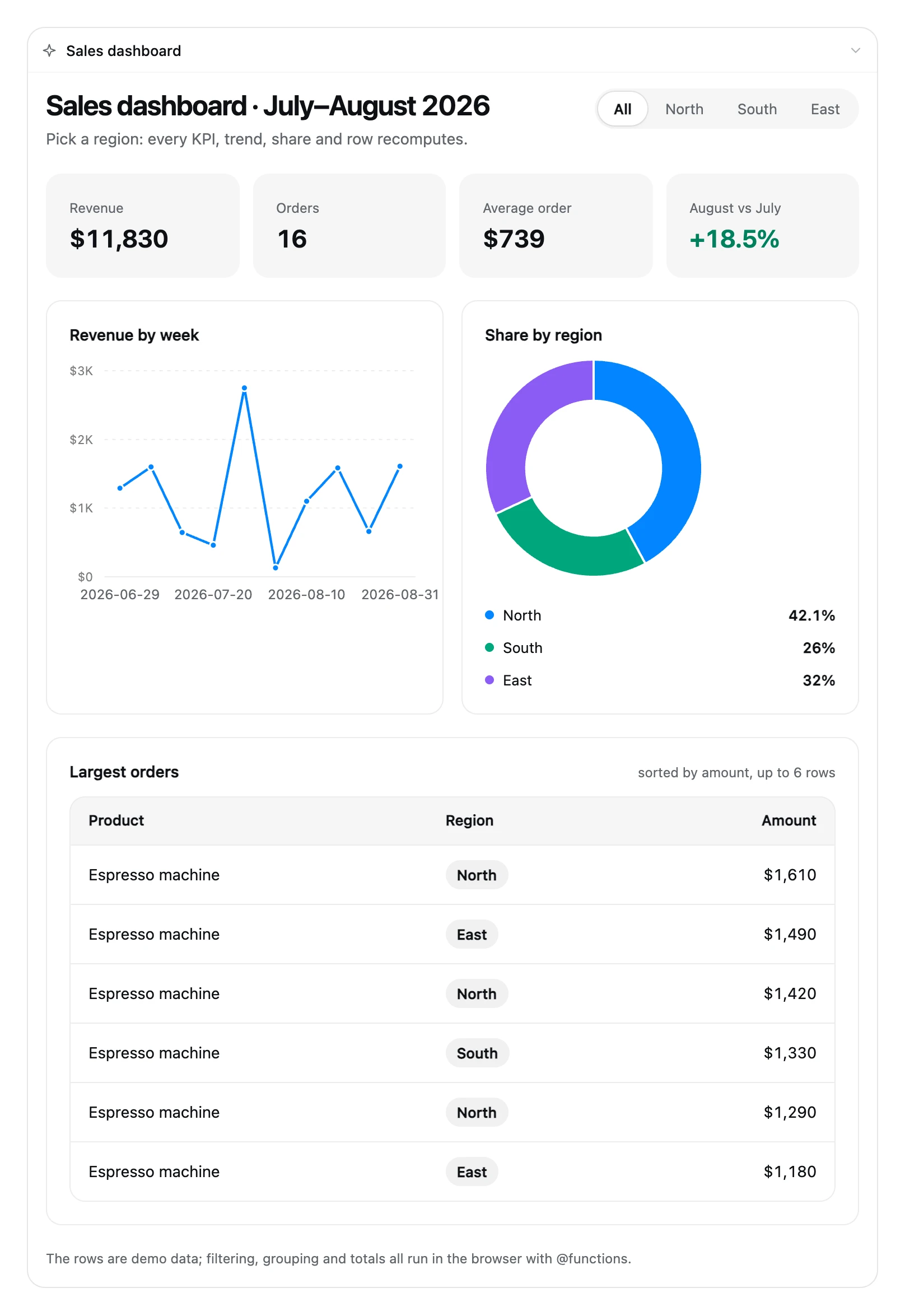
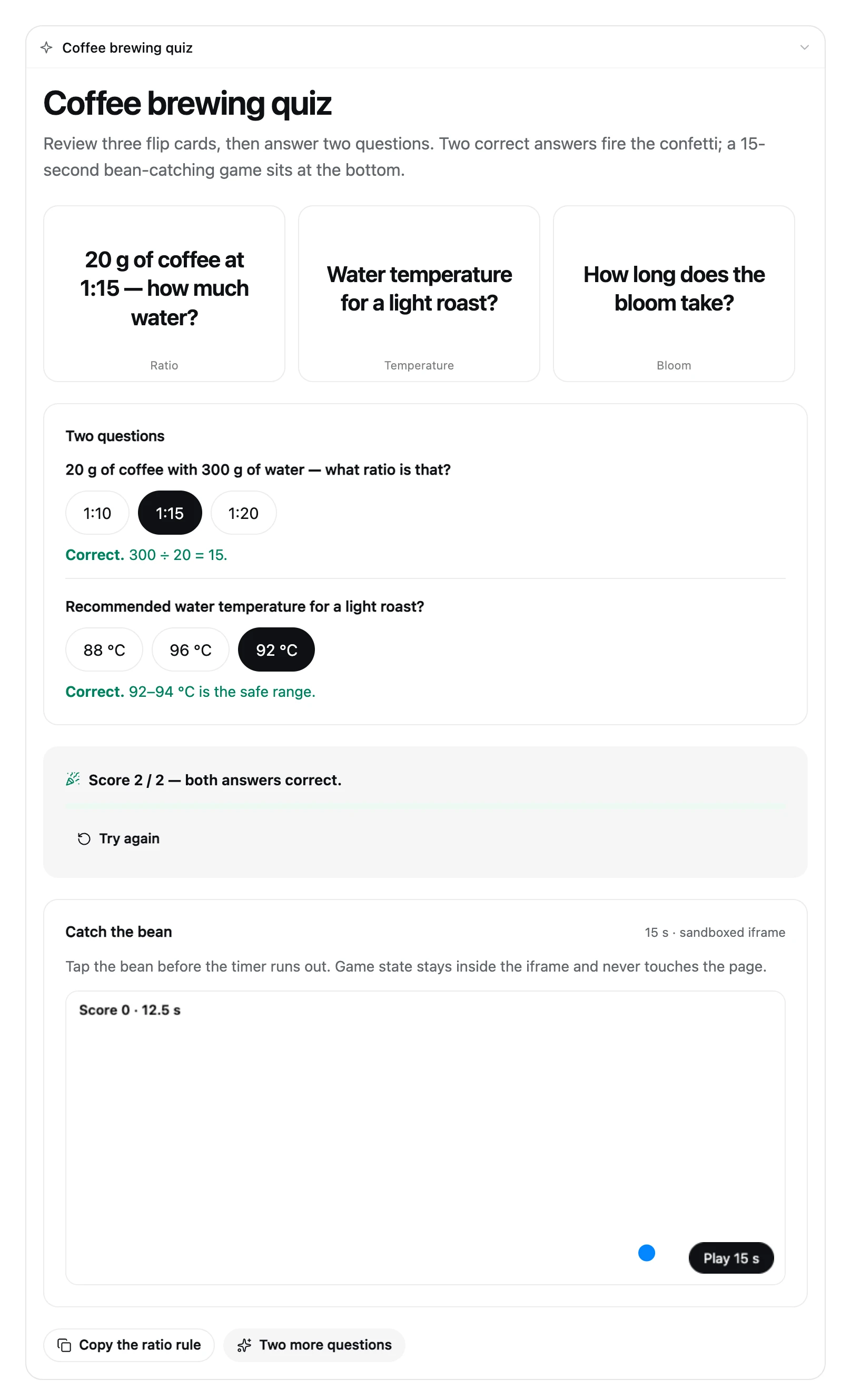
On a narrow screen (about 380 px) the card switches to a single column, and maps and charts fit the card width; over-long chart category labels are trimmed instead of overflowing:
Capabilities
| Capability | What it gives you |
|---|---|
| Interactive pages | Maps, photos, charts, checklists, forms, SVG drawings and mini-games are real components, not screenshots |
| Image export | Saves the rendered result as one PNG with a raw, rounded or card frame; background color and 1x/2x live on the Plugin detail page |
| Interactive-page export | Saves every card from the turn as a single-file HTML page; open it in a browser to keep interacting, and @ToAssistant copies its message plus a paste-back-into-DSH hint |
| Local execution | $variables, @Set and @functions run in the browser; only @ToAssistant writes a message back |
| Switch and style | Global defaults on the Plugin detail page; the composer UI control overrides per session; Auto / Card / Article |
| Bilingual UI | Follows DSH's UI language; dictionaries live in src/shared/locales.ts |
| Agent Skill | Registers intelligent-ui with the plugin so the model can load syntax, examples and troubleshooting on demand |
| Plugin detail page | Plugins → Intelligent UI detail page: Availability (global enable), Answer style (Auto / Card / Article), Composition (Free-form layout) and Export (background color, resolution, whether images/pages remove follow-up blocks; on by default) |
| Replayable | The generated program enters the session log as a tool argument and replays with history |
Getting the code
Clone the repository from GitHub:
git clone https://github.com/Zephinel/dsh-intelligent-ui.git
cd dsh-intelligent-ui
You can also install it from npm without a checkout (see Quick start).
Prerequisites
- DSH 0.2.1 (the
dshCLI): the Host/Client halves and plugin protocol are developed against this version; the verified version is0.2.1-rc.2, and later versions are unverified. Install withnpm install -g @deepseek-ai/dsh. - Node.js 24: build, tests and
npm packare verified on Node 24; the Host bundle targets Node 22 (target: 'node22'), and the repository has noenginesor.nvmrcpin, so verify a lower version yourself before using one. @deepseek-ai/dsh-client-locale: the browser half requires a deployment that composes it; DSH Web 0.2.1 includes it by default, and without it the switch and card do not mount (the Host tool and prompt keep working).
Confirm the tools are present:
node --version   # v24.x
dsh --version    # 0.2.1 or 0.2.1-rc.2
The restart examples cover a foreground dsh web, macOS launchd and Linux systemd; for other supervisors restart the corresponding service. Verified platforms: macOS (Web + DSH Desktop) and Windows (DSH Desktop); Linux is unverified.
Quick start
Install from npm (prerequisites are in the previous section):
dsh plugin --profile web add @zephinel/dsh-intelligent-ui

# pin the current version
dsh plugin --profile web add @zephinel/dsh-intelligent-ui@0.3.0-26-10-22

# or install from GitHub
dsh plugin --profile web add github:Zephinel/dsh-intelligent-ui
Restart the DSH process that serves the Web UI (foreground dsh web: Ctrl+C, then run it again; launchd/systemd: restart the service), open the URL it prints, and look for the UI control on the right side of the composer.
DSH Desktop needs no terminal command — install it inside the app:
- Open Plugins in the sidebar → Add plugin (or the arrow → Install a third-party plugin).
- Enter
@zephinel/dsh-intelligent-ui@0.3.0-26-10-22(or just the package name for the latest), then click Install. - When the install finishes, click Enable now; if the UI control does not appear, quit and reopen DSH Desktop.
The desktop profile is owned by the Electron app, so dsh plugin --profile desktop is rejected. A mainland-China mirror can lag behind the official npm registry for a fresh release; switch the install source back to npm if the version is not found.
Then click the UI control, choose "This session only" (or /iui on), set the session Auto / Card / Article style in the same panel if needed, and ask, for example:
Plan two days in Shanghai, with checkboxes and adjustments
See Development and deployment for the local-checkout development loop, uninstall and troubleshooting; the extension has no development server of its own.
Switch and answer style
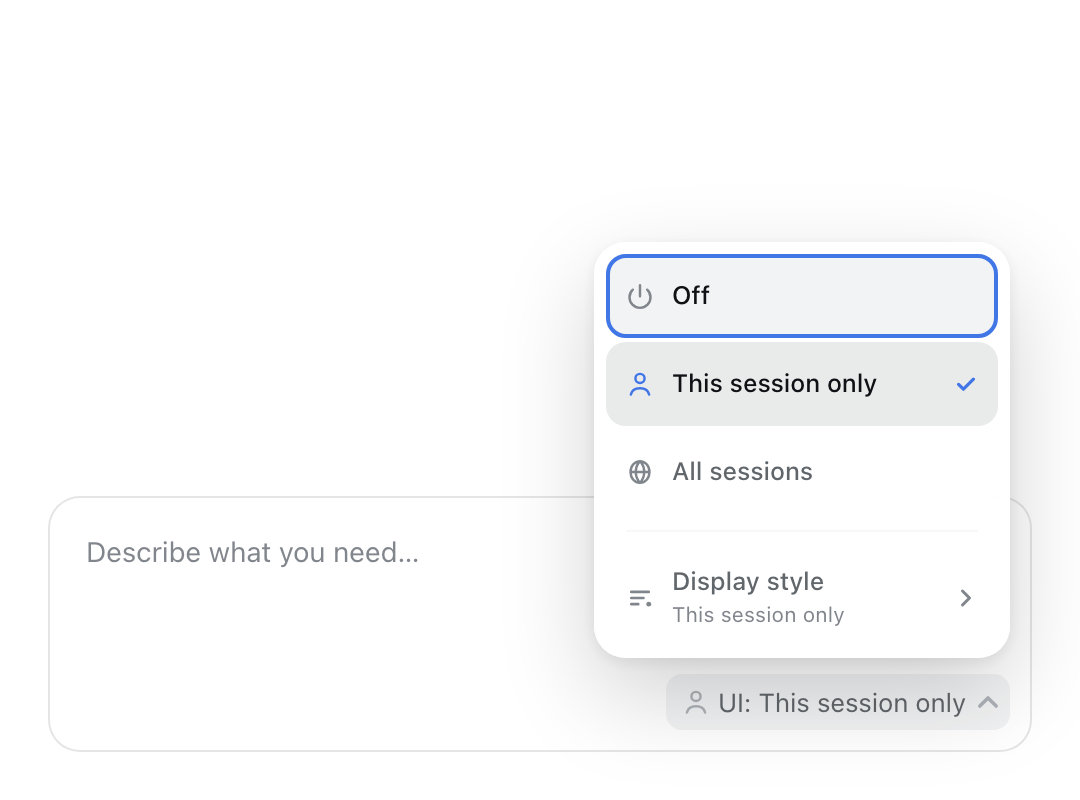
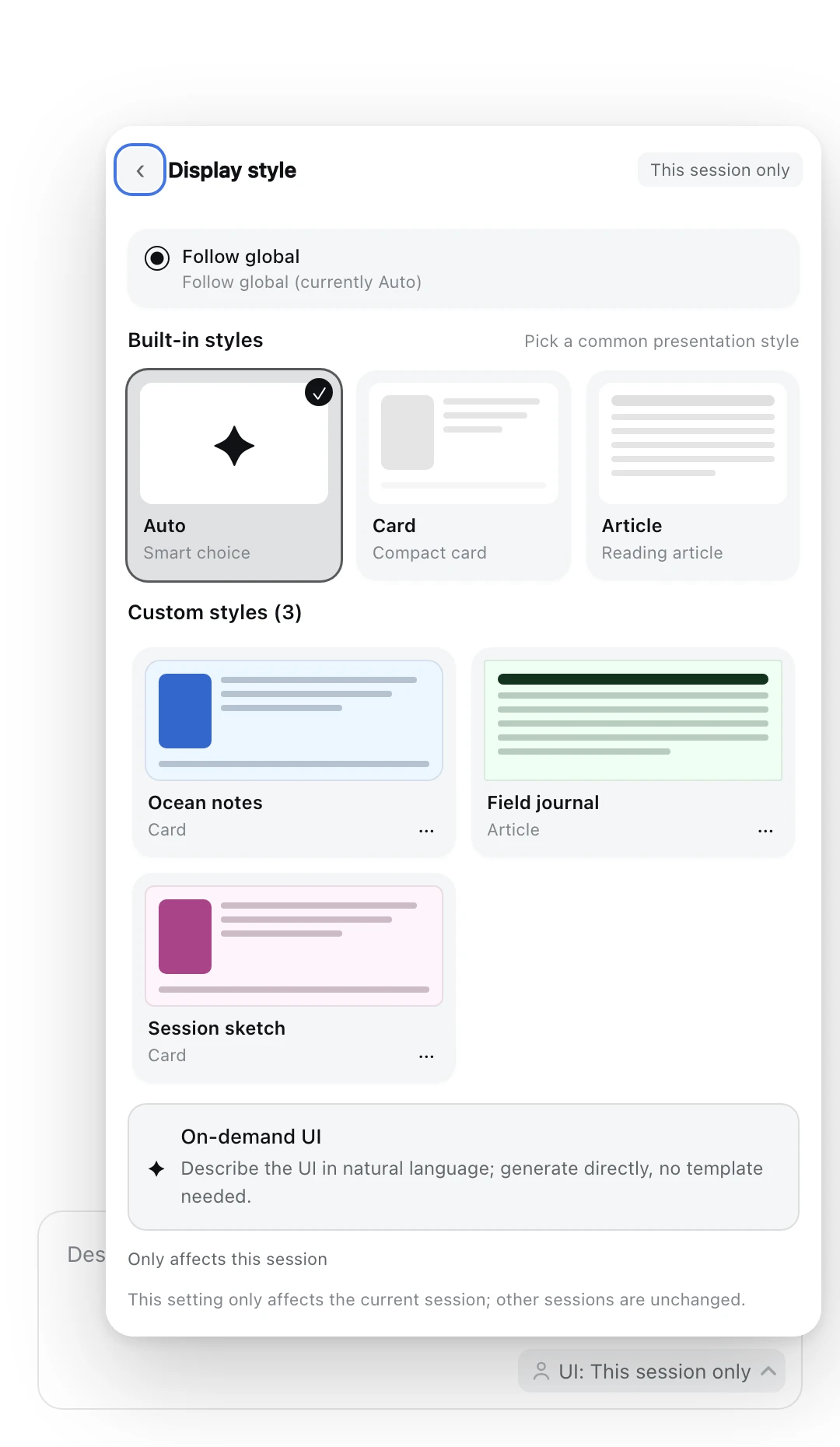
- Global defaults: the Plugin detail page's Enable in all sessions decides whether new sessions start on; the Display style control under Answer style sets the default Auto / Card / Article.
- Session overrides: the composer UI control changes only the current session; choosing This session only opens the style panel.
/iui on|off|inheritand/iui style auto|card|article|inheritare equivalent. - Auto lets the model choose: compact Card for interactive/structured answers, Article for detailed/in-depth/long-form ones. Article pages need a
Toc, collapsibleSections and substantive prose, not a skeleton. - Session state is written atomically to
<DSH_HOME>/dsh-intelligent-ui.jsonand survives a refresh or DSH restart; see Architecture and behavior for the full semantics.
Usage
With the switch on, just ask in natural language, for example:
- "Plan two days in Shanghai, with checkboxes and adjustments"
- "Build a gear-shifting simulator for a 7-speed bicycle"
- "Turn these tables into a sales dashboard I can filter"
- "Introduce Chinese history, expandable by dynasty"
Once enabled, any answer with structure defaults to a card — including explanations, introductions, timelines, stages, comparisons and things to explore; Markdown is reserved for a single fact, a one- or two-sentence reply, an explicit request for text/document/code, or repeated render failures. When the switch is off the model cannot see render_ui and answers in plain text — that is not a failure; turn the switch on and ask again.
To guarantee a card (or when the model still replies in text), invoke the skill explicitly with /intelligent-ui in a session where the switch is on; explicit invocation is treated as a direct instruction. You can also say "read the intelligent-ui skill and then build ... with render_ui".
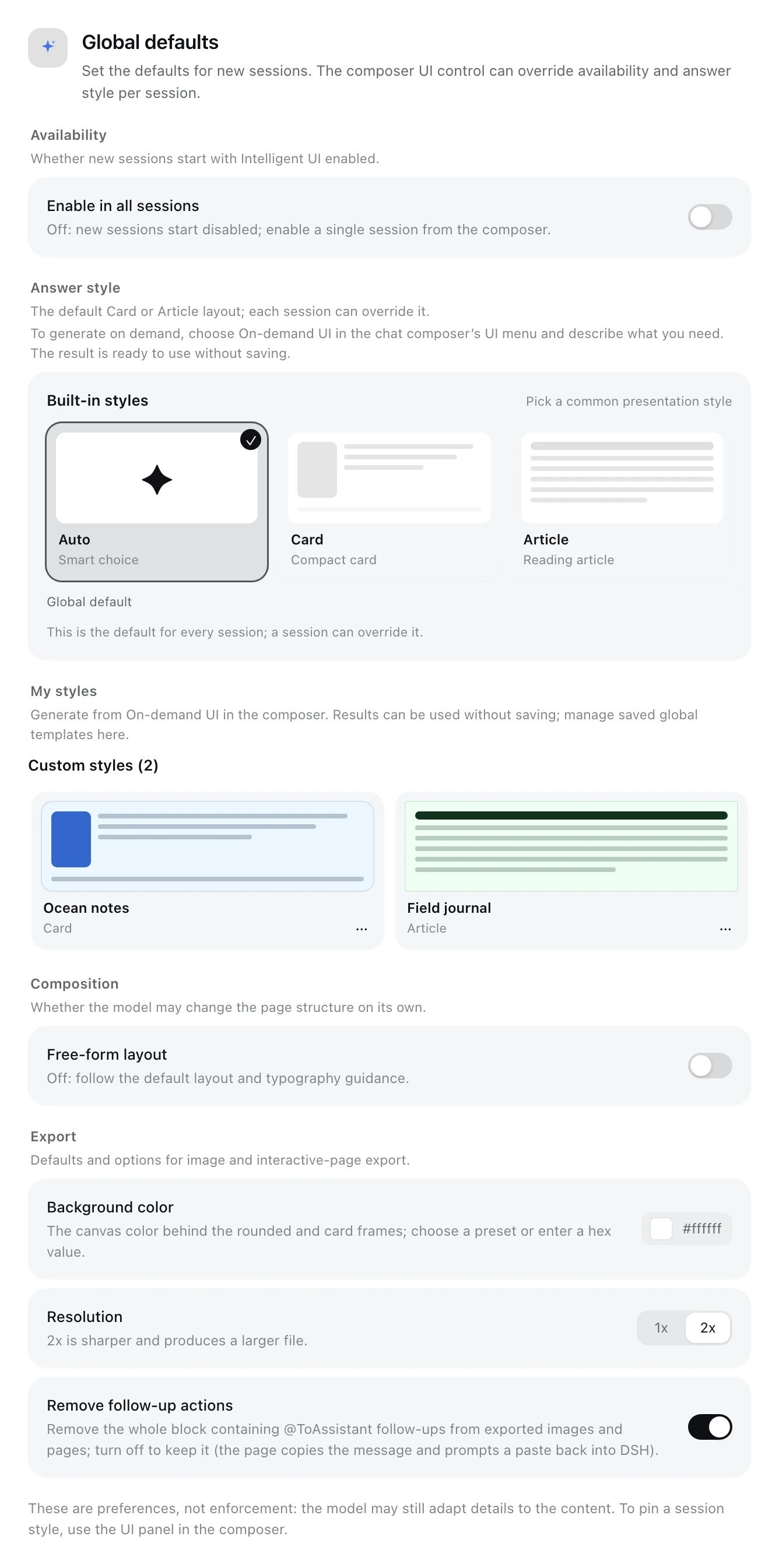
The Plugin detail page groups its settings into Availability, Answer style, Composition and Export. Global values are the defaults for new sessions; a session override in the composer wins. Free-form layout only changes how strongly the design guidance is advisory; it is orthogonal to the answer style. Export stores the default background color, the 1x/2x resolution, and whether images/pages remove the whole @ToAssistant follow-up block (on by default).
Once an answer has rendered, a labeled export pill appears at the far right of the message action strip (visually distinct from the native copy / like / branch icons); only answers rendered by the extension have it. It can save every card from that turn as one PNG — Raw (the answer alone), Rounded (background color and rounded padding) or Card (padding, rounded corners and a soft shadow) — or export them as a single-file HTML page, which opens in a browser with the interactions intact; in that page @ToAssistant copies the message and shows the paste-back-into-DSH hint instead of calling DSH. The image contains the rendered cards only, not the Markdown text around them and not the export control itself. See Architecture and behavior for the full flow.
Build, test and deploy
npm run build       # build the prompt, Host and Client bundle
npm run check       # build + Host/Client/packaging tests + renderer checks
npm run pack:check  # inspect the final npm pack file list
npm run test:browser # optional: real-browser E2E (style panel + image export + interactive page + Article spacing + custom color picker; Chrome required)
- The typography check inside
npm run checkneeds a local Chrome; without one that check is skipped and the remaining tests still run.
The published artifact is a DSH bundle; deploying means installing the plugin into the target DSH profile. See Development and deployment for uninstall and version notes.
Contributing
- Questions and feature requests: use GitHub Issues.
- Run
npm run checkbefore submitting; there is no PR CI, so the local command is the gate. Releases are published by the GitHub Actions Trusted Publishing workflow (push av*tag that matchespackage.json). - When behavior, copy or counts change, update the Chinese and English READMEs,
CHANGELOG.md, and the matching documents underdocs/; the sync rules live in.agents/skills/sync-iui-docs/SKILL.md(development-only, not shipped in the npm package). - Repository maintenance skills and doc-sync rules live under
.agents/skills/(not shipped); AI coding agents also usenpm run checkas the pre-submit gate. - Maintainer: @Zephinel.
Known limitations
- The card appears at the end of the turn; during generation the process area shows one "Interactive answer" line (交互式回答 in a Chinese UI).
- The model occasionally generates invalid OpenUI Lang; Host validation returns precise errors, and it usually repairs them within the same turn (1–2 attempts in testing).
- The map basemap relies on OpenFreeMap tiles, routes on the OSRM demo, and photos on Wikipedia/Wikimedia; when offline, maps degrade to a list of places and photos to placeholder blocks.
- KaTeX uses global styles already loaded by the DSH shell; if those styles are removed, the Math component degrades to plain text.
- The generation prompt is about 9.5K tokens and is sent only when the switch covers that session (global on, or the session explicitly on); when off, that cost is zero (the tool schema is absent too). Article mode produces longer pages, so output tokens and render time increase accordingly.
- The extension's UI copy follows DSH's UI language; the
/iuiHost replies, the command palette's command description and the README screenshots stay in English (the first two are DSH platform behavior). - Image export does not capture sandboxed iframes (
HtmlViewmini-games), so that region is missing from the image; maps are captured through the preserved WebGL drawing buffer, and a browser without WebGL falls back to the map's own place-list presentation. - Every card rendered by one turn is combined into one image; the image captures what is currently rendered, so it includes the interaction state at export time (checked items, active filters and so on). The export waits for in-card photos and image searches to settle (at most about 12.5 seconds); offline or still-pending photos are recorded from the placeholder state shown on the page.
- The interactive-page export inlines the renderer, the current theme and every card into one HTML file (about 3.4–4.9 MB), so it is large but install-free; maps, photos and other components still need the network.
@ToAssistantin that page tries the clipboard and shows a toast; when the clipboard is unavailable the toast keeps the message for manual copying. - The browser half requires a deployment that composes
dsh-client-locale(included by default in DSH Web 0.2.1); a minimal custom profile without it will not mount the switch or the card, while the Host tool and prompt keep working. - The configuration on the Plugin detail page requires the DSH settings services: a minimal custom profile without
dsh-settings/dsh-client-ui-settingsdoes not show it, and a Host/Client version mismatch can leave the switch unavailable. Global enable/style and free-form layout only change the prompt and page shape; no model is guaranteed to follow them perfectly, and session style overrides still rely on the Host-injected prompt. - The interactive-page export needs the
webServerservice (included by default in DSH Web 0.2.1); a minimal custom profile without it cannot build the exported page, while image export is unaffected.
FAQ
Why does an answer come back as plain text with no card? First check that the switch is on for that session (the UI control in the composer, or /iui on). Even then the model may treat a single fact, a one- or two-sentence reply, or an explicit text/code request as a bounded exception. To force a card, invoke the skill explicitly with /intelligent-ui in a session where the switch is on. See Usage.
Why is there no export pill under an answer? Only answers rendered by the extension have it; it is absent when the switch is off, the model replies in text, or rendering fails. See Usage and Known limitations.
Why did the UI not change (or show an error) after rebuilding the plugin? A page refresh may still load the old revision: restart the DSH process that serves the Web UI, then reopen the page. See Development and deployment for the exact errors and handling.
Documentation
- Architecture and behavior: Host/Client component tree, the full switch and answer-style semantics, UI language, image and interactive-page export flows, and the Agent Skill.
- Development and deployment: install and uninstall, development commands, the restart tip after renaming/rebuilding, Host/Client version mismatch and the release layout.
- Verification record: end-to-end verification, test and packaging results (historical).
- Changelog: additions, changes and fixes per release.
License
This project is MIT. It is based on Open Intelligent UI (MIT, Copyright (c) 2026 Thesys Inc.) and the OpenUI ecosystem; the browser bundle contains lucide-react (ISC), KaTeX (MIT), MapLibre GL JS (BSD-3-Clause), zod (MIT) and SnapDOM (MIT); the standalone interactive-page bundle also inlines React / React DOM (MIT). Full notices and license texts are in NOTICE and licenses/.
Links
More in this category
zhu1090093659/dsh-web#packages/dsh-task-board★ 9262
Task board for the dsh web GUI: a sidebar multi-column kanban whose cards run in real DSH agent sessions and can also be scheduled with cron expressions, executed host-side even with the browser closed.
zhu1090093659/dsh-web#packages/dsh-web-all★ 9262
Plugin and skin collection for the DSH Web UI: task board, Git graph, right-side panel, remote mobile UI, pet, live token stats, and a skin center.
MeteorNOX/DeepSeek-Balance-Whale-Widget★ 5677
A fixed-corner whale widget for the DSH web GUI — balance, today's usage and per-turn cost with peak/off-peak pricing, editable balance-alert and daily-budget bubbles, a module-based custom bubble queue with A/B weighted choices and random lines or images, 30+ vendor templates (OpenAI, OpenRouter, Kimi, SiliconFlow, Ark, Zhipu, MiniMax and more) with per-model balance and subscription quota, plus task-end sound, imported audio, custom roles and a resource manager. Local-only, no telemetry.
ccch1mneyyy/dsh-TUI★ 5125
Claude Code-style full-screen terminal UI: pixel-whale header, live status line, and streaming thought expansion.
omdsh-dev/DSH-better-sidebar★ 4413
Full sidebar workbench with file rendering and editing, terminal, Git, and subagents; third-party plugins can register new tabs.
Devin-AXIS/deepseek-design#deepseek-idesign★ 1491
Visual design studio for websites, app prototypes, posters, cards, reports, and magazines, with templates, direct element editing, selection-aware AI draft handoff, and export.
Community comments
Comments are public GitHub Discussions. Loading them connects to GitHub and Giscus; a GitHub account is required to post.