Windows computer use for DeepSeek Harness: an MCP stdio server over a PowerShell UIA backend exposing 22 desktop tools (UIA tree, screenshots, typed input, OCR, window management, failsafe).
Install
# from npm (prebuilt)
dsh plugin --profile web add dsh-computer-use-win
# from GitHub (first run asks for allowBuilds approval — follow the hint, retry)
dsh plugin --profile web add github:Yu-tao-Li/dsh-computer-use-win
Any plugin you install runs third-party code with your own permissions — it can read your files, use your credentials, and reach the network, and tool approvals don’t sandbox it. GitHub-sourced plugins also run build scripts at install time — pnpm blocks those until you allow them, so an install can stop with ERR_PNPM_GIT_DEP_PREPARE_NOT_ALLOWED or ERR_PNPM_IGNORED_BUILDS; dsh prints the exact key to add under allowBuilds in your profile’s pnpm-workspace.yaml, and the install works on the next run. Allowing a build is a trust decision: only install sources you trust, and pin a commit (github:owner/repo#sha).
README
dsh-computer-use-win

Windows computer use for DeepSeek Harness — an MCP stdio server backed by a PowerShell + UI Automation engine. It lets the agent see the desktop (accessibility tree, window-cropped screenshots, OCR with word boxes) and act on it (mouse, keyboard, semantic UIA actions, window management) across 22 tools.
Bridges into DSH through the in-box @deepseek-ai/dsh-mcp-client — no DSH modifications. Zero runtime dependencies.
① File Explorer: find locates the file, semantic invoke selects it (status bar: "1 item selected") |
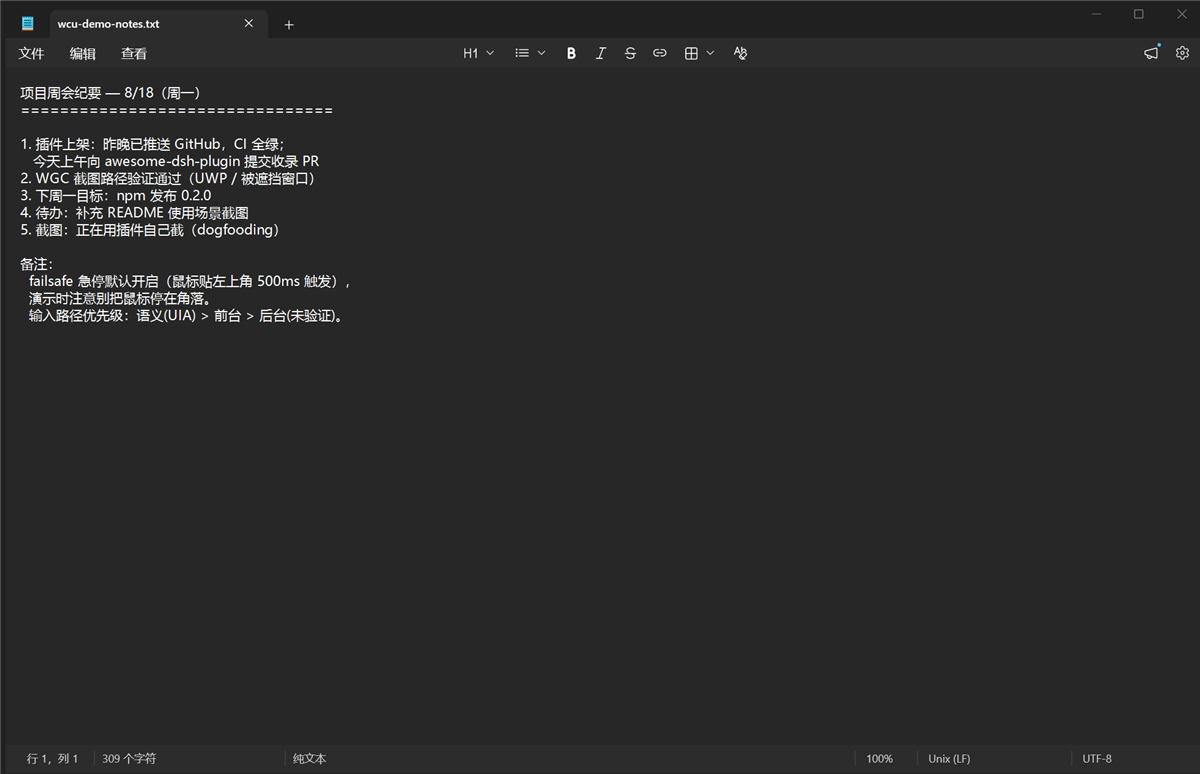
② type_text writing a real document (clipboard path, verifyValue read-back) |
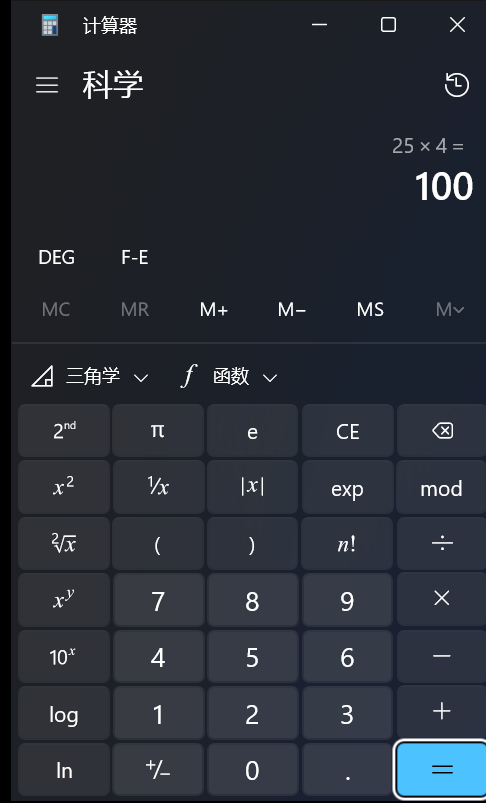
③ UWP Calculator: find locates buttons, semantic Invoke clicks (25×4=100) |
|---|---|---|
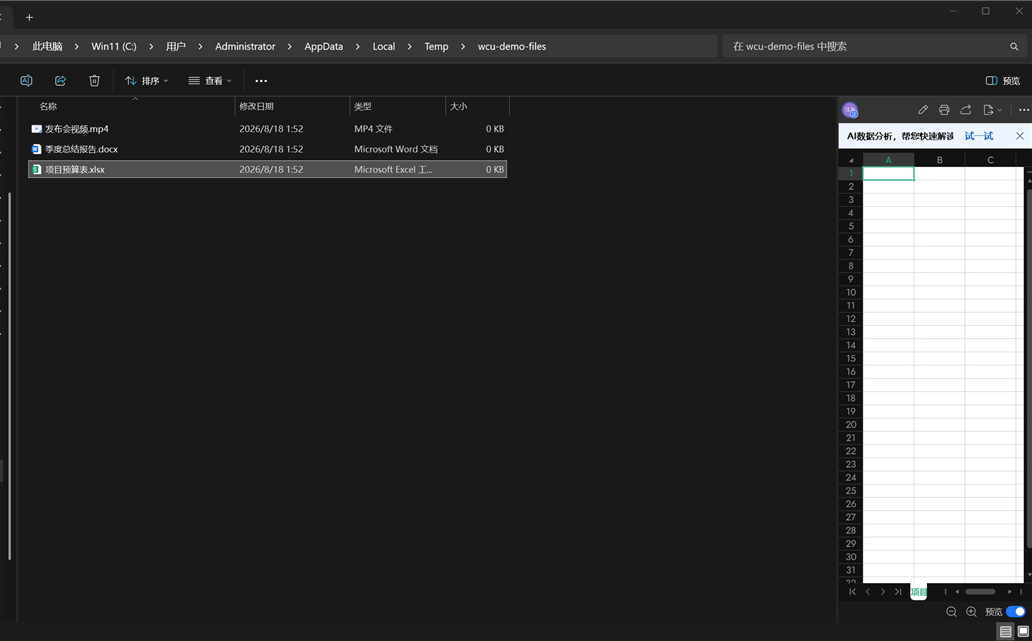 |
 |
 |
Features
- Text-first observation — UIA accessibility tree in three views (
control/content/raw); find controls by name, automation id, class or value instead of guessing pixels. Element ids use UIA RuntimeIds (stable across UI refresh; stale ids reportstaleinstead of mis-clicking). - Three-level screenshot chain —
PrintWindow(works on non-foreground windows) → WGC (Windows.Graphics.Capture, for DirectComposition/occluded windows) → screen-region fallback with anoccludedPossibleflag. Window crop + downscale +imageScale/origincoordinate mapping; PNGs auto-GC after 30 min. - Three input paths, honestly reported — semantic (UIA
Invoke/Toggle/Valuepatterns, no mouse), foreground (SetCursorPos+ SendInput + clipboard paste /KEYEVENTF_UNICODE), background (PostMessage into the window queue, no foreground steal; delivery is unverified and reported asverified:false— Chromium/Electron/WinUI silently drop synthetic messages, and the tool tells you). - OCR fallback for UIA-blind apps —
Windows.Media.Ocrvia a csc-compiled C# WinRT helper; returns text plus per-word screen-coordinate boxes, and upgrades aquerymatch to the control under the matched word (ControlFromPoint). - Safety built in
- Coordinate homing — window moves after observation are compensated; the click reports
homed:{dx,dy}. - Failsafe panic brake — park the physical mouse in the screen corner for 500 ms and all input is refused (
EMERGENCY STOP); only a human moving the mouse releases it. - Identity guard — acting on a
windowTitlewhose HWND/PID changed since last observation is refused (identity_changed). - Foreground verification — typed input is fail-closed: if the target window is not truly foreground, the action errors instead of hitting the wrong app.
- Win-key blacklist —
Win+R/X/L/Sstyle chords are refused by design.
- Coordinate homing — window moves after observation are compensated; the click reports
- Persistent backend — one long-lived PowerShell process with a JSON-line protocol; hot latency 6–100 ms (first call ~500 ms cold). C# P/Invoke helpers compile once to hash-named cached DLLs.
Install
# from npm (recommended)
dsh plugin --profile web add dsh-computer-use-win

# from GitHub (choose your profile)
dsh plugin --profile web add github:Yu-tao-Li/dsh-computer-use-win
# or from the dshmarket plugin market: search "dsh-computer-use-win"
Restart dsh web. The tools appear as mcp__wincu__windows_computer_use_*.
At boot the bundle resolves
server.mjsfrom the installed package through the host profile'spackage.json, so it works in any profile /$DSH_HOMEand with pnpm layouts — no hardcoded paths. Keep only oneserverName: wincurow per profile.
Tools (22, prefix mcp__wincu__)
| Group | Tools |
|---|---|
| Observe | health · snapshot (tree + screenshot) · accessibility_tree · list_windows · find · element_info · ocr |
| Act | click · double_click · move · drag · scroll · type_text (clipboard / sendinput / background) · keypress · focus · invoke · set_value |
| Window | activate_window · move_window · close_window (WM_CLOSE; the app may veto with a save dialog) · wait_for · wait |
Every tool accepts optional window targeting (windowTitle substring / processId / nativeWindowHandle) plus activate: true; untargeted calls act on the foreground window. activate is honoured wherever it changes the outcome (input tools, coordinate clicks/scroll, ocr capture, move_window); close_window ignores it (WM_CLOSE works in the background) and activate_window always activates. See docs/wiki/mcp-tools.md for exact per-tool semantics.
Architecture
DSH agent
   │  sees mcp__wincu__windows_computer_use_* tools
   ▼
@deepseek-ai/dsh-mcp-client   ← DSH in-box bridge (official MCP SDK, StdioClientTransport)
   │  JSON-RPC 2.0 over stdio (newline-framed)
   ▼
mcp/server.mjs                ← this repo: MCP server (Node ≥ 22, zero deps)
   │  spawns one persistent backend; JSON-line stdio protocol
   ▼
scripts/windows-uia.ps1       ← this repo: desktop engine (PowerShell 5.1)
   ├─ UI Automation assemblies        → accessibility tree
   ├─ user32 P/Invoke (cached C# DLL) → mouse / keys / window ops
   ├─ Windows.Media.Ocr (C# WinRT)    → OCR
   └─ Windows.Graphics.Capture        → WGC window capture
Safety & limitations
- Actions are real. Have the agent
snapshotbefore sensitive operations; scope important windows withwindowTitle. - WinUI / Chromium / Electron drop PostMessage synthetic input (
verified:falseis honest reporting, not success). Use the foreground/clipboard paths for them. - Elevated windows (UAC/admin) are not readable or clickable — Windows blocks both UIA and synthetic input.
- Coordinates are physical pixels (explicit Per-Monitor V2 DPI).
- OCR word boxes for CJK text are per-character (engine behavior) — fine for clicking.
- Windows only.
Development
mcp/server.mjs        MCP stdio server + persistent backend manager
scripts/windows-uia.ps1  desktop engine (one-shot & -Persistent modes)
test/                 self-test / MCP protocol / Notepad E2E / features / benchmarks
docs/wiki/            upstream architecture docs (see THIRD_PARTY.md)
docs/dev-notes.md     design rationale, pitfalls, benchmarks, test log
node mcp/server.mjs --self-test          # full stack smoke test (Windows only)
node test/mcp-test.mjs                   # initialize → tools/list → tools/call
node test/profile-resolution.mjs         # DSH profile node_modules resolution regression
node test/notepad-e2e.mjs                # real input E2E (opens Notepad)
npm test runs smoke, MCP protocol, profile-resolution, worker lifecycle, activation cancellation, window discovery/coordinate-cache/argument validation, and input-error regressions. Each suite uses a separate process and temporary directory; logs and smoke-test screenshots remain in the printed artifacts directory. Tests send no physical input and do not change installed DSH profiles. Input and window-movement scenarios use fake APIs; real desktop checks are read-only.
Windows PowerShell 5.1 is the default. Set $env:WINDOWS_CU_POWERSHELL = (Get-Command pwsh).Source before npm test to use PowerShell 7. CI (.github/workflows/ci.yml) tests both runtimes on every push/PR.
License
MIT — see LICENSE. This project is a derivative of cgissing/windows-computer-use (MIT); upstream copyright is preserved and detailed in THIRD_PARTY.md.
Links
More in this category
Tencent/WeKnora#dsh-weknora★ 31680
Four read-only tools over a WeKnora knowledge base: list knowledge bases, hybrid passage search, reassemble one document's chunks in order, and WeKnora's own cited RAG or ReAct-agent answer with a resumable session id.
superdesigndev/treg★ 3995
Tool catalog for agents: search ~2,600 external endpoints (SEO and SERP, backlinks, social, people and company enrichment, ad libraries, scraping) by the task you want done, read each one's parameters and per-call price, then call it with the credential injected server-side. Ships the skill plus an MCP row that stays disabled until TREG_TOKEN is set.
TencentCloudBase/CloudBase-AI-Toolkit#dsh-plugin★ 1130
Tencent CloudBase backend for DeepSeek Harness — scaffold and deploy full-stack apps from chat, render query results as table cards with paging, sorting and CSV export, preview a deployment on its domain, and call the CloudBase MCP toolset (`mcp__cloudbase__*`) with device-code login.
gitroomhq/postiz-agent#dsh-postiz★ 499
Connects DeepSeek Harness to Postiz over MCP: list connected social media channels, fetch per-platform posting rules, and schedule, draft, or publish posts to X, LinkedIn, Instagram, Facebook, Threads, TikTok, YouTube, Reddit, Bluesky, Mastodon, Discord, Slack, Telegram and more; adds a postiz workflow skill.
EthanYoQ/Invoice-Downloader#dsh-invoice-downloader★ 477
Local IMAP invoice download, OCR, archive, and Excel reimbursement summaries for DeepSeek Harness.
anysearch-team/anysearch-dsh★ 443
AnySearch-powered real-time web and vertical search provider for DeepSeek Harness.
Community comments
Comments are public GitHub Discussions. Loading them connects to GitHub and Giscus; a GitHub account is required to post.