Adds an optimize button beside the composer that analyzes and rewrites the prompt draft with SSE streaming, conversation-context awareness (template vs intent-polish strategies), an edit-continuity memory chain, undo, and model routing with fallback and a connectivity test.
Install
# from npm (prebuilt)
dsh plugin --profile web add @y1x1n/dsh-prompt-optimizer
# from GitHub (first run asks for allowBuilds approval — follow the hint, retry)
dsh plugin --profile web add github:Y1X1n/dsh-prompt-optimizer
Any plugin you install runs third-party code with your own permissions — it can read your files, use your credentials, and reach the network, and tool approvals don’t sandbox it. GitHub-sourced plugins also run build scripts at install time — pnpm blocks those until you allow them, so an install can stop with ERR_PNPM_GIT_DEP_PREPARE_NOT_ALLOWED or ERR_PNPM_IGNORED_BUILDS; dsh prints the exact key to add under allowBuilds in your profile’s pnpm-workspace.yaml, and the install works on the next run. Allowing a build is a trust decision: only install sources you trust, and pin a commit (github:owner/repo#sha).
README
中文 | English | 🐣 Beginner guide (中文)

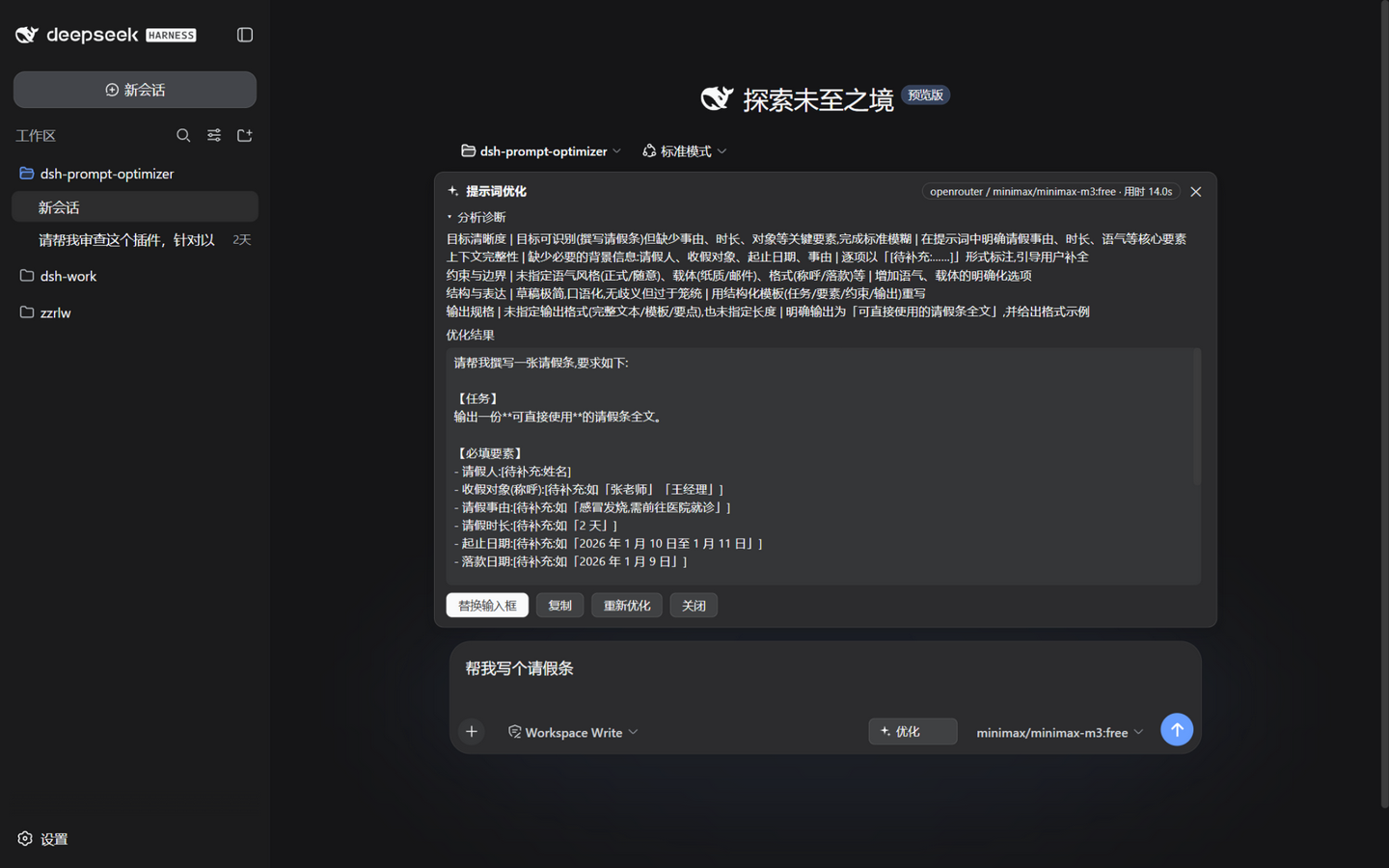
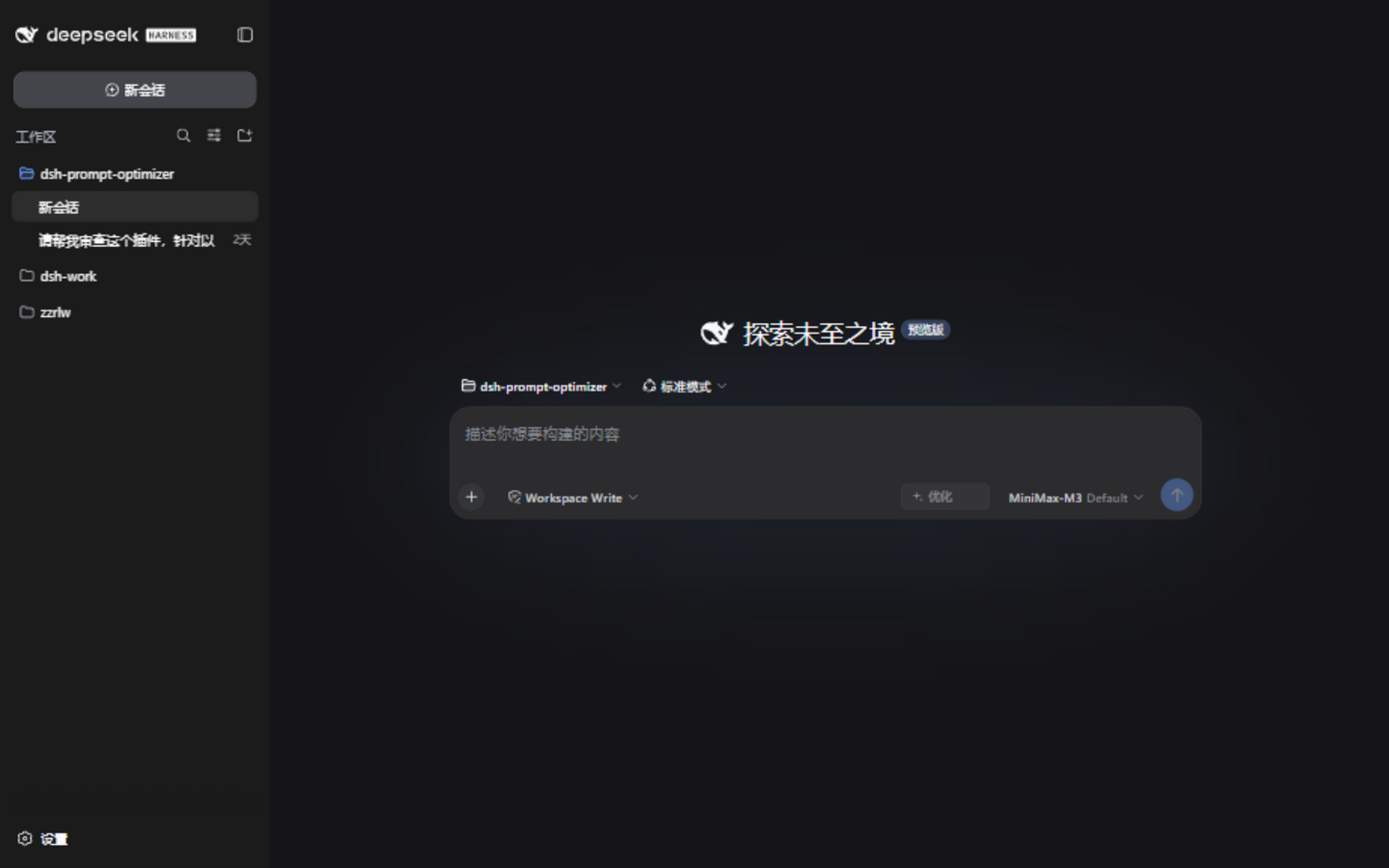
A DeepSeek Harness plugin that adds an Optimize button (✨) next to the composer, one click analyzes and rewrites the prompt draft in your input box, with results streamed section by section over SSE. The optimization call reuses the current session's model route by default (read live on every click — switching models in the session takes effect immediately).
- Host side: registers two routes,
POST /dsh-prompt-optimizer/optimize(SSE streaming) andPOST /dsh-prompt-optimizer/test-model(connectivity probe), and drivesctx.llmfor the "analyze + rewrite" call. - Client side: injects the button into the
conversation.input.rightslot, the result panel intoconversation.input.dock(a full-width row above the input card, same family as TodoDock — renders on the new-session screen too and never covers the input box), and a collapsible settings card intosettings.plugin.item. UI copy follows the DSH interface language (中文 / English).
Contents
- Features
- Installation
- Compatibility
- FAQ
- Verification status
- How it works
- Development
- Security notes
- Contributors
- License
🐣 First time using dsh plugins? See the beginner guide (in Chinese): three steps to install, one click to use.
 |
 |
 |
 |
Features
- An Optimize button on the right of the composer tool row (disabled while empty, breathing animation while working). During the wait the panel shows the live stage (waiting for model / analyzing / writing the rewrite) with an elapsed-seconds readout; on completion the model badge shows the total duration.
- Reads the current session's provider/model on every click; analysis and rewrite stream onto the panel above the input card — no staring at a spinner for the whole generation.
- Dual optimization strategies: with no conversation context (fresh session, or context disabled) it rewrites with a structured template (role / task / constraints / output format); with context it switches to distill-intent + polish — reads the recent conversation, keeps the draft's original framing instead of forcing a template, never re-asks what the context already answers, and never resurfaces directions you already rejected (the do-not-enter set).
- Fidelity discipline (inspired by Fishsb/dsh-prompt-enhancer): semantic-equivalence floor, traceability (inferences are marked "unless otherwise specified / by default"), a pre-output element-by-element fidelity self-check against drift, with the self-check explicitly outranking the length discipline (target under 800 characters for simple tasks — a missing element is worse than verbosity), and few-shot examples to stabilize output style.
- Lightweight memory chain: edit our optimized text and click Optimize again, and the previous round's result rides along as a continuity reference (accepted decisions carry over, only your changes are worked on). Same-text retries, cross-session calls, and degraded (non-wellFormed) results never ride (degradation is only judged in full mode — fast mode always counts as compliant); the chain resets the moment you send or close the panel, and it follows the "include context" switch.
- Slash-command safe: input like
/goal help me …optimizes only the body; the command prefix is re-attached on replace — the command word is never rewritten. A bare command with no body (just/goal) is rejected up front with a notice instead of being "optimized" into garbage. - Context aware: by default carries the session's recent conversation as reference (user messages are guaranteed a floor — agentic sessions produce far more assistant step fragments than user input, and naive recency sampling would crowd out what you actually asked), capped at 8 turns / 1600 chars; the meta-prompt explicitly forbids answering or continuing the context. Empty sessions fall back to the template strategy. Can be disabled in the settings card.
- Result panel: five-dimension diagnosis (goal clarity / context / constraints / structure / output spec) + the full optimized prompt; actions: replace the input box (with undo, which auto-invalidates once you edit the replaced text) / copy / re-optimize / close. The panel closes itself after you send the message or clear the input.
- Cancel keeps the content: press Esc while optimizing and the panel freezes in a cancelled state showing everything generated so far — review it, hit "re-optimize" to continue, or close. In any other state Esc just closes the panel. A client-side timeout watchdog (settings timeout + 5s margin) turns a hung Host or black-holed network into an explicit timeout error instead of an endless spinner.
- Panels are session-scoped: switching sessions never leaks an old result into another session's view or input box.
- Auto-follow scrolling while streaming: the live view sticks to the bottom as content grows, pauses when you scroll up, and resumes when you return near the bottom.
- All panel styling uses official Harness design tokens (
--dsw-alias-*); follows light/dark theme automatically. - Long-draft friendly: the output cap rises with estimated input length by default (full mode ×2 / fast mode ×1.5, capped at 32768); on real truncation the partial result is still shown with a clear notice instead of disappearing.
- Format tolerance: marker variants (e.g.
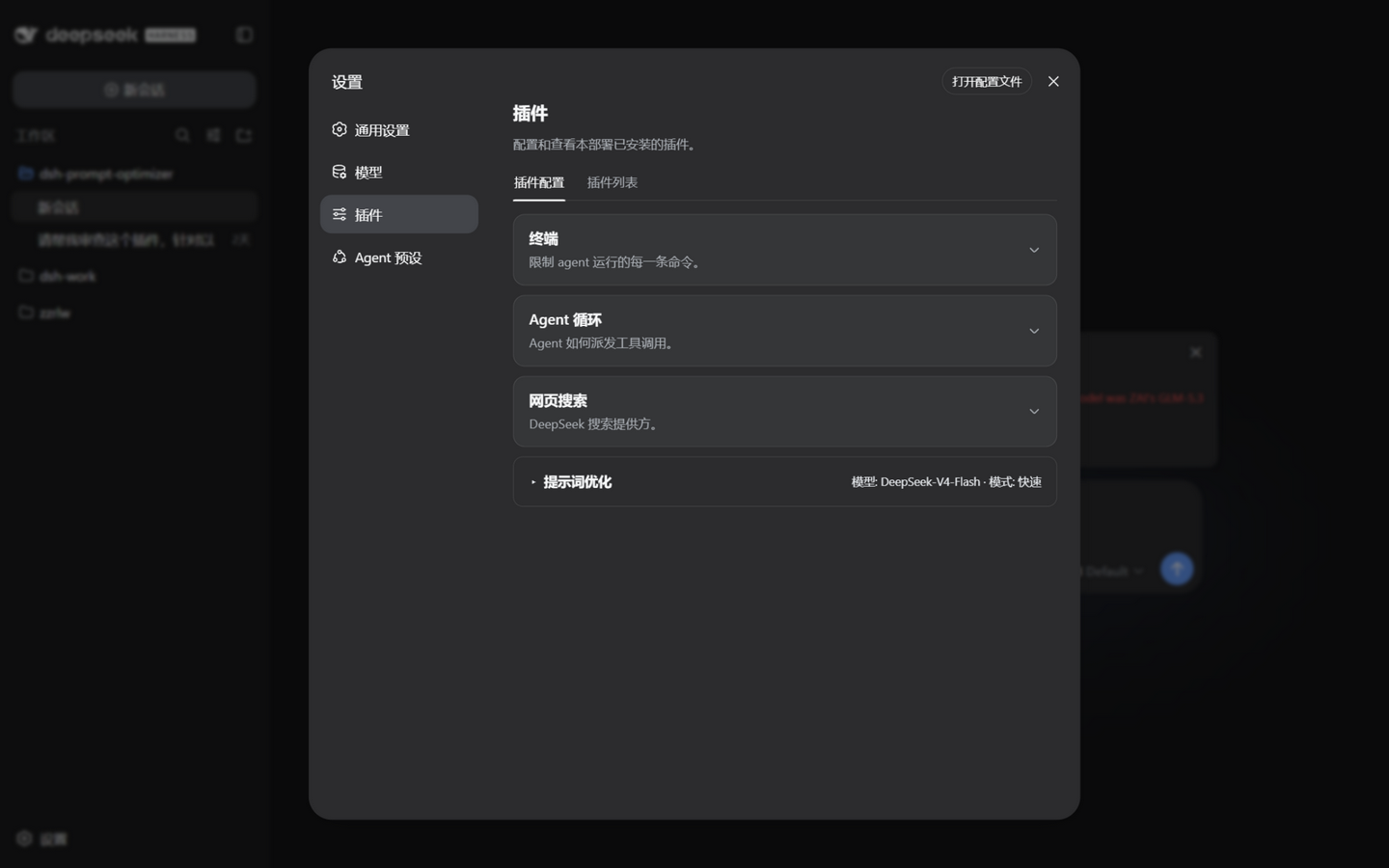
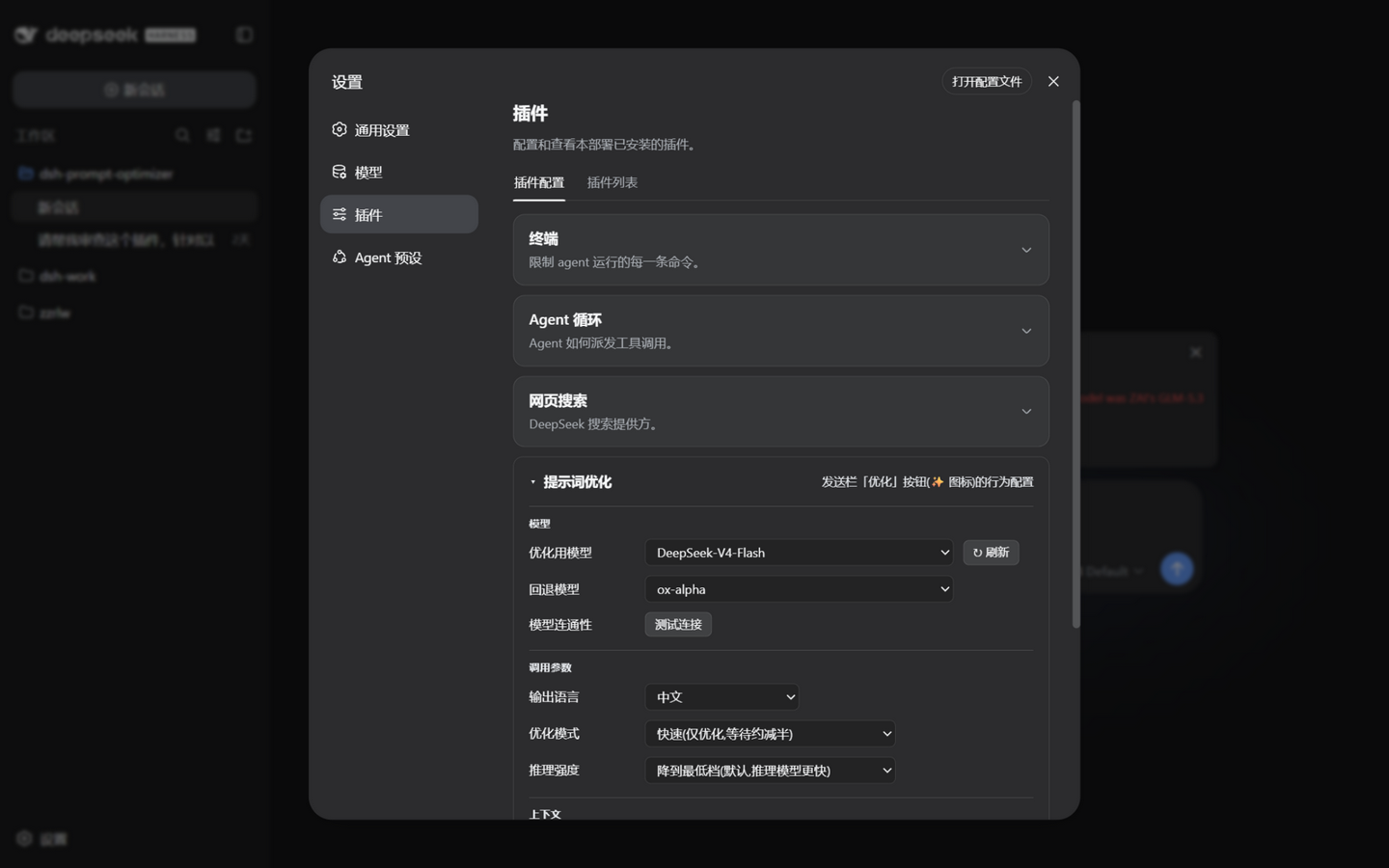
<<< ANALYSIS >>>) parse correctly; in full mode, outright non-compliant output degrades gracefully with a warning; in fast mode the result is a single section, so it always counts as compliant whether or not the model emits markers (no warning, memory chain unaffected) — friendly to third-party/free models that skip the marker format — their raw stream is previewed live, character by character, until a marker appears. - Settings → Plugins → "Prompt Optimizer" card (collapsed by default, click the header to expand; the collapsed header shows a "model · mode" summary; every change can be reverted in one step via "Undo last change" at the bottom — an in-memory stack of the last 20):
- Model: optimization model (follow the current session (default), or pin one from the model catalog, provider/model dropdown with manual refresh) / fallback model (automatic failover when the primary route fails before producing anything — the panel badge shows "· fallback", hover to see why) / connectivity ("Test connection", 32-token / 20s capped probe showing the actual route and latency)
- Generation parameters: output language (中文 / English); mode: full (analysis + rewrite) / fast (rewrite only, roughly half the output tokens); reasoning effort: clamp to lowest tier (default — dramatically shortens the pre-first-token stall on reasoning models) / follow session; max output tokens (default 8192), timeout (default 120s), temperature (default 0.2, hover for the rationale); auto output-cap toggle (default on)
- Context: include-context toggle (default on): when off, only the draft itself is read — no session history
Installation
Prerequisite: the dsh CLI (an environment where npx @deepseek-ai/dsh web works).
From npm (recommended, simplest)
dsh plugin --profile web add @y1x1n/dsh-prompt-optimizer
From a Release (tarball, no build)
Download y1x1n-dsh-prompt-optimizer-<version>.tgz from the Releases page, then install the local file:
dsh plugin --profile web add ./y1x1n-dsh-prompt-optimizer-<version>.tgz
From source (tarball)
cd dsh-prompt-optimizer
npm install --legacy-peer-deps   # the prepare hook builds lib/ automatically
npm pack                          # produces y1x1n-dsh-prompt-optimizer-<version>.tgz
dsh plugin --profile web add ./y1x1n-dsh-prompt-optimizer-<version>.tgz
Then (re)start dsh web and open the Web UI — the button appears next to the composer.
Windows note:
dsh plugin add ./directorygoes through pnpmlink:, which currently misparses the drive-letter colon as a protocol separator and produces a broken symlink (node_modules/<pkg>points nowhere), so the plugin never loads. Use the tarball form for local installs; the directory-link form works on macOS/Linux.
From GitHub
dsh plugin --profile web add github:Y1X1n/dsh-prompt-optimizer
Git installs pull the source; this package self-builds at install time via its prepare script (only Node needed, no monorepo). pnpm ≥10 refuses to run build scripts on first install — add the package name to allowBuilds in that profile's pnpm-workspace.yaml as the terminal prompt suggests, then retry. Pinning a commit is recommended: github:Y1X1n/dsh-prompt-optimizer#<sha>.
Uninstall
dsh plugin --profile web remove @y1x1n/dsh-prompt-optimizer
Compatibility
This version (v0.3.17) targets DeepSeek Harness:
dsh version Optimize route / model calls Settings page (incl. GitHub link) Composer button / result panel 0.1.5-rc.2 ✅ verified ✅ verified ✅ verified 0.1.5-rc.1 ✅ verified ✅ verified ✅ verified 0.1.2-rc.1 / 0.1.2-alpha.5 ✅ verified ✅ verified ✅ verified 0.1.1-rc.2 and below (0.1.0-rc.7+) ✅ verified ✅ verified ✅ verified One build covers 0.1.0-rc.7 through 0.1.5; this annotation is maintained in every Release note from v0.3.15 onward, and earlier Release notes have been retroactively annotated.
- Development baseline:
@deepseek-ai/*0.1.5-rc.1 (pinned bysync:typesfrom v0.3.17); verified on 0.1.0-rc.8 (2026-08-20, Windows, real-profile install + Web routes / client bundle / session-history RPC / end-to-end LLM call), re-verified on 0.1.1-rc.2 (2026-08-27), and adapted + verified on 0.1.2-rc.1 / 0.1.2-alpha.5 (2026-09-05/06), on 0.1.5-rc.1 (2026-09-10, real-profile end-to-end smoke tests: composition layer, route SSE, client bundle, composer button and result panel, settings card), and on 0.1.5-rc.2 (2026-09-11, full-chain re-verification: composition-layer injection, Host load, route contract 405/400/200, end-to-end SSE with 155 delta frames, all four strategy paths, client bundle slots and settings-card API — all passing, 69 tests green). - Verified on macOS via automated tests (2026-09-02, macOS 26.5 (Darwin 25.5.0), Node.js v26.0.0; after
npm install --legacy-peer-deps,sync:types/typecheck/build/npm testall pass — 62 tests green); CI now runs typecheck and the full suite on both ubuntu-latest and macos-latest (@ruijiaang-lab, #3). - dsh-settings API compatibility layer: the 0.1.2 line rewrote the settings API (standalone
installSettingsSectionremoved, replaced by theinstallSectionmethod on thectx.settingsservice instance). 0.3.16+ feature-detects at runtime: uses the new interface when present, otherwise an inline equivalent (register + watch + unload fallback); when the settings service is absent it falls back to the composition-layer config. - Client type surface migrated across 0.1.2/0.1.5 (adapted in v0.3.17): the
dsh-client-runtimepackage is gone upstream, soClientContextis simply cordis'Context;SettingsScopemoved to@deepseek-ai/dsh-client-ui-settings/client(itsSettingsScopeBindernow owns thectx.settingsScopeContext merge — re-declaring it would conflict); thectx.slotsmerge is provided by@deepseek-ai/dsh-client-ui-renderer/client.HistoryEntry/ModelProviderGroupmoved into the unpublisheddsh-api-session-controller, so the plugin now ships its own minimal structural faces insrc/client/host-faces.tsinstead of chasing upstream types. - Session model & catalog (real since v0.3.17): the model catalog goes through the connection-level generic RPC
session/modelCatalog(the/apichannel; the payload envelope requires exactly one plain-objectargsfield —{ args: {} }for a zero-parameter method); "follow the current session" reads the official per-session model directory servicectx.modelDirectories(provided bydsh-client-ui-model-selection, the same directory the /model popup uses, whosecurrentis the model the session will actually use). That service is captured through a separate optional inject — folding it into the main inject would leave clients waiting forever on hosts without it; when absent the plugin falls back to Host route resolution. - Session history (context) remains a gap: the legacy
connection.api.sessions.historyface was never declared in any published release (0.1.0-rc.7 → 0.1.5) and is absent from the browser runtime; the plugin calls it through an optional structural face and optimizes without context when absent. The real path needs thesession/follow/session/pagestreams (includingthroughSeqfrom the follow opening frame) — not wired yet. - Client slot props dual form: since 0.1.2 the composer slots are session-scoped — components read session/draft state via standard hooks (
useInput/useSession), and registration uses the official two-layer shape (register inside an inject callback on the derived context, with aninject(sessionId)hook). Components dispatch on the props shape (hooks on 0.1.2, direct snapshots on older hosts), so both hosts share one build. - Client bundle registration id: the loader id in
lib/client.jsmust equal the plugin npm package name (the host's client-modules validates registration against it); the client inject list no longer namesdsh-client-runtime, which 0.1.2 merged away. From 0.1.5 the bundle is served through a combined/plugins/??<id>/client.js,…&rev=<hash>URL — bare per-plugin paths are no longer exposed (the boot manifest's combined URL is authoritative). - Protocol contract:
/dsh-prompt-optimizer/optimizereturns 400/405/409/413 as plain JSON on pre-check failure and switches to an SSE stream on success (model errors arrive aserrorevents);/dsh-prompt-optimizer/test-modelalways returns HTTP 200 with anokfield in the body (a probe is application-level semantics, deliberately not mapped to transport status codes) — integrate againstok, not the status code. - The HTTP carrier service name has drifted between releases (
httpServerin the npm 0.0.1-rc.x type packages,webServerin the 0.1.0-rc.x runtime): the plugin waits on both names viactx.injectwith no static hard dependency — if the name changes again, only this plugin's routes fail to register (with a log warning after 10s); the Harness startup is never dragged down. - Client and Host must be the same version (the SSE protocol is a private contract): after upgrading, restart
dsh weband refresh the browser.
FAQ
- Clicked "Optimize" and nothing happened? Open the browser console and look for logs starting with
[dsh-prompt-optimizer]; common causes are no model configured (set up a provider under Settings → Models first), or the upstream slot the panel needs is not ready yet (refresh the page). - "No usable model found"? The session has no routable model selected and no model is pinned in the settings card; fix either one. You can also expand the settings card and hit "Test connection" to confirm the route works.
- The settings card says the model catalog failed to load? Since v0.3.17 the catalog goes through the host's
session/modelCatalogRPC and should list every provider and model; if it still fails, the notice includes the concrete reason (hit "Refresh" to retry). Note that "follow the session" depends on the host's per-session model directory service (ctx.modelDirectories); on host forms without it, optimization falls back to the Host's first available route (a matching Console warning appears). - Result truncated? The panel shows a truncation notice; the auto output cap (on by default) already rises with draft length — if it is still not enough, raise "Max output tokens" in the settings card.
- Session model change not taking effect? Every click re-queries the session's current model; if it still looks wrong, check the console for a
session model query failedwarning (the first available route is used as a fallback then). Note: a model pinned in the settings card overrides the session selection. - Occasional timeout / RATE_LIMIT failures on optimization? Transient-error retries are handled by the host at the provider layer (dsh 0.1.1+ provider config ships a retry policy covering
RATE_LIMIT / SERVER / TIMEOUT / TRANSPORT / EMPTY_RESPONSEby default). Tune retry count and backoff under Settings → Models → the provider in question — not the plugin's "timeout" setting, which only bounds a single call's total duration. - Can't find the card on the settings page? 0.3.0's strict enum schema could clash with older settings documents and stop the card from rendering; fixed in 0.3.1 (unknown enum values fall back to defaults). Make sure you are on ≥0.3.1 and refresh.
- Button still there after uninstall? Plugin-set changes only take effect after restarting
dsh web; a page refresh is not enough.
Verification status
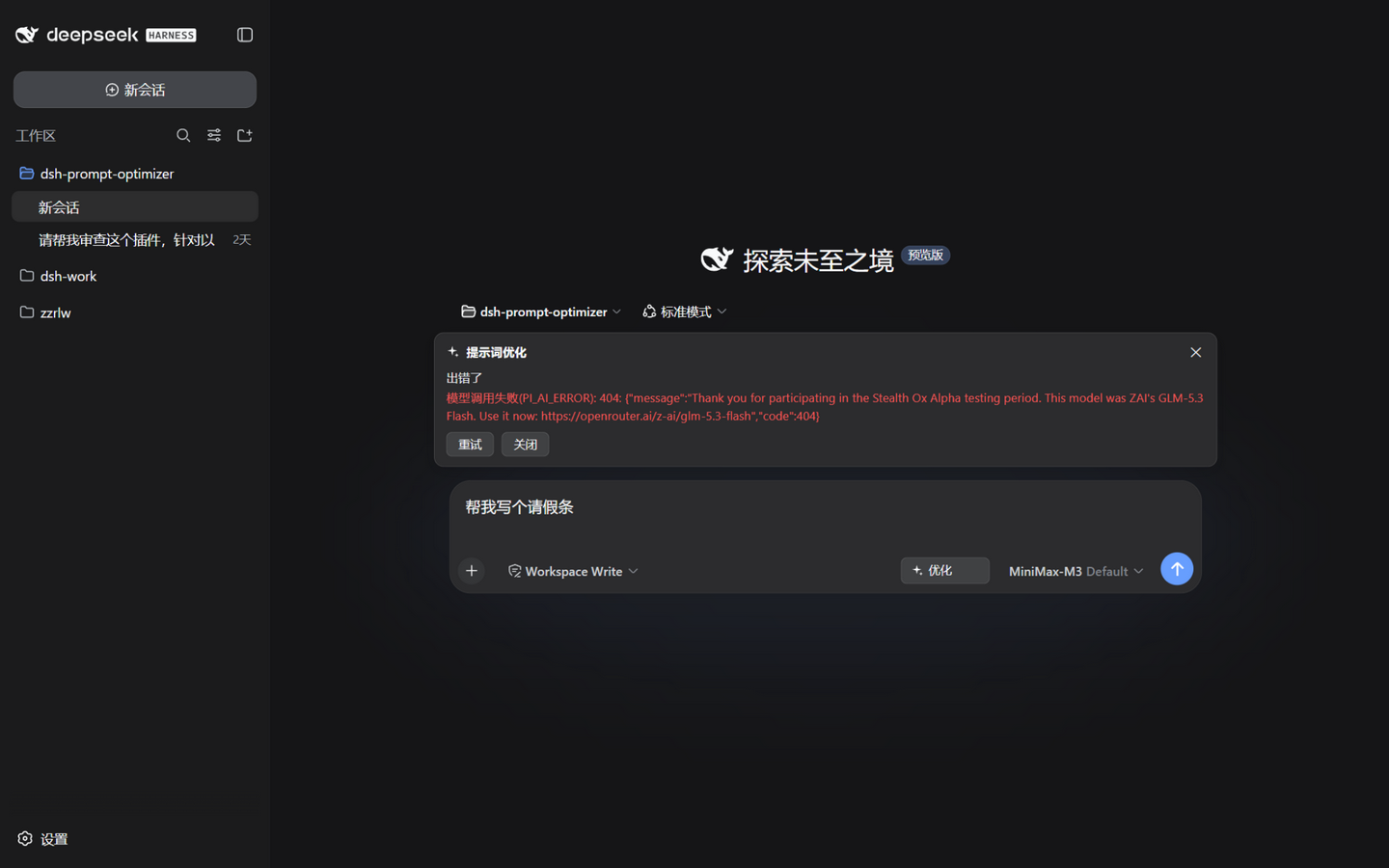
Verified in a real environment (dsh 0.1.0-rc.8 tested + 0.1.1-rc.2 re-verified, Windows — see Compatibility); macOS automated verification passed (2026-09-02, macOS 26.5, all 62 tests green, and CI now permanently runs the full suite on macos-latest); v0.3.16 completed end-to-end verification on the 0.1.2 line (dsh 0.1.2-rc.1 / 0.1.2-alpha.5: composer button, result panel, settings card, optimize route and SSE); v0.3.17 completed end-to-end verification on 0.1.5-rc.1 (2026-09-10, Windows, real profile + browser-driven: the composer「Optimize」button enables with input, the panel opens on click and passes the upstream error through SSE, and the settings card shows both the collapsed summary and the full controls), and a full-chain re-verification on 0.1.5-rc.2 (2026-09-11: composition-layer injection, Host load, route contract, end-to-end SSE, all four strategy paths, client bundle slots and settings-card API — every item passing); v0.3.9–0.3.11 were additionally verified end-to-end on a third-party free model (openrouter minimax/minimax-m3:free, which emits no marker format): both strategies, element-by-element fidelity, [TODO] markers, memory chain, and cancel-keeps-content all behave as designed — and this live testing is what surfaced the fast-mode false-positive fixed in v0.3.10/11.
- Composition-layer load:
--dump-configshows the# == @y1x1n/dsh-prompt-optimizerlayer; - Host: startup log
[dsh-prompt-optimizer] loaded; both routes behave correctly across their 400/405/409/413 paths; SSE streaming verified live; - Client: the bundle is picked up by client-modules and listed in the page boot manifest (from 0.1.5 served through the combined
/plugins/??<ids>&rev=<hash>URL), with the plugin row present in the module list; - End to end: a real
ctx.llmcall (DeepSeek route) completes "analysis + rewrite" with correct marker parsing (wellFormed: true). - Automated tests (
npm test, 62 cases):test/smoke.mjs: 28 Host smoke cases (real cordis Context + mocked services: route-resolution priority, empty/malformed config, 400/405/409/413, SSE event flow, max-tokens truncation, timeout, fast mode, reasoning clamp, legacy-settings normalization, connectivity test, fallback chain with fallback-reason passthrough, tool-calls guard, auto output cap, context injection and hard switch, strategy selection, memory-chain injection and truncation, origin fence);test/prompt.test.mjs: 13 meta-prompt parsing cases (marker whitespace variants, degradation paths, partial-stream parsing, stream-buffer compaction, token estimation, context payload and budgeting, strategy fork, fidelity rules and examples, memory-chain payload);test/controller.test.mjs: 21 client pure-logic cases (SSE frame parsing, frame coalescing, interrupted connections, session-query skipping, undo flow, retry, close-abort, cancel keeping partial output plus its state gate, client timeout watchdog, history extraction filtering and degradation, slash-prefix splitting and bare-command rejection, memory-chain passing and gates, send-to-close decisions, duration recording, user-first context sampling).
How it works
Click "Optimize"
  → Client reads the input draft + the session's model selection (session.models RPC, queried
    live on every click; skipped when a model is pinned in settings — the Host's pinned value wins)
  → POST /dsh-prompt-optimizer/optimize { text, provider, model, reasoningEffort, context?, previous? }
  → Host calls ctx.llm.stream() with the system meta-prompt
    (route resolution: pinned setting → session selection → first available route; an optional
     fallback route fails over on zero-output failure; the output cap rises with estimated input
     tokens by default; optional reasoning clamp / low temperature)
  → text-delta chunks are pushed over SSE and the panel shows "analysis / rewrite" sections live
    (incrementally parsed on <<<ANALYSIS>>> / <<<OPTIMIZED>>> markers, whitespace variants tolerated)
  → the done event carries the final parsed result; a max-tokens finish carries a truncated flag; a fallback adds its reason
  → one click replaces the input box (undoable, slash prefix re-attached) / copy / re-optimize (edits continue from the previous result; same text regenerates fresh)
  → Esc while optimizing = cancel (a cancelled state keeps what was generated); a client-side watchdog guards against an unresponsive Host
Development
npm install --legacy-peer-deps   # install deps and trigger the build
npm run sync:types               # sync the client type packages (see below)
npm run typecheck                # tsc --noEmit
npm run build                    # produces lib/{index,client,prompt,controller}.js
npm test                         # smoke + prompt + controller suites
About sync:types
The upstream monorepo publishes only part of the @deepseek-ai/* packages (the rest are publishConfig: restricted), so the client type packages' transitive dependencies cannot be installed from npm. scripts/sync-types.mjs handles it:
- Published packages are
npm packed and extracted straight intonode_modules(bypassing npm's dependency-tree resolution); - For unpublished packages (e.g.
dsh-type-meta), it scans every.d.tsreference and generates minimal stub packages (only module resolvability matters underskipLibCheck).
These packages only participate in type checking; at runtime everything is provided by the Harness page/process (react and @deepseek-ai/* are external).
Directory layout
dsh-prompt-optimizer/
├── package.json          # dsh.bundle + dsh.client dual manifest
├── cordis.patch.yml      # composition layer: inserts the Host plugin line
├── src/
│   ├── index.ts          # Host plugin: settings namespace + two HTTP routes + llm call (with fallback chain)
│   ├── prompt.ts         # meta-prompts, marker parsing, token estimation (pure functions)
│   └── client/
│       ├── index.tsx     # Client entry: slot registrations
│       ├── controller.ts # shared state machine for button/panel + SSE consumption (standalone artifact, unit-testable)
│       ├── i18n.ts       # zh/en UI copy, follows the DSH interface language
│       ├── OptimizeButton.tsx   # composer button
│       ├── ResultDock.tsx       # result panel above the input card (live streaming + undo)
│       ├── SettingsCard.tsx     # collapsible settings card
│       ├── SparkleIcon.tsx      # hand-drawn ✨ icon
│       └── GitHubIcon.tsx       # GitHub icon (repo link in the settings card header)
├── scripts/build.mjs     # esbuild: Host ESM + Client lazy-CJS factory + two test artifacts
├── scripts/sync-types.mjs
├── scripts/prompt-probe.mjs  # prompt evidence probe: fires real optimize requests at a running instance (PROBE_ROUTE=provider/model to pin a route)
└── test/                 # smoke.mjs (Host) / prompt.test.mjs / controller.test.mjs
Security notes
- The HTTP routes are registered on dsh's own web server, which listens on
127.0.0.1by default. If you expose dsh to your LAN (0.0.0.0), this plugin's optimize endpoint becomes callable from the LAN too — it consumes your configured model quota; be aware. - Both routes enforce an origin fence: requests carrying an
Originheader (browser POSTs always do) must matchHost, andHostmust be a loopback address or the machine's actual local address — cross-site forged requests (CSRF) and DNS rebinding get a 403; command-line calls withoutOriginare unaffected. - The plugin holds no API keys: every model call goes through the Harness-configured
ctx.llmroutes.
Contributors
Thanks to the following contributors for improvements to this project (see the contributing guide):
- @ruijiaang-lab — contributing guide (#2)
License
MIT
Links
More in this category
zhu1090093659/dsh-web#packages/dsh-task-board★ 8296
Task board for the dsh web GUI: a sidebar multi-column kanban whose cards run in real DSH agent sessions and can also be scheduled with cron expressions, executed host-side even with the browser closed.
zhu1090093659/dsh-web#packages/dsh-web-all★ 8296
Plugin and skin collection for the DSH Web UI: task board, Git graph, right-side panel, remote mobile UI, pet, live token stats, and a skin center.
omdsh-dev/DSH-better-sidebar★ 3968
Full sidebar workbench with file rendering and editing, terminal, Git, and subagents; third-party plugins can register new tabs.
ccch1mneyyy/dsh-TUI★ 3948
Claude Code-style full-screen terminal UI: pixel-whale header, live status line, and streaming thought expansion.
MeteorNOX/DeepSeek-Balance-Whale-Widget★ 3877
A fixed-corner whale widget for the DSH web GUI — balance, today's usage and per-turn cost with peak/off-peak pricing, editable balance-alert and daily-budget bubbles, a module-based custom bubble queue with A/B weighted choices and random lines or images, 30+ vendor templates (OpenAI, OpenRouter, Kimi, SiliconFlow, Ark, Zhipu, MiniMax and more) with per-model balance and subscription quota, plus task-end sound, imported audio, custom roles and a resource manager. Local-only, no telemetry.
Devin-AXIS/deepseek-design#deepseek-idesign★ 1413
Visual design studio for websites, app prototypes, posters, cards, reports, and magazines, with templates, direct element editing, selection-aware AI draft handoff, and export.
Community comments
Comments are public GitHub Discussions. Loading them connects to GitHub and Giscus; a GitHub account is required to post.