Keeps the question you are currently on pinned above the composer, with a dropdown of every earlier question that scrolls the conversation back to that turn; questions folded into process groups are expanded first, and Escape, scrolling or clicking outside collapses the panel.
Install
# from GitHub (first run asks for allowBuilds approval — follow the hint, retry)
dsh plugin --profile web add github:Xinyuan-Gao/xy-dsh#path:/xy-dsh-question-nav
Any plugin you install runs third-party code with your own permissions — it can read your files, use your credentials, and reach the network, and tool approvals don’t sandbox it. GitHub-sourced plugins also run build scripts at install time — pnpm blocks those until you allow them, so an install can stop with ERR_PNPM_GIT_DEP_PREPARE_NOT_ALLOWED or ERR_PNPM_IGNORED_BUILDS; dsh prints the exact key to add under allowBuilds in your profile’s pnpm-workspace.yaml, and the install works on the next run. Allowing a build is a trust decision: only install sources you trust, and pin a commit (github:owner/repo#sha).
README
This plugin publishes its README in Chinese only.
让「我现在到底在问什么」永远看得见,并能一键把对话翻回之前任何一轮提问。
一个 DeepSeek Harness(DSH)Web 客户端插件。对话一长,长时间的思考过程会把你自己刚提的问题顶出视野;这个插件在输入框上方常驻当前提问,并提供一份按时间排列的历次提问,点其中任何一条就把对话视图回退到那一轮。
这个目录是 xy-dsh 集合仓库的一个插件子目录 —— 装法见下面「安装」。

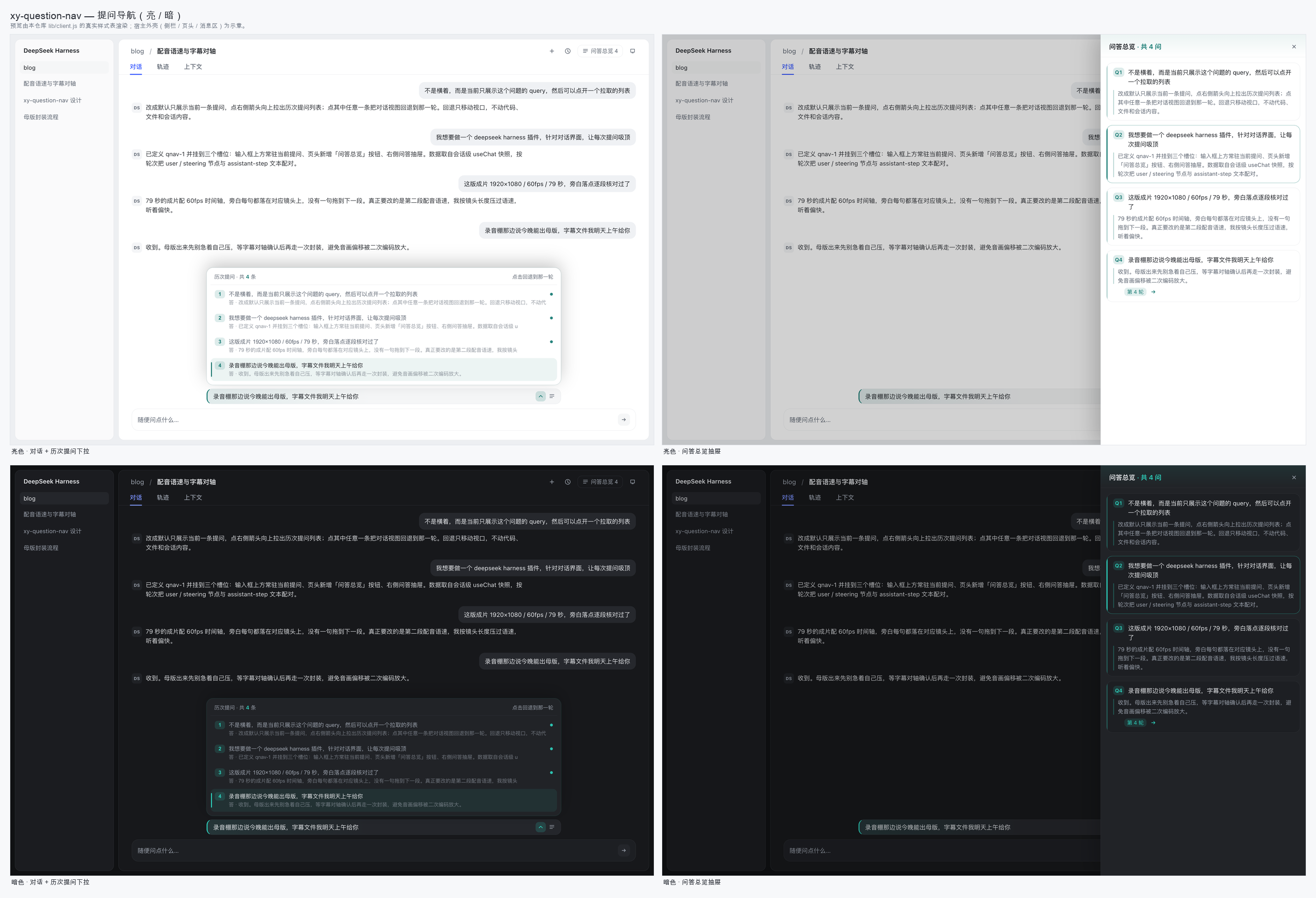
功能
| 位置 | 行为 |
|---|---|
| 输入框上方一行 | 常驻显示当前提问。默认单行截断,点文字展开到 4 行看全文。 |
该行右侧 ⌄ |
向上拉出历次提问面板:序号 + 提问摘要 + 回答摘要,按时间顺序排列。点任意一条 → 对话视图回退到那一轮。 |
该行右侧 ☰ / 页头「问答总览 n」 |
打开右侧抽屉:每一轮的提问全文 + 回答全文,点卡片展开全文,展开后可点箭头跳转。 |
| 滚动 / Esc / 点面板外 | 面板收起;滚动时当前所在的一轮会被标记。 |
关于「回退」:它只移动对话视口 —— 滚回那一轮的提问位置。不会回滚代码、文件、git 状态或会话内容。被折叠进「过程」分组的提问会先自动展开;尚未加载进窗口的历史会先分页拉取再落位。
数据全部来自运行时的会话快照:把 Chat 节点按轮次聚合,user / steering 节点作为提问,其后同一轮内最后一个 assistant-step 的文本块作为回答(推理块不进入摘要)。
挂载的槽位
| 槽位 | 内容 |
|---|---|
conversation.input.dock(order: -100) |
当前提问条 + 历次提问下拉 |
conversation.session.header.utilities(order: 20) |
「问答总览 n」按钮 |
shell.overlay(order: 40) |
右侧问答总览抽屉 |
三个槽位都是 additive 的:不会替换任何出厂 UI。插件依赖会话级 useChat hook 读取 Chat store,依赖宿主行标记 data-chat-anchor-key / data-chat-turn 与滚动容器 data-conversation-scroll 做定位。
配色
插件通过主题服务注册了自己的强调色层,而不是把颜色硬编码进样式表:
theme.overrideTokens('xy-dsh-question-nav/accent', {
  '--dshq-accent': { light: '#0F766E', dark: '#2DD4BF' },
  '--dshq-accent-soft': { light: '#E4F4F1', dark: '#10312E' },
})
所有彩色元素都由这一个 token 派生(color-mix() 调透明度与混合),因此亮/暗主题自动跟随,卸载插件时整层颜色一并消失。选青绿是为了与 DSH 自身的蓝色选中态形成对比,避免两个控件抢同一个视觉语义。
改配色只需要动 lib/client.js 里的 ACCENT / ACCENT_SOFT 两个值(工厂里紧挨注释 tokens 的那两行)。
安装
包结构遵循 DSH 客户端插件约定:package.json 的 dsh.client 声明注入依赖与平台;浏览器入口是 lib/client.js(以 window.__ModuleLoader__ 工厂注册,无构建步骤),宿主入口是 index.mjs。
本插件是 xy-dsh 集合仓库的一个子目录,安装时用 pnpm 的 #path: 片段指定目录:
# DSH Desktop 用 desktop;`dsh web` 用 web。装错 profile 的表现是
# 「刷新了页面但什么都没有」。
dsh plugin --profile desktop add "github:Xinyuan-Gao/xy-dsh#path:xy-dsh-question-nav"
装完重启 DSH Desktop,或重启 dsh web。要更新就重跑同一条命令。
重启后就没了? 那说明它没被装成 profile bundle。DSH 的动态 Cordis 包只在当前进程里有效,电脑或 DSH 一重启就消失;只有
dsh plugin add装进 profile 的包才会在每次启动时自动加载。本插件早期是作为动态包迭代的,所以踩过这个坑——用上面的命令装一次就固定下来。
想改代码就 clone 下来、用 link: 装一份可编辑的:
git clone https://github.com/Xinyuan-Gao/xy-dsh.git
cd xy-dsh
dsh plugin --profile web add link:"$PWD/xy-dsh-question-nav"
dsh.client.inject 已经声明了它需要的运行时依赖:@deepseek-ai/dsh-client-ui-renderer、@deepseek-ai/dsh-client-ui-conversation、@deepseek-ai/dsh-client-ui-session、@deepseek-ai/dsh-client-ui-chat、@deepseek-ai/dsh-client-ui-theme。
验证它活着
装好后刷新页面,看两点:
- 输入框上方是否出现当前提问那一行;
- 页头是否出现「问答总览 n」按钮 —— 数字出现就说明提问数据已经抓到(拿不到会话数据时按钮只有文字,不会有数字)。
开发
预览页与截图不是手写的,而是从插件源码里读取真实样式表后渲染的 —— 所以预览不会和实现漂移:
node tools/build-previews.mjs        # 生成 docs/previews/*.html(读 lib/client.js 的 CSS)
python3 tools/compose-sheets.py      # 合成 docs/screenshots/*.png
重新截图(需要本机 Chrome):
CHROME="/Applications/Google Chrome.app/Contents/MacOS/Google Chrome"
"$CHROME" --headless --hide-scrollbars --force-device-scale-factor=2 \
  --window-size=1380,880 --screenshot=docs/screenshots/light-strip.png \
  "file://$PWD/docs/previews/light-strip.html"
截图说明:
docs/screenshots/*.png是用上述方式、按插件真实样式表 + DSH 主题 token 值渲染的预览图;其中宿主外壳(左侧栏、页头、消息区)是示意性的,不属于本插件。
踩过的坑(给后来的插件作者)
这个插件最初是作为 DSH 的动态 Cordis 包迭代出来的,有三处不是「看起来像 bug」而是真的会让包加载失败的坑:
ctx是白名单代理:返回裸函数形式的插件没有inject声明位,读ctx.slots会被守卫以 service "slots" is not declared 拒绝 —— 必须返回{ name, inject: ['slots'], apply };apply不能有返回值:Cordis 把 effect 会执行apply的返回值,非函数、非 Promise、非迭代器的返回值(例如习惯性写return {})会被判为Invalid effect直接加载失败;- 外部槽位拿不到会话数据时不要硬读:跨会话共享的数据要先在会话槽位里发布、根作用域槽位再消费,并且读取处要容忍空值,否则会在挂载瞬间抛渲染错误。
兼容性
- DSH Web(浏览器端插件,
platform: "web")。 - 依赖会话级
useChathook;若某个槽位不注入它,插件会安静地不渲染提问条,而不是崩溃。
License
MIT
Links
More in this category
zhu1090093659/dsh-web#packages/dsh-task-board★ 9967
Task board for the dsh web GUI: a sidebar multi-column kanban whose cards run in real DSH agent sessions and can also be scheduled with cron expressions, executed host-side even with the browser closed.
zhu1090093659/dsh-web#packages/dsh-web-all★ 9967
Plugin and skin collection for the DSH Web UI: task board, Git graph, right-side panel, remote mobile UI, pet, live token stats, and a skin center.
MeteorNOX/DeepSeek-Balance-Whale-Widget★ 6767
A fixed-corner whale widget for the DSH web GUI — balance, today's usage and per-turn cost with peak/off-peak pricing, editable balance-alert and daily-budget bubbles, a module-based custom bubble queue with A/B weighted choices and random lines or images, 30+ vendor templates (OpenAI, OpenRouter, Kimi, SiliconFlow, Ark, Zhipu, MiniMax and more) with per-model balance and subscription quota, plus task-end sound, imported audio, custom roles and a resource manager. Local-only, no telemetry.
ccch1mneyyy/dsh-TUI★ 6630
Claude Code-style full-screen terminal UI: pixel-whale header, live status line, and streaming thought expansion.
omdsh-dev/DSH-better-sidebar★ 4833
Full sidebar workbench with file rendering and editing, terminal, Git, and subagents; third-party plugins can register new tabs.
Devin-AXIS/deepseek-design#deepseek-idesign★ 1681
Visual design studio for websites, app prototypes, posters, cards, reports, and magazines, with templates, direct element editing, selection-aware AI draft handoff, and export.
Community comments
Comments are public GitHub Discussions. Loading them connects to GitHub and Giscus; a GitHub account is required to post.