Native sidebar mind maps with Markdown notes, saved layouts, and offline HTML export.
Install
# from a prebuilt release tarball
dsh plugin --profile web add "https://github.com/Xiao-53/dsh-mindmap/releases/download/v0.3.12/dsh-mindmap-0.3.12.tgz"
# from GitHub (first run asks for allowBuilds approval — follow the hint, retry)
dsh plugin --profile web add github:Xiao-53/dsh-mindmap
Any plugin you install runs third-party code with your own permissions — it can read your files, use your credentials, and reach the network, and tool approvals don’t sandbox it. GitHub-sourced plugins also run build scripts at install time — pnpm blocks those until you allow them, so an install can stop with ERR_PNPM_GIT_DEP_PREPARE_NOT_ALLOWED or ERR_PNPM_IGNORED_BUILDS; dsh prints the exact key to add under allowBuilds in your profile’s pnpm-workspace.yaml, and the install works on the next run. Allowing a build is a trust decision: only install sources you trust, and pin a commit (github:owner/repo#sha).
README
This plugin publishes its README in Chinese only.
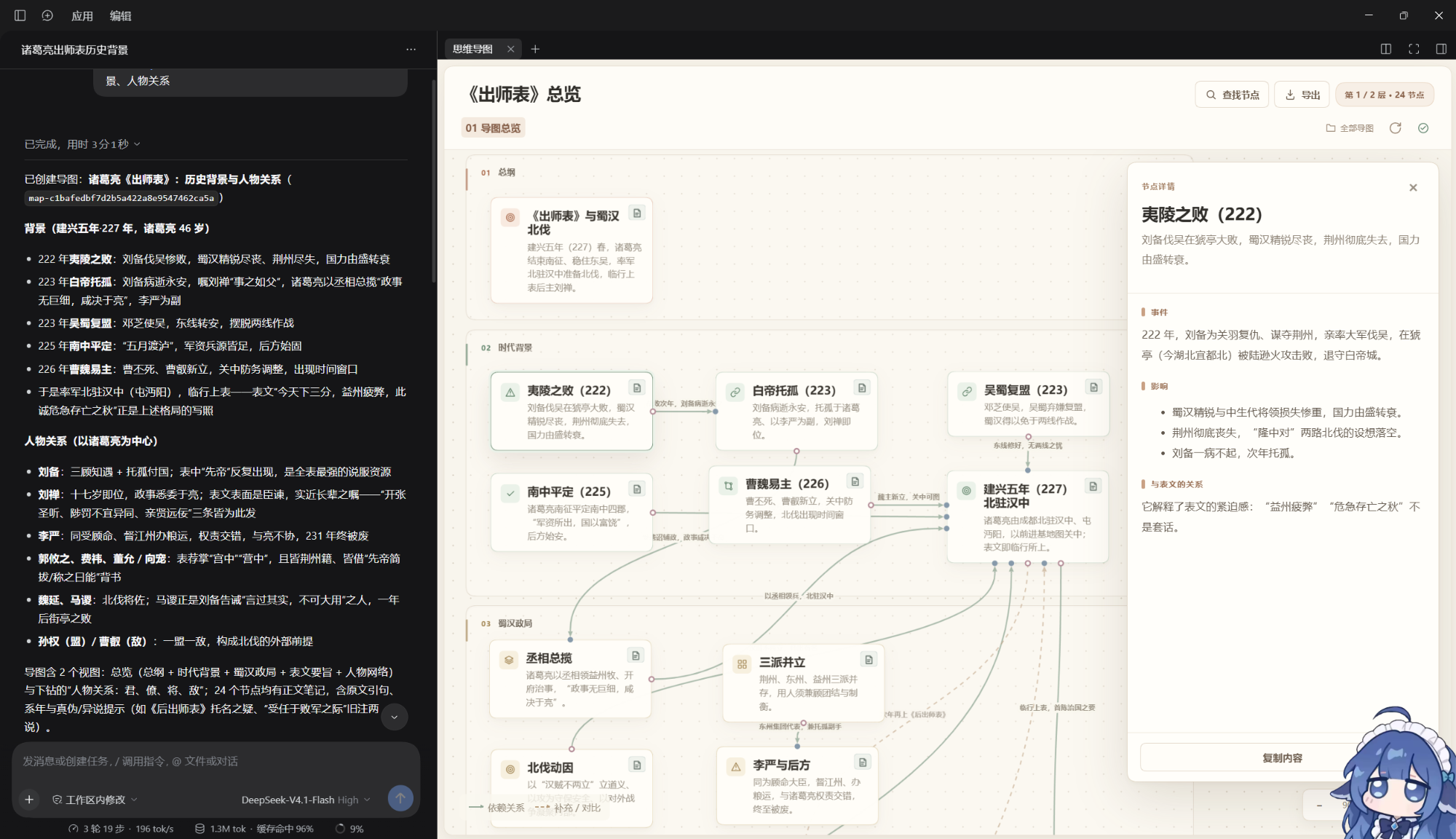
面向 DSH(DeepSeek Harness) 的原生侧栏思维导图插件,可用于整理知识、梳理流程、项目架构可视化等。
在对话中通过 /mindmap 描述需求,由模型调用插件工具创建或局部修改导图,再在侧栏中阅读、拖动和探索内容。
功能
- 原生侧栏:查看节点、关系、分组和可逐层进入的子图,阅读 Markdown 详情。
- 对话协作:通过
/mindmap创建、读取、补充和修改导图;请求由用户手动发送。 - 内容引用:将节点或选中的正文加入 DSH 输入框,通过引用回到来源。
- 布局与管理:拖动节点并保存布局,搜索导图,使用文件夹和回收站管理内容。
- 失败创建清理:在回收站标题旁的“未完成创建”中清理记录,也可让 DSH 调用专用工具;完整地图和活动事务不会被当作失败产物删除。
- 离线导出:下载可独立阅读的全图 HTML。
- 本地文件存储:地图结构、Markdown 正文和布局分别保存,便于持续维护。
界面预览
环境要求
- DSH
0.2.2-rc.3,使用原生侧栏,无需 Better Sidebar。
安装
直接把下面这段话发给 DSH,让它帮你安装:
请帮我安装 dsh-mindmap 思维导图插件。
项目地址:https://github.com/Xiao-53/dsh-mindmap
请从 GitHub 最新 Release 下载 .tgz 安装包,安装到我当前使用的 DSH profile,
保留已有配置,并在完成后告诉我是否需要重启或重新加载。
安装完成并按提示重启或重新加载后,在原生右侧栏中打开“思维导图”。
也可以前往 最新 Release 下载安装包。仓库保留源码,安装包通过 Release 提供。
使用
在 DSH 输入框选择或输入 /mindmap,补充具体需求后手动发送,例如:
/mindmap 介绍一下一战爆发前国际关系。
也可以指定已有地图,要求补充节点、调整关系或修改正文。保存成功后,插件会刷新并打开目标导图。
数据默认保存在当前工作区的 dsh-knowledge-maps/ 下,每张地图使用独立目录,包含 map.json、Markdown 正文和 layout.json。
当前状态
当前版本为 0.3.12,已通过 DSH 人工验收。
许可证
Links
More in this category
zhu1090093659/dsh-web#packages/dsh-task-board★ 10458
Task board for the dsh web GUI: a sidebar multi-column kanban whose cards run in real DSH agent sessions and can also be scheduled with cron expressions, executed host-side even with the browser closed.
zhu1090093659/dsh-web#packages/dsh-web-all★ 10458
Plugin and skin collection for the DSH Web UI: task board, Git graph, right-side panel, remote mobile UI, pet, live token stats, and a skin center.
ccch1mneyyy/dsh-TUI★ 7797
Claude Code-style full-screen terminal UI: pixel-whale header, live status line, and streaming thought expansion.
MeteorNOX/DeepSeek-Balance-Whale-Widget★ 7271
A fixed-corner whale widget for the DSH web GUI — balance, today's usage and per-turn cost with peak/off-peak pricing, editable balance-alert and daily-budget bubbles, a module-based custom bubble queue with A/B weighted choices and random lines or images, 30+ vendor templates (OpenAI, OpenRouter, Kimi, SiliconFlow, Ark, Zhipu, MiniMax and more) with per-model balance and subscription quota, plus task-end sound, imported audio, custom roles and a resource manager. Local-only, no telemetry.
omdsh-dev/DSH-better-sidebar★ 5191
Full sidebar workbench with file rendering and editing, terminal, Git, and subagents; third-party plugins can register new tabs.
omdsh-dev/dsh-genui★ 1007
Interactive UI components rendered inline in replies: layout, charts, forms, quizzes, mermaid, 3D scenes, and an action event loop back to the model.
Community comments
Comments are public GitHub Discussions. Loading them connects to GitHub and Giscus; a GitHub account is required to post.