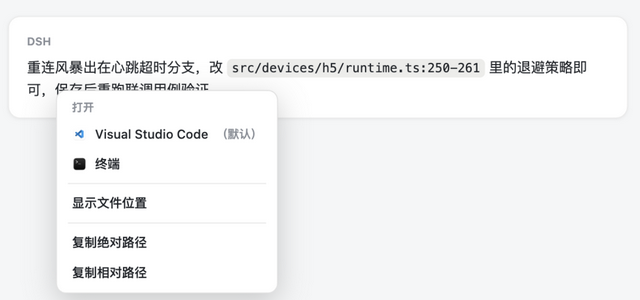
Adds a right-click menu on file references in chat output, listing registered applications with icons for open-with, revealing files in the file manager, and copying absolute or relative paths resolved against the session workspace, while code blocks, plain text and external links keep the native menu.
Install
# from npm (prebuilt)
dsh plugin --profile web add @codefisher798/dsh-file-link-menu
# from GitHub (first run asks for allowBuilds approval — follow the hint, retry)
dsh plugin --profile web add github:XcodeFish/dsh-file-link-menu
Any plugin you install runs third-party code with your own permissions — it can read your files, use your credentials, and reach the network, and tool approvals don’t sandbox it. GitHub-sourced plugins also run build scripts at install time — pnpm blocks those until you allow them, so an install can stop with ERR_PNPM_GIT_DEP_PREPARE_NOT_ALLOWED or ERR_PNPM_IGNORED_BUILDS; dsh prints the exact key to add under allowBuilds in your profile’s pnpm-workspace.yaml, and the install works on the next run. Allowing a build is a trust decision: only install sources you trust, and pin a commit (github:owner/repo#sha).
README
This plugin publishes its README in Chinese only.
DSH 文件引用右键菜单插件 —— 在 DSH 聊天输出里的文件路径上右键,直接用本机应用打开、在文件管理器中定位,或复制绝对/相对路径。
DSH 助手经常在回复里引用项目文件(行内代码路径、文件 chip、dsh-resource:// 链接),但原生右键菜单对它们无能为力。本插件接管这些文件引用的右键事件,弹出一个原生风格的浮层菜单;代码块、普通文本、外部链接不受影响。
功能
| 菜单项 | 行为 |
|---|---|
| 用 <应用> 打开(标注「默认」) | 用系统默认关联应用打开文件(带应用图标) |
| 用 <应用> 打开 | 本机所有注册了该文件类型关联的应用(带图标,逐项列出) |
| 显示文件位置 | 在系统文件管理器(Finder / 资源管理器)中定位该文件 |
| 复制绝对路径 | 复制 <当前会话工作区>/<相对路径> |
| 复制相对路径 | 复制相对于当前会话工作区的路径 |
识别范围(四层判据,按顺序)
<a href="dsh-resource://file/session/<id>/<path>">资源地址链接[data-file-path]显式标记- Markdown 文件链接按钮
<button title="<path>">(含带图标的行内引用 chip) - 非代码块内的行内代码
<code>:全文恰为文件路径(容忍:行号/-行号后缀)
代码块(<pre><code>)、普通文本、外链一律保持原生右键菜单,不会被劫持。
安装
方式一:DSH Desktop CLI(推荐)
DSH Desktop 的插件即 profile 的 pnpm 依赖,直接用桌面内置 CLI 从 GitHub 安装:
DSH_HOME="$HOME/Library/Application Support/dsh-desktop/harness"

"$DSH_HOME/.desktop-bin/node" \
  "/Applications/DSH Desktop.app/Contents/Resources/app.asar.unpacked/node_modules/@deepseek-ai/dsh/lib/bin.js" \
  plugin --profile web add --save-exact github:XcodeFish/dsh-file-link-menu
- 也可写完整 URL:
https://github.com/XcodeFish/dsh-file-link-menu(或git+https://…),效果相同 - 用
github:XcodeFish/dsh-file-link-menu#v1.0.0(tag)或#<commit>可锁版本 - 已发布到 npm(
@codefisher798/dsh-file-link-menu),可省事为:plugin --profile web add @codefisher798/dsh-file-link-menu
安装完成后重启 DSH Desktop 生效(client bundle 按文件 mtime 生成 rev 并版本化缓存,不重启不会重载)。
本插件纯 ESM、零依赖、无
prepare构建脚本,不会触发 pnpm 的allowBuilds审批,装完即用。
方式二:DSH NEXT plugin_manager
plugin_manager install_bundle(target="github:XcodeFish/dsh-file-link-menu")
或在 DSH NEXT 里「设置 → 插件 → 添加插件」填入 github:XcodeFish/dsh-file-link-menu。
同样接受 https://github.com/<用户名>/dsh-file-link-menu、release 资产的 .tgz 地址、npm 包名或本地绝对路径;#v1.0.0(tag)或 #<commit> 可锁版本。
方式三:本地路径安装(开发调试)
plugin_manager install_bundle(target="<本仓库绝对路径>")
或 DSH Desktop CLI:
"$DSH_HOME/.desktop-bin/node" \
  "/Applications/DSH Desktop.app/Contents/Resources/app.asar.unpacked/node_modules/@deepseek-ai/dsh/lib/bin.js" \
  plugin --profile web add /path/to/dsh-file-link-menu
本地路径安装会以 file: 依赖形式写入 profile(与 DSH 内置插件的源码调试方式一致),改完代码重启即可看到效果。
卸载
"$DSH_HOME/.desktop-bin/node" \
  "/Applications/DSH Desktop.app/Contents/Resources/app.asar.unpacked/node_modules/@deepseek-ai/dsh/lib/bin.js" \
  plugin --profile web remove dsh-file-link-menu
卸载后重启 DSH Desktop。
使用
装好并重启后,在聊天输出里对文件路径右键:
- 出现「打开」分组:默认应用(标注「默认」)+ 本机文件关联应用(带图标)
- 「显示文件位置」(在系统文件管理器中定位)
- 「复制绝对路径」「复制相对路径」
打开与定位均通过 Session Remote 由 Host 执行,Host 端会对路径做二次校验(仅限当前会话工作区内的文件)。
工作原理与实现要点(踩过的坑)
- client 插件必须注册 slot 才会被物化执行。DSH 的 client 模块是惰性的——「插件首次被使用之前什么都不会运行」,
immediately: true只让脚本被加载并注册 factory,不等于执行apply()。本插件注册空 slot(conversation.session.header.utilities/conversation.composer.dock)作为消费者。 - 文件打开走 Session Remote:
session.workspacePathApplications({path})查关联应用,session.openWorkspacePath({path, application})打开、{path, action: 'reveal'}定位。 - 不要依赖 CSS Modules 生成的类名(
fileMention/fileLink可能被构建 hash 化),判据以title与文本为准。 - 缩放/定位:菜单挂
document.body,position: fixed+ 高z-index,并按视口边界收敛坐标。
开发与自测
node --check client.js
node self-test.mjs
预期输出:
button[title] right-click -> intercepted | menu: built (7 blocks)
inline code (no path) -> left to native menu (ok)

ROUND TRIP OK — menu build path no longer throws
self-test.mjs 是一个最小 DOM-stub 测试床:加载 client.js、执行 factory + apply()、合成一次右键事件,覆盖「菜单构建」与「判据放行」两条主路径,无需浏览器。
项目结构
| 文件 | 作用 |
|---|---|
package.json |
bundle 清单:dsh.bundle.patch + dsh.client(platform: web, immediately: true) |
cordis.patch.yml |
组合行:insert: id: file-link-menu, name: dsh-file-link-menu |
index.js |
host 半边(空 apply;渲染与交互全在 client 半边) |
client.js |
浏览器半边:右键监听 + 自绘浮层菜单 + Session Remote 调用 |
self-test.mjs |
本地 DOM stub 自测(node self-test.mjs) |
兼容性
- DSH Desktop(
webprofile,含 0.10.x)/ DSH NEXT - macOS / Windows / Linux:「打开」「显示文件位置」由 Host 调系统接口执行,理论上跨平台
- 无 Node / 浏览器 API 之外的运行时依赖
FAQ
- 装完右键没反应? 重启 DSH Desktop / DSH NEXT —— client bundle 的 rev 按 mtime 生成并版本化缓存。
- 代码块里的路径右键还是原生菜单? 设计如此:代码块、普通文本、外链不劫持。
- 菜单里缺少某个应用? 该应用需在系统里注册过对应文件类型的关联(
workspacePathApplications只返回系统注册过的应用)。 - 只对工作区内的文件生效吗? 是。Host 端会二次校验路径,仅允许打开/定位当前会话工作区内的文件。
License
MIT © 2026 饮冰 (XcodeFish)
Links
More in this category
zhu1090093659/dsh-web#packages/dsh-task-board★ 10669
Task board for the dsh web GUI: a sidebar multi-column kanban whose cards run in real DSH agent sessions and can also be scheduled with cron expressions, executed host-side even with the browser closed.
zhu1090093659/dsh-web#packages/dsh-web-all★ 10669
Plugin and skin collection for the DSH Web UI: task board, Git graph, right-side panel, remote mobile UI, pet, live token stats, and a skin center.
ccch1mneyyy/dsh-TUI★ 8366
Claude Code-style full-screen terminal UI: pixel-whale header, live status line, and streaming thought expansion.
MeteorNOX/DeepSeek-Balance-Whale-Widget★ 7489
A fixed-corner whale widget for the DSH web GUI — balance, today's usage and per-turn cost with peak/off-peak pricing, editable balance-alert and daily-budget bubbles, a module-based custom bubble queue with A/B weighted choices and random lines or images, 30+ vendor templates (OpenAI, OpenRouter, Kimi, SiliconFlow, Ark, Zhipu, MiniMax and more) with per-model balance and subscription quota, plus task-end sound, imported audio, custom roles and a resource manager. Local-only, no telemetry.
omdsh-dev/DSH-better-sidebar★ 5362
Full sidebar workbench with file rendering and editing, terminal, Git, and subagents; third-party plugins can register new tabs.
omdsh-dev/dsh-genui★ 1070
Interactive UI components rendered inline in replies: layout, charts, forms, quizzes, mermaid, 3D scenes, and an action event loop back to the model.
Community comments
Comments are public GitHub Discussions. Loading them connects to GitHub and Giscus; a GitHub account is required to post.