Third-party TUI mode for DeepSeek Harness (dsh --profile pi-tui), built on a vendored pi-tui fork: covers the main session loop plus approvals, commands, session switching and full-text search, as well as presets, skills, model/settings menus and slash commands.
Install
# from npm (prebuilt)
dsh plugin --profile web add @xmoon76/dsh-pi-tui
# from GitHub (first run asks for allowBuilds approval — follow the hint, retry)
dsh plugin --profile web add github:XMoon/dsh-pi-tui
Any plugin you install runs third-party code with your own permissions — it can read your files, use your credentials, and reach the network, and tool approvals don’t sandbox it. GitHub-sourced plugins also run build scripts at install time — pnpm blocks those until you allow them, so an install can stop with ERR_PNPM_GIT_DEP_PREPARE_NOT_ALLOWED or ERR_PNPM_IGNORED_BUILDS; dsh prints the exact key to add under allowBuilds in your profile’s pnpm-workspace.yaml, and the install works on the next run. Allowing a build is a trust decision: only install sources you trust, and pin a commit (github:owner/repo#sha).
README
简体中文 | English
A Pi-style terminal frontend for DeepSeek Harness.
dsh-pi-tui is installed as an independent dsh bundle inside a profile. It provides terminal interaction for streaming conversations, tool calls, session management, subagents, history search, shell commands, approvals, and settings. Models, tools, Sessions, permissions, Skills, Plan, Goal, and Subagent runtime behavior are still provided by DeepSeek Harness.
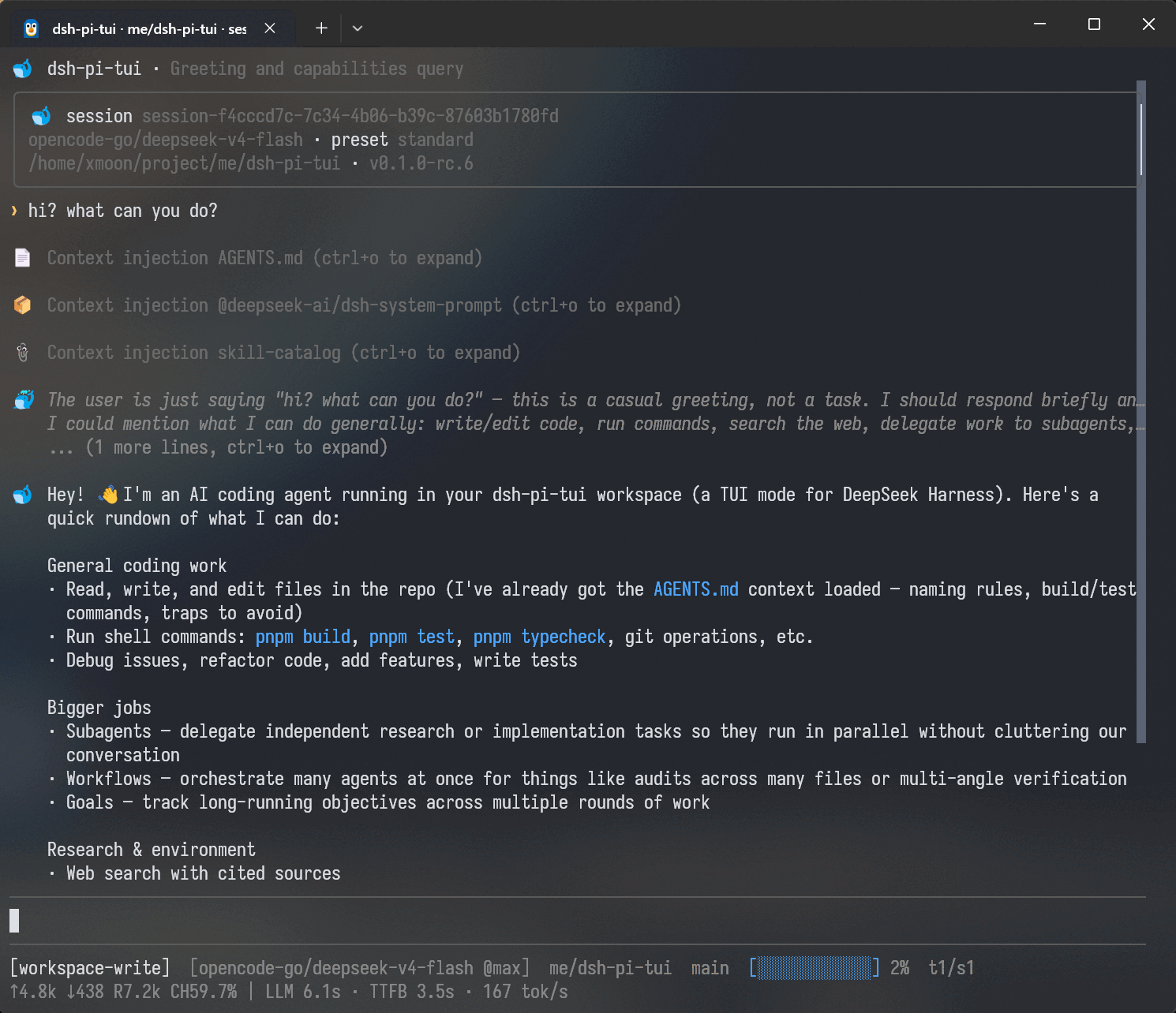
Install into a DSH profile
Stable / latest
Stable releases are recommended for ordinary users. Install DSH first, then add
the TUI to the pi-tui profile:
npm install -g --allow-scripts=@deepseek-ai/dsh-subprocess-local,koffi,node-pty @deepseek-ai/dsh@latest
dsh plugin --profile pi-tui -- add @xmoon76/dsh-pi-tui@latest
dsh --profile pi-tui
Next / npm line (validation)
Preview installation uses the DSH alpha channel and the TUI next channel.
The DSH native install scripts must be explicitly allowed:
npm install -g --allow-scripts=@deepseek-ai/dsh-subprocess-local,koffi,node-pty @deepseek-ai/dsh@alpha
dsh plugin --profile pi-tui -- add @xmoon76/dsh-pi-tui@next
dsh --profile pi-tui
Use the isolated npm driver (it installs the exact DSH version declared by this checkout and exercises the full build/test/package path):
pnpm compat:dsh:npm
See the compatibility guide for the stable minimum, next compatibility range, and fallback paths.
Requirements
- DeepSeek Harness
- Node.js
^22.19.0 || >=24
DSH/TUI version pairing (important)
| TUI package line | Official DSH tags for the pairing | Notes |
|---|---|---|
0.5.0 (stable / @latest) |
dsh-v0.1.7-rc.2, dsh-v0.2.0-rc.1 |
Current stable line; 0.1.7-rc.2 minimum, exact validation target 0.2.0-rc.1 |
0.4.9 (stable, previous) |
dsh-v0.1.7-rc.2 |
Previous stable; the compatible TUI for a 0.1.7-rc.2 runtime |
0.4.8 (stable, previous) |
dsh-v0.1.7-rc.1 |
Previous stable; the compatible TUI for a 0.1.7-rc.1 runtime |
0.4.6 (stable, previous) |
dsh-v0.1.5-rc.1, dsh-v0.1.5-rc.2 |
Previous stable; the compatible TUI for a 0.1.5 runtime |
0.4.7-alpha.2 (next, previous) |
dsh-v0.1.6-alpha.2 |
Previous next line; the compatible TUI for a 0.1.6-alpha.2 runtime |
Do not mix the stable and @next prerelease lines. The 0.5.0 line unifies its
whole DSH peer floor at >=0.1.7-rc.2 (the rc.2 preset registry peers
dsh-agent exactly, so a wider legacy floor no longer satisfies a standalone
tarball install), while its exact validation and recommended upgrade target is
the published 0.2.0-rc.1 family; older runtimes fail at the normal
incompatible-runtime boundary, so install the paired TUI line from the table
above. The startup notice
is best-effort rather than a Loader startup-order guarantee. See the full
historical compatibility matrix for official-tag
pairings and fallback commands, and see the latest next
README for the current
integration status.
New agent sessions use the official roster's selected preset id. A custom DSH
preset literally named code is valid and remains code when it exists in the
current roster. DSH V3 migration owns historical session code -> ptc
conversion, while the current projection preserves a legal custom code. An
omitted legacy settings default is never aliased: with no matching declaration
in the current roster it is simply an invalid preference.
Profile management
Update the installed TUI:
dsh plugin --profile pi-tui -- update @xmoon76/dsh-pi-tui
List installed plugins:
dsh plugin --profile pi-tui -- list
Remove the plugin:
dsh plugin --profile pi-tui -- remove @xmoon76/dsh-pi-tui
Resume an existing Session:
dsh --profile pi-tui --session <session-id>
Features
Conversation and tools
- Streaming Markdown output
- Collapsible Thinking blocks
- Tool Call cards with running / success / failure state
- Collapsible Tool / System details
- Full-text Transcript search
- Folding for long Session history
- Context, token, model, and runtime status
- Approval and
ask_user_questiondialogs - Plan Review
- Todo / Goal status
- Human-readable terminal window titles
- Bounded long-session windows with stable paging and live-follow position
- Long user prompts collapse to head + marker + tail;
Ctrl+Oexpands and collapses them in regular mode and in fullscreen outside Focus - No duplicate ghost Tool Cards after compaction / pruning
Ctrl+O controls Tool and System details and expands/collapses long user prompts in regular mode and in fullscreen outside Focus — in fullscreen Focus it bulk-expands the recent Thought roots or collapses them all, while long user prompts are expanded by clicking the marker (or by a search hit) and collapsed with Ctrl+O. Alt+T controls Thinking separately.
Conversation display
/display focus groups the current turn's Thinking, Tool Calls, and intermediate replies into a live Thought block; /display full restores the normal Transcript projection. /focus remains available as a compatibility command. The Compact preset is reserved and /display compact is rejected until its projection ships.
The full process can still be expanded when needed. In fullscreen Focus, Thought roots can be expanded/collapsed in bulk or opened with an individual card click, and the viewport survives switches and resizes. Display presets only change presentation; they do not modify Session events.
Communication policy
/settings exposes two independent communication controls. Progress updates owns the mid-turn update cadence: milestones (default) posts a brief update only when a substantial phase completes, the direction materially changes, or required user input blocks progress — never for a freshly discovered partial finding; frequent keeps the user actively informed through longer multi-step work; off suppresses progress narration entirely. Response style owns the visible answer's density: default adds no extra guidance, concise is compact and result-first, explanatory adds rationale, architecture, and tradeoffs. Changes apply on the next prompt assembly without restarting the agent and are saved across sessions. Focus is a surface capability, not a third preference: while Focus is active the progress section is simply ineffective (progress-only intermediate messages are not generated) and the saved cadence is untouched; the response style stays active in Focus.
Sessions
Supports persisted DSH Sessions, including:
- Creating and resuming Sessions
- Session switching
- Renaming
- Forking
- Rewind
- Session lineage
/export— full Session archive (descendants + attachments) saved to a Client-local directory/transcript— readable Markdown transcript saved to a Client-local directory
Use:
/sessions
/fork
/rewind
/export
/transcript
When the Agent is idle and the editor is empty, pressing Esc twice quickly also opens Rewind.
Rewind creates a new Child Session from a selected historical User Turn and restores that Prompt into the editor. The original Session is left unchanged.
Input history
Ctrl+R opens input history search.
Three scopes are available:
- Current session
- Current directory
- All directories
History results include the Prompt, working directory, timestamp, and Session information. Selecting an entry restores it to the editor without submitting it.
Regular ↑ / ↓ history recall is still available for recent input.
Subagents and the Task Center
/tasks opens the full Task Center, showing the work the current Session's
Job Registry / Subagent catalog still tracks; the Footer's ↓ opens the
lightweight Quick Tasks view for the current active work. Selecting a Job
opens a detail with the official non-consuming live
output preview (status, progress and the retained output tail); it never consumes
the model's job_output cursor and never becomes session history.
Task Center is a live tracked/control projection, not an execution-history
list. ACTIVE / TRACKED are presentation scopes: ACTIVE shows only the
currently active items, TRACKED shows everything the current authority
still lists. DSH 0.1.7 temporarily registers a Job while an ordinary
foreground bash / pwsh command runs, so it can be observed and stopped
from the Task Center; if the command finishes inside the foreground wait,
DSH removes that temporary record and the final result stays in the
Transcript's tool card. Explicit run_in_background: true jobs (and jobs
promoted to the background after a foreground timeout) remain visible in
TRACKED after completion as long as the Job Registry keeps their record.
/plugins opens the active profile's Plugin Manager: installed bundles and
plugins are grouped into Current TUI / TUI Extensions / DSH Plugins, with
enable/disable, remove and install; the dsh-pi-tui bundle currently providing
the surface is read-only and cannot be disabled or removed from its own screen.
The Plugins Manage… row in /settings opens the same surface on demand.
Subagents are shown using their complete lineage, including nested descendants:
main
├─ subagent A
│  └─ subagent B
└─ subagent C
The browser distinguishes:
continuableone-shot- running / inactive
- nested descendants
- Job Registry rows (including running foreground shell work)
The Footer's ↓ opens Quick Tasks as a lightweight browsing view: it only
supports arrow navigation, left/right expand/collapse, Tab type cycling,
Enter open, and Esc close. The bottom “Open Task Center” row opens the full
Task Center.
The full Task Center additionally offers A to toggle Active / Tracked, / search,
Tab / Shift+Tab to cycle types in both directions, S to stop the selected
task after confirmation, and R to refresh/retry. Quick Tasks consumes only the
whitelist above; every other keystroke is a no-op that never enters search, stop
confirmation, or management state, so Esc always closes it in one layer.
Completed one-shot Subagents remain available for persisted Transcript inspection.
A direct continuable Child can be opened in an interactive viewer and sent follow-up messages directly (through DSH's official subagents.prompt() human channel — queued in order as the Child's own next turn, with user provenance). The Child has its own Transcript, Draft, and runtime state, without modifying the main Session input.
Deeper nested Subagents are read-only by default.
The official subagent model selection (the DSH subagent-model-selection
setting) can be toggled and its allowlist maintained in /settings: once
enabled, a NEW session's official subagent tool may pick the child
provider/model per call (bounded by the allowlist). The setting is sampled at
session composition and never rewrites the tools of an already-running
session.
Shell
The editor supports two Shell modes:
! git status
Runs a local command and submits its output into the current Session.
!! git status
Runs the command locally only. Its output is not added to model context.
! / !! are editor modes rather than plain text prefixes. The prompt and completion behavior switch together with the active mode.
Shell cards show a bounded output preview by default. Ctrl+O expands the retained output — except in fullscreen Focus, where Ctrl+O owns the Thought roots and the shell cards keep their folded state.
File references and images
Typing @ opens workspace file search and completion:
@src/index.ts
@"path with spaces/file.ts"
/attach <path> is the unified Client-local image/file intake; /image <path> keeps its image-only compatibility semantics. Both complete files and directories; paths with spaces, quotes, or Windows separators preserve the input dialect, and directories can be expanded further.
Resolvable relative paths are canonicalized before submission.
Clipboard images can be added with Ctrl+V and persisted through the DSH Attachment service.
Models and runtime settings
The TUI uses DSH model and settings services.
Common entry points:
/model
/settings
/login
/permission
/plan
/goal
/compact
/footer
/statusline
Model selection, Reasoning Effort, permission presets, Plan, and Goal all keep the corresponding DSH runtime semantics.
The Icon style option in /settings switches the TUI's structural icons:
Emoji (default, colorful), Symbols (compact single-cell terminal
symbols), or Minimal (decorative icons hidden; only status/interaction
markers remain). Switching applies immediately and persists.
Slash Commands registered by other plugins through ctx.commands are discovered automatically.
Footer customization
/footer is the interactive Footer editor. You can combine builtin status items, change their side and order, choose a Style and Tone, edit Prefix/Suffix and Importance, and create your own Footer items.
Four item sources are supported:
- Builtin Item — Model, Context, Token, Tasks, Git branch, and other built-in status facts;
- Custom Text — a user-created static text item;
- Custom Command Item — a user-created dynamic command output that can be composed with other items;
- Extension Item — a Footer item contributed by a plugin through the Stable Extension API.
On narrow terminals, builtins with compact forms shorten before lower-importance content is dropped. Runtime compaction never rewrites the Style you saved.
A /footer Custom Command Item is different from footer: command: the former is one dynamic item that can sit next to Model, Context, and other items; the latter hands the whole Footer status surface to one user command.
For the full /footer workflow, Custom Text / Command items, YAML reference, security model, and troubleshooting, see:
/statusline is an alias of /footer.
Common keys
| Key | Action |
|---|---|
Enter |
Submit input |
Ctrl+Enter |
Submit with the OPPOSITE busy behavior (steers by default; queues when busyEnter=steer) |
Shift+Enter |
Insert newline |
Esc |
Cancel current interaction / interrupt running work |
Esc Esc |
Open Rewind while idle |
Ctrl+C |
Keyboard exit confirmation; clears the draft first |
Ctrl+D |
Keyboard exit confirmation when empty; forward-delete with draft text |
Ctrl+S |
Steer queued messages and the draft into the running turn |
Ctrl+T |
Toggle the todo panel |
Ctrl+R |
Search input history |
Ctrl+F |
Search Transcript |
Ctrl+End |
Jump to the latest Transcript output in fullscreen; a clickable ↓ Latest appears after leaving the live tail |
Ctrl+O |
Expand / collapse Tool and System details and long user prompts in regular/fullscreen-non-Focus; in fullscreen Focus, bulk-toggle the Thought roots (expand long user prompts by clicking the marker) |
Alt+T |
Expand / collapse Thinking |
Ctrl+G |
Edit current input in $VISUAL/$EDITOR |
Ctrl+V |
Paste image |
Tab |
Autocomplete slash commands and file paths |
@ |
File completion |
! |
Enter Shell mode |
!! |
Enter local-only Shell mode |
Use /help inside the TUI for the current command and keybinding list. The table above shows the defaults; after customization, /help and /keybindings show the effective keys.
Customizing keybindings
Host shortcuts are semantic actions (app.*) resolved through a
context-aware keymap — the UI (footer hints, /help, /keybindings)
always shows the EFFECTIVE keys, so a remap updates every hint. Configure
them through the in-TUI /keybindings panel (it writes the keybindings
field of the tui-app plugin's profile-owned configuration — since DSH
0.1.7 TUI preferences live on the profile Config, not the retired
dsh-pi-tui settings namespace); apply with /keybindings reload
(explicit — a configuration edit takes effect after the reload, no
restart). Field shape:
keybindings:
  app.input.steer: ctrl+s          # one key
  app.permission.cycle: [shift+tab, ctrl+shift+p]   # several keys
  app.history.search: ctrl+r
  app.transcript.toggleThinking: false   # disable the action's keys
  leader: ctrl+x                    # M6: leader sequences
  bindings:
    app.tasks.open: <leader>t
- A plain printable key can never be bound to a Host action (it would swallow typing); a bad entry is a warning, never a startup failure (fail-soft).
- Any user declaration REPLACES the action's builtin default keys:
app.input.steer: ctrl+xmakes Ctrl+X steer and Ctrl+S stop steering; a leader-onlyapp.todo.toggle: <leader>tmakes Leader T the only toggle trigger (Ctrl+T stops);['ctrl+z', '<leader>s']keeps both USER triggers;falseremoves every trigger of the action. Leader completions that the effective editor-owned submit key would consume (for example,<leader>enter) are rejected instead of being advertised as dead sequences. DSH_PI_TUI_SAFE_KEYBINDINGS=1ignores all user overrides (builtin defaults only). The whole/keybindingseditor is read-only while safe mode is active, so it cannot save a configuration that is only checked after safe mode is disabled.- In the editor, untouched default bindings that are still effective are
selectable.
Add shortcutmaterializes those surviving defaults plus the new key; shadowed definition defaults remain reference-only, and replacing or removing one surviving default preserves its siblings. Once an action has a user declaration, that declaration still replaces the builtin set as described above. /helpremains the key-first, read-only help surface;/keybindingsis the action-first, editable Keyboard Shortcuts Editor: it groups actions by category, searches action IDs/descriptions/current keys/default keys, and marks customized, conflict, Unbound, Disabled, and fixed states. A standalone Leader key row also configures the global leader key./settingshas oneKeyboard shortcutslauncher that opens the same editor and persistence controller as/keybindings.- The recorder reads a real terminal key, parses it with
parseKey, and stores the canonicalKeyId; known dead, typing-swallowing, terminal-ambiguous, and conflicting shortcuts are rejected before saving. Ordinary recording cancels onEsc; the direct Host interrupt recorder uses a short double-press window: oneEsccancels and twoEscpress events assign physical Escape. Key repeats/releases do not count, and there is no single-letter shortcut; physical Escape remains reserved for Host lifecycle paths. - Conditional affordances are labeled separately in the editor (for example,
Down (conditional)for the empty-editor task browser) instead of appearing as ordinary configured shortcuts. /keybindings conflictslists conflicts (same key + overlapping scope + same priority — never silent last-write-wins);/keybindings reloadre-reads the settings (fail-soft: a bad entry is diagnosed and skipped, a throwing read is an error notice — never a crash; the keymap keeps the last-known-good configuration);/keybindings resetclears the overrides through the settings service and rebuilds the running keymap immediately.- The subagent viewer blocks PARENT actions by action id, so a remapped parent shortcut stays blocked inside the viewer.
- Conditional affordances are ADDITIVE: binding
app.tasks.open: ctrl+xADDS a trigger — the empty-editor↓task-browser affordance still works; onlyfalseremoves every trigger of an action.
Running from source
git clone https://github.com/XMoon/dsh-pi-tui
cd dsh-pi-tui

pnpm install
pnpm build
Install using file::
dsh plugin --profile pi-tui -- add @xmoon76/dsh-pi-tui@file:$PWD
file: copies the current build output at install time. After changing source, rebuild and add the package again.
For continuous development, use link::
dsh plugin --profile pi-tui-dev -- add @xmoon76/dsh-pi-tui@link:$PWD
dsh --profile pi-tui-dev
After that, rebuilding is enough:
pnpm build
The development profile continues to point at the working tree.
DeepSeek Harness integration
dsh-pi-tui implements the terminal interaction layer only.
The following capabilities are provided by DeepSeek Harness:
- Agent Loop
- LLM / Provider
- Session Persistence
- Tools
- Skills
- Approval
- Permission Presets
- Plan Mode
- Goal
- Jobs
- Subagents
- Credentials
- Settings
The TUI therefore does not maintain a separate model configuration, Session format, or Agent Runtime.
It can coexist with other DSH surfaces using the same runtime data:
dsh --profile web
dsh --profile headless
dsh --profile pi-tui
Extension API
In addition to being used as a TUI, dsh-pi-tui exposes versioned Extension APIs for other Cordis / DSH plugins that need to extend terminal interaction.
Three public entries are currently available:
| Entry | Use | Stability |
|---|---|---|
@xmoon76/dsh-pi-tui/extensions |
General extensions | Stable |
@xmoon76/dsh-pi-tui/extensions/advanced |
Deeper interaction capabilities | Advanced |
@xmoon76/dsh-pi-tui/extensions/unstable |
Low-level capabilities | Unstable |
Extension points include:
- Header / Footer
- Input Widget
- Slash Command
- Theme
- Setting
- Autocomplete
- Keybinding
- Message Renderer
- Tool Renderer
- Overlay
- Interactive UI
- Editor Control
- Replacement Editor
Plugins depend only on public entries and do not need to import internal types such as TuiApp or TuiMainScreen.
Minimal example:
import {
  PI_TUI_EXTENSIONS_SERVICE,
  type PiTuiExtensionService,
} from '@xmoon76/dsh-pi-tui/extensions'

export const name = 'my-plugin'
export const inject = ['tuiStartup', PI_TUI_EXTENSIONS_SERVICE]

export function apply(ctx: Context): void {
  const service = ctx.get(
    PI_TUI_EXTENSIONS_SERVICE,
  ) as PiTuiExtensionService

  if (!service.api().capabilities.has('slot.chrome.header.badge')) {
    return
  }

  service.register(
    'chrome.header.badge',
    {
      id: 'my-badge',
      order: 100,
    },
    {
      text: 'my-plugin',
      tone: 'info',
    },
  )
}
Documentation:
Development
pnpm install
pnpm build
pnpm typecheck
pnpm test
The test suite covers the Pi TUI fork, host / surface behavior, and Extension API fixtures and smoke tests.
Terminal rendering and input routing are tested extensively with @xterm/headless, so most UI tests do not require a real TTY or a live model connection.
Performance baseline:
node --expose-gc scripts/bench.mts
The project is also developed against a dedicated pi-tui-dev profile:
dsh plugin --profile pi-tui-dev -- add @xmoon76/dsh-pi-tui@link:$PWD
dsh --profile pi-tui-dev
DSH compatibility and validation
This section contains DSH compatibility and CI validation details only; ordinary users do not need them to install the TUI.
npm mode (current next)
The current compatibility-train line is npm mode: it targets the published
dsh-v0.2.0-rc.1 family declared by this checkout's package.json and
resolved by its lockfile (the runtime peer floor stays >=0.1.7-rc.2). The
isolated npm driver installs that exact
family from the public registry and exercises the TUI build/test/package path:
pnpm compat:dsh:npm
Source Mode (validation only)
Source Mode is the validation-only distribution for an unpublished DSH
checkout, available for local compatibility checks and explicit
source-boundary work. It reads the full commit pin in
test/compat/dsh-source.json, builds the official DSH tarball family, installs
it through temporary pnpm overrides, and removes the temporary state afterward.
Do not write DSH source paths, file: dependencies, or workspace symlinks into
a published package.
The published package already contains the Pi TUI fork required at runtime. No separate internal TUI package needs to be installed.
CI validation policy
CI follows the tracked test/compat/dsh-mode.json policy for pushes to next and pull requests targeting next; main and every tag use npm Mode. Source Mode reads the source target from test/compat/dsh-source.json and validates the complete official DSH tarball family, TUI presets, and the old-runtime boundary; npm Mode uses the DSH version declared by the checkout's package.json and frozen lockfile to run the registry lane. The published pi2dsh ecosystem check is explicitly marked skipped for an unpublished source family. See docs/dsh-compatibility.md for the full workflow.
Repository layout
The repository root is the npm package published as @xmoon76/dsh-pi-tui.
The Pi TUI fork lives under:
packages/pi-tui/
It is an internal build dependency bundled with the root package and does not need to be installed separately by users.
Upstream provenance, version information, and local divergence are tracked in:
packages/pi-tui/package.json
packages/pi-tui/AGENTS.md
Contributor-oriented repository structure and development rules are documented in AGENTS.md.
Documentation
| Document | Content |
|---|---|
| docs/README.md | Documentation index |
| docs/architecture.md | Architecture and module ownership |
| docs/input-history.md | Input history |
| docs/surface-decisions.md | TUI interaction decisions |
| docs/concurrency.md | Session concurrency |
| docs/failure-model.md | Async failure / cancellation |
| docs/perf-baseline.md | Performance baseline |
| docs/local-development.md | Local development and worktree policy |
| docs/extension-api.md | Extension API |
| AGENTS.md | Contributor operating manual |
Changelog
简体中文:
English:
License
Links
More in this category
zhu1090093659/dsh-web#packages/dsh-task-board★ 8440
Task board for the dsh web GUI: a sidebar multi-column kanban whose cards run in real DSH agent sessions and can also be scheduled with cron expressions, executed host-side even with the browser closed.
zhu1090093659/dsh-web#packages/dsh-web-all★ 8440
Plugin and skin collection for the DSH Web UI: task board, Git graph, right-side panel, remote mobile UI, pet, live token stats, and a skin center.
MeteorNOX/DeepSeek-Balance-Whale-Widget★ 4135
A fixed-corner whale widget for the DSH web GUI — balance, today's usage and per-turn cost with peak/off-peak pricing, editable balance-alert and daily-budget bubbles, a module-based custom bubble queue with A/B weighted choices and random lines or images, 30+ vendor templates (OpenAI, OpenRouter, Kimi, SiliconFlow, Ark, Zhipu, MiniMax and more) with per-model balance and subscription quota, plus task-end sound, imported audio, custom roles and a resource manager. Local-only, no telemetry.
ccch1mneyyy/dsh-TUI★ 4130
Claude Code-style full-screen terminal UI: pixel-whale header, live status line, and streaming thought expansion.
omdsh-dev/DSH-better-sidebar★ 4031
Full sidebar workbench with file rendering and editing, terminal, Git, and subagents; third-party plugins can register new tabs.
Devin-AXIS/deepseek-design#deepseek-idesign★ 1424
Visual design studio for websites, app prototypes, posters, cards, reports, and magazines, with templates, direct element editing, selection-aware AI draft handoff, and export.
Community comments
Comments are public GitHub Discussions. Loading them connects to GitHub and Giscus; a GitHub account is required to post.