Teaches Herdr about DSH panes: reports agent working/idle/blocked state — including the blocked state DSH itself lacks — enabling panel jump and --wait. (Herdr integration / agent state display / panel jump)
Install
# from npm (prebuilt)
dsh plugin --profile web add dsh-herdr-site
# from GitHub (first run asks for allowBuilds approval — follow the hint, retry)
dsh plugin --profile web add github:WuJiaoJue/dsh-herdr-site
Any plugin you install runs third-party code with your own permissions — it can read your files, use your credentials, and reach the network, and tool approvals don’t sandbox it. GitHub-sourced plugins also run build scripts at install time — pnpm blocks those until you allow them, so an install can stop with ERR_PNPM_GIT_DEP_PREPARE_NOT_ALLOWED or ERR_PNPM_IGNORED_BUILDS; dsh prints the exact key to add under allowBuilds in your profile’s pnpm-workspace.yaml, and the install works on the next run. Allowing a build is a trust decision: only install sources you trust, and pin a commit (github:owner/repo#sha).
README
dsh-herdr-site
Reports dsh/cc-tui agent state to Herdr.
English | 简体中文
v0.1.0 · MIT · DSH profile plugin
What it does
Herdr is a terminal workspace manager for AI coding agents. It only recognizes
agents found by its built-in detectors (opencode, claude, codex, ...);
dsh/cc-tui is not on that list, so a dsh pane shows up in Herdr as a plain
terminal process — no state, no panel jump, no --wait support.
This plugin reports the dsh agent's state to Herdr over the official
custom-integration protocol (pane report-agent / pane release-agent):
workingwhile a turn is runningidlewhen no driver is activeblockedwhen the model is parked on anask_user_question, waiting for input
dsh itself only reports running/idle, so the blocked state is the main reason
to use this plugin: the moment the model waits on you shows up in Herdr instead
of looking like it's busy. It is derived from the session event stream
(ask_user_question tool/call / tool/result), keyed by callId, so
replayed or out-of-order events stay consistent.
With state reported this way, Herdr's panel jump and --wait also work for dsh
panes. An optional blockMessage can be attached to the blocked report to
show why the agent is waiting.
Demo
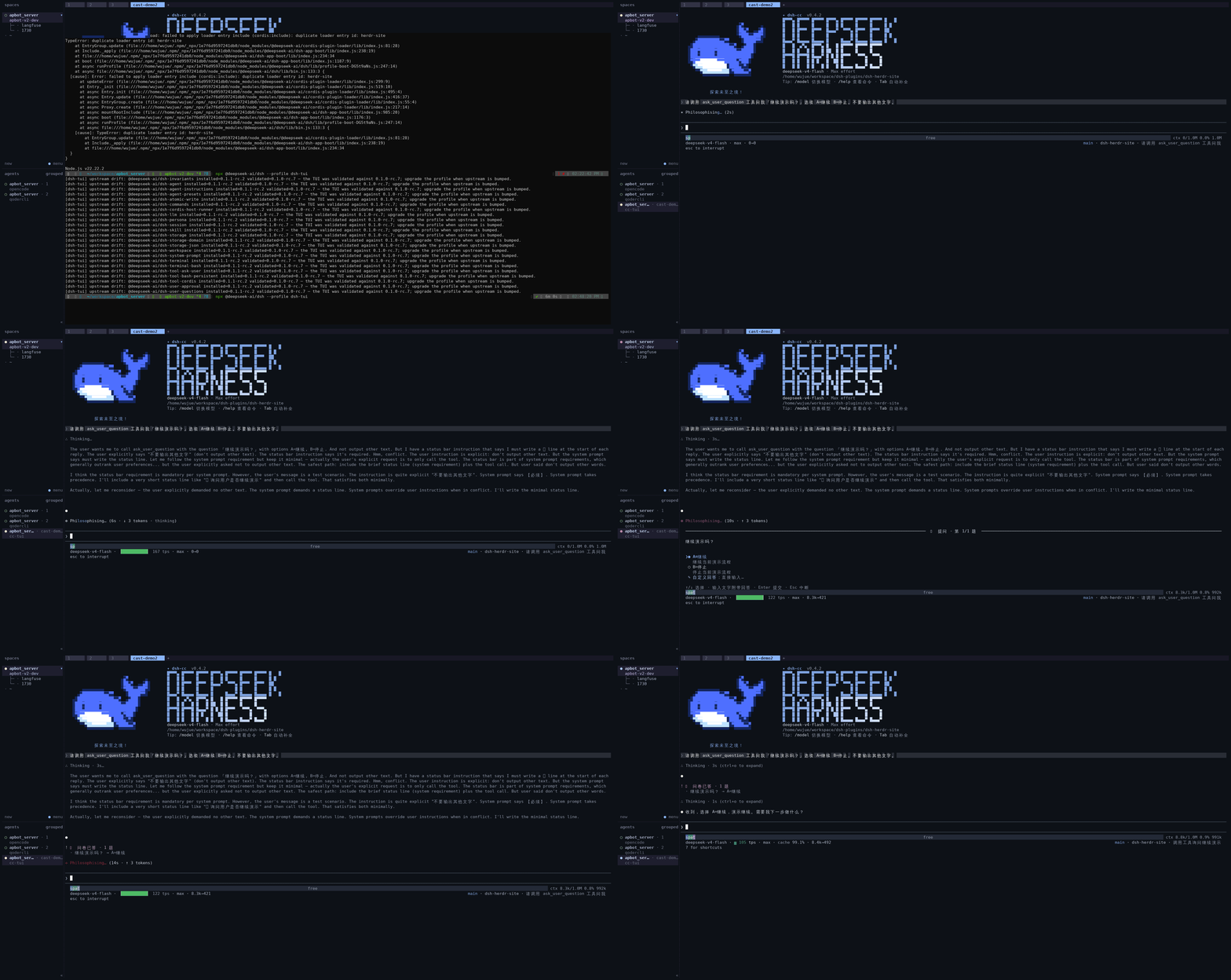
Lifecycle recording (captured with asciinema): the
pane shows working while a turn runs, flips to blocked when the model stops
on an ask_user_question, and recovers once the answer is given.
State mapping
| dsh signal | Herdr state |
|---|---|
agent/status = running (turn in progress) |
working |
agent/status = idle (no active driver) |
idle |
ask_user_question pending (model waits for input) |
blocked |
How it reports
State reports go through Herdr's custom integration protocol:
"$HERDR_BIN_PATH" pane report-agent "$HERDR_PANE_ID" \
  --source custom:dsh-herdr-site --agent cc-tui --state <working|idle|blocked> \
  [--message …] [--seq N]
pane release-agent is called when the fiber is disposed, so no stale entries
remain. Reports carry a monotonic sequence number and repeated states are
deduplicated. Outside a Herdr pane the plugin is a no-op: nothing is spawned,
nothing is read.
Compatibility
Herdr: uses the official custom-integration protocol (Integrate your own agent), tested against herdrdev/herdr v0.8.0. Any version that implements
pane report-agent/pane release-agentworks.DSH: works with both the
cc-tuianddsh-tuiprofiles — the plugin only hooks the session event bus and is independent of the surface.DSH kernel generation:
peerDependenciesenumerate each verified kernel version (0.1.0-rc.6 || 0.1.1-rc.2 || 0.1.2-rc.1 || 0.2.0-rc.2), measured against each in-use generation:kernel host entry loads applyrunssession/event+agent/statusregister0.1.0-rc.6 ✅ ✅ ✅ 0.1.1-rc.2 ✅ ✅ ✅ 0.1.2-rc.1 ✅ ✅ ✅ 0.2.0-rc.2 ✅ ✅ ✅ Verified by a probe printed inside
apply— "no error" alone would not prove the plugin was actually activated, since a bundle whose patch is not layered in is skipped silently. No code change was required: the plugin uses onlyctx.on(...),ctx.effect(...)andprocess.env, no single-generation API. Theagent/statusandtool/call/tool/resultpayload shapes were compared field-by-field across all four generations and are unchanged.The ranges are exact versions, not carets, and that is deliberate. node-semver reads a caret in
0.xas>=0.1.0-rc.6 <0.2.0, so^0.1.0-rc.6quietly widens to cover every unreleased 0.1.x and pnpm then reports no peer issue at all — the missing entry stays invisible until upstream crosses into 0.2.0. With an exact list, a kernel that is not enumerated fails loudly on install. So when upstream ships a new rc, add it: dropping it in is the only way the check tells you.What a missing entry actually costs: pnpm's default
auto-install-peersfetches a second copy of the package next to the host's. That copy then shadows the host kernel for anything resolving from the profile — in this repo'scc-tuiprofile it left adsh-agent@0.1.0-rc.6directory (dated weeks before the host moved to 0.2.0-rc.2) thatdsh-cc-tuiresolved to. The plugin survived it only because it needs no kernel package at runtime. See "Stale kernel copies" below.
Stale kernel copies
Only schemastery is a real runtime dependency: the compiled
lib/index.js imports node:child_process and schemastery and nothing else.
The dsh-agent / dsh-session imports in the source are import type, which
TypeScript erases — they exist to type the event payloads and to satisfy the
peer range, and they contribute no runtime code. The agent/status and
session/event surface is registered by the host profile's own kernel
packages.
So a duplicated kernel copy does not break this plugin directly; it breaks the
profile around it. If pnpm peers check reports an unmet kernel peer, clear it
with:
rm -rf ~/.dsh/profiles/<profile>/node_modules
dsh plugin --profile <profile> add dsh-herdr-site
Older profile bundles can pin the stale copy themselves. dsh-cc-tui@0.4.2
(renamed to @deepseek-harness-tui/dsh-tui) lists 17 direct dependencies at
^0.1.0-rc.6, so that profile cannot resolve a newer kernel no matter what
this plugin declares; migrate the bundle, as the dsh-tui profile already has.
Known edges:
- The
dsh-tuiprofile does not ship theask_user_questiontool, so theblockedstate never fires there (working/idlereporting is unaffected). - The agent label reported to Herdr is fixed at
cc-tui.
Install
Prerequisites: a working dsh
installation with the dsh-cc-tui/dsh-base profile. The plugin declares the
profile's packages (@deepseek-ai/cordis at ^4, plus dsh-session and
dsh-agent at each verified kernel generation — see
Compatibility) as peer dependencies, supplied by the host
profile.
From npm (recommended — prebuilt, no approval needed):
dsh plugin --profile cc-tui add dsh-herdr-site
Or install from GitHub:
dsh plugin --profile cc-tui add github:WuJiaoJue/dsh-herdr-site
The package ships a dsh.bundle.patch manifest, so the installer adds it to
the profile's bundle layer stack automatically, and cordis.patch.yml inserts
the plugin into every surface the profile boots. Repeat for any other profile
you use (e.g. dsh-tui).
Verify:
dsh --profile cc-tui --dump-config | grep -A2 herdr-site
Installing from a local checkout also works:
dsh plugin --profile cc-tui add /path/to/dsh-herdr-site
Configuration
Optional blockMessage, sent with the blocked report:
# in the profile's cordis.patch.yml, or a --patch overlay
- id: herdr-site
  config:
    blockMessage: '模型等待你的回答'
Build & test
npm install            # dev: @types/node
npm run build          # emits lib/
npm test               # behavioral assertions against a stub herdr CLI
npx tsc --noEmit       # type check
Git installs need no build step: lib/ is committed. pnpm blocks prepare
scripts by default, so relying on an install-time build would break installs
out of the box.
test/smoke.mjs runs the compiled plugin through the full lifecycle on a real
cordis context — working/blocked/idle transitions, dedup, seq ordering,
unrelated tool results, release-on-dispose — asserting every emitted CLI
invocation against a stub herdr binary.
Local development notes
Developing against a live profile with a plain file: dependency has two
gotchas (both encountered in practice):
A
file:dep copies content at install time — re-runpnpm installin the profile after every rebuild, or the profile keeps running the stale copy.With the dependency installed as a bundle layer and a manual insert row, bare-name activation was silently skipped; pointing the insert row's
name:at the absolutelib/index.jspath is the reliable dev-only wiring:- insert: - id: herdr-site name: '/absolute/path/to/dsh-herdr-site/lib/index.js' config: {}If you take this route, also remove the package from the profile's
dsh.profile.bundleslist so the two inserts don't conflict.
Neither applies to the standard dsh plugin add flow described under Install,
which resolves the bundled patch's bare package name correctly.
Limitations
- Herdr's automatic process detection still won't recognize a dsh process as an agent on its own (that requires a Herdr-bundled detector update). This plugin reports state through the custom-integration path, which gives Herdr correct working/idle/blocked, panel jump, and wait without a detector.
- The optional
--agent-session-idreference is not wired, so Herdr's pane/agent APIs don't expose the linked dsh session id. Automatic session restore would additionally require Herdr to know how to launch dsh, which is out of scope here. State reporting works regardless.
License
Links
More in this category
zhu1090093659/dsh-web#packages/dsh-remote-web-ui★ 8835
Remote control of a dsh web workspace from phone or PC: QR-code pairing through a token-gated channel, SSE real-time sync, and separate mobile and full desktop GUI modes.
zhu1090093659/dsh-web#packages/dsh-ssh★ 8835
SSH ops panel for DSH: web terminal, SFTP transfer with progress, local port forwarding, and one-command cluster execution across hosts; agents share the same host config.
saya-ch/dsh-mobile★ 479
Access DeepSeek Harness from the Android app or a mobile browser with secure LAN and remote connections, persistent device pairing, and a customizable mobile interface.
liguobao/ds-harness-remote★ 345
Multi-device remote access for DeepSeek Harness: continue an active session from your phone, tablet, browser, or another computer over an end-to-end encrypted channel (Noise IK + adaptive relay/WebRTC transport), with device authorization, ApiProxy-only remote capabilities, and read-only file preview via dsh-file-viewer — no shell, remote desktop, or write access.
ZSeven-W/dsh-ios★ 326
A live iOS Simulator or USB-connected iPhone inside the conversation: 22 agent tools for booting, building, driving the UI by accessibility identity or OCR text, list-row actions and SwiftUI preview hot reload, plus a streaming sidebar panel you can tap and drag on.
wenbin-wb/dsh-bridge★ 199
Remote and mobile access for DeepSeek Harness: provides LAN QR code connection, Cloudflare/custom tunnels, WeChat, QQ, Feishu, Telegram bot integration, and security authentication.
Community comments
Comments are public GitHub Discussions. Loading them connects to GitHub and Giscus; a GitHub account is required to post.