Matches prompts to installed skills for automatic activation, applies skill-declared lifecycle hooks and tool policies, and manages GitHub-hosted skills from Settings or the skill_manager tool.
Install
# from npm (prebuilt)
dsh plugin --profile web add @wisdoverse/dsh-skills-manager
# from GitHub (first run asks for allowBuilds approval — follow the hint, retry)
dsh plugin --profile web add github:Wisdoverse/dsh-skills-manager-plugin
Any plugin you install runs third-party code with your own permissions — it can read your files, use your credentials, and reach the network, and tool approvals don’t sandbox it. GitHub-sourced plugins also run build scripts at install time — pnpm blocks those until you allow them, so an install can stop with ERR_PNPM_GIT_DEP_PREPARE_NOT_ALLOWED or ERR_PNPM_IGNORED_BUILDS; dsh prints the exact key to add under allowBuilds in your profile’s pnpm-workspace.yaml, and the install works on the next run. Allowing a build is a trust decision: only install sources you trust, and pin a commit (github:owner/repo#sha).
README
🧩 dsh-skills-manager
Proactive skill activation, hook orchestration, and GitHub sync for DeepSeek Harness.
English · 简体中文

🚀 Quick install
dsh plugin --profile web add @wisdoverse/dsh-skills-manager
Restart the Web profile after installation. See requirements and installation options.
🚀 Installation · ✨ Features · ⚙️ Configuration · 🐛 Feedback
Table of contents
- Why this plugin
- Highlights
- How it works
- Quick start
- Compatibility
- Skill configuration
- Hook compatibility
- GitHub-managed skills
- Project-scoped skills
- Management and observability
- Permissions and data
- Security
- Development
Why this plugin
The built-in DSH skill tool relies on the model to notice a short summary and decide to load the full skill. In practice, useful skills are often missed, skill files cannot directly declare lifecycle behavior, and locally scattered skills are difficult to keep synchronized.
dsh-skills-manager closes those gaps:
- matches every user turn against available skills;
- loads strong matches automatically and suggests weaker matches;
- maps Claude Code-style hook declarations onto DSH host events;
- manages skill sources from GitHub;
- keeps user and project overrides isolated;
- exposes controls in Settings and through the
skill_managermodel tool.
Highlights
| Icon | Capability | Description |
|---|---|---|
| 🚀 | Proactive activation | Full skill injection for strong matches and lightweight reminders for suggestions |
| 🪝 | Skill-level hooks | UserPromptSubmit, PreToolUse, PostToolUse, PostToolUseFailure, and SessionStart |
| 🔄 | GitHub lifecycle | Install, update, authoritative sync, uninstall, and commit-change reporting |
| 🧭 | Workspace-aware scope | Project skills override user skills without leaking configuration between workspaces |
| 🛠️ | Built-in management | Settings UI plus the skill_manager model tool |
| 🛡️ | Guardrails | Source allowlisting, argument-array Git execution, hook path validation, and no shell execution for hooks |
How it works
flowchart LR
    U[User message] --> M[Pre-step matcher]
    M -->|auto| A[Inject full skill]
    M -->|suggest| S[Inject reminder]
    T[Tool call] --> P[PreToolUse policy]
    R[Tool result] --> O[PostToolUse activation]
    G[GitHub source] --> Y[Install or update]
    Y --> C[DSH skill catalog]
    C --> M
Before each agent step, the plugin scores available skills:
- explicit skill-name mention: +12;
- trigger phrase or regular expression: +7;
- description or
whenToUsetoken overlap: +4 to +6.
By default, a turn can auto-load up to two skills and suggest up to three. Activation markers are stored in conversation history, so full skill content is not injected repeatedly while it remains visible. After context compaction removes a marker, the skill can be loaded again automatically.
Quick start
Requirements
- DeepSeek Harness
0.1.1-rc.2,0.1.2-alpha.3,0.1.3-alpha.1, or0.2.0-rc.2; - Node.js
^22.19.0 || >=24.0.0; - pnpm available on
PATHfordsh plugin.
Install from npm (recommended)
dsh plugin --profile web add @wisdoverse/dsh-skills-manager
DSH recognizes the package's dsh.bundle manifest and adds @wisdoverse/dsh-skills-manager to the Web profile automatically. Restart a running Web profile after installation.
Install from GitHub
dsh plugin --profile web add github:Wisdoverse/dsh-skills-manager-plugin
Use the GitHub source when testing unreleased changes from main. Pin a commit when reproducibility matters.
Update or remove
dsh plugin --profile web update @wisdoverse/dsh-skills-manager
dsh plugin --profile web remove @wisdoverse/dsh-skills-manager
Restart the profile after either operation so its composition matches the installed bundle set.
Install a local checkout for development
git clone https://github.com/Wisdoverse/dsh-skills-manager-plugin.git
cd dsh-skills-manager-plugin
pnpm install --frozen-lockfile
dsh plugin --profile web add .
The included cordis.patch.yml inserts skill-manager into the host composition for all sessions.
Compatibility
| Component | Supported or continuously verified |
|---|---|
| DeepSeek Harness | 0.1.1-rc.2 dependency contract; 0.1.2-alpha.3 dependency contract plus isolated install and UI smoke tests; 0.1.3-alpha.1 tagged-source API review and session-hook regression tests; 0.2.0-rc.2 isolated install, Web boot, Settings API, and live /name skill invocation |
| Node.js | 22.19.0 and 24.19.0 |
| pnpm | 11.19.0 with a frozen lockfile |
| Operating systems | Ubuntu and Windows CI matrix |
The 0.1.3-alpha.1 adaptation supports session.snapshotEvents() and array-based surface nodes while retaining the legacy events API. Full install/UI smoke testing for that release is pending availability of its host packages on npm.
For DSH 0.2.0-rc.2, use plugin 1.0.6 or later: older plugin versions emit source.kind: "plugin", which DSH's v4 session format rejects. A live Web-profile test invoked /ponytail-help, loaded its full instructions (skill-invocation), recorded the manager notice as plugin:dsh-skills-manager, and completed the turn. This verifies explicit skill invocation and manager injection; other 0.2.x host versions are outside the current peer range.
DSH is in developer preview. Pin the plugin to a commit when reproducibility matters, and re-run the install smoke test when upgrading DSH dependencies.
Skill configuration
Declare activation and hooks directly in SKILL.md frontmatter:
---
name: repo-hardening
description: Review and harden a repository with build/test gates.
metadata:
  activation: auto             # auto | suggest | off
  triggers:
    - "harden"
    - "build fails"
    - "re:exit code \\d+"
  hooks:
    UserPromptSubmit:
      inject: "Run build and tests before reaching a conclusion."
    PreToolUse:
      - tool: bash
        when: "git push"       # substring or re:<pattern>
        decision: deny         # allow | deny | ask
        reason: "Direct pushes are not allowed"
    PostToolUse:
      - tool: bash
        when: "re:exit code [1-9]"
        action: activate
    SessionStart:
      activate: true
---
Activation modes
| Mode | Behavior |
|---|---|
auto |
A match injects the complete skill immediately |
suggest |
A match adds a lightweight reminder so the model can load the skill |
off |
The skill never participates automatically but remains manually invocable |
Codex-style manual and disabled values are accepted as aliases for off. If activation is omitted, skills with explicit triggers default to auto; all others default to suggest.
DSH also accepts /name for a user-invocable skill. This loads the full instructions directly, regardless of whether the manager would suggest it; suggest alone only adds a reminder.
Triggers and policies
- Plain trigger strings use case-insensitive substring matching.
- Values prefixed with
re:are treated as regular expressions; invalid expressions are ignored. PreToolUse.toolaccepts a concrete tool name or*.- Tool policies return
allow,deny, oraskwith an optional reason. - User overrides can be stored outside upstream SKILL.md files so updates do not erase local policy.
Example overrides:
skill_manager set-triggers ponytail-review triggers=["review this diff","over-engineering"]
skill_manager set-hooks repo-hardening hooks={"PostToolUse":[{"tool":"bash","when":"re:exit code [1-9]","action":"activate"}]}
Hook compatibility
| Skill hook | DSH host event | Support |
|---|---|---|
UserPromptSubmit |
agent/pre-step |
✅ Inject text on every submission while active |
PreToolUse |
tools/pre-execute |
✅ Allow, deny, or ask based on tool and arguments |
PostToolUse |
tools/post-execute |
✅ Activate a skill from matching tool output |
PostToolUseFailure |
tools/post-execute |
✅ Match failure text through the same result event |
SessionStart |
agent/session-start |
✅ Activate before matching is required |
SessionEnd / Stop |
agent/disposed / agent/turn-stopping |
⚠️ Observable only; no content injection |
PreCompact |
No DSH core equivalent | ⚠️ Not implemented; removed activation markers allow reinjection |
GitHub-managed skills
The manager accepts owner/repo shorthand and full https://, git@, or ssh:// Git URLs.
skill_manager install owner/repo
skill_manager update
skill_manager status
skill_manager uninstall skill-name
During installation, the plugin:
- shallow-clones one branch into
<DSH_HOME>/skill-sources/<slug>; - discovers SKILL.md directories up to depth 3;
- ignores
.git,node_modules,dist, andbuild; - copies discovered skills into
<DSH_HOME>/skills/<name>.
Updates fetch the configured ref, reset the source to FETCH_HEAD, and perform an authoritative resync of installed skills. Filesystem watchers then invalidate the catalog automatically and emit skills/change.
Plugin manifests are detected in this order:
.codex-plugin/plugin.json;.claude-plugin/plugin.json.
The Settings page displays the plugin name, version, skills, and hook count. Safe in-repository Node lifecycle hooks are supported for SessionStart and UserPromptSubmit.
State is stored in <DSH_HOME>/skill-manager.json, including sources, refs, commits, installed paths, scoped overrides, and the 50 most recent operations.
Project-scoped skills
The filesystem provider resolves skill roots in priority order:
| Priority | Root | Source |
|---|---|---|
| 1 | <project>/.dsh/skills |
project-dsh |
| 2 | <project>/.agents/skills |
project-agents |
| 3 | Host-configured directory | custom |
| 4 | <DSH_HOME>/skills |
user-dsh |
| 5 | <agentsHome>/skills |
user-agents |
| 6 | Bundled skills | bundled |
Project skills participate in the same matching pipeline and win same-name conflicts by priority. Mode, trigger, and hook overrides are keyed by scope plus cwd, preventing settings from leaking across projects or into user-level skills.
Project-local skills remain owned by the project's Git repository. The manager's update operation synchronizes user-level sources only; filesystem watchers refresh project changes.
Management and observability
Settings UI
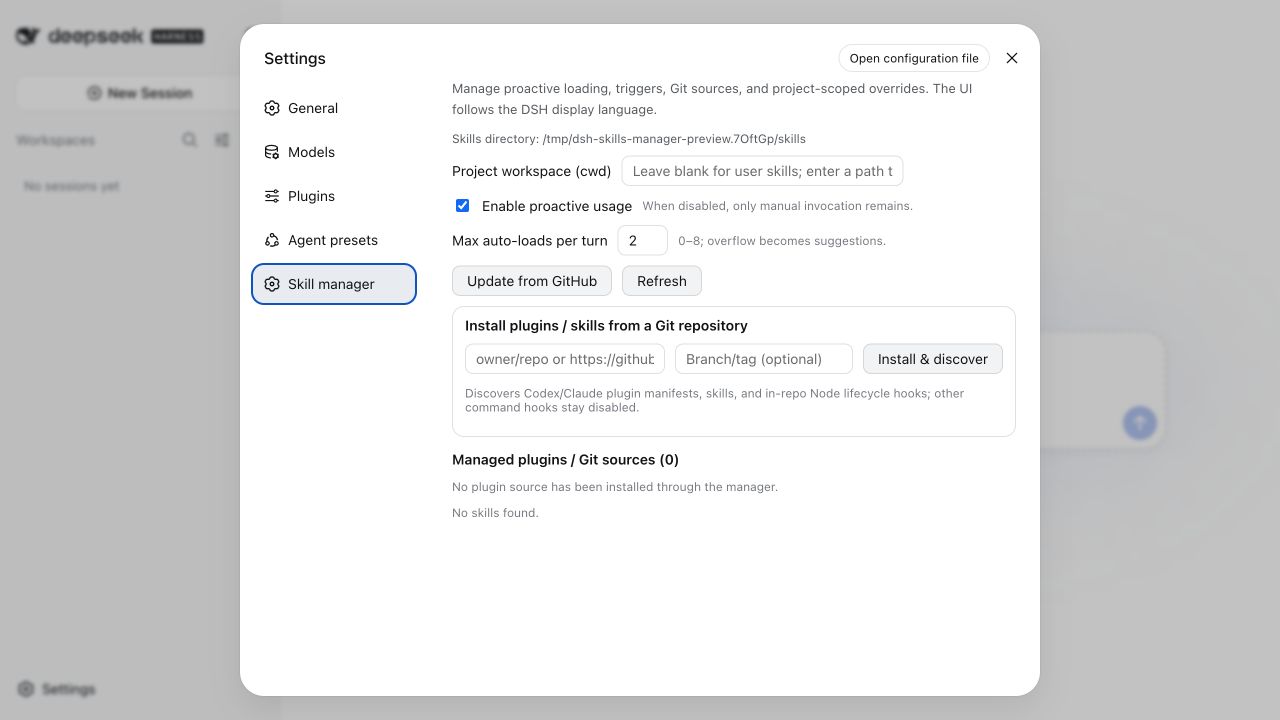
The settings page shows activation controls, source details, and skill management actions.
Settings → Skill Management provides:
- English and Simplified Chinese copy that follows the active DSH display language;
- a master switch for proactive activation;
- per-turn auto-load limits;
- GitHub install and update controls;
- per-skill mode, trigger, hook, source, and commit details;
- project workspace selection;
- uninstall actions and recent operation history.
Model tool
The skill_manager tool supports status, install, update, uninstall, set-mode, set-triggers, set-hooks, and set-config. Project records use scope: project plus a required cwd.
Events
skill-manager/hook—{ event, skill, action, detail, at }for hook activity.skill-manager/update— synchronization results after install, update, or uninstall.skills/change— emitted by the filesystem provider after catalog changes.
Permissions and data
| Surface | Behavior |
|---|---|
| Filesystem reads | Reads DSH user and project skill roots selected by the host, plus metadata from configured Git sources |
| Filesystem writes | Stores sources under <DSH_HOME>/skill-sources, manager-owned skills under <DSH_HOME>/skills, and state in <DSH_HOME>/skill-manager.json |
| Network | Invokes the local git executable only for user-requested source installation or update; the plugin implements no telemetry |
| Processes | Runs git with argument arrays and may run explicitly declared in-repository Node lifecycle hooks with time and output limits |
| Credentials | Does not store Git credentials; authentication remains owned by the user's Git configuration and credential helper |
| Conversation context | Reads the active prompt and skill catalog for matching, then injects activation or suggestion messages into the current session |
Uninstalling a manager-owned skill removes its copied skill directory. Locally authored skills that have no managed Git source are not removed by the manager.
Security
- Git sources must match the supported URL allowlist.
- Git arguments are passed as arrays, not interpolated shell commands.
- Skill hooks do not run through a shell.
- Manifest hook paths must resolve to Node scripts inside the cloned repository.
- Malformed regular expressions and unsupported hook declarations are ignored.
Installing a plugin with executable hooks means trusting that repository's code. Review third-party sources before installation.
See SECURITY.md for supported versions and private vulnerability reporting.
Development
pnpm test
pnpm lint
| File | Responsibility |
|---|---|
lib.js |
Pure matching, scoring, state, hook, and manifest logic |
index.js |
DSH events, tools, RPC, Git operations, and integration wiring |
client/client.js |
Settings UI |
test.mjs |
Node test suite |
cordis.patch.yml |
Host composition patch |
Issues and pull requests are welcome in the GitHub repository. See CONTRIBUTING.md for setup, validation, and pull-request expectations.
License
Released under the MIT License.
Links
More in this category
zhu1090093659/dsh-web#packages/dsh-skill-explorer★ 8801
Skill center for the dsh web GUI: browse all loaded skills grouped by source, enable or disable model invocation, create new skills, and delete into a recoverable trash.
GanyuanRan/Aegis★ 1349
Software-engineering method pack for coding agents, with skills for baseline-first planning, systematic debugging, prompt hygiene, verification before completion, and repair/retirement tracking.
superdesigndev/superdesign-skill★ 786
Design skill for UI and marketing graphics on the Superdesign canvas: reads the repo for context, extracts its design system, then generates and iterates branchable design drafts, flow pages, and reusable components through the Superdesign CLI.
linhay/harmony-next.skills★ 362
HarmonyOS NEXT skill bundle for DeepSeek Harness with offline API references and DevEco, HDC, and emulator automation guidance.
dhicoc/dsh-reverse-skill★ 252
Complete reverse-skill pack (85 SKILL.md) as a DeepSeek Harness Cordis plugin: reverse engineering, authorized pentesting and security-research skill router.
sandbaseai/sandbase-skills★ 201
Mounts 88 packaged research, social-intelligence, marketing and business Agent Skills into dsh through the filesystem Skill provider.
Community comments
Comments are public GitHub Discussions. Loading them connects to GitHub and Giscus; a GitHub account is required to post.