Coordinate multiple live DSH sessions on a canvas with task planning, file cards, pipelines, and node-level progress.
Install
# from npm (prebuilt)
dsh plugin --profile web add dsh-plugin-inspiration-workbench
# from GitHub (first run asks for allowBuilds approval — follow the hint, retry)
dsh plugin --profile web add github:WilShi/dsh-plugin-inspiration-workbench
Any plugin you install runs third-party code with your own permissions — it can read your files, use your credentials, and reach the network, and tool approvals don’t sandbox it. GitHub-sourced plugins also run build scripts at install time — pnpm blocks those until you allow them, so an install can stop with ERR_PNPM_GIT_DEP_PREPARE_NOT_ALLOWED or ERR_PNPM_IGNORED_BUILDS; dsh prints the exact key to add under allowBuilds in your profile’s pnpm-workspace.yaml, and the install works on the next run. Allowing a build is a trust decision: only install sources you trust, and pin a commit (github:owner/repo#sha).
README
This plugin publishes its README in Chinese only.
Open many DeepSeek Harness sessions side by side, as draggable cards on a free canvas. 把多个 DSH 会话同时摊在一个画布上,像便利贴一样拖动、叠放、对比。
DSH 一次只能打开一个会话:想同时看三条线的进展,只能来回切标签、丢掉上下文。 这个插件把会话变成卡片:可以并排看、叠成一摞、按状态分栏、把一张卡的结论引用/流水线喂给另一张卡。
截图 / Screenshots
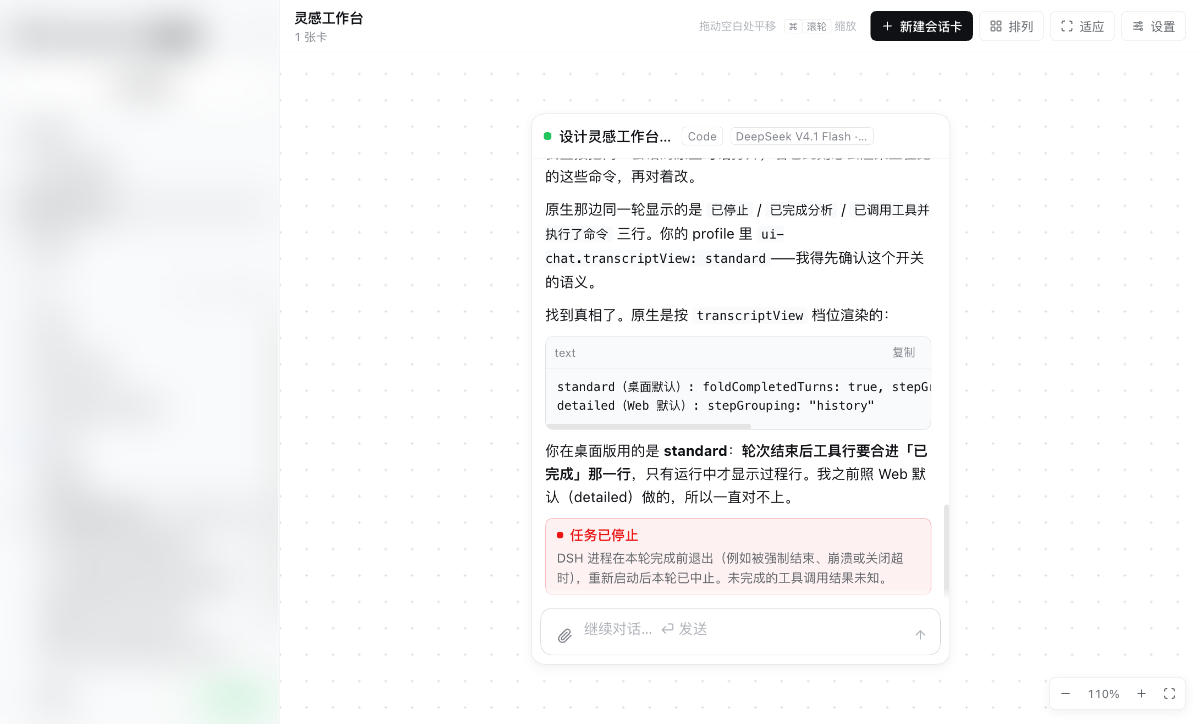
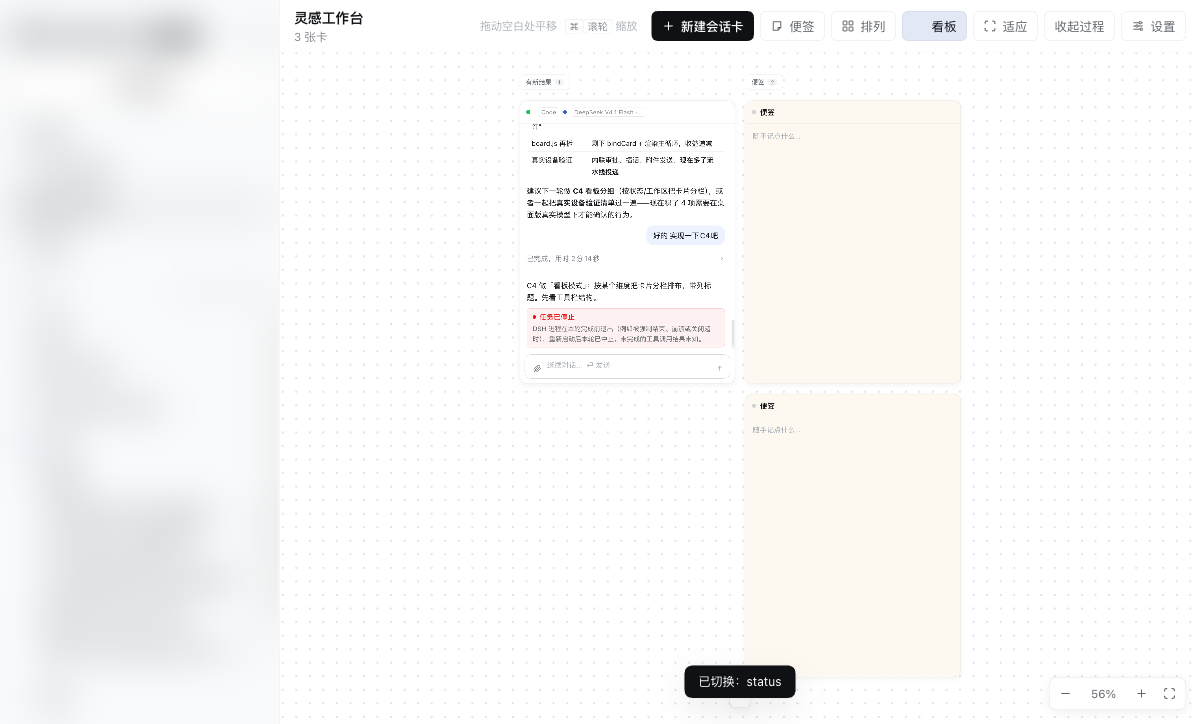
| 多卡 + 折叠轮次 | 分栏看板 |
|---|---|
 |
 |
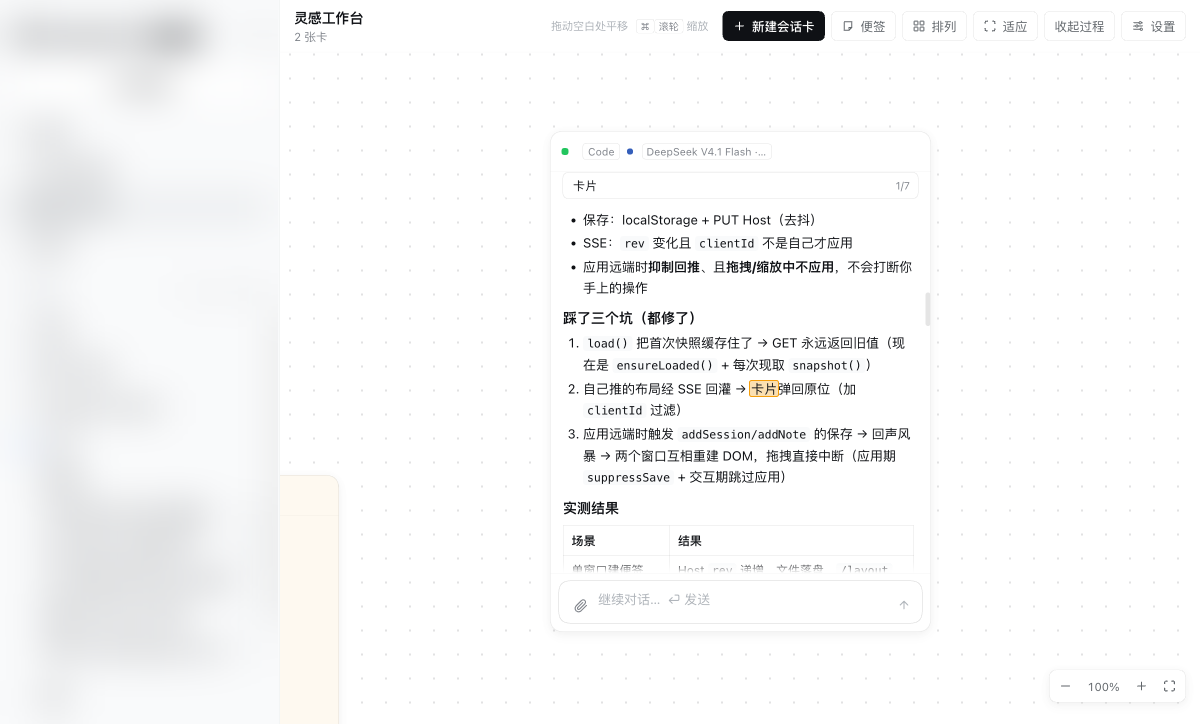
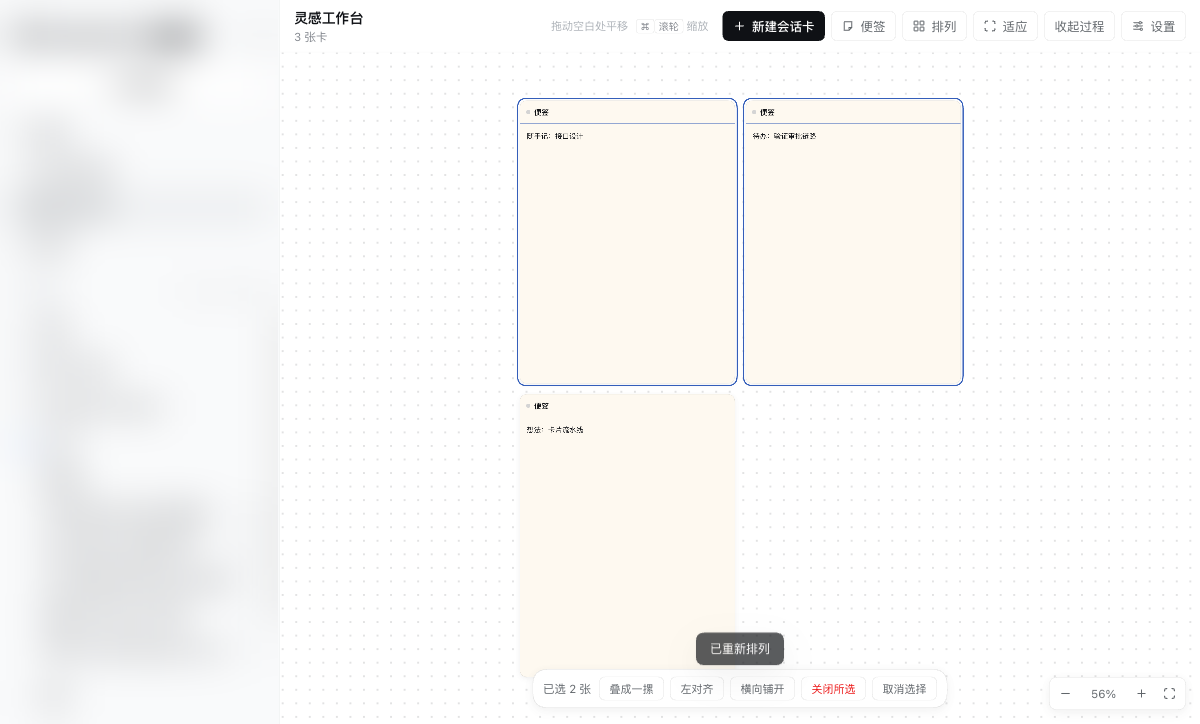
| 卡内搜索 | 批量操作 |
|---|---|
 |
 |
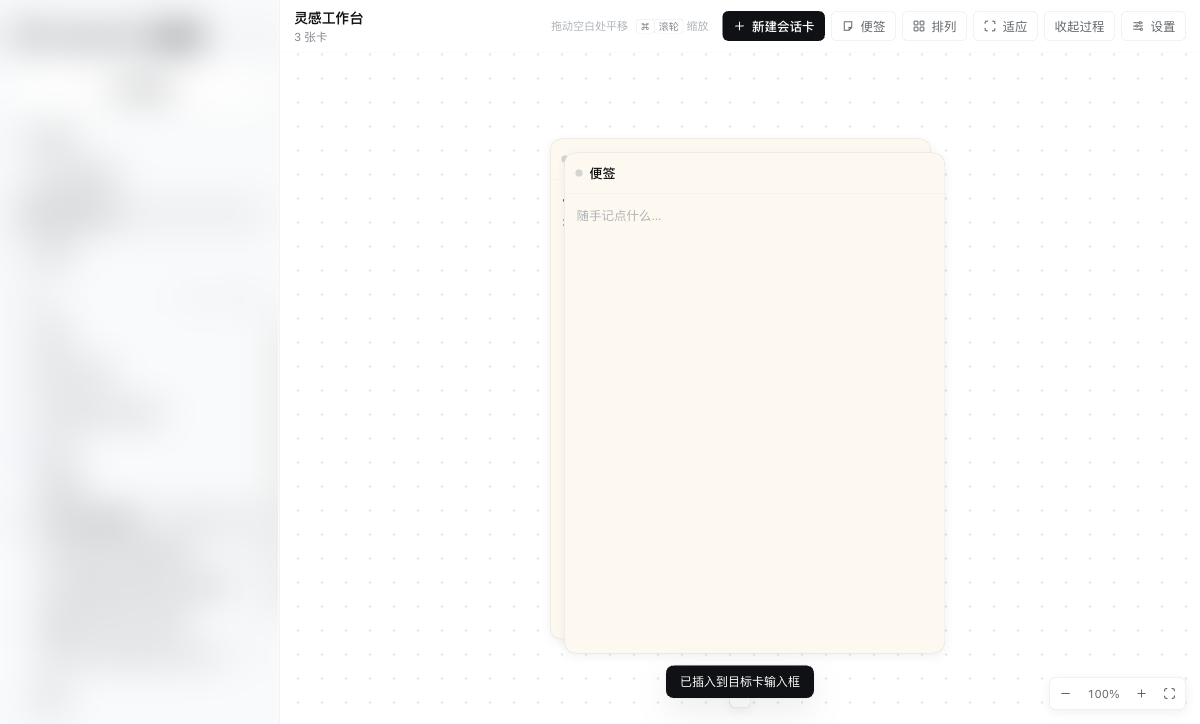
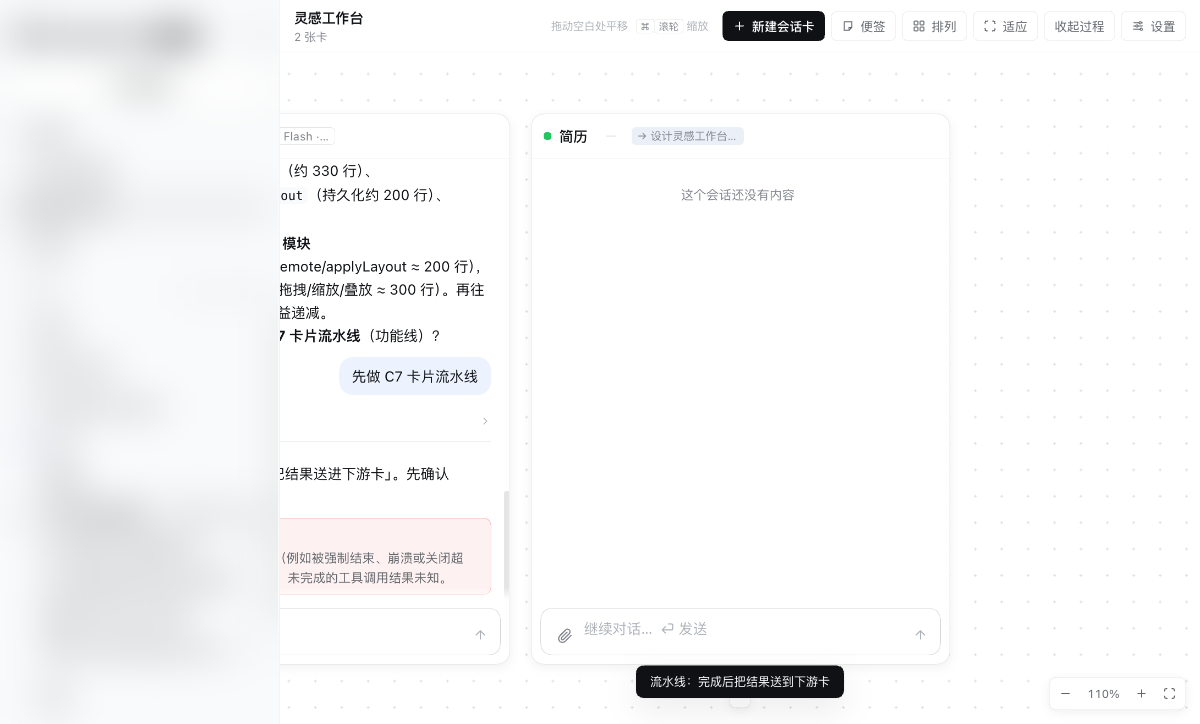
| 跨卡引用 | 卡片流水线 |
|---|---|
 |
 |
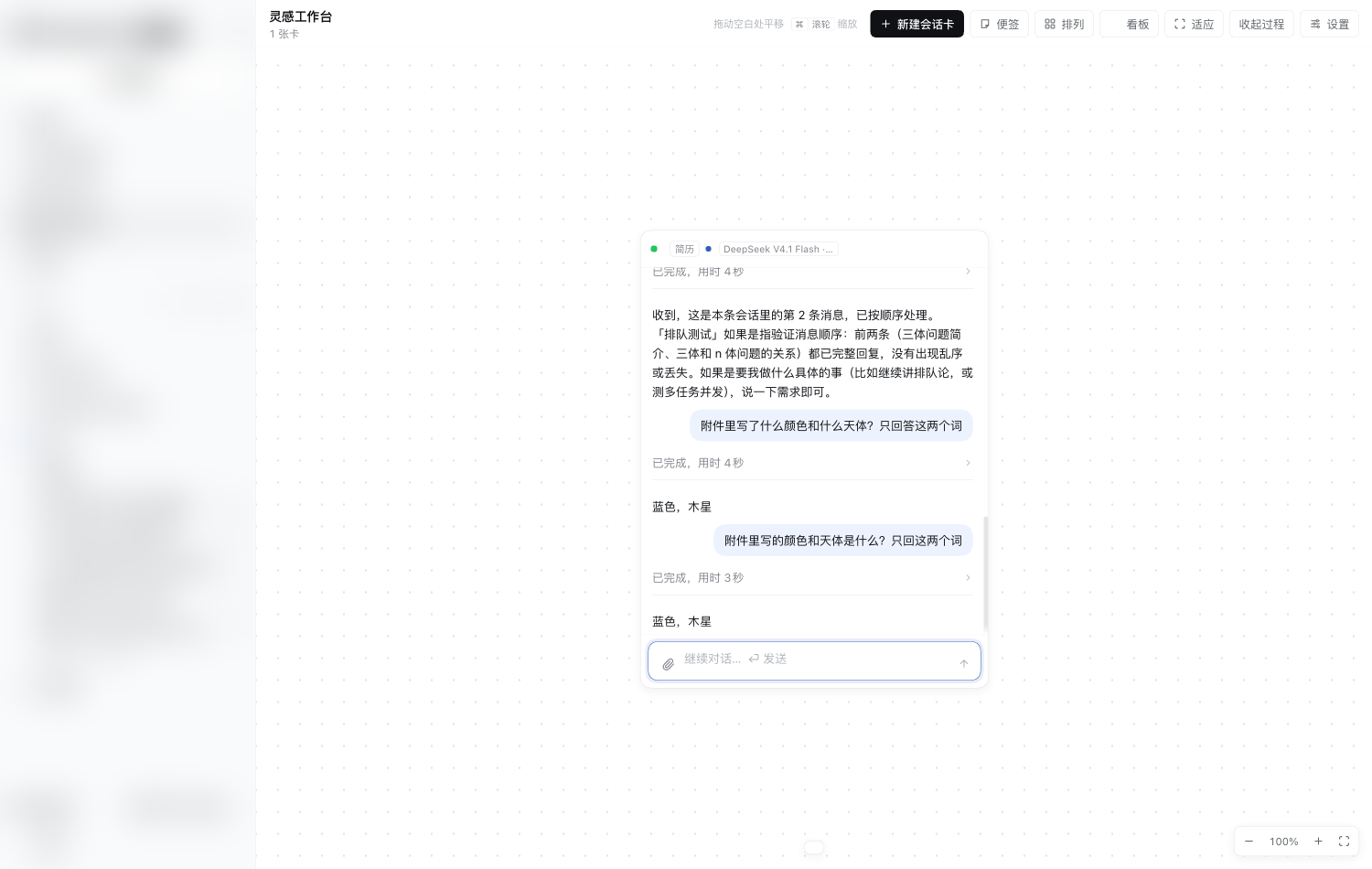
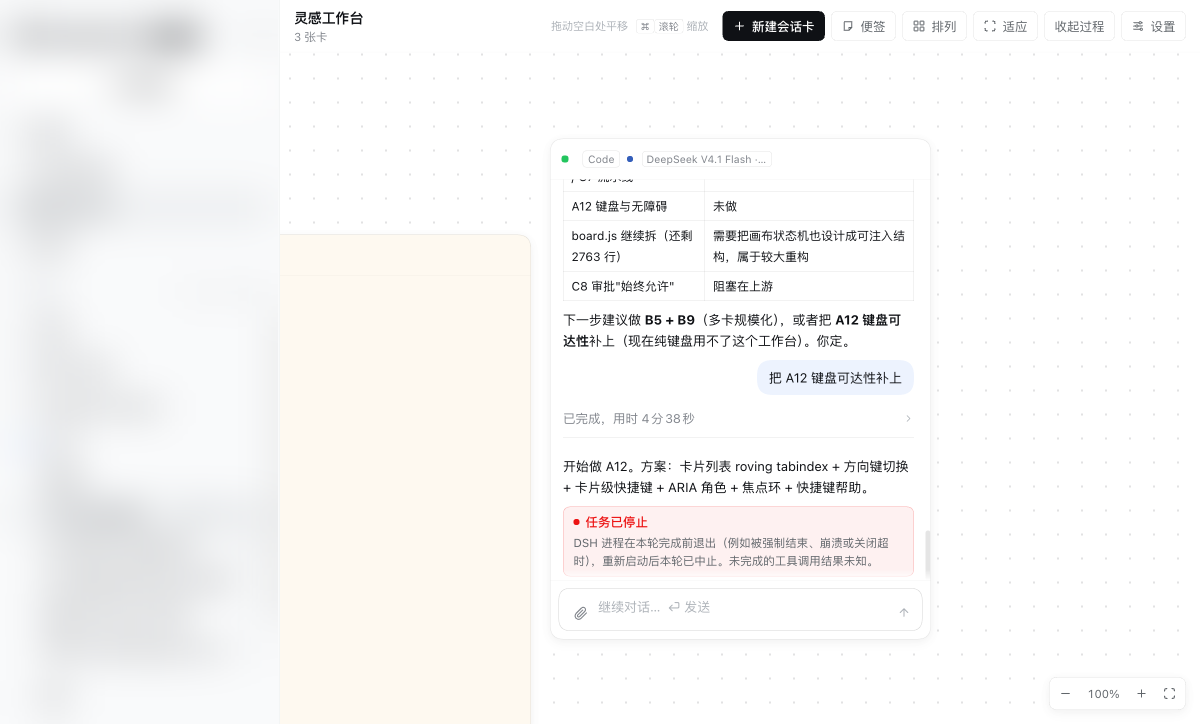
| 附件(模型真实读到文件) | 键盘可达 |
|---|---|
 |
 |
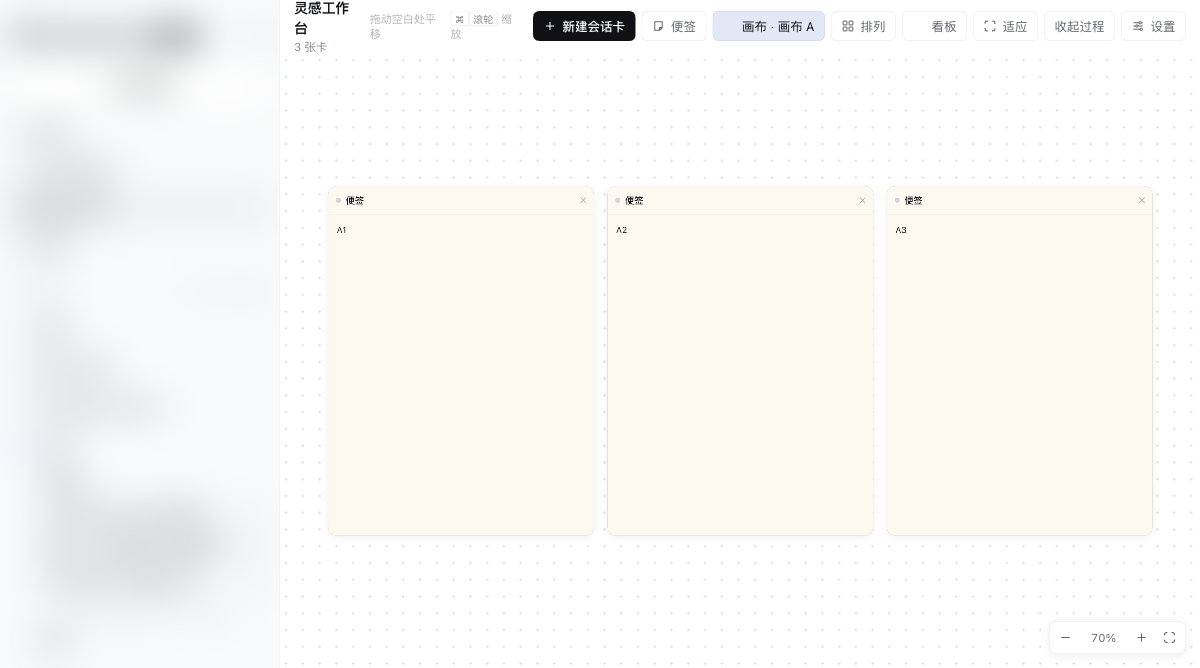
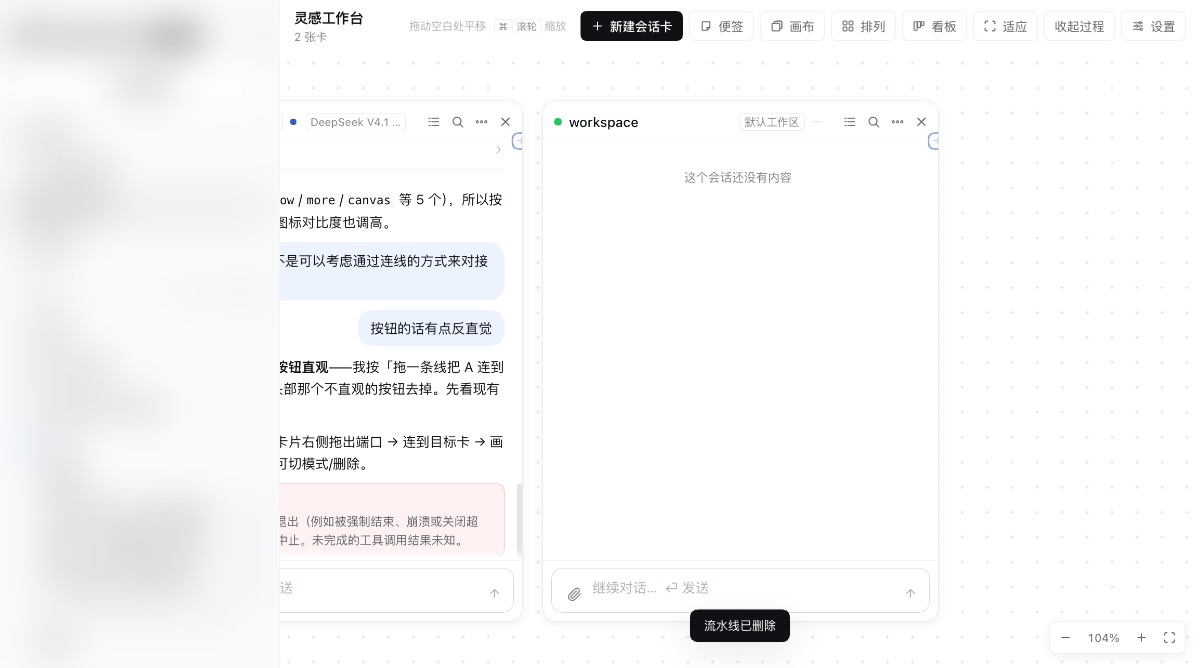
| 保存 / 切换画布 | 流水线:直接连线 |
|---|---|
 |
 |
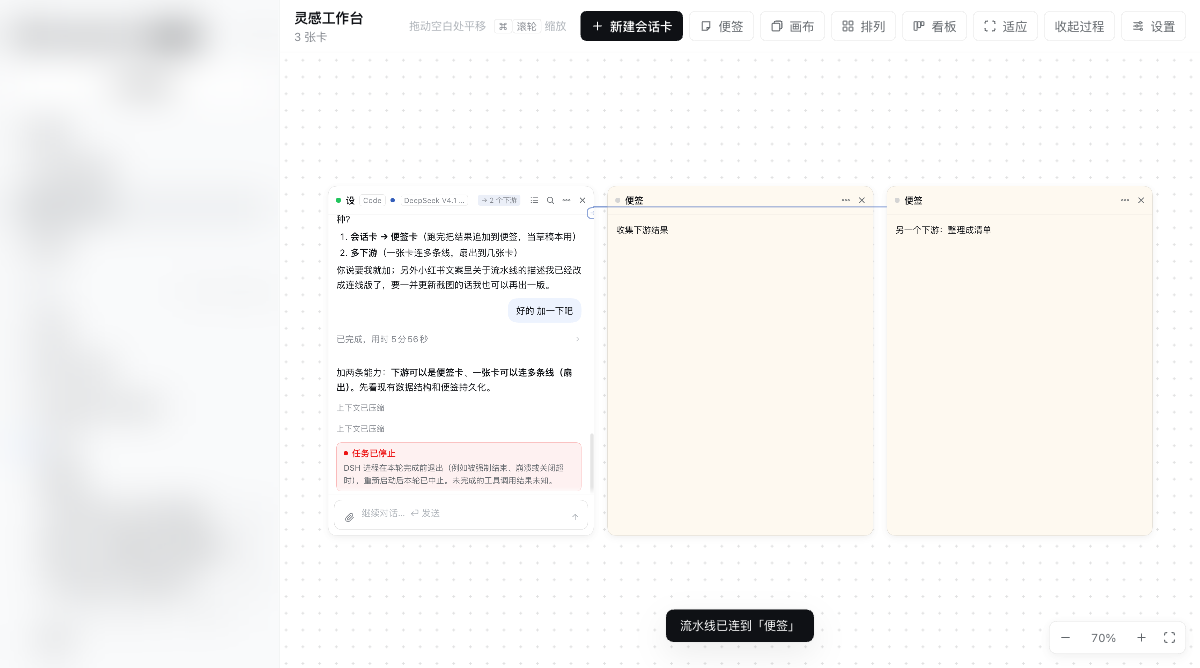
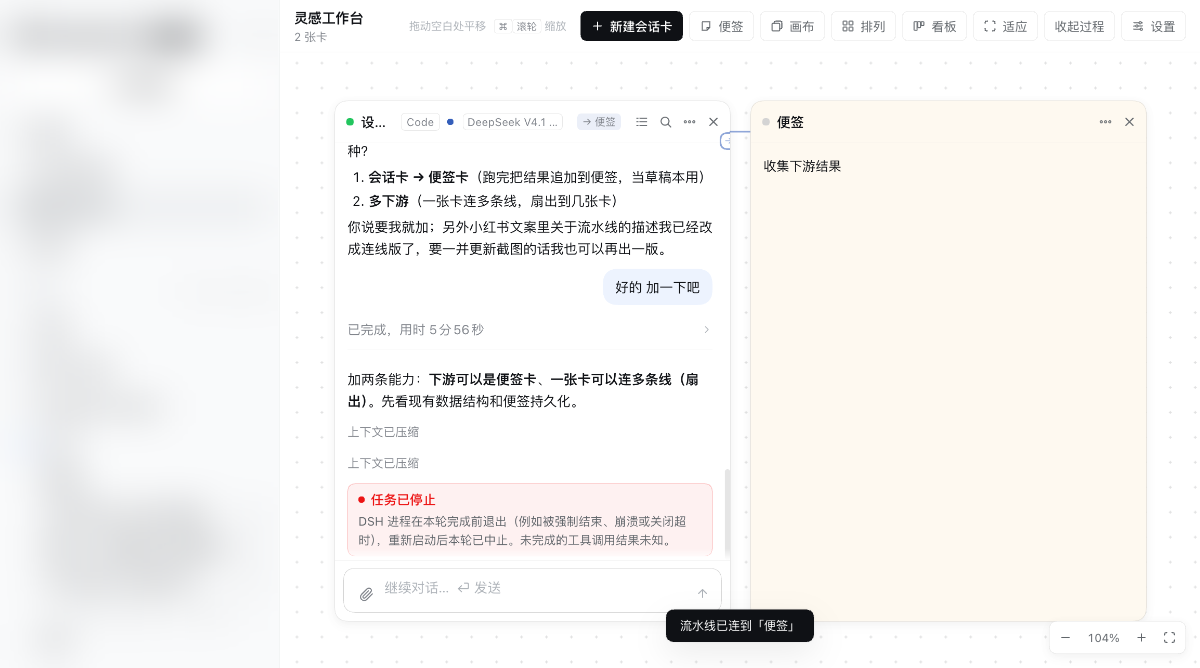
| 扇出到多个下游 | 下游可以是便签 |
|---|---|
 |
 |
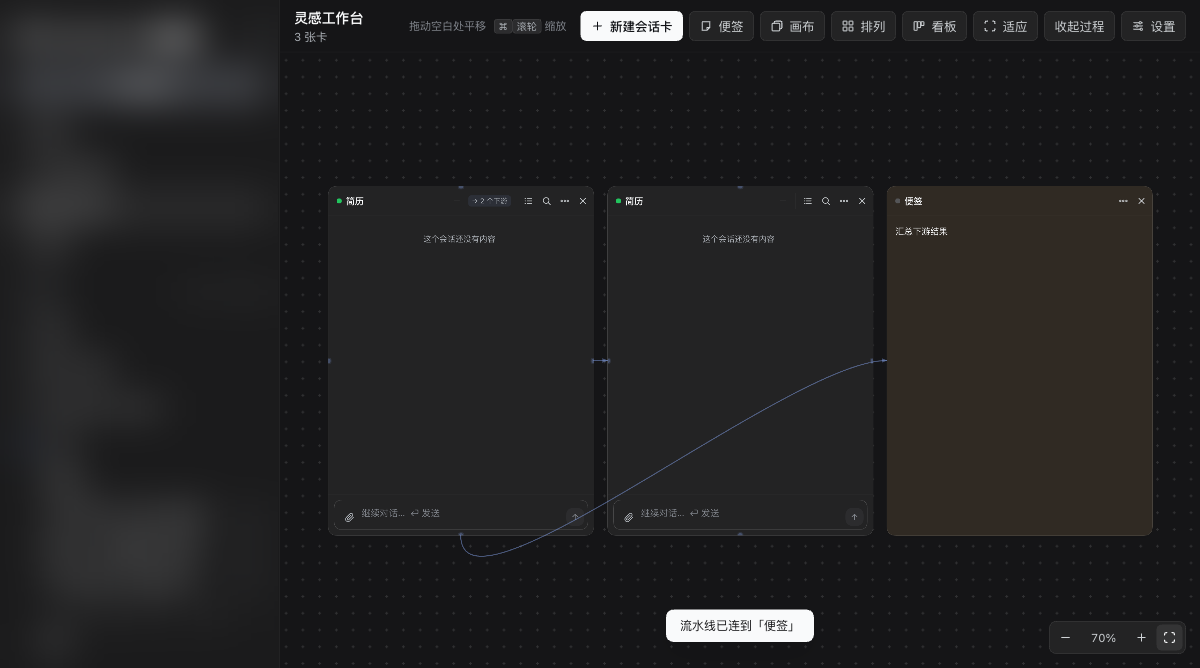
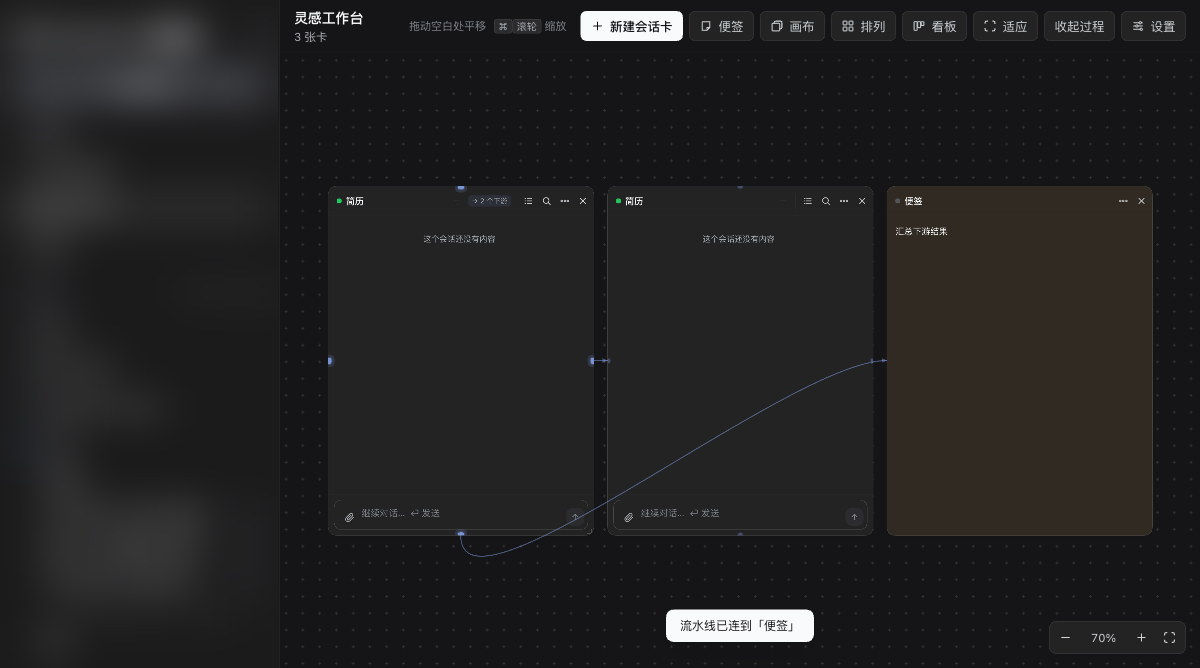
| 端口在四边中点,静止时是极淡的小点 | 悬停卡片后展开成带光环的把手 |
|---|---|
 |
 |
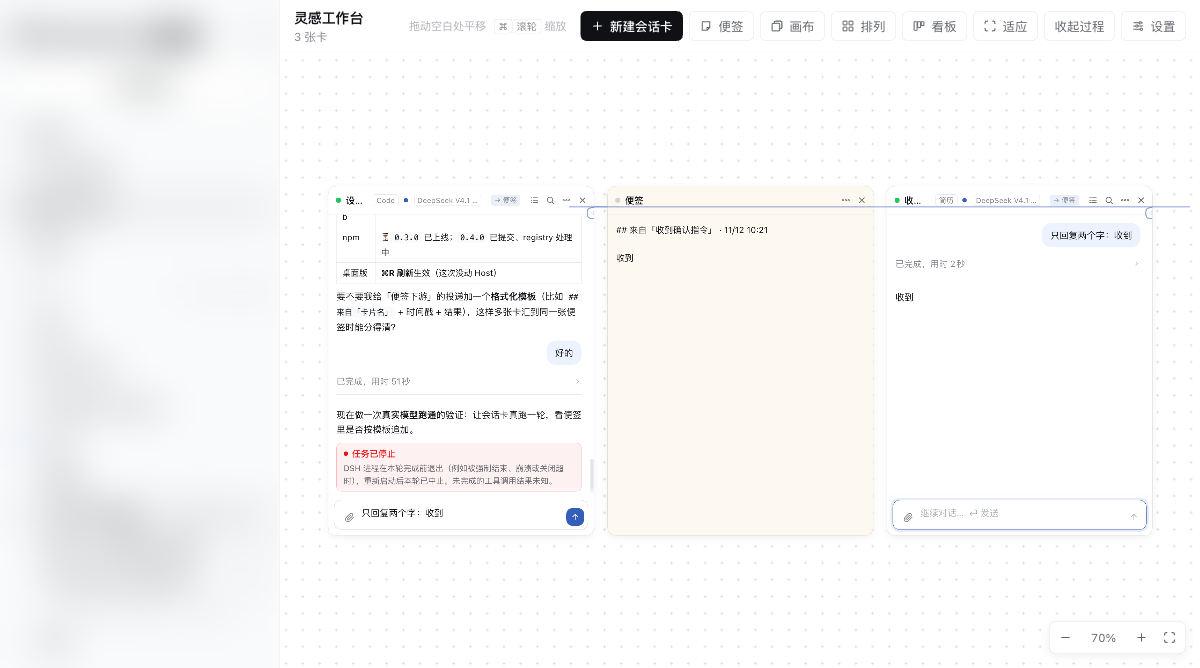
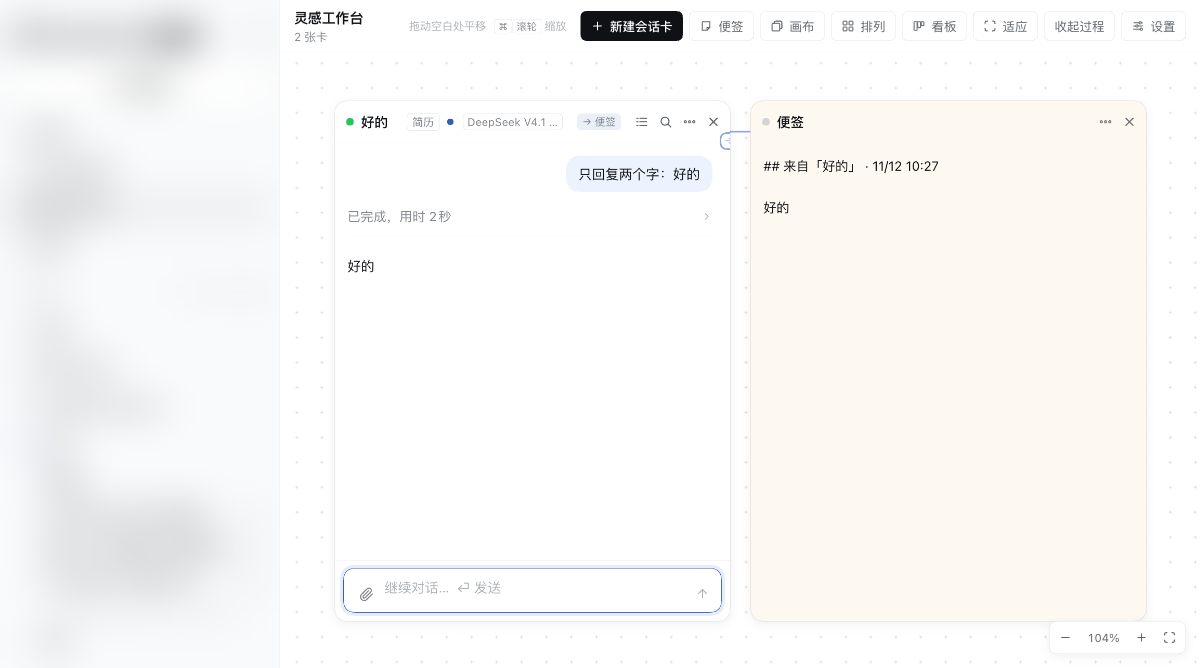
| 便签投递带标题和时间戳 | 便签可设为「只保留最新」 |
|---|---|
 |
 |
功能 / Features
画布与卡片
- 侧栏会话行的
+把会话加成卡片;侧栏点击行为不变 - 拖动 / 缩放 / 叠成一摞 / 双击居中 / 点空白平移 / ⌘+滚轮缩放
- 命名画布:保存当前这面墙、切换回之前保存的画布、覆盖 / 删除;数据存 Host,刷新不丢
- 流水线:卡片四条边的中点各有一个端口,从任意一条边拖线到另一张卡即建立;一条卡可连多个下游(扇出),下游可以是会话卡,也可以是便签卡(结果按
## 来自「卡片名」 · 时间分块写入;便签可选「追加」或「只保留最新一段」);点连线切换「自动发送 / 只填草稿」或删除 - 卡片头部操作常驻显示(流水线 / 大纲 / 搜索 / ⋯ / 关闭),次要操作用「⋯」收纳,窄卡片也不挤
- 便签卡(随手记)、钉住位置、未读圆点、复制为 Markdown、在原生会话打开
与原生一致的会话渲染
- 轮次折叠(桌面默认
standard策略)、点开看步骤、步骤行活动图标 + 悬停变箭头 - Markdown(代码块带复制、表格、列表、引用)、失败横幅、思考强度两级菜单
- 排队消息条、插话(⌘+Enter)、图片/文件附件、提问回答
多卡协作
- 卡内搜索(高亮 +
1/N跳转)、轮次大纲 - 跨卡引用:把任意消息引用到另一张卡的输入框(带来源)
- 批量选择(⌘/Shift 点击)+ 叠放 / 对齐 / 铺开 / 关闭
- 排列策略:网格 / 按工作区 / 按最近活动
- 看板分栏:按状态 / 工作区 / 活跃度,退出恢复原位
- 流水线:上游卡一轮跑完,自动把结果送进下游卡;在画布上直接拖线连接,点线可切模式/删除(发送 or 只填草稿,3 跳防环)
工程能力
- Host 侧持久化 + SSE 多窗口同步(清站点数据可从 Host 恢复)
- 键盘可达:roving tabindex、方向键切卡、Shift+方向键移动、
/topc[] - 25+ 项 Playwright 回归断言:
npm run verify -- --url "<dsh url>"
双模式任务工作流(v0.13.2)
- 顶部「画布 / 任务」切换:画布负责执行,任务中心负责目标、异常、交付和验收。
- 画布自动保存:新建空白画布前保存当前工作;未命名内容会要求确认;切回时恢复卡片、便签、连线、视口与输入草稿。
- 新建空白画布、设置重置与删除卡片都会同步清理连线,避免旧流水线残留。
- 任务中心:待处理优先、状态筛选、智能排序、进入现场、续做草稿、验收或返修;状态自动更新,无需手选。
- 流水线完成自动投递:运行结束会发送下游;上游已有结果或后补连线时,也会自动补投递。
- 会话整理:选择现有会话,本地规则或 AI 生成任务草案,用户勾选后再入库。
- 需求拓扑:生成 2-4 个节点的执行草案,支持会话与便签汇点;「仅创建」保留草稿,「创建并启动」只启动根节点。
- 真实流转记录:等待投递、投递中、已发送、仅草稿、写入便签和失败均保存到任务事件。
- 任务、画布、流转事件共享真实会话引用,支持 Host/localStorage 持久化及多窗口 rev 同步。
- 便签默认 Markdown 渲染,支持预览 / 源码切换;预览便签按 Enter 直接进入源码编辑;图片与文件卡支持粘贴、拖入、选择和刷新恢复。
- 文件预览统一弹窗:图片、文本、HTML 沙箱、PDF、DOCX 文本、PPTX 文本,其他格式提供下载。
- 规划弹窗支持默认模型与可选模型目录,模型目录后台加载,不阻塞规划按钮。
- 任务详情显示节点级进度与完成数量,放在摘要之后、待处理之前。
- 工作区下拉选择与新建自动选中,避免新会话落入未分组;卡片内滚动不带动画布,卡片外才平移。
- 远程模型、提问接口为可选能力;缺失时画布和本地拓扑仍可使用。
安装 / Install
dsh plugin add dsh-plugin-inspiration-workbench
然后重启 DSH(或 ⌘R 刷新 Web UI),侧栏会出现「灵感工作台」。
直接从 GitHub 安装(不需要等 npm 版本):
dsh plugin --profile <profile> add github:WilShi/dsh-plugin-inspiration-workbench
v0.1.0 有问题:客户端 bundle 里写死了本地开发包名,安装后侧栏不出现入口。 请用 0.1.1+,或用上面的 GitHub 方式安装。
本地开发用链接安装:
git clone https://github.com/WilShi/dsh-plugin-inspiration-workbench.git
cd dsh-plugin-inspiration-workbench
npm install
npm run build          # 产出 lib/client.js
ln -s "$PWD" ~/.dsh/profiles/<profile>/node_modules/@local/dsh-inspiration-workbench
使用 / Usage
- 侧栏悬停任意会话 → 点
+→ 变成卡片 - 卡片顶部:模型 / 思考强度、工作区、搜索、大纲、流水线、钉住、复制、打开原生、关闭
- 「新建会话卡」会先问工作区(画布没有"继承侧栏行工作区"的上下文)
- 卡片底部输入框:Enter 排队、⌘+Enter 插话、回形针/粘贴/拖拽加附件
- 「画布 → 任务」查看任务;「进入现场」返回同一画布;「续做」只生成草稿,不会自动发送
- 「任务 → 整理会话」选择最近会话并生成草案;「规划需求」生成拓扑后,可仅创建或创建并启动
- 工具栏画布菜单保存命名画布;旁边的「+」新建空白画布,已保存工作不会被删除或停止
兼容性 / Compatibility
| DSH | 状态 |
|---|---|
0.2.2-rc.1 |
✅ 完整验证 |
0.2.1-rc.5 |
✅ 完整验证 |
只支持 web 平台(桌面版 / 浏览器版都包含 web UI)。远程模型、模型目录和提问接口缺失时会降级:核心画布、任务和本地拓扑可用,AI 规划与对应原生能力需要宿主提供接口。
已知限制 / Known limitations
- 内联审批做不到:
approval/request是宿主的客户端瀑布事件,这一版只派发给内置包; 插件从根作用域和会话作用域注册监听都收不到(实测注册成功、调用次数 0)。 卡片会显示"这一版插件拿不到审批请求",建议用「工作区内修改」访问模式让沙箱直接拒绝。 - 布局落盘在
~/.dsh/inspiration-workbench-layout.json,全机共享,未按 profile 隔离。 - 拖侧栏会话行到画布未实现(侧栏 drag payload 未公开)。
- 触屏/手势未做。
开发 / Development
npm install
npm run build     # esbuild → lib/client.js(产物随包发布,安装时无需构建)
npm test          # 任务模型、拓扑、AI 适配、Host 与 Store 单元/逻辑测试
npm run verify -- --url "http://127.0.0.1:<port>/?token=<token>"
npm run verify:task -- "http://127.0.0.1:<port>/?token=<token>"  # 双模式真实交互验收
npm run verify:ai -- "http://127.0.0.1:<port>/?token=<token>"    # 真实模型在线验收
npm run verify:pipeline -- "http://127.0.0.1:<port>/?token=<token>" # 会话间自动投递、补投递与状态自动验收
npm run verify:files -- "http://127.0.0.1:<port>/?token=<token>"    # 便签、文件卡、预览与恢复验收
npm run verify:models -- "http://127.0.0.1:<port>/?token=<token>"   # 模型选择、规划与节点进度验收
源码结构:
| 文件 | 作用 |
|---|---|
src/client/index.jsx |
插件入口:locale、slot 注册、审批 hub |
src/client/board.js |
画布状态机 + 卡片装配 |
src/client/render.js |
会话内容渲染(轮次/步骤/工具/审批/附件) |
src/client/card-tools.js |
复制、卡内搜索、轮次大纲、跨卡引用 |
src/client/popovers.js |
模型菜单、排列、设置、工作区选择 |
src/client/sessions.js |
会话适配层(retain / prompt / 投影读取) |
src/client/markdown.js |
Markdown 渲染 |
src/host/index.js |
Host 半:布局读写 + SSE 广播 |
License
MIT © WilShi
Links
More in this category
loopx-project/loopx#dsh-loopx-plugin★ 6694
LoopX, a provider-neutral, local-first state kernel and control plane for long-horizon agents: keeps Goal, Todo, gate, evidence, quota, recovery, and handoff state above DeepSeek Harness, while the plugin bootstraps the CLI and skills, admits bounded same-session continuation, and adds a loopback GoalBar for the exact bound loop.
Q00/ouroboros#integrations/dsh-plugin★ 6373
Config-only bundle that mounts Ouroboros through the DSH MCP client, exposing 36 interview, Seed, execution, evaluation, and evolution workflow tools in DSH.
chuspeeism/dashi-taskboard#deepseek-harness★ 3495
Embeds the active installed Codex Taskboard runtime in the DeepSeek Harness sidebar, using its launcher runtime descriptor instead of a fixed port.
NanmiCoder/dsh-agent-teams★ 2978
AgentTeams multi-agent teams.
EthanYoQ/AI-Novel-Writer#dsh-ai-novel-writer★ 2670
Installs a dedicated AI novel-writing preset and workbench: revisioned local project assets, a compact side drawer, and native approval-gated single-file changes.
shanliuling/dsh-image-gen★ 1576
Native conversational image generation for DeepSeek Harness: ask the agent to create an image, and it handles generation and keeps the result directly in the conversation.
Community comments
Comments are public GitHub Discussions. Loading them connects to GitHub and Giscus; a GitHub account is required to post.