Search and insert workspace file and directory paths with `@`, plus a `/h` menu for reusing prompts from the current session.
Install
# from GitHub (first run asks for allowBuilds approval — follow the hint, retry)
dsh plugin --profile web add github:WhitePlusMS/dsh-input-plus
Any plugin you install runs third-party code with your own permissions — it can read your files, use your credentials, and reach the network, and tool approvals don’t sandbox it. GitHub-sourced plugins also run build scripts at install time — pnpm blocks those until you allow them, so an install can stop with ERR_PNPM_GIT_DEP_PREPARE_NOT_ALLOWED or ERR_PNPM_IGNORED_BUILDS; dsh prints the exact key to add under allowBuilds in your profile’s pnpm-workspace.yaml, and the install works on the next run. Allowing a build is a trust decision: only install sources you trust, and pin a commit (github:owner/repo#sha).
README
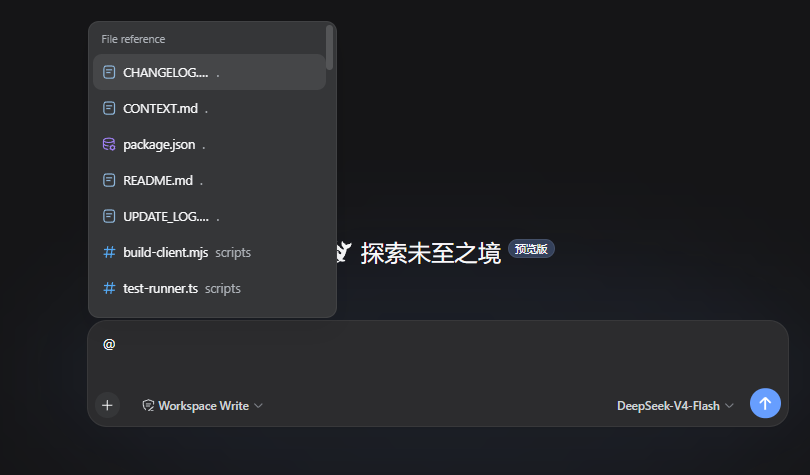
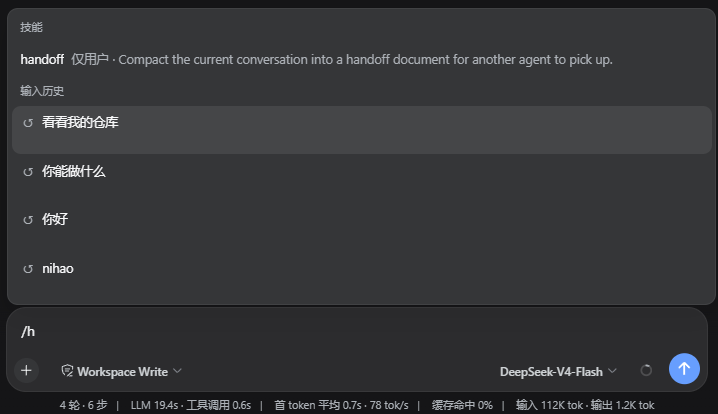
An input composer enhancement plugin for the DSH Web UI. On the Host side, it builds an index of the active workspace. In the browser, it connects to DSH's official @ input trigger so files and directories can be searched and inserted into the composer. Type /h to open a candidate menu of previous prompts from the current Session.
Features
@ file and directory path selection
Type @ in the DSH composer, then continue with a file name, directory name, or path fragment. The candidate menu lists files and directories from the current Session workspace. After selection, the draft keeps a plain-text path reference, for example:
@src/contract.ts
The reference contains only the path. Sending the message does not read the file, expand the directory, or generate a directory manifest. When the model needs the target, it can inspect the path with the native workspace tools provided by the current Session.
After selecting a directory, you can continue with an instruction:
@src Find the code responsible for candidate ranking
The official input-trigger pipeline owns the candidate menu, caret, and write-back behavior. This plugin does not replace the official textarea, send button, or candidate menu, and it does not take over native arrow-key behavior.
/h input history
Type /h in the composer to open the history candidate menu through DSH's official / input trigger. You can continue typing a keyword to filter the results, for example:
/h
The candidates contain only user prompts that were successfully submitted in the current Session, ordered from most recent to oldest.
Installation
Requires DSH 0.1.0-rc.6 or a compatible DSH Web profile. Install through the official DSH profile plugin flow:
dsh plugin --profile web add https://github.com/WhitePlusMS/dsh-input-plus/archive/refs/tags/v0.0.2.tar.gz
GitHub tag installation consumes the committed lib/ Host and Client artifacts directly.
Before creating or updating an installation tag, run pnpm run build and include the
generated lib/ directory in the commit; installing a source-only archive will fail
because the package entry points resolve to lib/index.js and lib/client.js.
Configuration
The plugin registers the input-plus settings namespace. The options used by workspace indexing and path resolution are:
| Option | Default | Range | Description |
|---|---|---|---|
maxIndexDepth |
3 |
0–10 |
Maximum workspace indexing depth |
maxIndexEntries |
200 |
1–2000 |
Maximum number of entries retained per candidate index |
referenceRoot |
'' |
Absolute path or empty | Overrides the current Session workspace; empty uses the Session workspace |
Development
Requirements: Node.js 18+ and pnpm.
pnpm install

# TypeScript type checking
pnpm run typecheck

# Run the in-process test suite
pnpm test

# Build the Host and browser bundles
pnpm run build

# Check that lib/client.js is synchronized with the source
pnpm run check:client
The build has two parts:
tsc -p tsconfig.build.jsongenerates the Host code and declaration files;scripts/build-client.mjsuses the TypeScript Compiler API to generatelib/client.jsin-process, avoiding an esbuild service subprocess in restricted environments.
Repository layout
src/
  index.ts            Host plugin entry, settings, and HTTP routes
  contract.ts         Minimal Host/Client wire contract
  host/
    files.ts          Workspace indexing, matching, and path safety
    git.ts            Git modification state
    settings.ts       Settings schema and defaults
    workspace.ts      Session workspace resolution
  client/
    index.ts          Browser plugin entry
    input-source.ts   @ candidate source and path write-back
    history-source.ts /h and /history candidate source and two-line menu styles
    history-recorder.ts Current Session prompt recording
    find.ts           Client candidate matching and ranking
    file-icons.ts     Candidate icons
    input-status.ts   Composer status dock
scripts/
  build-client.mjs    Browser bundle builder
  test-runner.ts      In-process test entry
License
MIT
Links
More in this category
zhu1090093659/dsh-web#packages/dsh-task-board★ 8076
Task board for the dsh web GUI: a sidebar multi-column kanban whose cards run in real DSH agent sessions and can also be scheduled with cron expressions, executed host-side even with the browser closed.
zhu1090093659/dsh-web#packages/dsh-web-all★ 8076
Plugin and skin collection for the DSH Web UI: task board, Git graph, right-side panel, remote mobile UI, pet, live token stats, and a skin center.
omdsh-dev/DSH-better-sidebar★ 3828
Full sidebar workbench with file rendering and editing, terminal, Git, and subagents; third-party plugins can register new tabs.
ccch1mneyyy/dsh-TUI★ 3661
Claude Code-style full-screen terminal UI: pixel-whale header, live status line, and streaming thought expansion.
MeteorNOX/DeepSeek-Balance-Whale-Widget★ 3277
A fixed-corner whale widget for the DSH web GUI — balance, today's usage and per-turn cost with peak/off-peak pricing, editable balance-alert and daily-budget bubbles, a module-based custom bubble queue with A/B weighted choices and random lines or images, 30+ vendor templates (OpenAI, OpenRouter, Kimi, SiliconFlow, Ark, Zhipu, MiniMax and more) with per-model balance and subscription quota, plus task-end sound, imported audio, custom roles and a resource manager. Local-only, no telemetry.
Devin-AXIS/deepseek-design#deepseek-idesign★ 1628
Visual design studio for websites, app prototypes, posters, cards, reports, and magazines, with templates, direct element editing, selection-aware AI draft handoff, and export.
Community comments
Comments are public GitHub Discussions. Loading them connects to GitHub and Giscus; a GitHub account is required to post.