A visual plugin marketplace for DSH: browse multiple Git sources, install plugins with one click, and wire skills, subagents, MCP connectors, LSP servers and hooks into the harness automatically.
Install
# from GitHub (first run asks for allowBuilds approval — follow the hint, retry)
dsh plugin --profile web add github:Ultmebius/universal-plugin-hub
Any plugin you install runs third-party code with your own permissions — it can read your files, use your credentials, and reach the network, and tool approvals don’t sandbox it. GitHub-sourced plugins also run build scripts at install time — pnpm blocks those until you allow them, so an install can stop with ERR_PNPM_GIT_DEP_PREPARE_NOT_ALLOWED or ERR_PNPM_IGNORED_BUILDS; dsh prints the exact key to add under allowBuilds in your profile’s pnpm-workspace.yaml, and the install works on the next run. Allowing a build is a trust decision: only install sources you trust, and pin a commit (github:owner/repo#sha).
README
English | 简体中文
A plugin marketplace for DeepSeek Harness (DSH). It comes with the official Claude plugin catalog preloaded and supports installing agent skills, subagents, MCP tools, and LSP servers with one click.
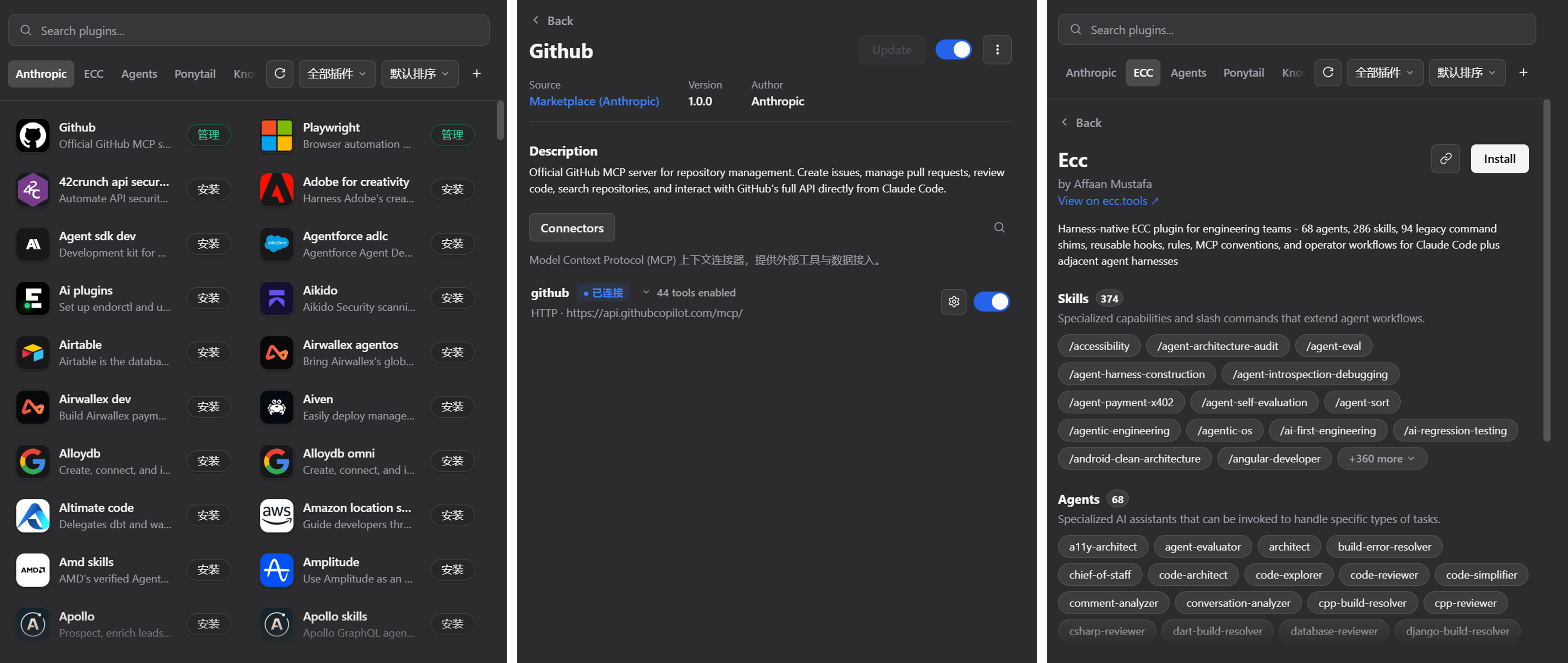
Installation
DeepSeek Harness Desktop
- Open DeepSeek Harness.
- Go to Settings -> Plugins.
- Paste the repository URL into the input field:
https://github.com/Ultmebius/universal-plugin-hub.git - Click install.
Command line
Run this in your terminal:
dsh plugin add https://github.com/Ultmebius/universal-plugin-hub.git
From source
cd ~/.dsh/plugins
git clone https://github.com/Ultmebius/universal-plugin-hub.git
cd universal-plugin-hub
npm install
Features
- Preloaded catalog: Loads the official Claude plugin catalog (
anthropics/claude-plugins-official) by default. - Custom Git sources: Add any GitHub or Git repository as a plugin source.
- Automated setup:
- Commands and skills map into DSH agent skills automatically.
- Subagents compile into Hub skills for agent delegation.
- MCP connectors register into configuration files, with per-tool toggles and token testing.
- LSP servers register automatically.
- Environment support: Works in both DeepSeek Harness Desktop and the CLI web profile.
Usage
- Browse and search: Open the marketplace panel and search plugins by name or keywords.
- Install: Click Install on a plugin card. The hub downloads the plugin and configures it.
- Manage: Toggle plugins, configure MCP tokens, or uninstall plugins from the management tab.
Data and directory layout
- Hub installation:
~/.dsh/profiles/desktop/node_modules/universal-plugin-hub - Marketplace plugins:
- Installed plugin files:
~/.dsh/agent-skills/universal-plugin-hub/installed/<plugin-name> - Cloned source cache:
~/.dsh/agent-skills/universal-plugin-hub/market/<source-id> - State and source registry:
~/.dsh/agent-skills/universal-plugin-hub/state.json
- Installed plugin files:
- Runtime patch configuration:
~/.dsh/profiles/<profile>/cordis.patch.yml
License
Links
More in this category
zhu1090093659/dsh-web#packages/dsh-plugin-manager★ 8801
Plugin manager tab in DSH Settings → Plugins: install from npm or git with progress, enable/disable switches effective at next startup, conflict reconciliation with undo, and one-click hand-off to a fix session.
dsh-market/dsh-market★ 6668
Browse, search and install community plugins from inside DeepSeek Harness settings, with category filters, one-click updates, enable/disable, theme switching and configuration backup.
kingOfSoySauce/dsh-skin-market★ 197
Native skin marketplace and lifecycle manager that discovers community skins, displays previews and compatibility status, and provides verified one-click or manual installation paths.
awesome-dsh-plugin/dsh-find-plugin★ 187
Find plugins without leaving the agent: search this curated registry by keyword or category, with ready-to-run install commands.
bradeGithub/DSH-Plugins-Marketplace★ 176
GitHub-topic-driven plugin & skill marketplace: a Settings page that browses the auto-collected registry (the whole dsh-plugin topic plus the skills index, CI-refreshed every 2 hours) with one-click install, type detection, install-script and host-shadow-dependency safety confirmations, env-key management, and the STANDARD.md recognition spec.
Sanqi-normal/dsh-webui-market-plugin★ 104
In-harness plugin market for the dsh web GUI: browse the awesome-dsh-plugin.com catalog and install/uninstall plugins into a profile from Settings → Plugins → Plugin Market.
Community comments
Comments are public GitHub Discussions. Loading them connects to GitHub and Giscus; a GitHub account is required to post.