Mirrors an Android phone screen into a transparent desktop mini-window from the DSH sidebar: scan a QR code to pair, then the H.264 stream runs over scrcpy through adb outside the browser, with independent content and background opacity, eight-way resize and pin. Bundles adb, scrcpy and the phone-side APK, so nothing else needs installing; Windows hosts only.
Install
# from npm (prebuilt)
dsh plugin --profile web add dsh-miniwin
# from GitHub (first run asks for allowBuilds approval — follow the hint, retry)
dsh plugin --profile web add github:TomCatV/dsh-miniwin
Any plugin you install runs third-party code with your own permissions — it can read your files, use your credentials, and reach the network, and tool approvals don’t sandbox it. GitHub-sourced plugins also run build scripts at install time — pnpm blocks those until you allow them, so an install can stop with ERR_PNPM_GIT_DEP_PREPARE_NOT_ALLOWED or ERR_PNPM_IGNORED_BUILDS; dsh prints the exact key to add under allowBuilds in your profile’s pnpm-workspace.yaml, and the install works on the next run. Allowing a build is a trust decision: only install sources you trust, and pin a commit (github:owner/repo#sha).
README
English | 中文
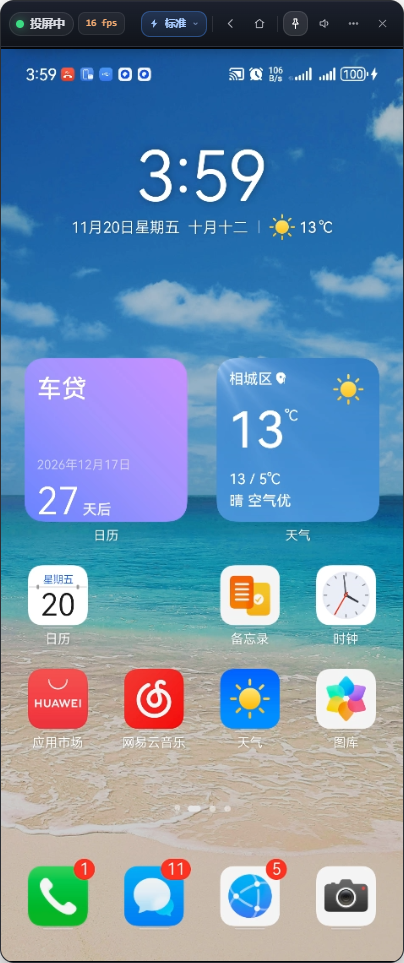
Scan a QR code in the DSH sidebar and the phone screen opens in a transparent desktop mini-window. No IP, no port, no browser tab: the picture travels over scrcpy's H.264 stream through adb and is decoded straight into a native window.
What it is (and what it is not)
Three surfaces, easy to mix up:
- The sidebar panel — shows the QR code, pairs the phone, starts and stops the session. It never draws the picture.
- The desktop mini-window — the actual phone screen. Always-on-top, draggable, eight-way resize, independent content and background opacity.
- The phone — either the bundled APK (scan the QR to download it) or a zero-install pairing page served by the plugin itself.
The picture never enters the browser, so the DSH web UI stays at full frame rate.
Requirements
- Windows 10/11 (the bundled scrcpy build and its DLLs are Windows binaries)
- An Android phone with USB debugging enabled, on the same LAN as the PC
dsh0.1.0 or newer
Nothing else: adb, scrcpy and the scrcpy-server jar ship inside runtime/.
Install
dsh plugin --profile web add dsh-miniwin
From a checkout instead:
dsh plugin --profile web add link:<path-to-this-repo>
Restart the host, then open the 手机投屏 panel in the sidebar.
Layout
lib/                 host side (Cordis plugin: routes, pairing, session control)
lib/client.js        browser side (the sidebar panel)
runtime/             the mirroring runtime, shipped with the plugin
  main.js            mini-window Electron entry
  ui.html preload.js the window itself
  scrcpy-capture.js  named-pipe MKV reader → H.264 frames
  wifi-receiver.js   audio + video receiver for the APK path
  tools/scrcpy/      adb.exe, scrcpy.exe, scrcpy-server
  apk/miniwin.apk    optional phone-side sender (audio)
cordis.patch.yml     bundle patch: mounts the host half into the profile
runtime/ is resolved at load time: MINIWIN_HOME (development) first, then the
bundled directory. The mini-window reuses the host's own Electron through
process.execPath, so the package does not carry a second 200 MB runtime.
Environment overrides
| Variable | Purpose |
|---|---|
MINIWIN_HOME |
point at a different runtime directory instead of the bundled one |
MINIWIN_ELECTRON |
use a specific electron.exe when the host is not Electron |
MINIWIN_NODE |
node used for the receiver child process |
MINIWIN_ADB |
adb used for device discovery |
Known limits
- Windows only. The transport is adb over USB/WiFi; the bundled binaries are win32.
- One phone per host at a time.
- MediaProjection-based audio needs the bundled APK; without it only the picture is mirrored.
License
MIT. The bundled scrcpy and platform-tools binaries keep their own licenses —
see runtime/tools/scrcpy/scrcpy-win64-v5.0.1/LICENSE.txt.
Links
More in this category
zhu1090093659/dsh-web#packages/dsh-remote-web-ui★ 10645
Remote control of a dsh web workspace from phone or PC: QR-code pairing through a token-gated channel, SSE real-time sync, and separate mobile and full desktop GUI modes.
zhu1090093659/dsh-web#packages/dsh-ssh★ 10645
SSH ops panel for DSH: web terminal, SFTP transfer with progress, local port forwarding, and one-command cluster execution across hosts; agents share the same host config.
liguobao/ds-harness-remote★ 3780
Multi-device remote access for DeepSeek Harness and supported coding workspaces through an end-to-end encrypted channel, with adaptive Relay/WebRTC transport, device authorization, workspace files, read-only previews, terminals, and optional Codex Remote.
saya-ch/dsh-mobile★ 1006
Access DeepSeek Harness from the Android app or a mobile browser with secure LAN and remote connections, persistent device pairing, and a customizable mobile interface.
uumit-ai/dsh-uumit-remote★ 531
Open dsh web from your phone or another computer through a UUMit account, without running your own server or installing another program: a built-in tunnel client connects to UUMit's hosted tunnel, and a panel in the sidebar handles pairing and who can use it (only you, people you invite by link or phone number, or everyone), with revocation. Requires dsh web on DSH >=0.2.1-rc.2.
ZSeven-W/dsh-ios★ 485
A live iOS Simulator or USB-connected iPhone inside the conversation: 22 agent tools for booting, building, driving the UI by accessibility identity or OCR text, list-row actions and SwiftUI preview hot reload, plus a streaming sidebar panel you can tap and drag on.
Community comments
Comments are public GitHub Discussions. Loading them connects to GitHub and Giscus; a GitHub account is required to post.