Login gate for the dsh web surface: password or shared-token authentication, session cookies, rate limiting, and a user-management CLI (dsh.bundle manifest since 0.4.1, one-command `dsh plugin add` mounting).
Install
# from npm (prebuilt)
dsh plugin --profile web add dsh-auth-gate
# from GitHub (first run asks for allowBuilds approval — follow the hint, retry)
dsh plugin --profile web add github:TecFancy/dsh-auth-gate
Any plugin you install runs third-party code with your own permissions — it can read your files, use your credentials, and reach the network, and tool approvals don’t sandbox it. GitHub-sourced plugins also run build scripts at install time — pnpm blocks those until you allow them, so an install can stop with ERR_PNPM_GIT_DEP_PREPARE_NOT_ALLOWED or ERR_PNPM_IGNORED_BUILDS; dsh prints the exact key to add under allowBuilds in your profile’s pnpm-workspace.yaml, and the install works on the next run. Allowing a build is a trust decision: only install sources you trust, and pin a commit (github:owner/repo#sha).
README
English | 简体中文

A login door for your DeepSeek Harness (dsh) web instance. Put it in front of a public dsh deployment and nobody can reach your agents, your chat sessions, or your LLM credentials without signing in first.
Maintained until dsh ships authentication natively. dsh has no built-in login yet, and this repository is how we close that gap: new dsh releases are tracked (mount-point changes, supported version ranges, Linux/Windows CI), regressions are fixed, and releases keep shipping. When official authentication lands we will publish the migration path and keep supporting the dsh versions still in use, so nobody is left on an abandoned fork.
Contents
- What it does
- What it does not do
- Quick start
- See it in action
- Configuration
- Command-line tool
- Admin tools: list users and reset a password
- Bundled configuration skill
- Troubleshooting
- Deployment
- Authenticated local proxy (optional)
- Requirements
- Notes & limitations
- Development
- License
What it does
- Everything needs a login. Every page, API call, and WebSocket connection
is checked. Visitors without a valid session are sent to a simple login page
(or rejected with
401for API/script requests). The one exception isGET /manifest.webmanifest: browsers fetch the Web App Manifest without credentials, so that exact path is public (name / icons / display mode only). - Two ways to sign in (pick one in the configuration):
- Password (recommended): each admin gets a username and password.
- Token: one shared secret token for the whole instance.
- Works for browsers and scripts. Browsers use the login page; scripts and
curl can pass
Authorization: Bearer <token>and skip the page entirely. - Admin tools. In password mode an administrator can list users and reset another user's
password, either from the Account security section of the Settings panel or over HTTP
(
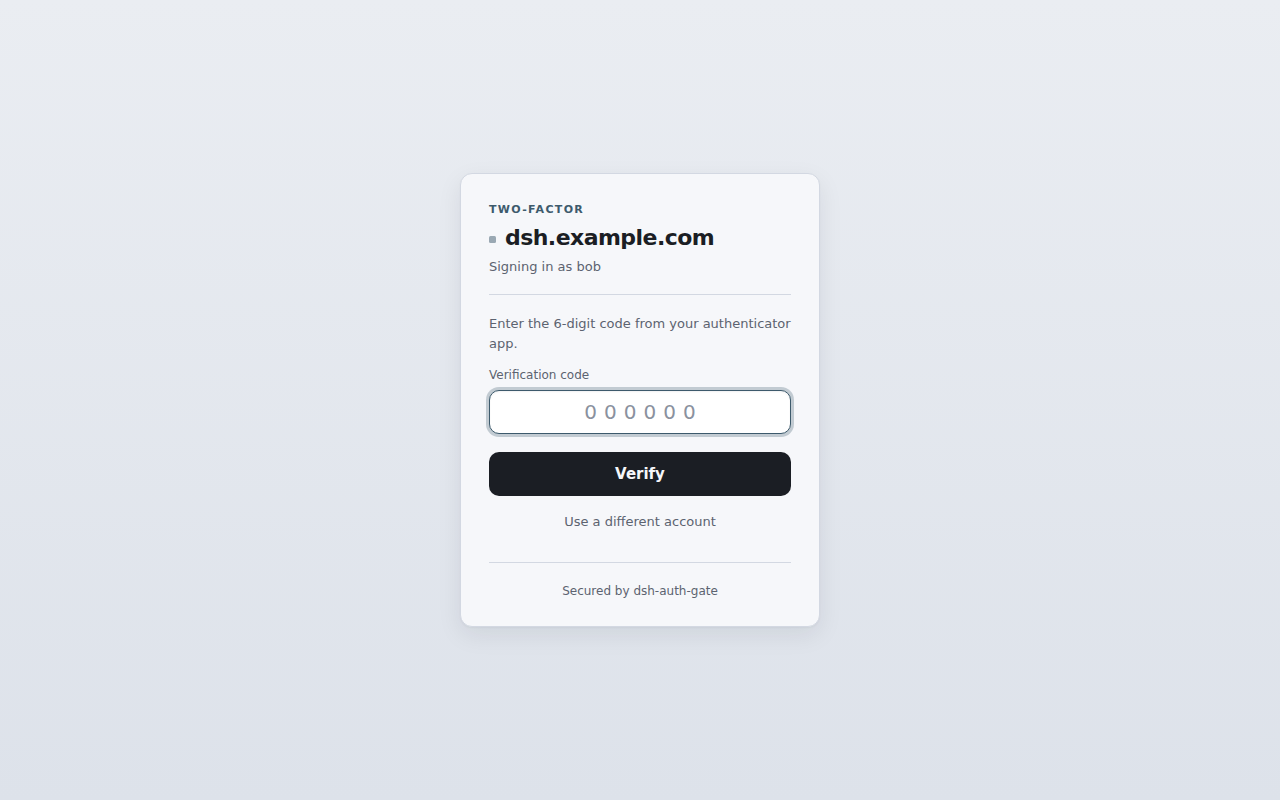
GET /auth/users,POST /auth/users/password); a reset revokes that user's sessions and forces a new password at their next sign-in before they can reach anything else. Only an administrator on a full session sees the panel block, and the admin plane refuses to reset your own account (use the self-service form above it, or the CLI when you have forgotten your password). - Optional two-factor authentication (TOTP). In password mode, a user with a TOTP secret added to their account signs in with password plus a 6-digit code from an authenticator app (RFC 6238, configurable off/optional/required).
- Safe by default. Passwords are stored hashed, logins are rate-limited
(repeated wrong attempts temporarily lock the address), session cookies are
secure, and any missing or broken configuration blocks access instead of
silently opening the door. A wrong username or password makes the login card
re-render with an inline
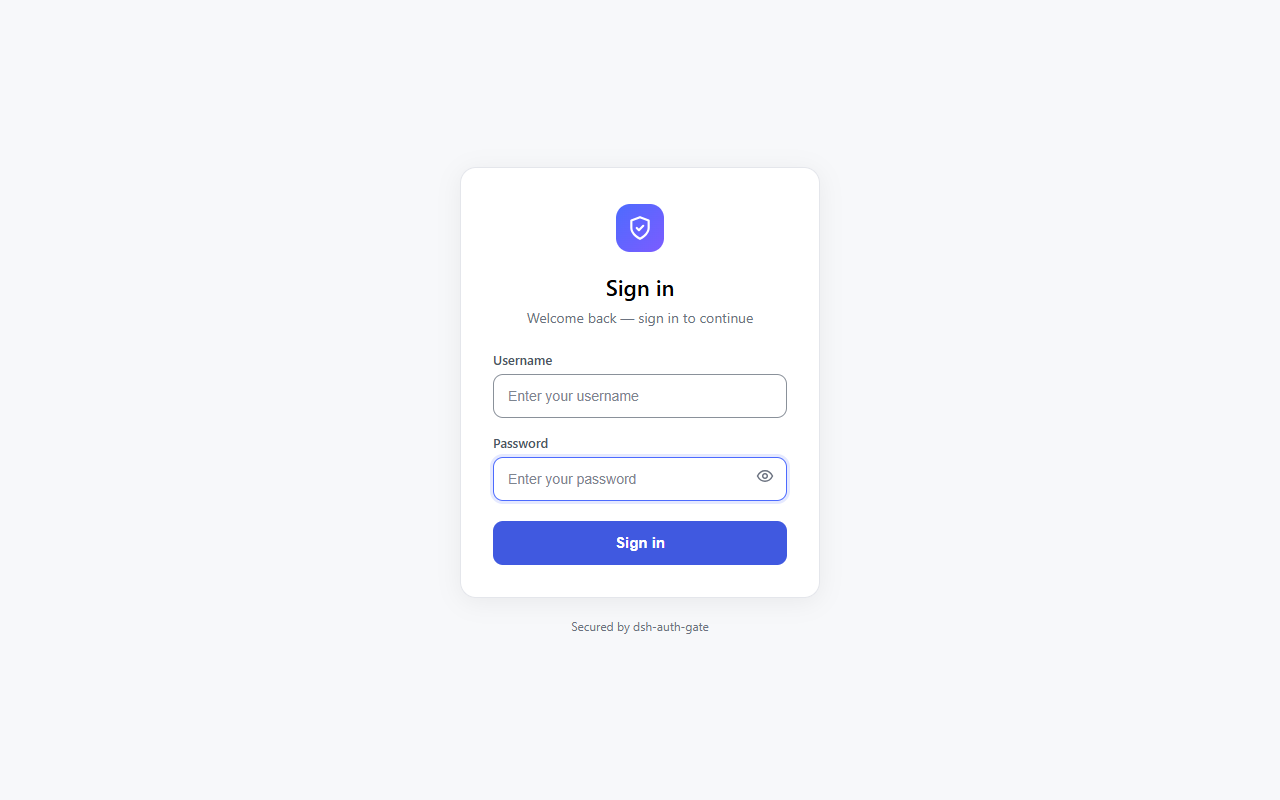
Invalid username or password.: the username is kept, the password must be retyped. A lockout (HTTP 429 +retry-after) shows the same card with the retry seconds and a message saying the lockout applies to "this network". The number of remaining attempts is deliberately never shown, and with JavaScript a page refresh no longer consumes another failed attempt.
What it does not do
Honest boundaries, so you can gauge the risk before installing (the full list with
mechanisms is in docs/deployed/known-limitations.md):
- Not server-level security. Keep the OS user locked down and the config files
private (
auth/users.yamland.credentials.yamlare created0600); this plugin guards dsh's web surface only. - Not every way of changing a password evicts sessions.
dsh-auth user disableblocks future logins and revokes the sessions that user was issued (withinrevokeSweepMs, 5 s by default); the Settings panel's self-service change revokes every session of that user, and so does an administrator's reset of someone else's password; the CLI'sdsh-auth user passwdonly rewrites the stored hash. - Not a replacement for HTTPS. With
cookieSecure: trueyou must serve the site over https. - Not a full identity provider. No OAuth/OIDC, no self-registration, no e-mail reset; users are created and managed by an administrator through the CLI.
Quick start
# 1. Install the plugin from npm into your dsh profile.
#    Since 0.4.1 the package declares a `dsh.bundle` manifest, so `dsh plugin add`
#    also registers the mount (dsh.profile.bundles) automatically:
dsh plugin --profile web add dsh-auth-gate

# 2. Create an admin account.
#    `dsh plugin add` installs the plugin into the profile's node_modules
#    ($DSH_HOME/profiles/web, default ~/.dsh/...) — the CLI is NOT added to your
#    PATH, so call it through the profile. `dsh plugin` already requires pnpm:
printf '%s\n' 'choose-a-strong-password' | \
  pnpm --dir "$DSH_HOME/profiles/web" exec dsh-auth user add admin --password-stdin

# 3. Turn on password login: override the plugin config in $DSH_HOME/cordis.patch.yml
#    (a ready-to-use config-override template ships in deploy/cordis.patch.yml;
#    see Configuration below — the mount itself needs no manual patch row)

# 4. Restart dsh. Open your site — you will be asked to sign in.
See it in action
Every screenshot below uses the English UI, and both READMEs share the same set of images (the plugin's own panels follow the GUI language; the server-rendered pages are English in every locale).
Visitors without a session are sent to the login page (the card is rendered by the plugin server-side in English, so this shot is the same in every locale):
When TOTP is enabled for your account, signing in continues with a second step — a 6-digit code from your authenticator app (password first, then the code):
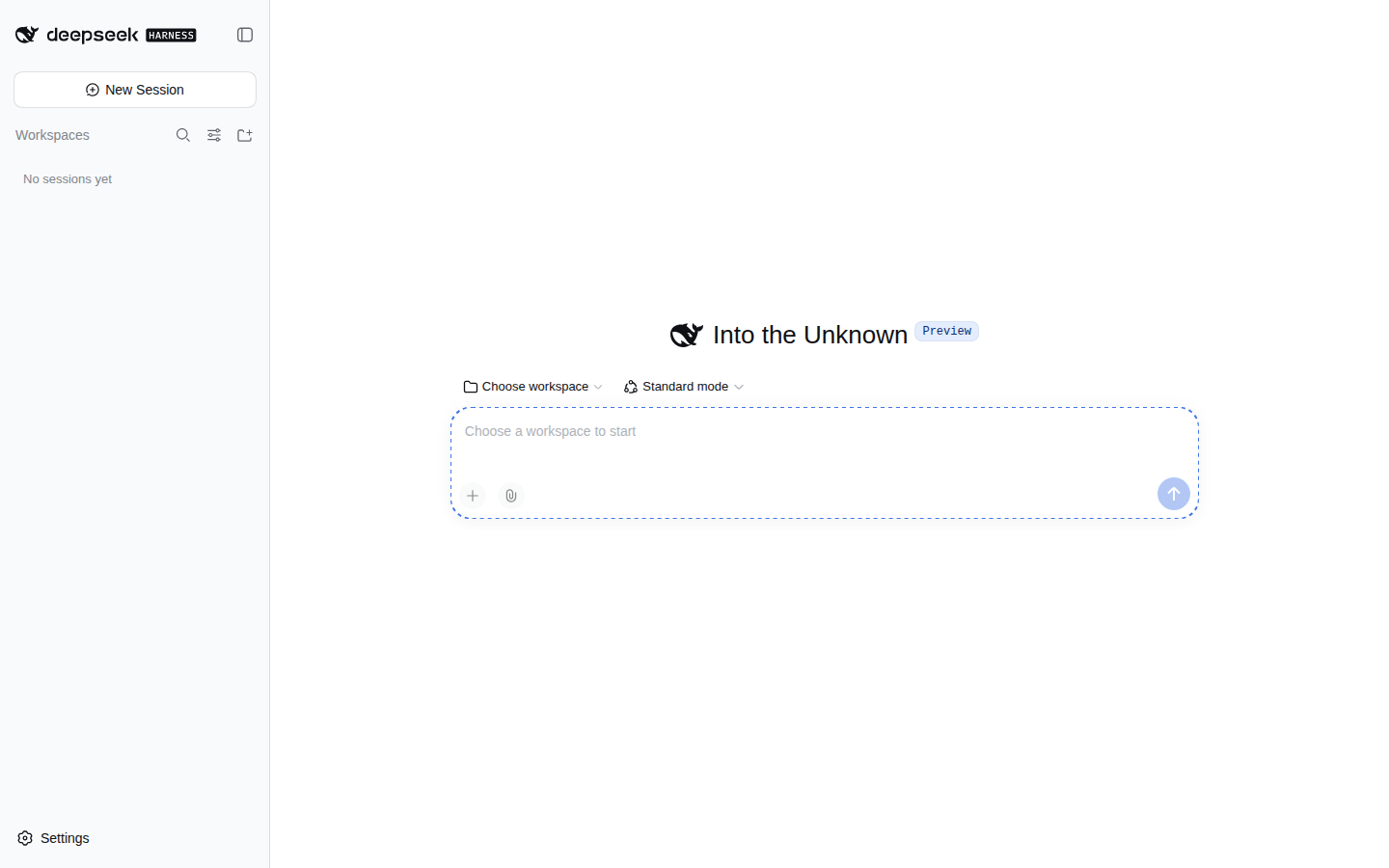
After signing in, they land on your instance:
On dsh 0.1.2-alpha+ (which guards pages with a launch token), signing in
auto-bridges the token gate: the login redirect takes a short relative
/?token=… hop that sets the dsh cookie, then lands on / (details in
docs/implemented/impl-launch-token-bridge.md).
A prominent Sign out / 退出登录 button sits inside the Settings panel
(the Settings → General page, below the last preference row). It's a centered,
danger-styled filled button (16px door icon + localized label, theme tokens
for light/dark), and its label follows the GUI language through the same
locale mechanism the Settings language switch uses. Clicking it runs the same
native POST /auth/logout?next=/ flow as before.
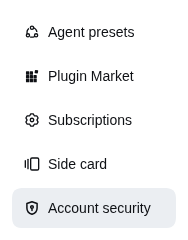
A signed-in user can also change their own password from the Account security section of the Settings panel (password mode only): current password, the new password typed twice, and a TOTP code whenever the account has a secret. The panel title carries the plugin's own mark (a shield + keyhole outlined at 16px).
The mark next to the section name in the nav is the plugin's too: the host has no
per-section icon option yet (settings.section carries only id/order/label,
and nav icons come from the host's hard-coded navIcon(id), which falls back to
the default gear for third-party sections), so a temporary DOM stopgap replaces
our own row and nothing else (if it cannot find the row it silently falls back to
the gear). Once dsh offers an icon option, the stopgap and its code are removed
(see ADR D24.1 for the migration conditions).
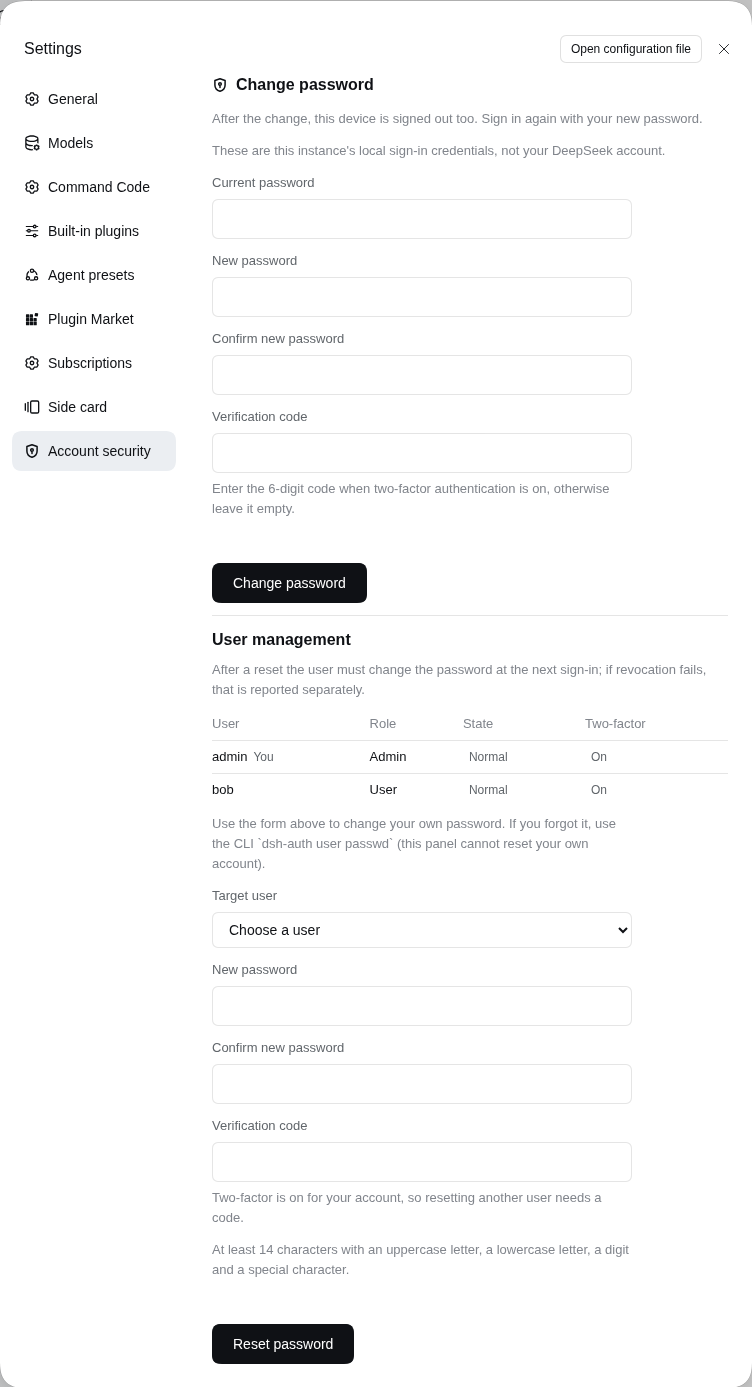
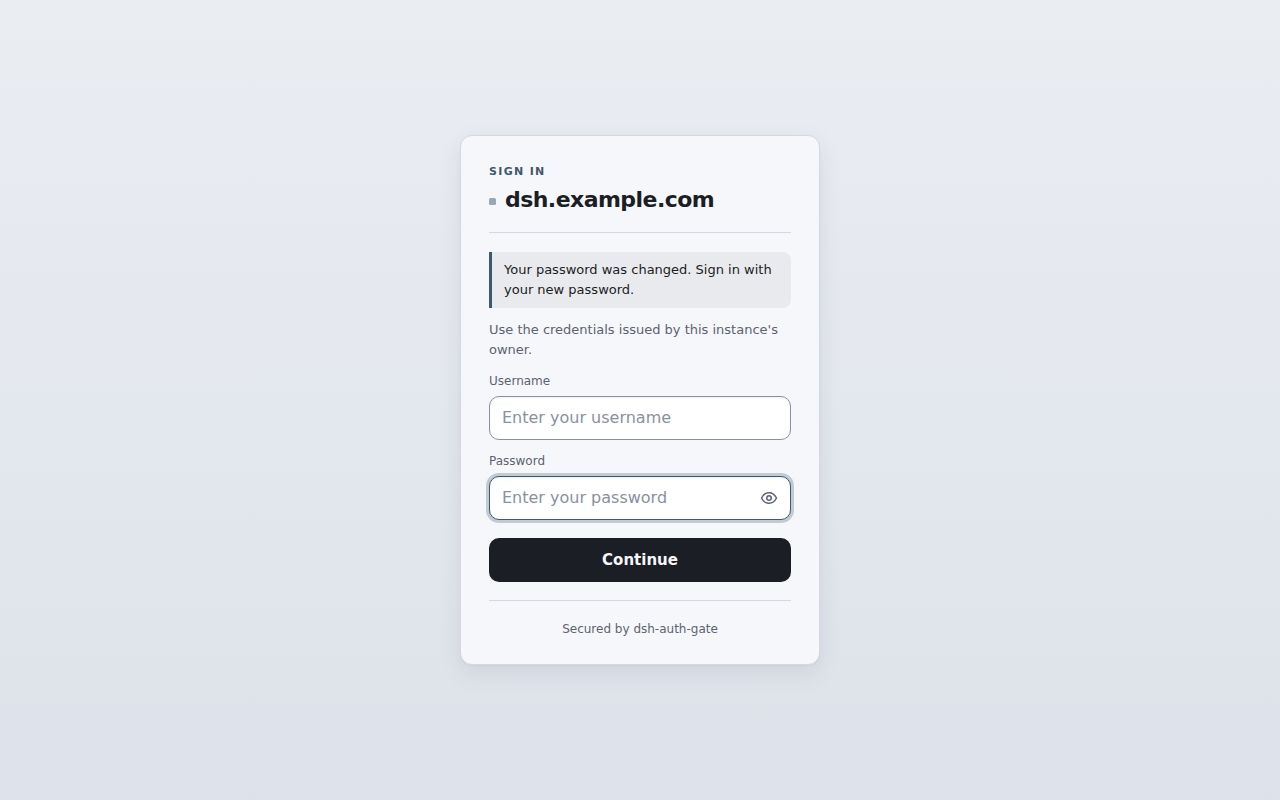
The panel posts to POST /auth/password (current / password / code,
form-urlencoded) and, on success, every session of that user is revoked,
including the one making the change. The client immediately sends the device
back to the login page with a reason, and the card explains why (the success panel
only stays on screen when the environment refuses to navigate; its "Sign in again"
button is then the fallback way out):
Passwords must be at least 14 characters, contain four character classes and differ from the current one. With TOTP on, a code already spent in the current 30-second window is rejected as a replay: wait for the next code.
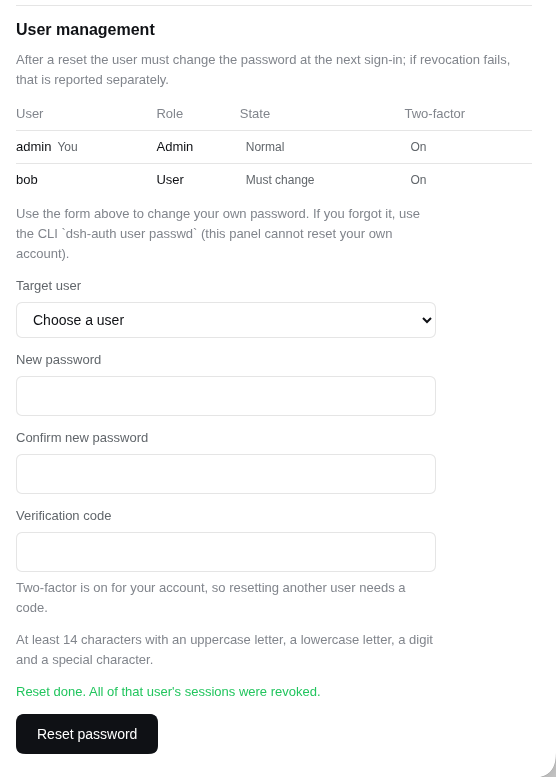
An administrator on a full session also gets a user management block below that form (the
panel screenshot above shows it): a read-only list (name, role, a mutually exclusive
disabled / must-change-password / normal badge and a two-factor badge, with "You" on their own
row) plus a reset form for another user. A reset forces the target to pick a new password at the
next sign-in and revokes every session that user had, while the acting administrator's own
session is untouched. When the administrator's own account has TOTP enabled, the reset asks for a
current code as well. The block renders only for role === "admin" on a full (not forced-change)
session, and a non-admin client never requests the user list at all. Resetting your own
account is not possible: the server refuses it and the dropdown excludes you, so an administrator
who has forgotten their own password must reset it on the server with
dsh-auth user passwd <name>.
Configuration
The bundle mount (id dsh-auth-gate, inserted by dsh plugin add) uses the
default config: mode: "token" backed by the DSH_AUTH_TOKEN environment
variable. To change it, override the config in $DSH_HOME/cordis.patch.yml
(or the profile's cordis.patch.yml — a ready-to-use override template ships
in deploy/cordis.patch.yml). The override targets the mounted row by id
(no insert — adding one would double-mount the plugin):
- id: dsh-auth-gate
  config:
    mode: "password" # "password" (recommended) or "token"
    totp: "optional" # "off" (default), "optional", or "required"
    cookieSecure: true # keep true when you use https
| Option | Default | What it does |
|---|---|---|
mode |
"token" |
"password" = username/password login; "token" = one shared secret |
totp |
"off" |
Password mode only. "optional": users with a TOTP secret sign in with password + code; "required": all users must have a secret (users without one get the uniform 401 at the password stage, same body as a wrong password — anti-enumeration) |
sessionTtl |
604800 |
How long a login lasts (seconds) before you must sign in again |
cookieName |
dsh_auth |
Name of the session cookie (rarely needs changing) |
tokenRef |
"DSH_AUTH_TOKEN" |
Token mode only: which environment variable holds the shared secret |
cookieSecure |
true |
Set to false only if you are testing over plain http |
usersFile |
"" |
Password mode: where your user list lives. Defaults to $DSH_HOME/auth/users.yaml |
publicHost |
"" |
Host rendered in the login page identity block (the anti-phishing "which instance is this" line). Empty = use the request Host header. Set it when a reverse proxy rewrites Host (e.g. Caddy header_up Host 127.0.0.1:3080), otherwise the card shows a loopback address instead of your public domain. With D25 it also lets the admin and password-change endpoints validate an Origin header: with publicHost empty they accept only Sec-Fetch-Site: same-origin, so production deployments should set it, and write it with the scheme (https://host) when TLS terminates at a reverse proxy |
revokeSweepMs |
5000 |
Password mode: how fast (ms) a user disabled with dsh-auth user disable loses already issued sessions. 0 = never sweep (disabling only blocks new logins) |
clientIpHeader |
"" |
Header carrying the real client address for rate limiting (x-forwarded-for, or cf-connecting-ip behind Cloudflare). Empty = read no header at all. Only read when the request's peer is inside trustedProxyCidrs; without it a same-host reverse proxy makes every client share one lockout bucket (issue #74) |
trustedProxyCidrs |
["127.0.0.0/8", "::1/128"] |
Which peers may supply clientIpHeader (default: loopback only; a peer without an address, i.e. a Unix socket, counts as local). Invalid entries are dropped with an error log and trust narrows to loopback, an explicit [] means "trust nobody", and 0.0.0.0/0 / ::/0 are always rejected |
logoutOrder |
1000 |
Slot order of the "Sign out" button in Settings → General (higher = lower on the page). Raise it if another plugin registers a bigger order |
To enable TOTP for a user, run dsh-auth user totp enable <name> and add the
printed secret (or scan the otpauth:// URI) into an authenticator app (Google
Authenticator, 1Password, etc.). The code changes every 30 seconds; a code from
the previous or next window is also accepted (drift tolerance).
Command-line tool
dsh-auth manages users from the shell:
dsh-auth user add admin --password-stdin   # add a user (--admin creates an administrator)
dsh-auth user list                          # list users
dsh-auth user passwd admin                  # change a password (read twice; there is no --password flag)
dsh-auth user role admin user               # grant/revoke the admin role: user role <name> <admin|user>
dsh-auth user disable admin                 # block future logins + revoke that user's live sessions
dsh-auth user enable admin                  # re-enable a disabled user (a reset alone does not let them in)
dsh-auth user totp enable admin             # generate a TOTP secret (prints an otpauth:// URI)
dsh-auth user totp disable admin            # remove the TOTP secret
dsh-auth is directly on your PATH when the package is installed globally. After
dsh plugin add the binary lives inside the profile and must be called through it -
see Quick start.
dsh-auth user passwd only rewrites the stored hash: it does not revoke that user's
live sessions. Use the Settings panel change when sessions must be evicted right away;
dsh-auth user disable also blocks future logins, but the sessions already issued are
dropped by the periodic sweep (revokeSweepMs, ~5 s by default).
Admin tools: list users and reset a password
In password mode an administrator can list users and reset another user's password from the
Account security section of the Settings panel, or over HTTP for scripts
(/auth/users is a field-whitelisted list, /auth/users/password is the reset). Both routes
behave identically, and every authenticated state-changing POST is checked against its Origin,
so a script must send one (there is no exemption):
# List users (admin session cookie in jar).
curl -s -H "Origin: https://dsh.example.com" -b jar https://dsh.example.com/auth/users

# Reset someone's password. `code` is required only when YOUR own account has TOTP enabled.
curl -s -H "Origin: https://dsh.example.com" -b jar \
  -d "target=alice&password=<new>&confirm=<new>&code=<your-totp>" \
  https://dsh.example.com/auth/users/password
A request without an Origin, or with one that does not match the instance, is rejected with
403 (fail-closed); the only other accepted signal is the browser's own
Sec-Fetch-Site: same-origin. Configure publicHost when a reverse proxy rewrites Host:
without it the server cannot derive its own origin, and the change/reset endpoints then accept
Sec-Fetch-Site: same-origin alone, which the commands above do not send. Write it with the
scheme (https://dsh.example.com) when TLS terminates at the proxy: with a bare host:port the
scheme is inferred from whether the incoming connection itself is TLS, so an http hop from the
proxy makes script Origin checks fail (browsers are unaffected).
The reset marks the target account as "must change password" and revokes every session that
user had (the acting admin's own session is untouched). At the target's next sign-in they get a
restricted session (15 minutes, never renewed): it can reach only the plugin's own password
form at GET /auth/password and nothing else, not even the host UI. That form is
server-rendered and works without JavaScript (no external assets, no script); submitting it
still requires the current password, and success clears the mark and signs the user out so they
can sign in normally. A reset does not touch the target's TOTP secret, and resetting a
disabled account does not let it sign in: the login path rejects disabled users, so run
dsh-auth user enable <name> first. The full contract is in
D25.
Bundled configuration skill
The package ships a configuration quick-reference skill at
.agents/skills/dsh-auth-gate-config/ (this page). Install it into the
user-level dsh skill root so agents on the deployment side can answer
"what configuration does auth-gate support?" directly:
pnpm --dir "${DSH_HOME:-$HOME/.dsh}/profiles/<profile>" exec dsh-auth skill install [--force]
It copies the skill to $DSH_HOME/skills/dsh-auth-gate-config/, which
dsh's skill discovery picks up automatically. Re-running without
--force keeps any local edits to the skill; use --force to refresh it
from the package.
The skill is a user-only skill (disable-model-invocation: true in its
frontmatter): it stays out of the model's auto-invocable skill catalog so it is
not injected into every agent turn, and you open it explicitly from the skill
panel whenever you need the config reference (the UI marks it user-only).
If you prefer the agent to answer configuration questions automatically,
remove that frontmatter field after installation.
Troubleshooting
dsh-auth: command not found
dsh plugin --profile web add dsh-auth-gate installs the package into the
profile's node_modules ($DSH_HOME/profiles/web/node_modules/dsh-auth-gate,
default ~/.dsh/...), but nothing is added to your shell's PATH, so the CLI
binary is not callable by name. This only affects the CLI — the plugin itself
runs fine. Pick one:
Call it through the profile (recommended).
dsh pluginalready requires pnpm, so the CLI resolves from the same place the plugin lives:pnpm --dir "${DSH_HOME:-$HOME/.dsh}/profiles/web" exec dsh-auth user add admin --password-stdin pnpm --dir "${DSH_HOME:-$HOME/.dsh}/profiles/web" exec dsh-auth user listOptionally, once per shell session:
alias dsh-auth='pnpm --dir "${DSH_HOME:-$HOME/.dsh}/profiles/web" exec dsh-auth'Direct node invocation (no pnpm needed at runtime):
node "$DSH_HOME/profiles/web/node_modules/dsh-auth-gate/lib/cli.js" user add admin --password-stdinInstall the package globally, then
dsh-authis on your PATH:npm install -g dsh-auth-gate dsh-auth user add admin --password-stdin
Whichever way you call it, the CLI manages the same shared user list
($DSH_HOME/auth/users.yaml, fallback ~/.dsh/auth/users.yaml) that the plugin
reads — the global copy is just a launcher.
Deployment
- Reverse-proxy deployment guide — Caddy/nginx
setups, the browser-trust fence gotcha (Settings-page
403s behind a proxy, and why auth alone doesn't fix them), and the recommended semi-shell topology. docs/deployed/deployment.md— ops checklist, acceptance steps (A–I) and troubleshooting. Chinese version:docs/deployed/deployment_zh.md.
Authenticated local proxy (optional)
⚠️ Known limitation (unaffected by any auth-gate release): dsh's settings pages ("Settings -> Models", etc.) are editable only when the page origin is loopback (
localhost/127.x). This is a dsh client-side boundary (isLoopback), orthogonal to authentication — on a domain page the settings dialog reports "settings are unavailable in this browser" and providers/credentials cannot be edited; upgrading dsh-auth-gate does not change that. To edit configuration, use this local proxy, or openhttp://127.0.0.1:3080on the server itself. Chatting and model selection on the domain page are unaffected.
After the semi-shell fixed the server-side
/apifence, dsh's client still requires "page origin must be loopback"; the local proxy provides a loopback page entry on the user's machine, used together with auth-gate so remote config editing stays authenticated end-to-end, without touching dsh sources. Full design: docs/deployed/local-proxy.md (Chinese: docs/deployed/local-proxy_zh.md).
- Zero-dependency Node bin (
dsh-auth-proxy): strictly bound to127.0.0.1, stateless pass-through for pages/API,events.mux/events.hostWebSocket tunneling, and stripping of theSecureattribute fromSet-Cookie(Safari fallback). - Authentication reuses auth-gate (password and token modes): the login page and session cookies pass through untouched.
- Security boundary (deny-list, Phase 2.1): combined with
--mark-proxy, the server-side guard answers403for marked requests hittinghost.pickDirectory/host.openPath/settings.openDocument/llm.discoverModels, so a remote authenticated user cannot reach the host's native capabilities; unmarked traffic behaves exactly as if the proxy were not deployed.
dsh-auth-proxy --listen 127.0.0.1:8443 --target https://your-domain.example --mark-proxy
# Open http://127.0.0.1:8443 in the browser -> log in -> "Settings -> Models" is editable
systemd example: deploy/systemd/dsh-auth-proxy.service.example.
Requirements
- Node ≥ 22.19 and pnpm on the server.
- dsh
0.1.x/0.2.x(declared asengines.dsh: ^0.1.0-rc.6 || ^0.1.5-rc.2 || ^0.1.7-alpha.1 || ^0.2.0-rc.1). Runtime-verified against0.1.5-rc.2and0.1.7-rc.2(production, in that order), plus0.1.7-alpha.1and0.2.0-rc.2(isolated instances); the full test suite runs on the0.2.0-rc.2host packages. The0.1.6-*prereleases are not enumerated because no plugin version was verified against them (stable0.1.6is covered by^0.1.5-rc.2). The plugin runs on the host's own@deepseek-ai/dsh-storage-domainand@deepseek-ai/cordiscopies — both are peer dependencies, never bundled — so a profile booted from the dsh base bundle already provides them. dsh0.2.0-rc.2(already on thenextline) refuses to install, and at boot silently skips, plugins whose@deepseek-ai/dsh*peer ranges do not cover the running host version; that check reads peers only -engines.dshis not consulted - and a plugin declaring no such peer is not checked at all. The0.2.0-rc.1alternative is therefore declared in bothengines.dshand the storage-domain peer. - The dsh
webprofile running (dsh --profile web). - If
cookieSecureistrue, your site must be served over https (browsers refuse secure cookies on plain http).
Notes & limitations
The short list; the full version, including the mechanisms and the ADRs behind them,
is in docs/deployed/known-limitations.md.
- Disabling a user only stops new logins; sessions already issued are revoked by the
periodic sweep (
revokeSweepMs, 5 s by default - with0they stay valid until they expire). - Login rate limiting and the TOTP replay guard reset when the server restarts.
- Behind a reverse proxy, set
clientIpHeader(andtrustedProxyCidrs): otherwise all clients share one lockout bucket, and login plus the self-service change each have their own, so both are affected. - A password change reports success even if revoking the old sessions fails; the failure is logged at error level and the old cookie stays valid until its session TTL.
- The
Origincheck covers the two authenticated state-changing POSTs only:POST /auth/loginkeepsSameSite=Laxas its only cross-site defence, and a reset whose session revocation fails still answers200withsessionsRevoked:false(plus an error log), so a stale cookie can survive until the session TTL expires. - A reset never touches the target's TOTP secret, and resetting a disabled account does not let
it sign in (the login path rejects disabled users), so run
dsh-auth user enable <name>first. - An administrator without TOTP makes the admin endpoints single-factor; enable TOTP for administrators in production.
- The plugin protects dsh's web surface only. Keep the OS user and the config files private.
Development
Built on the engineering conventions of
dsh-plugin-framework: barrel-only
cross-slice imports, the npm run verify gate chain, and decision records. verify
runs format / lint / no-emdash / slice / lock / decisions / docs / readme-parity /
type-check / coverage 80% / build / bundle; tests, build and the release flow are
documented in docs/specs/development.md.
License
Links
More in this category
toby-bridges/api-relay-audit★ 862
Runs local security audits of AI API relays and LLM proxies from DeepSeek Harness, producing Markdown reports for prompt injection, model substitution signals, tool-call rewriting, error leakage, stream integrity, and profile-gated Web3 risks.
SeaOf0/dsh-redteam-model★ 652
Authorized-security DSH collection: nine work modes (redteam coordinator, pentest, code audit, binary analysis, attack-defense, AV evasion, incident response, cloud security, CTF solving) and fifteen runtime plugins, managed from a settings page with one-click deploy, install, update and uninstall.
howmp/dsh-pentest★ 566
Authorized pentest mode for DeepSeek Harness — exploration chain, assets and findings with a Web view.
PerryLink/dsh-auto-review★ 218
Second-model auto-review on the approval answerer chain: a read-only reviewer subagent returns structured allow/deny verdicts with reasons, fail-closed by default.
NanmiCoder/dsh-auto-mode★ 164
Adds an Auto permission preset between Workspace Write and Full access: routine work stays in the official workspace-write sandbox while the current session model reviews escalation and destructive calls, granting one exact wider access once, asking when the intent is ambiguous, and denying critical paths.
PerryLink/dsh-permission-rules★ 117
Claude Code-style declarative permission rules: ordered allow/deny/ask YAML rules matching tool names, arguments, workspace paths, and agent identity on the tools/pre-execute waterfall, with full session-log audit, dry-run mode, and hot reload.
Community comments
Comments are public GitHub Discussions. Loading them connects to GitHub and Giscus; a GitHub account is required to post.