Adds a chevron row under New Session that folds the sidebar panel list in place, returning the height to the workspace and session list. The hiding is driven by one attribute on the page root plus CSS: no host bundle is patched and no row is unregistered, and plugin entries injected outside the panel slot fold too because they are matched by their own data attributes. The state is remembered per browser and the control hides itself in the 56px rail.
Install
# from a prebuilt release tarball
dsh plugin --profile web add "https://github.com/Sunday530/dsh-sidebar-panel-collapse/releases/download/v0.1.0/dsh-sidebar-panel-collapse-0.1.0.tgz"
# from GitHub (first run asks for allowBuilds approval — follow the hint, retry)
dsh plugin --profile web add github:Sunday530/dsh-sidebar-panel-collapse
Any plugin you install runs third-party code with your own permissions — it can read your files, use your credentials, and reach the network, and tool approvals don’t sandbox it. GitHub-sourced plugins also run build scripts at install time — pnpm blocks those until you allow them, so an install can stop with ERR_PNPM_GIT_DEP_PREPARE_NOT_ALLOWED or ERR_PNPM_IGNORED_BUILDS; dsh prints the exact key to add under allowBuilds in your profile’s pnpm-workspace.yaml, and the install works on the next run. Allowing a build is a trust decision: only install sources you trust, and pin a commit (github:owner/repo#sha).
README
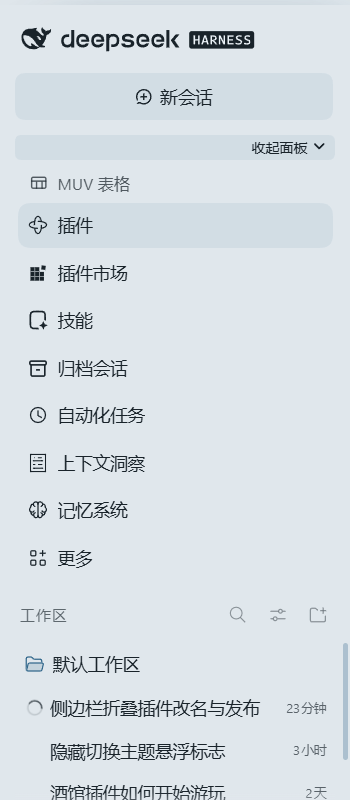
Adds a collapse toggle above the DSH sidebar panel list. One click hides the whole panel block (MUV 表格 / 插件 / 插件市场 / 技能 / 归档会话 / 自动化任务 / 上下文洞察 / 记忆系统 / 更多) so the workspace list below it gets the vertical space.
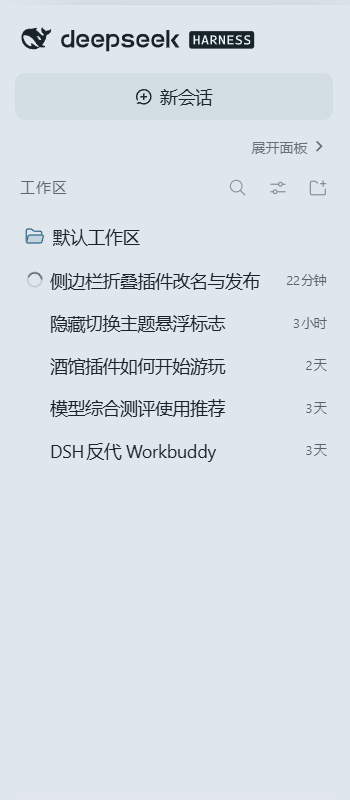
Nothing else changes: the sidebar itself stays, the collapse state is remembered per browser, and the workspace area simply grows from one row-height section up.
What it looks like
Expanded — the toggle sits right under 「新会话」, above 「MUV 表格」:
Collapsed — every panel entry row is gone and 工作区 fills the height:
Install
dsh plugin --profile web add dsh-sidebar-panel-collapse
Or from a checkout of this repository:
dsh plugin --profile web add github:Sunday530/dsh-sidebar-panel-collapse
Restart DeepSeek Harness once after installing so the bundle row is composed into the profile. In the plugin market card you can toggle it off/on at any time.
How it works
The browser half (lib/client.js) registers one client bundle:
- Injects a single
<style>element keyeddsh-sidebar-panel-collapse/toggle.css. All hiding rules key onhtml[data-dsh-sidebar-panel-collapsed="1"], so the state lives in one attribute on<html>and the rules are trivially reversible. - Inserts a 20px-high chevron button as a sibling of the sidebar's panel
<nav>(nav[class*="_panelList"]), directly under the new-session button. The shell's React tree never removes it, because it is not part of that tree; aMutationObserverre-attaches it if the sidebar is re-rendered. - Marks any plugin entry button that skips the
sidebar.panellistslot and mounts itself directly into the sidebar column (dshpc-extra), plus attribute-based rules for the plugins that stamp a stable data attribute on their row ([data-dsh-muv-entry],[data-dsh-mnemon-entry],[data-dsh-vr-entry],[data-dsh-ctx-entry]). Without this, "collapse" would only hide the slot-based rows and leave the out-of-slot ones behind. - Persists the choice in
localStorageunderdsh-sidebar-panel-collapse:collapsed(and migrates the olderdsh-panel-collapse:collapsedkey once).
The node half (lib/index.js) is intentionally a no-op cordis plugin — it exists only
so the package is a valid dsh.bundle row. It exports a named apply because cordis
rejects a module that has neither an apply export nor a callable default
(invalid plugin, expect function or object with an "apply" method, received object).
Notes
- Selectors match CSS-module class names by their stable suffix (
_panelList,_newSession,_collapsed) rather than the hashed whole name, so a rebuild of the shell does not break the plugin. - The toggle is hidden while the sidebar is in its 56px rail (
_collapsed), because the shell already hides the panel list there. - The plugin never touches the shell's own collapsed state or width — it only hides the panel-entry block.
- Tested against DSH release
0.2.1-rc.5.
License
MIT
Links
More in this category
zhu1090093659/dsh-web#packages/dsh-task-board★ 10247
Task board for the dsh web GUI: a sidebar multi-column kanban whose cards run in real DSH agent sessions and can also be scheduled with cron expressions, executed host-side even with the browser closed.
zhu1090093659/dsh-web#packages/dsh-web-all★ 10247
Plugin and skin collection for the DSH Web UI: task board, Git graph, right-side panel, remote mobile UI, pet, live token stats, and a skin center.
ccch1mneyyy/dsh-TUI★ 7252
Claude Code-style full-screen terminal UI: pixel-whale header, live status line, and streaming thought expansion.
MeteorNOX/DeepSeek-Balance-Whale-Widget★ 7046
A fixed-corner whale widget for the DSH web GUI — balance, today's usage and per-turn cost with peak/off-peak pricing, editable balance-alert and daily-budget bubbles, a module-based custom bubble queue with A/B weighted choices and random lines or images, 30+ vendor templates (OpenAI, OpenRouter, Kimi, SiliconFlow, Ark, Zhipu, MiniMax and more) with per-model balance and subscription quota, plus task-end sound, imported audio, custom roles and a resource manager. Local-only, no telemetry.
omdsh-dev/DSH-better-sidebar★ 5011
Full sidebar workbench with file rendering and editing, terminal, Git, and subagents; third-party plugins can register new tabs.
Devin-AXIS/deepseek-design#deepseek-idesign★ 1778
Visual design studio for websites, app prototypes, posters, cards, reports, and magazines, with templates, direct element editing, selection-aware AI draft handoff, and export.
Community comments
Comments are public GitHub Discussions. Loading them connects to GitHub and Giscus; a GitHub account is required to post.