Sidebar session-row status lamp: blue dot for idle, hollow ring for parked (manual, or automatic after 5 days without conversation), solid grey dot for archived; the first item under View options → Filter sessions hides archived and parked sessions. Native pending, running and unread lamps stay unchanged.
Install
# from npm (prebuilt)
dsh plugin --profile web add dsh-status-lamp
# from GitHub (first run asks for allowBuilds approval — follow the hint, retry)
dsh plugin --profile web add github:SpokAtom/dsh-status-lamp
Any plugin you install runs third-party code with your own permissions — it can read your files, use your credentials, and reach the network, and tool approvals don’t sandbox it. GitHub-sourced plugins also run build scripts at install time — pnpm blocks those until you allow them, so an install can stop with ERR_PNPM_GIT_DEP_PREPARE_NOT_ALLOWED or ERR_PNPM_IGNORED_BUILDS; dsh prints the exact key to add under allowBuilds in your profile’s pnpm-workspace.yaml, and the install works on the next run. Allowing a build is a trust decision: only install sources you trust, and pin a commit (github:owner/repo#sha).
README
A status lamp for the session rows in the DeepSeek Harness sidebar: a blue dot for idle, a hollow grey ring for parked, a solid grey dot for archived — plus a one-click Hide archived and parked toggle in the view options menu. Pending, running and unread lamps stay exactly as DSH ships them.
English | 简体中文
Why it exists
DSH's own lamp expresses only four states (pending interaction, running, unread completion, idle), and two of the states it cannot express are the ones that matter for a long sidebar:
- Idle: nothing is drawn in the leading cell.
- Archived: the leading cell is left blank, so an archived row looks identical to an idle one.
The result is that idle, parked and archived sessions all look the same, long-tail sessions pile up, and there is no way to see at a glance which sessions should be put away. This plugin brings the three-way split back and parks sessions that have had no conversation for 5 days.
| Without this plugin | With this plugin | |
|---|---|---|
| Idle | nothing | 🟦 blue dot |
| Parked (manual / automatic) | not expressible | ⚪ hollow grey ring |
| Archived | indistinguishable from idle | ⚫ solid grey dot (right of the time) |
| Pending / running / unread | DSH native lamps | unchanged |
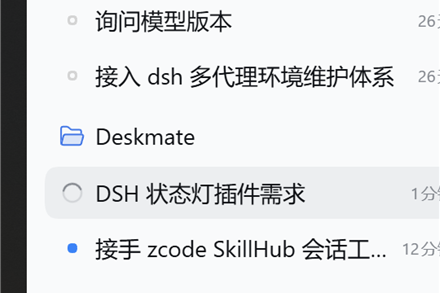
Sample session titles are the author's own data in Chinese; the lamps themselves are language-independent.
What the three lamps mean
| Lamp | State | How it is decided | Where it renders |
|---|---|---|---|
| 🟦 blue filled dot | Idle | the native primary state is idle and the session is not parked | leading 16px cell |
| ⚪ hollow grey ring | Parked | marked manually, or last activity ≥ 5 days ago | leading 16px cell |
| ⚫ solid grey dot | Archived | the session is in the archived set | right of the time label (DSH hard-codes an empty leading cell for archived rows) |
Priority: native four states > parked > idle. A parked session that starts running is covered by the native running ring; an unread result covers it with the green dot; the parked ring returns once the row is idle again. Archived is shown independently and outranks parked.
Install
Requires DSH 0.2.2-rc.1 or newer, and the name of the profile you actually run (the desktop app uses desktop, the web build uses web).
Option 1: npm (recommended)
dsh plugin --profile desktop add dsh-status-lamp
Option 2: GitHub (pin a commit for production)
dsh plugin --profile desktop add github:SpokAtom/dsh-status-lamp
# pinned: dsh plugin --profile desktop add github:SpokAtom/dsh-status-lamp#<commit>
Option 3: a local directory (development)
dsh plugin --profile desktop add "D:\path\to\dsh-status-lamp"
Restart the app afterwards — the desktop profile reads its bundles at startup. The web build only needs a page refresh.
Verify: open the Plugins page; a "Status lamp" entry should be listed. Back in a conversation, idle session rows should show a blue dot.
Usage
1. Idle blue dot (automatic)
Works as soon as the plugin is enabled; nothing to configure.
2. Park / unpark a session manually
- Find the session row in the sidebar.
- Right-click it (or click the
…button at the end of the row). - Pick Park session — the leading cell turns into a hollow grey ring. Right-click again and pick Unpark session to restore the blue dot.
Unparking records a wake-up timestamp: the five-day rule will not immediately re-park a session you just woke. Once the session gets new conversation, the rule applies again.
3. Automatic parking after 5 quiet days
When a session's last activity (updatedAt) is at least five days old, it turns into a hollow grey ring without a page refresh — a minute-level clock recomputes it.
The threshold is a constant; change it and reinstall:
// client.js
const AUTO_PARK_MS = 5 * 24 * 60 * 60 * 1000; // 7 days: 7 * 24 * ...
4. Hide archived and parked sessions
- Click the sliders icon in the "Workspaces" header to open the view options.
- The Filter sessions section has a new first item: Hide archived and parked.
- Click it once: archived and parked rows disappear. Click again: they come back.
The switch is stored in browser local storage and survives restarts.
5. Archived rows
Use DSH's own archive action (session row menu → Archive). Archived rows get the solid grey dot, placed to the left of the relative time.
Decision order
1. native pending / plan review / question  -> native amber dot (this plugin stays out)
2. native running / running subagents       -> native animated ring (stays out)
3. native unread completion                 -> native green dot (stays out)
4. manual park mark                         -> hollow grey ring
5. last activity >= 5 days and not woken    -> hollow grey ring
6. everything else                          -> blue dot
- "Last activity" is
updatedAtfrom DSH's session list snapshot; the plugin never reads conversation content. - Manual parking is visual only: it does not block execution or interrupt tasks.
Data and configuration
| Data | Location | Shape |
|---|---|---|
| park marks / wake timestamps | browser localStorage → dsh.status-lamp.parked.v2 |
{ "explicit": ["sessionId"], "awake": { "sessionId": timestamp } } |
| filter switch | browser localStorage → dsh.status-lamp.filter.v1 |
hide or show |
| threshold | AUTO_PARK_MS in client.js |
reinstall after editing |
Example — clear all manual marks:
localStorage.removeItem('dsh.status-lamp.parked.v2')
Compatibility
- Developed and verified on DSH 0.2.2-rc.1 / rc.3,
desktopprofile, Windows. package.jsondeclares"engines": { "dsh": ">=0.2.2-rc.1" }.- Uses official extension points only:
sidebar.session.row.leading,sidebar.session.row.trailing, the session-row menu viactx.contextMenus, and the Clientlocale/contextMenus/sessionsservices. - The filter row is a DOM-level addition: DSH's view-options menu exposes no plugin slot, so the plugin clones a native menu row into the "Filter sessions" section while the menu is open, and hides rows through its own stylesheet. If a DSH upgrade changes that menu, the item silently disappears; the native UI is never broken.
Troubleshooting
| Symptom | Likely cause | Fix |
|---|---|---|
| No blue dots in the sidebar | plugin disabled, or installed into a different profile | check the Plugins page; make sure it was added to the profile the app runs |
| A parked session still shows a blue dot | it is running or has unread results | expected: native states outrank parked |
| No "Hide archived and parked" item | the DSH version changed the menu structure (DOM addition) | update the plugin; meanwhile use the native "Hide archived" filter and park rows manually |
| Ticking the switch changes nothing | there are no archived or parked sessions in this view | expected |
| Manual marks gone after restart | site data cleared / different browser | marks are browser-local; automatic parking is unaffected |
| Empty workspace header remains | the filter hides session rows only | known limitation |
Permissions and privacy
- No network requests; nothing is uploaded.
- No writes to the Host or to session logs; archive membership and timestamps come from DSH's own list snapshot.
- Only local browser storage holds the park marks and the filter switch.
Development
index.js             Host half (empty; makes the bundle valid)
client.js            all logic: two row seats, park menu action, view-options filter row
cordis.patch.yml     bundle patch inserting the status-lamp row
locale/{zh,en}.json  title and description shown in Plugin Manager
docs/                images
DESIGN.md            design notes and trade-offs
Reinstall after editing client.js (a linked install does not hot-reload):
plugin_manager: remove_bundle dsh-status-lamp -> install_bundle "D:\dsh space\plugins\dsh-status-lamp"
License
MIT
Links
More in this category
zhu1090093659/dsh-web#packages/dsh-task-board★ 10458
Task board for the dsh web GUI: a sidebar multi-column kanban whose cards run in real DSH agent sessions and can also be scheduled with cron expressions, executed host-side even with the browser closed.
zhu1090093659/dsh-web#packages/dsh-web-all★ 10458
Plugin and skin collection for the DSH Web UI: task board, Git graph, right-side panel, remote mobile UI, pet, live token stats, and a skin center.
ccch1mneyyy/dsh-TUI★ 7797
Claude Code-style full-screen terminal UI: pixel-whale header, live status line, and streaming thought expansion.
MeteorNOX/DeepSeek-Balance-Whale-Widget★ 7271
A fixed-corner whale widget for the DSH web GUI — balance, today's usage and per-turn cost with peak/off-peak pricing, editable balance-alert and daily-budget bubbles, a module-based custom bubble queue with A/B weighted choices and random lines or images, 30+ vendor templates (OpenAI, OpenRouter, Kimi, SiliconFlow, Ark, Zhipu, MiniMax and more) with per-model balance and subscription quota, plus task-end sound, imported audio, custom roles and a resource manager. Local-only, no telemetry.
omdsh-dev/DSH-better-sidebar★ 5191
Full sidebar workbench with file rendering and editing, terminal, Git, and subagents; third-party plugins can register new tabs.
omdsh-dev/dsh-genui★ 1007
Interactive UI components rendered inline in replies: layout, charts, forms, quizzes, mermaid, 3D scenes, and an action event loop back to the model.
Community comments
Comments are public GitHub Discussions. Loading them connects to GitHub and Giscus; a GitHub account is required to post.