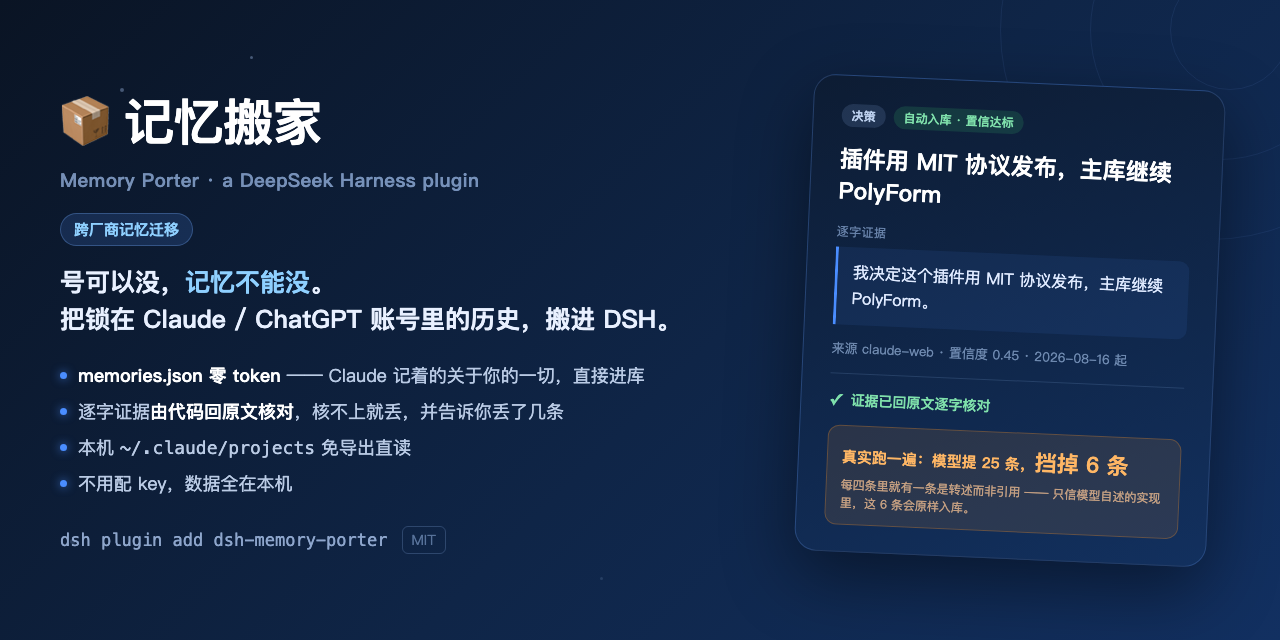
Brings your existing Claude / ChatGPT history into DSH: instant zero-token import of the memories.json inside a Claude export, local Claude Code transcripts with no export needed, and conversations distilled through the model you already configured in DSH. Every memory carries verbatim evidence checked against the source by code — a paraphrase is dropped and counted, and evidence found only in the assistant turns is always routed to review rather than stored.
Install
# from npm (prebuilt)
dsh plugin --profile web add dsh-memory-porter
# from GitHub (first run asks for allowBuilds approval — follow the hint, retry)
dsh plugin --profile web add github:Shiye-10Pages/dsh-memory-porter
Any plugin you install runs third-party code with your own permissions — it can read your files, use your credentials, and reach the network, and tool approvals don’t sandbox it. GitHub-sourced plugins also run build scripts at install time — pnpm blocks those until you allow them, so an install can stop with ERR_PNPM_GIT_DEP_PREPARE_NOT_ALLOWED or ERR_PNPM_IGNORED_BUILDS; dsh prints the exact key to add under allowBuilds in your profile’s pnpm-workspace.yaml, and the install works on the next run. Allowing a build is a trust decision: only install sources you trust, and pin a commit (github:owner/repo#sha).
README
Accounts come and go. Your memory shouldn't.
Bring the history locked inside your Claude / ChatGPT accounts into DeepSeek Harness — every memory carries verbatim evidence, and you approve them one by one.
中文 · Community plugin, not affiliated with DeepSeek.
What this solves
The DSH ecosystem already has plenty of memory plugins. They all solve "remember from today onward."
None of them solve: "what happens to the two years I already spent in Claude and ChatGPT?"
- Your memory is locked to one vendor's account. Everything that taught Claude to understand you lives inside that account, and it does not travel with you.
- Switching platforms means starting from zero — preferences, conclusions, and hard-won lessons from thousands of conversations, gone in one move.
- Few people know this: the Claude Code transcripts under
~/.claude/projectsstay on your own disk regardless of what happens to the account.
Memory Porter pulls that history out, distills it into memories backed by verbatim evidence, and hands them to DSH for recall once you approve them.
Already running another memory plugin? They handle "remember from today", this handles "bring the past in" — export to plain Markdown / JSONL and feed it straight to them.
Sources
| Source | Channel | Export needed | Verification |
|---|---|---|---|
| Claude cloud memory | memories.json inside the export |
Yes | ✅ Verified on a real export (zero tokens — already distilled) |
| Claude Code (local) | Reads ~/.claude/projects directly |
No | ✅ Verified on real data |
| claude.ai (web / desktop) | Account export conversations.json |
Yes | ✅ Verified on a real export |
| ChatGPT (web / desktop) | Account export conversations.json |
Yes | ⚠️ Implemented to the documented format, not yet verified against a real export |
⚠️ About the ChatGPT connector: the parser follows ChatGPT's documented export shape (the tree-structured
mapping) and is covered by unit tests, but the author does not yet have a real ChatGPT export to verify end to end. If yours fails to parse or the result looks wrong, please open an issue describing the shape — do not attach your conversation content. Saying so plainly rather than letting you find out the hard way.
Getting your export in three steps
The main path depends on an official export, and that is where all the friction is:
Claude (claude.ai)
- Sign in → avatar (bottom left) → Settings → Privacy → Export data
- Wait for the email (hours to a day), download the zip from the link
- Unzip it and put the folder path into the first field on the Port tab
Inside you will find conversations.json (your history) and memories.json — everything
Claude remembers about you. The latter is the zero-cost path and imports instantly.
ChatGPT
- Sign in → avatar (top right) → Settings → Data controls → Export data
- Wait for the email, download the zip
- Unzip it and use the same field
Don't want to wait for an email? After installing, just click "See what is still here" — your Claude Code conversations under
~/.claude/projectsare read directly, no export needed.
Install
dsh plugin --profile web add dsh-memory-porter
No API key required — distillation borrows the model you already configured in DSH.
After installing, a 📦 Memory Porter row appears at the bottom of the sidebar (just above
the Settings gear). It opens the panel: Port / Pending / Library. A small badge in the
conversation header serves as a secondary entry point. The model can call the recall_memory
tool directly; retrieval is fully local (BM25, no embedding model needed).
Three hard rules
- No verbatim evidence, no entry. Every memory must carry the original text — and the evidence is checked against the source by code, not taken on the model's word. If it doesn't match, it's dropped, and you're told how many were dropped. Evidence comes in two tiers: matched against your own messages it takes the normal path; found only in the AI's replies (usually the AI accurately restating you) it is still kept but always pushed to Pending and labelled — that is a restatement, not your own words.
- Nothing AI-inferred lands automatically. Claude's cloud memory is the model's summary of you, not your own words, so all of it goes to the review queue.
- Your data stays on your machine. The library is JSONL under
~/.dsh/memory-porter/— no telemetry, no account, no cloud sync.
What lands automatically vs. what you review — your call
Every memory carries the reason it got in. Visible in the panel and in exports, no black box:
| Reason | Meaning |
|---|---|
| Auto · confidence met | Trustworthy source, solid evidence — stored directly |
| Auto · corroborated | The same conclusion appears in several places; merged, confidence raised |
| Review · AI-inferred | From Claude's cloud memory — the model's summary, not your words |
| Review · high impact | Touches money, direction, or resources |
| Review · conflicts | Same topic as an existing memory but a different conclusion — you decide which holds, the plugin won't |
| Review · low confidence | Below the threshold |
Three settings, via reviewMode in cordis.yml or the panel:
- id: memory-porter
  name: dsh-memory-porter
  config:
    reviewMode: balanced   # strict | balanced | trusting
    scanLimit: 100         # conversations per scan — this is a cost cap, not a perf cap
strict— nothing lands without approval. Safest; the queue gets long.balanced(default) — only the four "Review" rows above stop you.trusting— only AI-inferred items and conflicts stop you.
One thing stated plainly: on the default setting, memories from Claude / ChatGPT web exports land exactly on the auto-store threshold (source reliability 0.60 × LLM extraction 0.75 = 0.45, equal to the cutoff, and the test is "below the line gets held"). That is a deliberate trade-off — a port is usually large, and nobody reads a queue of hundreds. Switch to
strictif you want to be more careful.
What it costs
Distillation sends your conversation text to a model, so the panel estimates the cost before anything runs, and only proceeds once you confirm.
Measured reference: agentic coding sessions run about 13k tokens each. At the default cap of 100 conversations, one port costs roughly ¥2.5 (off-peak) to ¥5 (peak). Ordinary web chats are much shorter.
memories.json uses the zero-cost path — it is already distilled and never touches a model.
⚠️ Distillation is the one step that leaves your machine: conversation text goes to whichever provider you configured in DSH. Scanning, retrieval, review, and export are entirely local.
License
MIT
Links
More in this category
vectorize-io/hindsight#coding-agents★ 44359
Hindsight, agent memory that learns: long-term project memory with auto recall and retain, knowledge pages, deep reflection, and per-repo memory banks.
volcengine/OpenViking#examples/dsh-memory-plugin★ 39101
OpenViking memory and context bundle for DeepSeek Harness: pre-step auto-recall and profile injection, session capture, `viking://` URI guarding, and recall/write memory tools backed by an OpenViking server.
agentscope-ai/ReMe#dsh★ 3545
Connects DeepSeek Harness to ReMe's local-first, self-evolving personal knowledge base: automatically captures completed main-agent conversations as user-owned Markdown memory, searches conversations and source material through reme_search with BM25, optional embeddings, and wikilink expansion, and schedules daily memory consolidation.
zilliztech/memsearch#MemSearch★ 2691
Shared Markdown memory for DSH and other coding agents, with automatic capture, pre-step context injection, searchable recall, and memory-to-skill self-evolution through a review panel.
vshulcz/deja-vu#extensions/dsh★ 1116
Reads the session files thirty-three other coding agents on this machine already wrote — Claude Code, Codex, Cursor, VS Code Copilot Chat, opencode, OpenClaw, Hermes, Kimi, Cline, Zed and more — including sessions from before it was installed: six tools (deja_recall, deja_session, deja_blame, deja_fix, deja_how, deja_remember), a /deja command, and optional automatic recall added to the runtime context. Local BM25 index, no LLM, no embeddings, no network (dsh plugin --profile web add dsh-deja).
adoresever/graph-memory★ 633
Traceable, searchable cross-session memory for DeepSeek Harness — conversation knowledge as typed graph nodes (TASK/SKILL/EVENT) and typed edges.
Community comments
Comments are public GitHub Discussions. Loading them connects to GitHub and Giscus; a GitHub account is required to post.