Conversation node navigation rail for the DSH Web UI: one dash per user message on the right edge, reading-position tracking, hover preview card, click-to-jump with highlight line, sliding window, and auto-hide.
Install
# from GitHub (first run asks for allowBuilds approval — follow the hint, retry)
dsh plugin --profile web add github:SherUnlocked-4869/dsh-plugin-msg-nav
Any plugin you install runs third-party code with your own permissions — it can read your files, use your credentials, and reach the network, and tool approvals don’t sandbox it. GitHub-sourced plugins also run build scripts at install time — pnpm blocks those until you allow them, so an install can stop with ERR_PNPM_GIT_DEP_PREPARE_NOT_ALLOWED or ERR_PNPM_IGNORED_BUILDS; dsh prints the exact key to add under allowBuilds in your profile’s pnpm-workspace.yaml, and the install works on the next run. Allowing a build is a trust decision: only install sources you trust, and pin a commit (github:owner/repo#sha).
README
dsh-plugin-msg-nav
DeepSeek Harness conversation node navigation rail plugin: renders a column of short dash nodes on the right edge of the conversation area — one node per real user message — tracking your reading position. When the mouse approaches the node strip, it "morphs open" into a single-line message preview panel (covering the strip's original position; moving away restores it). Clicking any preview smoothly jumps to that message and highlights the dash; when there are too many nodes, scroll the wheel inside the hover area to browse the list; Alt+↑ / Alt+↓ jump directly between adjacent user messages. The host-side session projection makes the strip cover all user messages across the entire history the moment you enter a session — zero page-fetch requests, no initial lag.
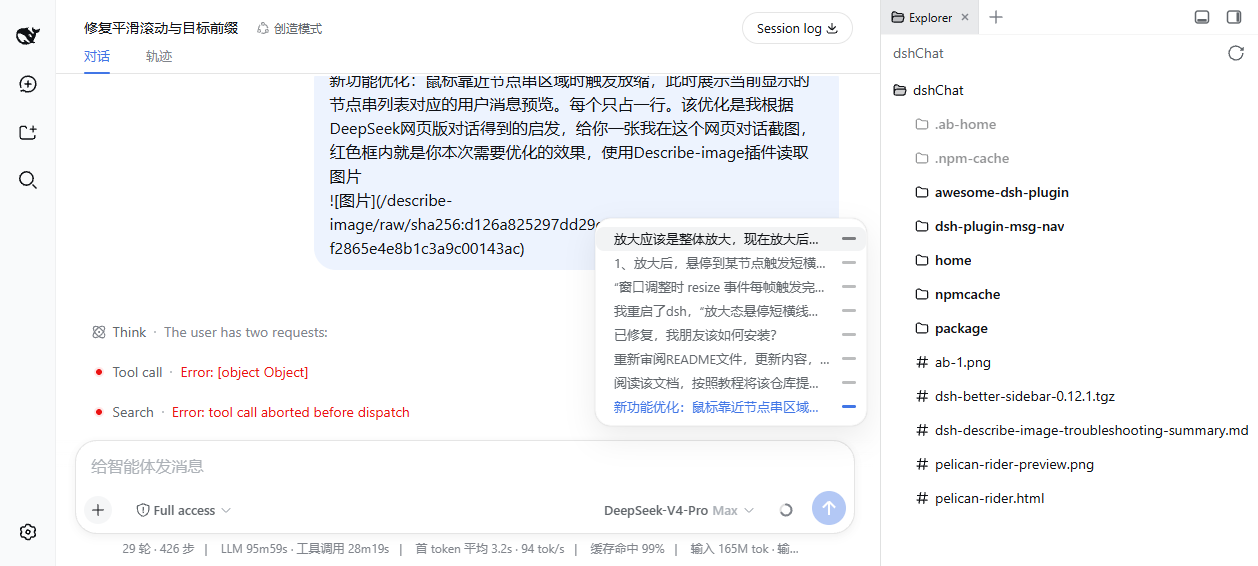
Distributed as a bundle: after dsh plugin install, it automatically joins the profile layer stack — no manual config edits. Architecture follows dsh-chat-timeline's host session projection + client on-demand loading pattern.
Installation (official DSH command)
# Install directly from GitHub
dsh plugin --profile web add github:SherUnlocked-4869/dsh-plugin-msg-nav
dsh plugin forwards to pnpm to install into the profile directory and automatically adds packages declaring dsh.bundle to the dsh.profile.bundles layer stack. Then start (or restart, if already running) the deployment:
dsh web # or dsh --profile <your profile>
Update to the latest version:
cd ~/.dsh/profiles/web && pnpm update dsh-plugin-msg-nav
Uninstall:
dsh plugin --profile web remove dsh-plugin-msg-nav
Features
| Feature | Behavior |
|---|---|
| Node navigation rail | Vertical column of short dash lines on the right edge of the conversation area, one node per real user message (system-injected goal auto-continuations etc. are not counted), constant 20px spacing |
| Hover popup panel | Mouse enters the node strip area: the dashes fade out and a single-line preview panel pops out to the left (0.18s scale animation, covering the strip's original position; in-row dashes land exactly on the x-coordinates of the original nodes, as if the strip morphs open); moving out restores the strip |
| Panel layout | One line per message (text left + dash right), 24px line height, symmetric 8px vertical padding; hovering a line highlights its text and dash synchronously with an 8px rounded background; the current reading-position line (text + dash) is highlighted in brand blue/white |
| List scrolling | Shows at most 10 items; when exceeded, hovering in the node strip area and scrolling the wheel scrolls the list (the page itself does not scroll), and the panel scrolls proportionally |
| Exit re-center | After the mouse leaves the hover area, the list smoothly re-centers on the current reading position and resumes tracking |
| Reading-position tracking | The active node (brand blue / white in dark mode) updates in real time with scroll detection |
| Click to jump | Smooth-scrolls to the corresponding message + full-width brand-blue highlight dash (1.5s fade-out); a watchdog fallback guarantees landing even under streaming-output interference, and the list auto-centers on the target node |
| Keyboard jump | Alt+↑ / Alt+↓ smooth-jump between adjacent user messages, sharing the click-to-jump path (on-demand loading for unloaded messages + highlight dash + list re-centering); repeated/held presses keep stepping across messages; suppressed while the focus is in an input holding a draft, so typing is never interrupted |
| Full history instantly in strip | Host-side session projection (msgNavMessages) folds the entire log; the full user message list arrives instantly via the history tail page + push frames — zero page-fetch requests on entering a session, the strip immediately covers all user messages with no initial lag. Deployments without the projection registry mounted automatically fall back to background page-by-page loading (50 per page, up to 120 pages), with a pulsing dash at the strip's end while loading |
| Click on-demand loading | When clicking an old message node not yet rendered into the window, older history is fetched page by page until the message enters the window and its row renders, then smooth jump + highlight (precisely associated by message id and window row, independent of node key format) |
| Auto-hide | Hidden when there are <2 user messages, the session is empty, or the view is not a conversation (e.g. the trace page) |
| Rendering details | Node positions are aligned to device pixels by devicePixelRatio (consistent thickness); window resizes are rAF-coalesced so the UI never lags; the rail and panel are window-rendered (only visible-window elements are created), scroll detection is rAF-throttled with an incrementally-maintained row cache — near-zero plugin overhead on long sessions |
How it works
The same "projection fast path + on-demand paging" pattern as dsh-chat-timeline:
- Host projection: the host half registers the
msgNavMessagessession projection unit, folding everyuser/messageevent in the entire log (only real user messages and steering withsource.kind === "user"; injected context lines are excluded — exactly matching the chat view node assembler's classification) into a full{seq, time, text, id}list; the framework keeps driving it, delivered via the history tail page andsession/projectionpush frames. - Client instant rendering: the node strip renders the full list directly with
useProjection("msgNavMessages"); messages within the loaded window are associated with DOM rows by persistent id for reading-position tracking and jumps. - Click on-demand paging: when an old node not yet in the window is clicked,
loadOlder()is looped by message id (50 per page, up to 120 pages) until the target enters the window and renders its row, then smooth jump + highlight. - Fallback: on deployments without the projection registry mounted, the client automatically falls back to a background
loadOlderfull loop (stopping immediately once the projection arrives); session switches invalidate the old loop generationally, and plugin unload stops it too.
Reference project
The new "full history instantly in strip" and "click on-demand loading" features reference jjxjjjjiik-bot/dsh-chat-timeline (MIT):
- Host session projection (
msgNavMessages) follows itsdshChatTimelineprojection unit's folding approach: fold the entire log into a full user message list on the host side (only real user messages and steering withsource.kind === "user", injected context excluded) and deliver it instantly to the client via the history tail page and push frames, avoiding the initial lag of client-side page-by-page history pulls; - Client on-demand
loadOlder(fetching page by page until the target enters the window when clicking old nodes) follows itsjumpToMessageload-wait-land pattern; this plugin instead associates by persistent message id and window row, without relying on its hard-coded node key format; - The background page-by-page fallback for deployments without the projection likewise follows its client
loadOlderloop (50 per page, up to 120 pages).
Package structure
lib/client.js— browser-side bundle (window.__ModuleLoader__registration format, loaded/unloaded with the DSH module system); node strip UI + projection instant rendering + fallback background loading + click on-demand loadinglib/index.js— host-side session projection unitmsgNavMessages(full user message folding; automatically inactive when the registry is absent)lib/types/— TypeScript type declarationscordis.patch.yml— bundle patch layer:insertoneui-msg-navclient linepackage.json— dual declarations ofdsh.client(browser manifest) +dsh.bundle(bundle manifest)assets/screenshot.png— screenshot
FAQ
dsh plugin add reports ERR_PNPM_TARBALL_INTEGRITY?
If a third-party plugin installed in the profile via a refs/heads/... branch address is updated upstream, the new tarball checksum no longer matches the lockfile, and pnpm's supply-chain protection rejects the entire install. After confirming the upstream update is trustworthy, pin that dependency to a specific commit instead (this plugin is installed that way):
"dependencies": {
  "<pkg>": "https://codeload.github.com/<owner>/<repo>/tar.gz/<commit-sha>"
}
Then run pnpm install to refresh the lockfile, and re-run dsh plugin add.
The node strip doesn't appear?
- Confirm the deployment has been restarted and the page refreshed (bundle changes require a deployment restart; refreshing the page usually fetches the new bundle)
- The current session needs ≥2 real user messages and must be in the "conversation" view
Development
git clone https://github.com/SherUnlocked-4869/dsh-plugin-msg-nav.git
# local integration: install into a test profile
dsh plugin --profile <profile> add file:<abs-path>
dsh --profile <profile> --port 3090
License
MIT
Links
More in this category
zhu1090093659/dsh-web#packages/dsh-task-board★ 8121
Task board for the dsh web GUI: a sidebar multi-column kanban whose cards run in real DSH agent sessions and can also be scheduled with cron expressions, executed host-side even with the browser closed.
zhu1090093659/dsh-web#packages/dsh-web-all★ 8121
Plugin and skin collection for the DSH Web UI: task board, Git graph, right-side panel, remote mobile UI, pet, live token stats, and a skin center.
omdsh-dev/DSH-better-sidebar★ 3868
Full sidebar workbench with file rendering and editing, terminal, Git, and subagents; third-party plugins can register new tabs.
ccch1mneyyy/dsh-TUI★ 3734
Claude Code-style full-screen terminal UI: pixel-whale header, live status line, and streaming thought expansion.
MeteorNOX/DeepSeek-Balance-Whale-Widget★ 3369
A fixed-corner whale widget for the DSH web GUI — balance, today's usage and per-turn cost with peak/off-peak pricing, editable balance-alert and daily-budget bubbles, a module-based custom bubble queue with A/B weighted choices and random lines or images, 30+ vendor templates (OpenAI, OpenRouter, Kimi, SiliconFlow, Ark, Zhipu, MiniMax and more) with per-model balance and subscription quota, plus task-end sound, imported audio, custom roles and a resource manager. Local-only, no telemetry.
Devin-AXIS/deepseek-design#deepseek-idesign★ 1665
Visual design studio for websites, app prototypes, posters, cards, reports, and magazines, with templates, direct element editing, selection-aware AI draft handoff, and export.
Community comments
Comments are public GitHub Discussions. Loading them connects to GitHub and Giscus; a GitHub account is required to post.