Per-workspace memo/todo panel that auto-captures queued and running user instructions, marks preempted tasks as interrupted, and restores them to their previous state with one click.
Install
# from GitHub (first run asks for allowBuilds approval — follow the hint, retry)
dsh plugin --profile web add github:SeanWang114514/dsh-memo-notebook
Any plugin you install runs third-party code with your own permissions — it can read your files, use your credentials, and reach the network, and tool approvals don’t sandbox it. GitHub-sourced plugins also run build scripts at install time — pnpm blocks those until you allow them, so an install can stop with ERR_PNPM_GIT_DEP_PREPARE_NOT_ALLOWED or ERR_PNPM_IGNORED_BUILDS; dsh prints the exact key to add under allowBuilds in your profile’s pnpm-workspace.yaml, and the install works on the next run. Allowing a build is a trust decision: only install sources you trust, and pin a commit (github:owner/repo#sha).
README
This plugin publishes its README in Chinese only.
按工作区记录未完成任务:自动捕获排队/执行中的用户指令,持久化到磁盘,支持插队打断与一键按原状态恢复重发。为 DeepSeek Harness (dsh) 打造的备忘录/待办插件。
为什么需要它?在长会话里,任务排队、被打断、恢复是家常便饭。memo-notebook 把「我让助手做什么、做到哪了、被打断前是什么状态」变成一个可见、可点、可恢复的面板——再也不怕切换会话或重启 web 后丢失上下文。
✨ 功能亮点
| 功能 | 说明 |
|---|---|
| 🪝 自动捕获 | 发给助手的新指令自动进入备忘录,排队 → 进行中 状态自动流转 |
| ⚡ 插队打断 | 新消息插入时,旧任务自动标记为「打断」,并记录原状态(previousStatus) |
| 🔄 一键恢复 | 恢复按钮按原状态恢复:原排队 → 回排队;原进行中/提问 → 恢复 running 并继续执行 |
| ✅ 划线完成 | 「一键完成」将任务划线下沉(不删除,保留记录);「一键删除」才真正移除 |
| 🗂 状态分类 | 全部 / 排队 / 正在进行 / 提问 / 失败 / 打断 / 已完成(失败与错误合并) |
| 🧹 自动完成 | agent 正常结束时任务自动标记「已完成」划线,手动完成与自动完成区分 |
| 📌 窗口置顶 | 浮动面板固定在侧栏之上、设置窗口之下;标题栏可拖动,位置持久化保存 |
| 💾 同步持久化 | 每次变更立即写盘(同步写入),停止/重启 web 不丢数据 |
| 🌏 UTF-8 存储 | 避免 Windows 控制台编码导致的乱码问题 |
📸 截图
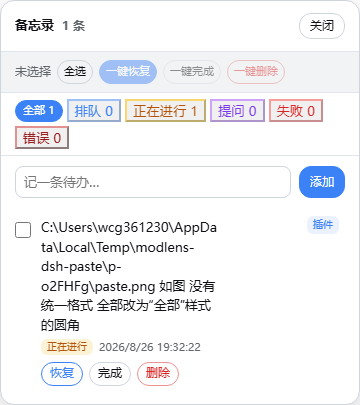
📦 安装
前置要求
- 已安装 DeepSeek Harness (dsh),并有一个可用的 profile(默认
web) - 机器能访问 GitHub(安装时从 GitHub 拉取源码)
方式一:dsh plugin add(推荐 ✅ 已验证)
打开终端,运行:
# 安装到 web profile(最常用)
dsh plugin add SeanWang114514/dsh-memo-notebook --profile web

# 或使用完整仓库地址
dsh plugin add https://github.com/SeanWang114514/dsh-memo-notebook.git --profile web

# 安装到其他 profile(如 default)
dsh plugin add SeanWang114514/dsh-memo-notebook --profile default
--profile也可以放在add前面:dsh plugin --profile web add ...,两种写法等价(均已实测)。
安装成功后,dsh --profile web --dump-config 应能看到 memo-notebook 插件行(含 stateFile 配置)。
方式二:手动链接(开发调试用)
将本仓库克隆后链接到 profile 的 node_modules:
git clone https://github.com/SeanWang114514/dsh-memo-notebook.git
mklink /J "%USERPROFILE%\.dsh\profiles\web\node_modules\memo-notebook" "%CD%\dsh-memo-notebook"
安装后
- 重启 dsh web:让 Host 端(
lib/index.mjs)生效 - 刷新浏览器(Ctrl+F5):加载 Client 端(
lib/client.js) - 页面右下角出现 📝 图标,点击打开备忘录面板即安装成功
验证安装
# 1. 插件已注册
dsh --profile web --dump-config | grep -A2 memo-notebook

# 2. API 可访问(重启 web 后)
curl http://127.0.0.1:3080/api/memo/list
# → {"items":[...]} 表示 Host 端工作正常
卸载
dsh plugin remove memo-notebook --profile web
🚀 使用
- 点击浏览器右下角的 📝 图标打开面板
- 在输入框输入任务,回车/点击「添加」入队
- 任务状态实时流转:排队 → 正在进行 → 已完成(自动划线)
- 被插队打断的任务显示「打断」徽章,点「恢复」按原状态回去
- 勾选多条目后可用「一键完成 / 一键删除 / 一键恢复」批量操作
面板交互
- 标题栏拖动:按住面板顶部空白处拖动,位置自动记忆
- 分类筛选:点击分类按钮过滤状态,分类按钮风格与删除按钮完全一致
- 勾选:点击条目左侧圆圈,可多选后批量操作
🔌 API
| 方法 | 路径 | 说明 |
|---|---|---|
| GET | /api/memo/list |
列出全部条目 |
| GET | /api/memo/events |
SSE 实时推送状态变化 |
| POST | /api/memo/add |
新增条目 {text} |
| POST | /api/memo/complete |
标记完成(划线保留){id} |
| POST | /api/memo/remove |
删除条目 {id} |
| POST | /api/memo/resume |
恢复条目到原状态并继续执行 {id} |
| POST | /api/memo/batch-complete |
批量完成 {ids} |
| POST | /api/memo/batch-remove |
批量删除 {ids} |
| POST | /api/memo/batch-resume |
批量恢复 {ids} |
示例
# 新增
curl -X POST http://127.0.0.1:3080/api/memo/add \
  -H "Content-Type: application/json" \
  -d '{"text": "帮我写周报"}'

# 恢复
curl -X POST http://127.0.0.1:3080/api/memo/resume \
  -H "Content-Type: application/json" \
  -d '{"id": "mtbmk094-nhgxutw7"}'
⚙️ 配置
cordis.patch.yml 中通过 stateFile 指定持久化文件:
- insert:
    - id: memo-notebook
      name: memo-notebook
      config:
        stateFile: !!js dshHomePath('memo-notebook/state.json')
默认存储于 ~/.dsh/memo-notebook/state.json(UTF-8,每次操作同步写入)。
🗂 状态流转
用户发消息 ──► queued(排队)
                 │ agent 开始执行
                 ▼
              running(进行中)
                 │ 新消息插队 / agent 空闲
                 ▼
           interrupted(打断,记录 previousStatus)
                 │ 点「恢复」
                 ▼
      回到 previousStatus(queued 或 running)
                 │ agent 正常完成
                 ▼
           completed(已完成,划线保留)
| 状态 | 徽章颜色 | 说明 |
|---|---|---|
| queued | 蓝色 | 排队等待执行 |
| running | 绿色 | 正在执行 |
| asking | 橙色 | 向用户提问中 |
| failed | 红色 | 执行失败(含错误) |
| interrupted | 紫色 | 被新消息打断(记录原状态) |
| completed | 灰色 | 已完成(划线) |
📁 目录结构
memo-notebook/
├── lib/
│   ├── index.mjs   # Host: API + 事件捕获 + 状态流转 + 持久化
│   └── client.js   # Client: 侧栏按钮 + 浮动面板 UI
├── cordis.patch.yml   # dsh 插件挂载配置
├── package.json       # 插件元数据(dsh.bundle manifest)
├── screenshots.json   # 市场截图声明
├── shot-panel.png     # 面板截图
└── README.md
🧩 技术细节
- Host:监听
agent/inbox/inserted(新指令入队)、agent/status(状态流转)、tools/result(工具执行结果)事件,驱动状态机 - Client:原生 DOM + addEventListener,无框架依赖;骨架只构建一次,列表独立渲染,输入框永不被重建(焦点稳定)
- 持久化:同步
writeFileSync,每次变更立即落盘,杜绝进程被杀时数据丢失 - SSE 推送:
/api/memo/events实时推送状态变化,多标签页同步
📝 许可证
MIT License — 自由使用、修改、分发。
Links
More in this category
vectorize-io/hindsight#coding-agents★ 63857
Hindsight, agent memory that learns: long-term project memory with auto recall and retain, knowledge pages, deep reflection, and per-repo memory banks.
volcengine/OpenViking#examples/dsh-memory-plugin★ 42946
OpenViking memory and context bundle for DeepSeek Harness: pre-step auto-recall and profile injection, session capture, `viking://` URI guarding, and recall/write memory tools backed by an OpenViking server.
MemTensor/MemOS#memos-local-plugin★ 12527
Local-first memory plugin for DeepSeek Harness: layered L1/L2/L3 memory with automatic capture, manual memos_* retrieval tools, and a built-in memory viewer.
agentscope-ai/ReMe#dsh★ 3860
Connects DeepSeek Harness to ReMe's local-first, self-evolving personal knowledge base: automatically captures completed main-agent conversations as user-owned Markdown memory, searches conversations and source material through reme_search with BM25, optional embeddings, and wikilink expansion, and schedules daily memory consolidation.
zilliztech/memsearch#MemSearch★ 2956
Shared Markdown memory for DSH and other coding agents, with automatic capture, pre-step context injection, searchable recall, and memory-to-skill self-evolution through a review panel.
vshulcz/deja-vu#extensions/dsh★ 1686
Cross-session memory and context recovery across forty-five other coding agents (45+) on this machine, reading session files they already wrote before install (Claude Code, Codex, Cursor, Windsurf, Trae, Antigravity, VS Code Copilot Chat, opencode, OpenClaw, Hermes, Kimi, Qoder, Cline, Zed, Magpie and more): six tools (deja_recall, deja_session, deja_blame, deja_fix, deja_how, deja_remember), a /deja command, and optional automatic recall injected into runtime context. Local BM25 CLI/MCP index, no LLM, no embeddings, no network (dsh plugin --profile web add dsh-deja).
Community comments
Comments are public GitHub Discussions. Loading them connects to GitHub and Giscus; a GitHub account is required to post.