Session-local scheduled tasks: inject a prompt into the current session after a delay, at a fixed time, or on a repeating interval, so the model wakes up and runs it on time. Manage them from a panel above the composer, the /schedule command, or seven model-facing tools. Timers freeze while DSH is closed and never auto-resume; pause keeps the remaining time, so resuming continues from where it stopped.
Install
# from npm (prebuilt)
dsh plugin --profile web add dsh-tick
# from GitHub (first run asks for allowBuilds approval — follow the hint, retry)
dsh plugin --profile web add github:Saretheya/dsh-tick
Any plugin you install runs third-party code with your own permissions — it can read your files, use your credentials, and reach the network, and tool approvals don’t sandbox it. GitHub-sourced plugins also run build scripts at install time — pnpm blocks those until you allow them, so an install can stop with ERR_PNPM_GIT_DEP_PREPARE_NOT_ALLOWED or ERR_PNPM_IGNORED_BUILDS; dsh prints the exact key to add under allowBuilds in your profile’s pnpm-workspace.yaml, and the install works on the next run. Allowing a build is a trust decision: only install sources you trust, and pin a commit (github:owner/repo#sha).
README
dsh-tick
Schedule work inside a DSH session: when the time comes, a prompt is injected into the current session to wake the model up and run it.
English · 中文
The collapsed summary row above the composer — click it to manage tasks.
What it does
You want the AI to "check the build queue in 5 minutes", "summarize today's work at 11pm", or "look at the deployment every 10 minutes" — say it once, and it happens on time.
dsh-tick brings scheduling into the current session: at the appointed time your prompt is injected into that session, waking the model to carry it out. Tasks belong to the session that created them and never leak into another one.
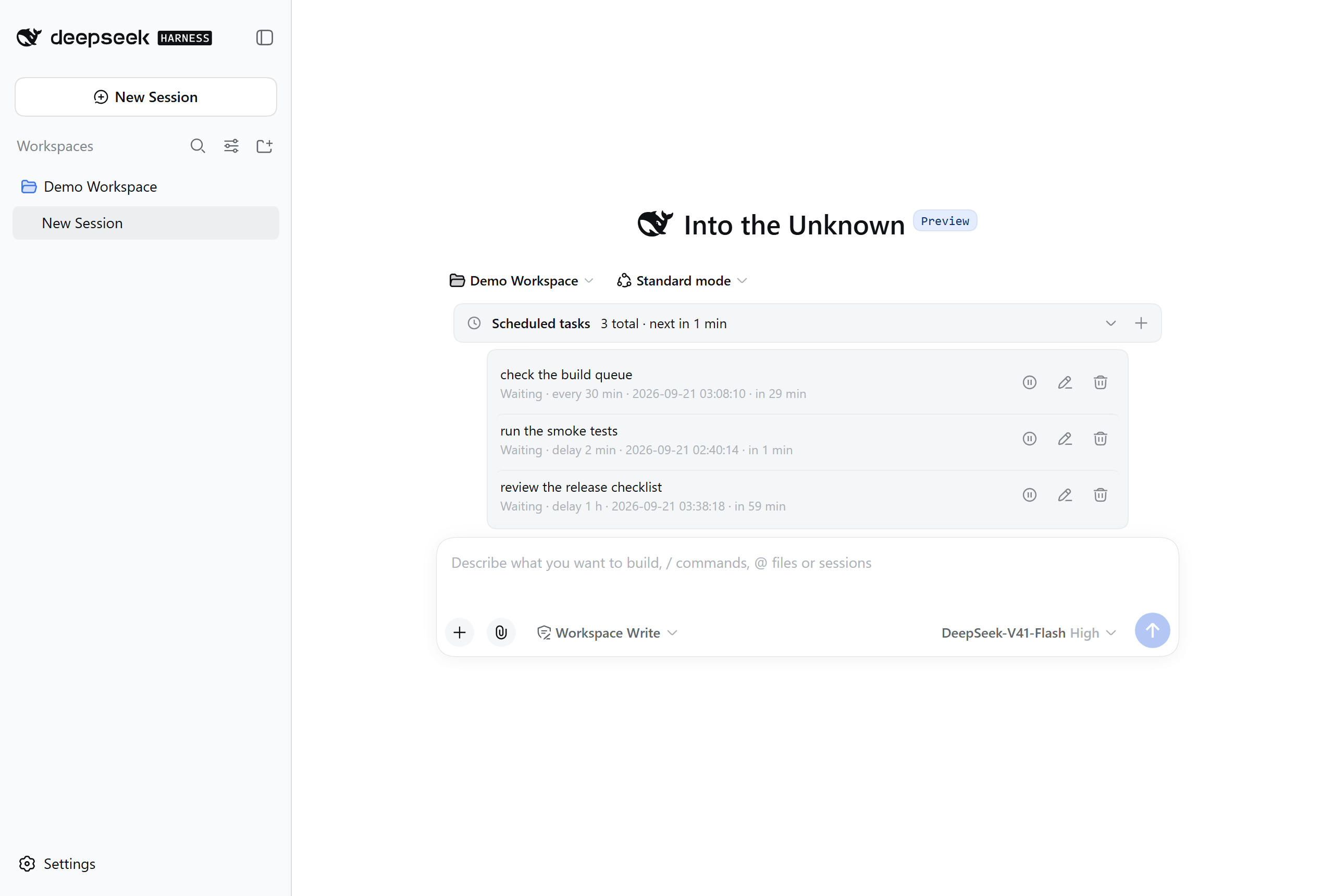
Three timing modes
| Mode | How you ask | Behaviour |
|---|---|---|
| Delay | "check the build queue in 2 minutes" | Runs once when the countdown ends |
| Fixed time | "summarize my work at 23:00 today" | Runs once at that moment |
| Periodic | "look at the deployment every 30 minutes" | Fires on a fixed interval until you pause or delete it |
Delays are capped at 30 days (longer ones are rejected, and the error tells you to use fixed-time mode instead); periodic intervals have no duration cap. To wait longer, use Fixed time with an absolute moment.
One caveat for very long intervals: timers freeze while DSH is closed, so a periodic task only keeps a true interval while DSH stays open.
Three ways to manage tasks
One set of tasks, whichever way you prefer:
- The panel above the composer — expand it to see time remaining, pause, edit, delete;
- The
/schedulecommand — create one right in the chat box, no panel needed; - Let the assistant manage them — your model can create, list, pause and delete tasks directly.
/schedule +30m check the build queue
/schedule +2h30m summarize today's changes
/schedule every 10m look at the deployment
/schedule @2026-09-21T09:00:00+08:00 summarize what is left before standup
/schedule list
Durations use
s/m/h(e.g.+30m,+2h30m); Chinese units (秒 / 分钟 / 小时) work too. Thed(days) unit is not supported — to wait more than a day, use Fixed time with an absolute moment instead.
How it behaves
Pause and resume freeze the remaining time. Pause a task with 4 minutes left, resume it tomorrow, and it still waits 4 minutes — it will not fire immediately just because a night passed.
Timers freeze while DSH is closed (delay and periodic modes). When you reopen DSH those tasks come back paused, so nothing fires while you are away. A fixed-time task whose moment passed in the meantime is marked Overdue and waits for you.
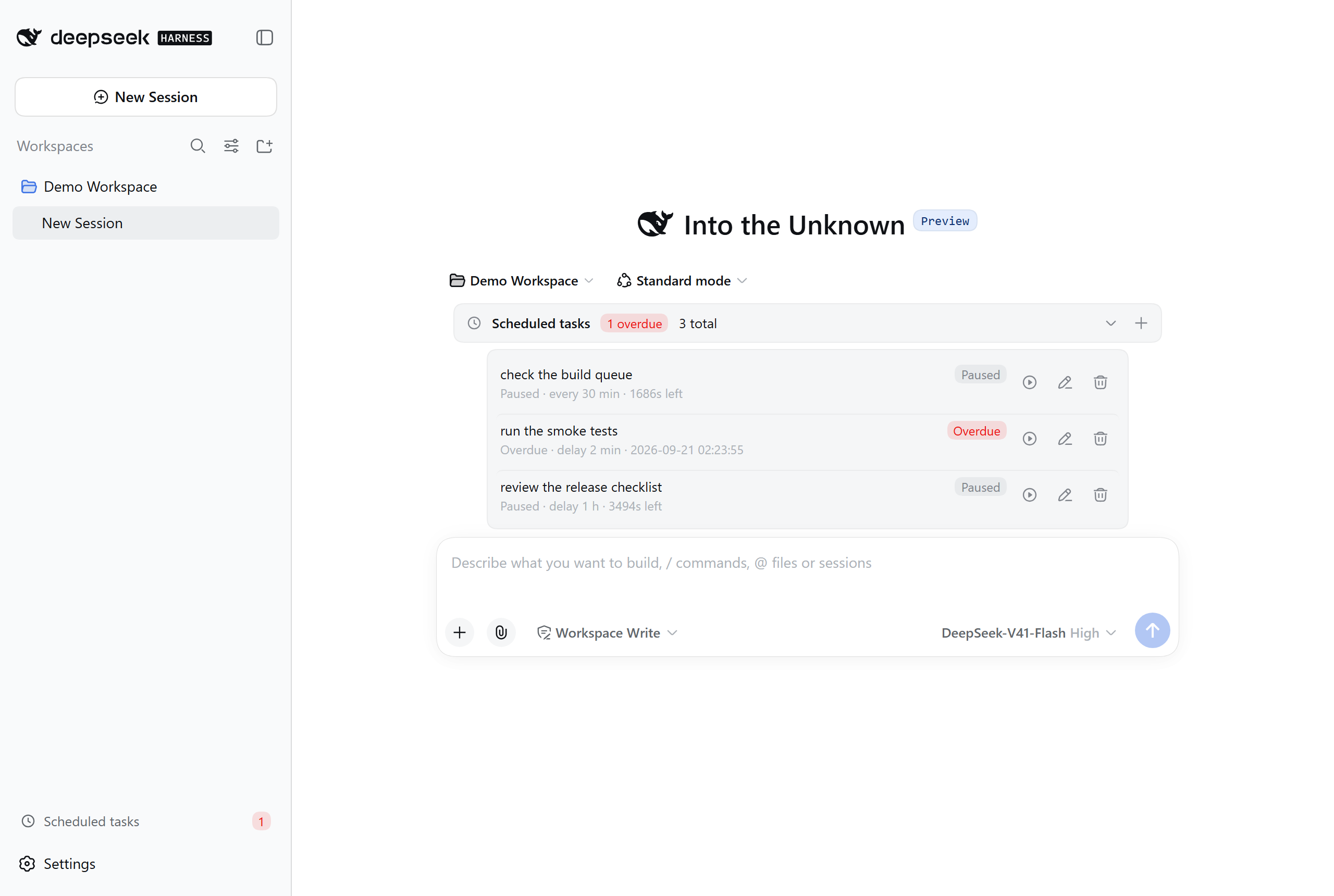
The three rows above are: Paused (periodic), Overdue (fixed time, missed across a restart), and Paused (delay). The red number in the sidebar footer is the total overdue count across all sessions.
An overdue task runs the moment you press play — the resume action is "run now".
Install
dsh plugin --profile web add dsh-tick
Restart DSH afterwards.
Requires DSH
0.1.5-rc.2or a compatible version. The plugin does not touchsettings.yaml; uninstalling removes it along with its own folder, leaving nothing behind.
Configuration
The plugin keeps its own config file inside its own folder
(nothing is written to DSH's settings):
{
  // Language of the prompt injected into the model: 'en' (default) | 'zh' | 'custom'
  "serverPromptLanguage": "en",

  // ── These three gates ship with CONSERVATIVE defaults — raise them to taste ──
  "maxTasksPerSession": 50,      // how many tasks one session may store
  "maxActivePerSession": 10,     // how many may be enabled at once
  "maxInjectionsPerMinute": 1,   // injections per minute (guards self-loops)

  "heartbeatMs": 15000,          // heartbeat interval: timer precision across restarts
  "graceMs": 60000,              // tolerance so a task that just fired is not called "missed"
  "showDock": true,              // show the panel above the composer
  "showSidebarSummary": false,   // sidebar footer summary entry (off by default)
  "allowAiCreate": true          // let the model create tasks
}
⚠️ The three gates default to conservative values (
maxTasksPerSession: 50,maxActivePerSession: 10,maxInjectionsPerMinute: 1). They exist to catch runaway batches of AI-created tasks and self-injection loops — they are not performance limits. If they feel tight in daily use, just raise them: they are a safety rope for you, not a hard product constraint.Every option here takes effect immediately — no DSH restart needed.
Injection language (serverPromptLanguage)
Controls the language of the prompt the model sees, independently of the UI language:
| Value | Effect |
|---|---|
"en" (default) |
English |
"zh" |
Chinese |
"custom" |
Your own templates |
Defaulting to English matches what DSH's own goal / todo / schedule plugins do: they ship a bilingual UI, but the prompt injected into the model is always English.
Choosing custom generates a template file with full inline documentation,
picked up on the next injection — no restart needed. If that file is ever
corrupted, the plugin renames it to .bad-<timestamp>, regenerates the initial
template, and shows a one-off notice in the conversation.
UI language
The panel, the sidebar entry and /schedule replies follow DSH's language
setting (Settings → General → Language) — both Chinese and English are supported.
Chinese is used when no choice has been made.
The prompt injected into the model uses
serverPromptLanguageabove and is independent of the UI language.
Boundaries with DSH
- No custom events in the session log. Task state lives in the plugin's own folder. DSH's session log enforces an event-type allowlist and offers no public way for a plugin to register its own types.
- Injected messages are marked as plugin-sourced and never impersonate the user. Session history always distinguishes "what you said" from "what the timer injected".
- It does not take over the official
dsh-schedule. That plugin is a reminder system (it tells the model to relay content, not to act on it); this one is a task system (it tells the model to act). Running both would leave you and the model facing two scheduling systems with opposite semantics.
Appendix: why there is no in-session icon
You will not see a scheduled-task icon in the session list. That is not an oversight — the official mechanism simply cannot provide one.
DSH's sidebar exposes only six slots, and the session-list area
(sidebar.workspaces) is a single slot already claimed by the official
workspace UI. single means "the highest-priority renderer wins": a second
registrant replaces rather than joins, so nothing can be added incrementally.
Inside an individual session row there is no slot render point at all.
The only workable path is DOM injection keyed on minified class names — it breaks on every DSH release and fails silently when it does. Not worth it. The official goal and todo plugins have no in-session icon either.
The alternative: a cross-session summary entry in the sidebar footer
(showSidebarSummary, off by default). Turn it on and it shows the pending and
overdue totals across all sessions; clicking it expands a cross-session list you
can jump from. It uses the official sidebar.footer.action slot with zero DOM
dependency — just set showSidebarSummary to true in the config above.
Known limitations
- Timers need DSH running. Delay and periodic modes freeze while DSH is closed; keep DSH open if you need them to follow real time.
- No catch-up. Rounds missed while DSH was closed are discarded, not replayed on restart.
- Injection rate defaults to 1 per minute (
maxInjectionsPerMinute): if you set a shorter interval than that, the extra firings are throttled. Raise this value if you need faster. - The
d(days) unit is not supported. Useh(e.g.+48h) or Fixed time.
License
MIT
Copyright (c) 2026 Saretheya · MIT License
Links
More in this category
Q00/ouroboros#integrations/dsh-plugin★ 6082
Config-only bundle that mounts Ouroboros through the DSH MCP client, exposing 36 interview, Seed, execution, evaluation, and evolution workflow tools in DSH.
loopx-project/loopx#dsh-loopx-plugin★ 5960
LoopX, a provider-neutral, local-first state kernel and control plane for long-horizon agents: keeps Goal, Todo, gate, evidence, quota, recovery, and handoff state above DeepSeek Harness, while the plugin bootstraps the CLI and skills, admits bounded same-session continuation, and adds a loopback GoalBar for the exact bound loop.
chuspeeism/dashi-taskboard#deepseek-harness★ 3196
Embeds the active installed Codex Taskboard runtime in the DeepSeek Harness sidebar, using its launcher runtime descriptor instead of a fixed port.
NanmiCoder/dsh-agent-teams★ 1786
AgentTeams multi-agent teams.
EthanYoQ/AI-Novel-Writer#dsh-ai-novel-writer★ 1089
Installs a dedicated AI novel-writing preset and workbench: revisioned local project assets, a compact side drawer, and native approval-gated single-file changes.
tong-io/tongflow#dsh-tongflow★ 1029
TongFlow film-crew studio for image, voice, music and video production: the agent writes per-asset TongFlow workflow files (.tongflow.json) that run through TongFlow plugins, with an embedded workflow canvas, a shot/character/take project layout and a manga-drama template; sessions starting with @tongflow open the Studio view.
Community comments
Comments are public GitHub Discussions. Loading them connects to GitHub and Giscus; a GitHub account is required to post.