Adds a pending-decision board to the session header: agents record a decision as they ask it, the board lists each entry with its options and their costs, clicking one fills the composer with a reply like "Q-2 选 B" without sending it, and a user message that answers an entry marks it decided. Each session keeps its own file, so boards never leak across sessions.
Install
# from npm (prebuilt)
dsh plugin --profile web add dsh-decisions-board
# from GitHub (first run asks for allowBuilds approval — follow the hint, retry)
dsh plugin --profile web add github:Sandwich-git/dsh-decisions-board
Any plugin you install runs third-party code with your own permissions — it can read your files, use your credentials, and reach the network, and tool approvals don’t sandbox it. GitHub-sourced plugins also run build scripts at install time — pnpm blocks those until you allow them, so an install can stop with ERR_PNPM_GIT_DEP_PREPARE_NOT_ALLOWED or ERR_PNPM_IGNORED_BUILDS; dsh prints the exact key to add under allowBuilds in your profile’s pnpm-workspace.yaml, and the install works on the next run. Allowing a build is a trust decision: only install sources you trust, and pin a commit (github:owner/repo#sha).
README
This plugin publishes its README in Chinese only.
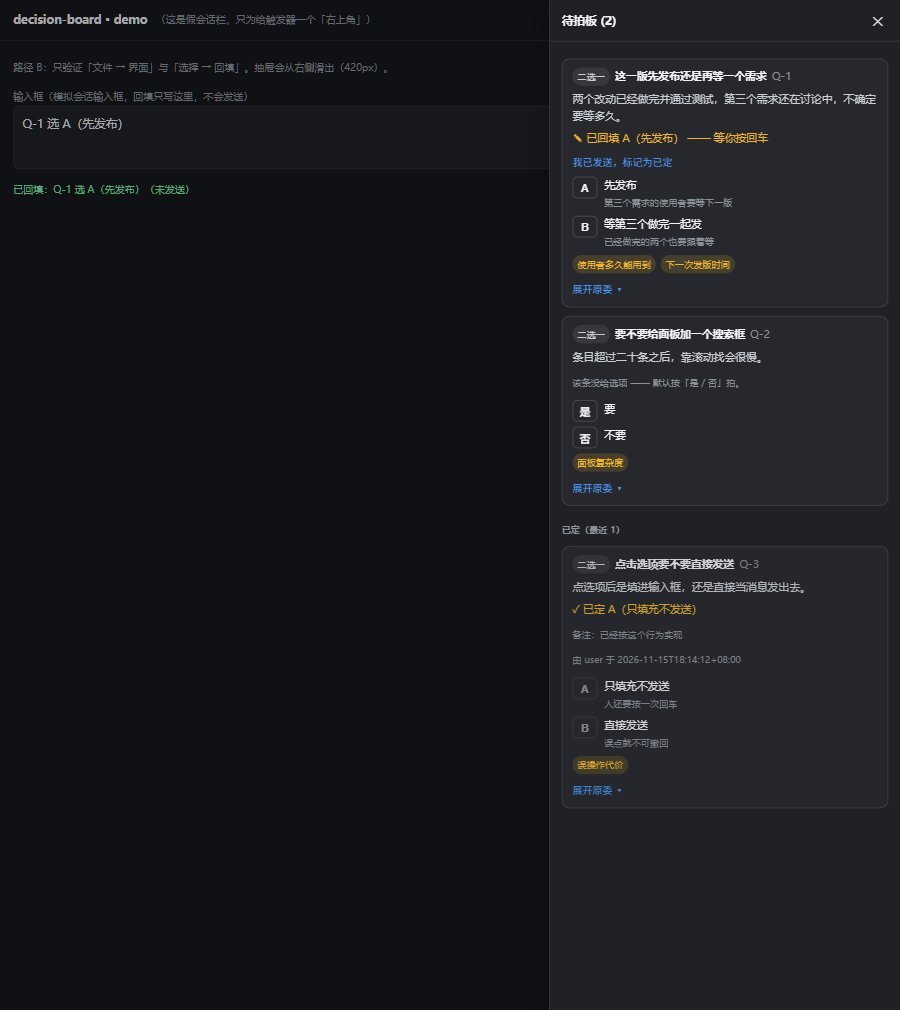
在 DSH 会话标题行右侧加一块「待拍板」看板:agent 提问时把决策记进去,你从清单里点一个,
它只把 Q-2 选 B 这样的回复填进输入框,按回车才真正发送。数据是一个可 diff 的本地 JSON。
零运行时依赖;宿主半与浏览器半都在本仓库。
长什么样
| 完整抽屉 | 「要不要」型(默认给是/否) | 已回填但未发送 |
|---|---|---|
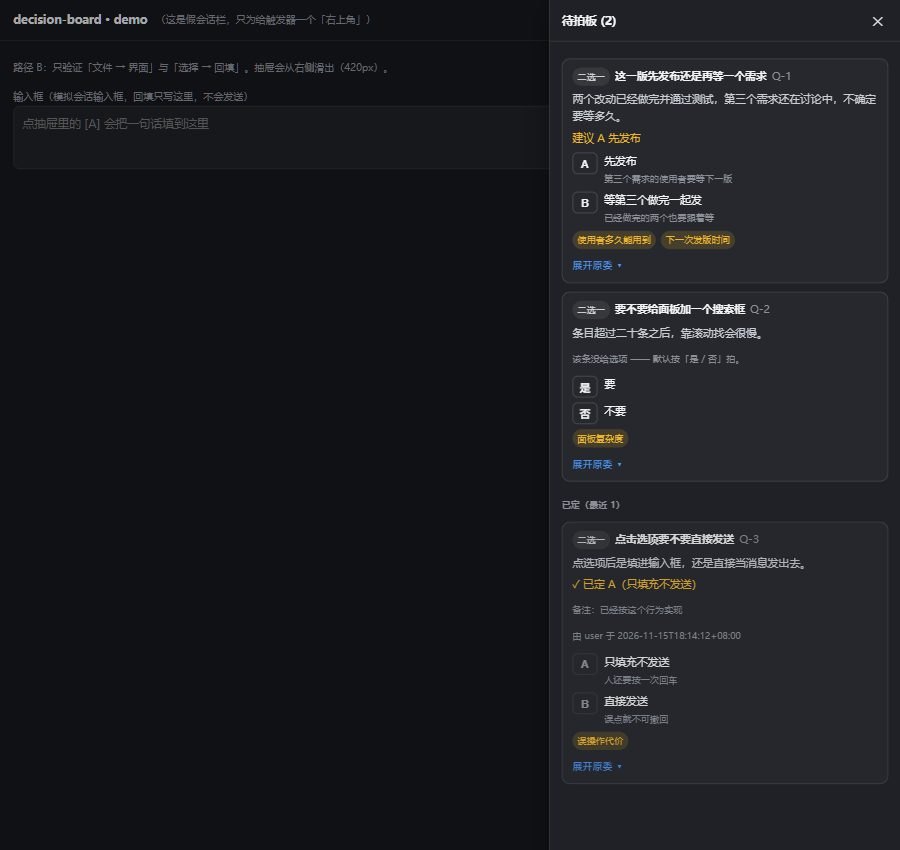 |
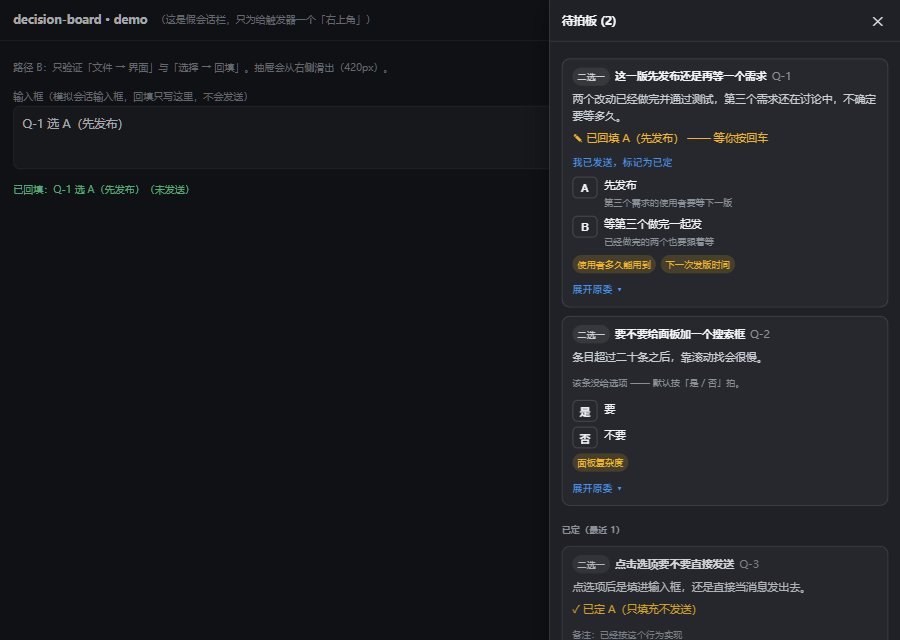 |
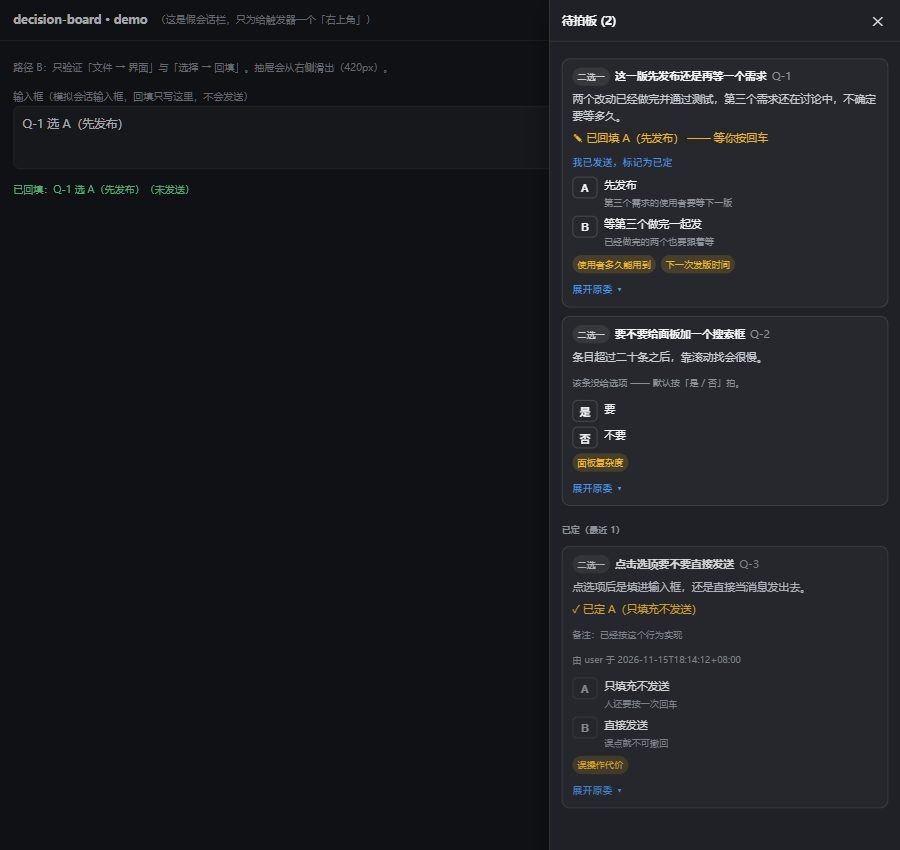 |
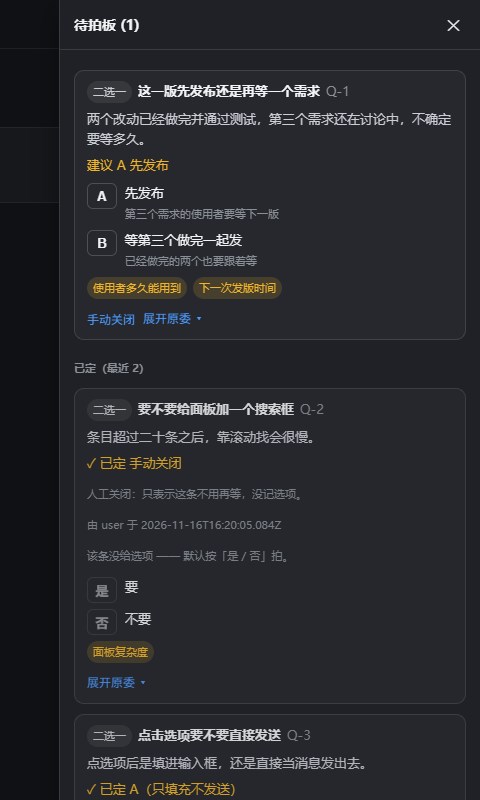
每条未定的决策右侧还有「手动关闭」—— 插件没认出来的答案,人自己收口:
| 未定:待拍卡片上的「手动关闭」 | 关闭后:落到「已定」,并注明没记选项 |
|---|---|
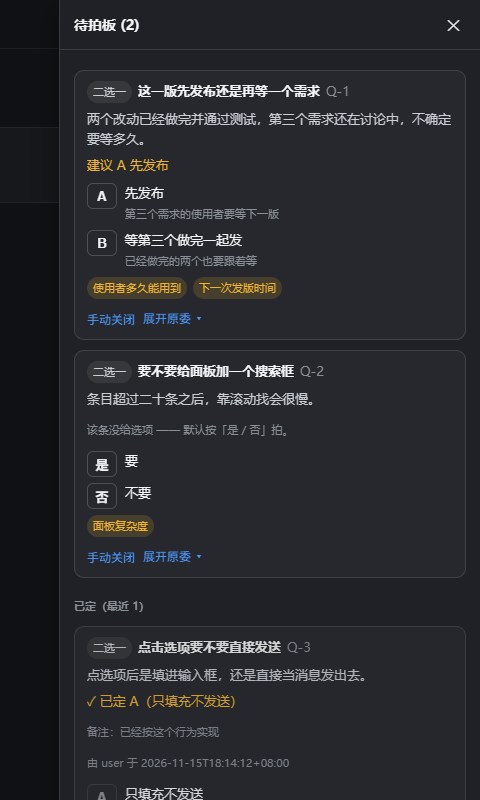 |
 |
用仓库里的示例数据跑,看到的就是这样:
安装
需要一个能装本地插件的 DSH Desktop(Plugin Manager 通道)。
方式一:npm(预构建,装的时候不需要构建授权)
dsh plugin add dsh-decisions-board
npm 上目前是 0.4.0(已公开,不含「手动关闭」)。本仓库当前是 0.5.0,尚未发布 —— 要用最新功能就走方式二。自查:
npm view dsh-decisions-board versions --json。
方式二:本地 tgz
npm pack # 产出 dsh-decisions-board-<version>.tgz(远小于 8 MiB 上限)
然后让 agent 调一次工具即可(在任意会话里说「装这个本地插件 <tgz 绝对路径>」):
install_local_workbench({ path: '<tgz 绝对路径>', replace: false })
看返回的 application:applied 表示已生效;restart-required 则走菜单「Harness → 重启 Harness」。
装好后会话标题行右侧会出现角标 ⚖ 待拍 N。
清单硬要求(安装器会校验):dsh.bundle.patch + dsh.client.platform === 'web' +
dsh.client.inject 含 dsh-desktop-workbenches + exports['./client'] —— 本包都已声明。
卸载:profile 的 package.json 删依赖与 dsh.profile.bundles 项后重启。
用户数据不会被删(在 .dsh/decisions/ 下)。
用法
条目怎么进来
两条路,都不需要改你的项目配置:
| 路径 | 谁触发 | 说明 |
|---|---|---|
| 自动捕获(默认开) | agent 写 :::decisions 块 |
插件往系统提示注入一段格式约定,agent 要你拍板时会照着写;插件解析该块并落盘 |
| 显式工具 | agent 调 decisions_board |
action=add title=… options=[…];id 自动编号、文件/目录不存在自动建、写盘前先归一化校验 |
标记块的形态:
:::decisions {"kind":"choice","title":"一句话说明要拍什么","question":"为什么","options":[{"key":"a","label":"方案甲","cost":"代价甲"}],"recommended":"a","impact":["影响"],"quote":"人的原话"} :::
一条消息可以有多块;title 必填;「要不要」型把 options 写成空数组,看板会给是/否。
重复提交不会叠出第二条。判定顺序(命中任一即视为同一条):
| 规则 | 说明 |
|---|---|
id 相同 |
显式撞号直接报错(要更新已有条目就别带 id) |
| 标题 + 问题相同 | 两者都先归一化:去空白、去标点、统一全半角与大小写 |
| 标题相同 + 选项相同 | 挡住「同一件事,问题那段被改写」 |
| 标题相同 + 两边都没有选项 | 「要不要」型重复出现 |
命中时不新增,只把既有条目还空着的字段补上(问题、选项、建议、影响、链接、原话),
返回值里带 duplicate: { id, status, reason, filled }。
取舍:宁可漏判,也不误判 —— 「标题相同但选项不同」不算重复,那多半是同一件事的两个不同方案列表。
怎么收口
三条带答案的路,写入规则与复述句完全一致,decided.by 分别记为 user-message / user / agent:
- 自动(默认开):你在会话里发出答案(如
Q-2 选 B)⇒ 插件订阅session/event的user/message,立刻标decided; - 人点确认:点卡片上的「我已发送,标记为已定」;
- agent 收口:agent 调
decisions_board action=settle。
点选项本身只写 filled(已回填 · 待发送),条目继续留在清单里 —— 见下方第 3 条边界。
没被认出来时:自己关掉(手动关闭)
自动收口只认一种形态(Q-2 选 B)。如果你在对话里用自己的话答了 —— 或者压根不是在会话里答的 ——
插件认不出来,条目就会一直挂在「待拍」里,越积越多。
这时点卡片上的 「手动关闭」(两步:第一次只是把按钮变成「确认关闭?」):
| 它做什么 | 它不做什么 |
|---|---|
直接把这条落成 decided,decided.manual = true,by = user,留 at 时间戳 |
不记选项(value 为空 —— 关闭不是一张选票) |
| 复述一句「已定:Q-16(手动关闭)」 | 不往输入框写任何字,也不发送(只填不发的红线不变) |
| 已定的条目移到抽屉下半部分的「已定」,并在卡片上注明「人工关闭:没记选项」 | 不动别的条目、不重写人手加的字段 |
为什么给这个按钮而不是让插件去猜:猜错会把没定的当已定,那是静默的、事后无法追责的错; 手动关闭只会少一条提醒,而且
by/at/manual三个标记都在文件里,事后能看出「这条是人自己关的」。
数据文件
<会话工作目录>/.dsh/decisions/<sessionId>.json
一个会话一份,互不可见。文件不存在 = 空板子(不报错、不猜)。读取顺序:
?dir=<绝对目录> → 插件配置 file → 该会话的 workspace 目录 → 宿主 workspaceRoot。
| 字段 | 说明 |
|---|---|
id |
稳定锚点,跨文件引用靠它;自动编号形如 Q-1 |
kind |
caliber / scope / contract / priority / choice(显示为 标准/范围/约定/优先级/二选一) |
status |
pending 待拍 · filled 已回填 · decided 已定 · deferred 后置 · cancelled 取消 |
title / question |
一句话说明 + 为什么需要拍 |
options[] |
{ key, label, cost };cost 缺失会被显式标成「未给代价」,不静默省略 |
recommended |
建议选项的 key |
impact / links |
影响标签 / 引用(只放链接,不放正文) |
source |
{ turn, anchor, quote };quote 存人的原话一小段(≤80 字) |
decided |
{ value, at, by, note, manual };manual: true 表示人点了「手动关闭」(此时 value 为空,不是选票) |
配置
cordis.patch.yml 里三个开关:
| 键 | 默认 | 作用 |
|---|---|---|
file |
空 | 固定数据文件路径(覆盖按会话推导) |
autoCapture |
true |
注入 :::decisions 格式约定 + 订阅 assistant/message 自动建条目 |
autoSettle |
true |
订阅 user/message,人一发答案就自动收口 |
设计边界(它刻意不做的事)
- 不替人决定:不自动选、不自动发送;
inputActions.submit()永远不调。 - 不读会话正文(仅一个例外):只解析消息里的
:::decisions标记块;块外文本一律不读、不存、不外传, 也不写会话历史、不做摘要。要连这个例外也关掉:autoCapture: false。 - 不静默丢板:点选项只写
filled,条目继续留在清单。理由:回填可能被别的插件吞掉,人也可能不按回车 —— 那时看板若已把条目移走,这条决策就静默消失了。 - 只改
decided/status:其余字段只读,避免插件成为第二份真值。 - 不碰会话共享的可写方法:填充走
setDraft,不用insertText—— 后者会被别的插件猴补丁(实测dsh-voice-plus会把它变成「转写 → LLM 校对 → 延迟写回」),导致文本被改写或丢失。 - 不改
app.asar:只走 Plugin Manager 通道安装。 - 自动收口只认一种形态:消息文本仅用于匹配
id 选 值;认不出就不动,条目留在filled里可见 —— 出口是人自己点「手动关闭」,不是插件去猜。 - 手动关闭不产生选票:它不记
value、不填输入框、不发消息,只把状态关掉; 带value调dismiss会被宿主回 400 —— 免得看板谎称「定了某个方案」。 - 不做跨会话总览:会话隔离是有意的 —— 同一工作区的不同会话各看各的板子。
已知限制
- 只在当前 DSH Harness 版本上验过;
systemPrompt.section()与session/event的形态若变,注入或捕获会失效; - 浏览器半只在 Chromium 下测过;
dsh.client.inject依赖dsh-desktop-workbenches,所以定位是 Desktop 插件;- 抽屉里最多显示最近 5 条已定条目(更早的只在文件里);
- 面板每 2000 ms 轮询一次自己的文件,外部改动最多延迟约 2 秒可见。
开发
node --test tests/*.test.mjs   # 80 条(模型 / 产物 / 宿主 / 客户端)
node tools/build-client.mjs   # 改完 src/ 必跑,产物 lib/client.js 勿手改
node tools/serve.mjs --file examples/decisions.sample.json   # 本地预览页,端口随机
- 预览页端口是随机的(
listen(0)),用打印出来的 URL,别写死端口; - 客户端插件热更需要
pnpm run dev:web;否则改完lib/client.js必须重启 Harness; - 验证记录(十轮里抓到的缺陷、守卫会红的证明、运行时证据)见 docs/VERIFICATION.md。
目录
| 路径 | 作用 |
|---|---|
src/model.js |
纯逻辑:归一化/校验、计数、回填句、收口语义(有单测,不依赖宿主) |
src/panel.js |
界面(原生 DOM):触发器 + 抽屉;插件与本地预览页共用同一份 |
lib/index.js |
宿主半:读写数据文件,提供 /api/decisions-board/{state,decide},注册工具与事件订阅 |
lib/client.js |
浏览器半,由 tools/build-client.mjs 生成(内联 model + panel),勿手改 |
tools/build-client.mjs |
打包前必跑;内联后自检「不得残留 import/export」 |
tools/serve.mjs + public/ |
零依赖本地预览页(不装插件也能看界面) |
examples/ |
三条示例数据,配合预览页使用 |
docs/VERIFICATION.md |
验证记录 |
docs/R1-slot-research.md |
会话标题行 slot 的取证结论 |
tests/ |
node --test:模型 / 产物 / 宿主 / 客户端,共 80 条 |
许可证
MIT,见 LICENSE。
Links
More in this category
zhu1090093659/dsh-web#packages/dsh-task-board★ 10458
Task board for the dsh web GUI: a sidebar multi-column kanban whose cards run in real DSH agent sessions and can also be scheduled with cron expressions, executed host-side even with the browser closed.
zhu1090093659/dsh-web#packages/dsh-web-all★ 10458
Plugin and skin collection for the DSH Web UI: task board, Git graph, right-side panel, remote mobile UI, pet, live token stats, and a skin center.
ccch1mneyyy/dsh-TUI★ 7797
Claude Code-style full-screen terminal UI: pixel-whale header, live status line, and streaming thought expansion.
MeteorNOX/DeepSeek-Balance-Whale-Widget★ 7271
A fixed-corner whale widget for the DSH web GUI — balance, today's usage and per-turn cost with peak/off-peak pricing, editable balance-alert and daily-budget bubbles, a module-based custom bubble queue with A/B weighted choices and random lines or images, 30+ vendor templates (OpenAI, OpenRouter, Kimi, SiliconFlow, Ark, Zhipu, MiniMax and more) with per-model balance and subscription quota, plus task-end sound, imported audio, custom roles and a resource manager. Local-only, no telemetry.
omdsh-dev/DSH-better-sidebar★ 5191
Full sidebar workbench with file rendering and editing, terminal, Git, and subagents; third-party plugins can register new tabs.
omdsh-dev/dsh-genui★ 1007
Interactive UI components rendered inline in replies: layout, charts, forms, quizzes, mermaid, 3D scenes, and an action event loop back to the model.
Community comments
Comments are public GitHub Discussions. Loading them connects to GitHub and Giscus; a GitHub account is required to post.