Model high-availability failover (quarantine, circuit breaking, probe recovery) and subagent orchestration (fanout/pipeline/supervisor) with bilingual settings UI.
Install
# from npm (prebuilt)
dsh plugin --profile web add dsh-ha-orchestrator
# from GitHub (first run asks for allowBuilds approval — follow the hint, retry)
dsh plugin --profile web add github:Saktawdi/dsh-ha-orchestrator
Any plugin you install runs third-party code with your own permissions — it can read your files, use your credentials, and reach the network, and tool approvals don’t sandbox it. GitHub-sourced plugins also run build scripts at install time — pnpm blocks those until you allow them, so an install can stop with ERR_PNPM_GIT_DEP_PREPARE_NOT_ALLOWED or ERR_PNPM_IGNORED_BUILDS; dsh prints the exact key to add under allowBuilds in your profile’s pnpm-workspace.yaml, and the install works on the next run. Allowing a build is a trust decision: only install sources you trust, and pin a commit (github:owner/repo#sha).
README
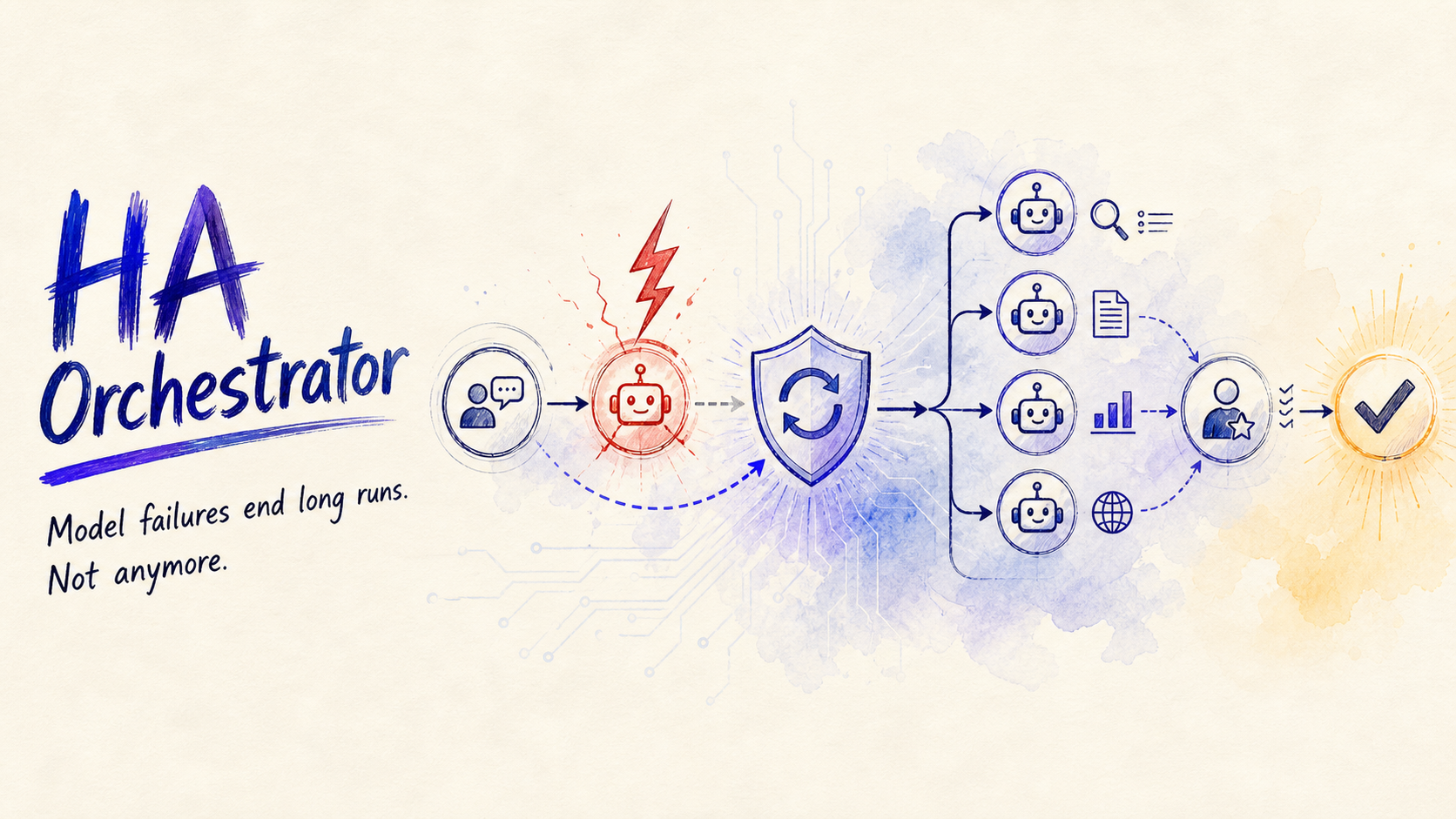
HA Orchestrator
HA Orchestrator is a plugin for DeepSeek Harness (dsh):
- When a model call fails mid-run, it retries on a backup model and the run continues.
- It adds an
orchestratetool that the model calls on its own when a task suits it, splitting work across subagents in parallel (fanout), in stages (pipeline), or with review and reduction passes (supervisor,map-reduce,router).
The settings page also lets you define custom subagents (or generate one with AI), and the UI and prompt copy are available in Chinese and English, following your DSH language.
Reliable model recovery. Parallel work. Review-ready delivery.
HA Orchestrator keeps long-running DSH sessions moving when a model fails, then turns complex work into observable, concurrent subagent runs with evidence-rich results.
| 🛡️ Survive model outages | ⚡ Scale work sideways | ✅ Deliver with confidence |
|---|---|---|
| Backup rotation, cooldowns, provider circuits, and recovery probes keep a failed model from ending the run. | Five orchestration modes cover parallel research, staged plans, routing, reduction, and supervisor review. | Budgets, run history, resumability, structured output, and reviewer passes keep the final result inspectable. |
Best for: deep research, large codebase reading, batch reviews, multi-option comparisons, and implementation planning.
What it does
Failover when a model fails
- When a model request errors, it is retried on the next backup model. Backups are tried in order.
- The failed model is temporarily skipped and cools down; it comes back on its own when the cooldown expires.
- It supports burst-window failure counting, provider-level circuit breaking, low-cost recovery probes, and optional context-window degradation.
- Each failure episode has a retry budget. Once it is spent, the plugin stops retrying instead of looping forever.
- If a model error interrupts the run, the plugin restarts the task once so the work is not lost.
Backup models, cooldown, failure threshold, and error-code filter are configurable in Settings → "HA 与编排".
Orchestration, triggered automatically
The orchestrate tool is available in every session. Its description and a hint in the system prompt tell the model to call it on its own when a task has parallel parts, runs in stages, or needs a review pass:
fanout— split the task, run subtasks in parallel, merge the results.pipeline— run stages one after another; each stage's output feeds the next.supervisor— run subtasks in parallel, then let a supervising subagent review and merge them.map-reduce— run the map tasks in parallel, then send their outputs to a reduction subagent.router— send a list of candidate tasks to one routing subagent to choose or route the work.
The tool also supports saved presets, resuming an interrupted run, supervisor review rounds, multiple reviewers, per-run subagent budgets, structured output schemas, and per-agent tool allow/deny lists. Nested orchestration from a subagent is rejected by default.
If a particular run does not orchestrate on its own, just say "use orchestration".
Note: if the current session uses a
complete: truepersona preset such asminimal/minimal-v3, the platform intentionally drops plugin system-prompt sections; auto-triggering then relies on theorchestratetool description alone. The plugin now includes "read a large project" in that description, but if it still does not trigger, just say "use orchestration".
You can also turn off the auto-triggering: in Settings → "HA 与编排" → System card, turn off context injection. The model then only orchestrates when you ask for it, for example "use the dsh-ha-orchestrator plugin".
Subagents do not receive this context injection by default, preventing them from being prompted to start nested orchestration. If you want subagents to see the same context, enable Also inject into subagents in the System card.
Custom subagents
Define reusable subagents in the settings page: name, provider/model, model effort, description, system prompt, and optional tool allow/deny lists. Each role may also define its own ordered fallbacks model chain, with per-fallback provider/model@effort; a start failure or child model error retries that role on its own chain without reading the global HA backup list. Tasks pick them by name, and the model can look up the list at any time. Individual tasks may also request an output hint or an object-root JSON Schema when the selected provider supports structured output. The "AI Generate" button takes a one-sentence requirement and has the current model fill in the full definition.
Languages
The settings UI and all prompt copy come in Chinese and English. The plugin follows your DSH language selection and falls back to Chinese if a language pack fails to load. You can also pin a language in the "System" card.
Installation
Requirements: DeepSeek Harness with the web profile. Published packages need no local build step; DSH supplies the peer runtime services.
Method 1: install from npm (recommended)
The package is published on npm as dsh-ha-orchestrator:
Run the one-command install:
dsh plugin --profile web add dsh-ha-orchestratorBecause this package declares
dsh.bundle.patch,dsh plugin addautomatically adds dsh-ha-orchestrator todsh.profile.bundlesand appliescordis.patch.yml. No manual composition line is needed.No restart needed: the bundle-patch layer is hot-reloaded (Cordis HMR), so the plugin activates in the running process. Refresh the browser page to load the settings UI. The plugin also loads at startup and survives restarts.
Method 2: install from a local checkout (development)
For development or testing an unreleased version. Requires pnpm on PATH:
Run the one-command install:
dsh plugin --profile web add "file:<absolute-path-to-this-repo>"Because this package declares
dsh.bundle.patch,dsh plugin addautomatically adds dsh-ha-orchestrator todsh.profile.bundlesand appliescordis.patch.yml. No manual composition line is needed.No restart needed: the bundle-patch layer is hot-reloaded (Cordis HMR), so the plugin activates in the running process. Refresh the browser page to load the settings UI. The plugin also loads at startup and survives restarts.
Method 3: manual install (no pnpm)
Clone/copy this repo into your DSH profile:
~/.dsh/profiles/web/node_modules/dsh-ha-orchestratorAdd it to the composition file
~/.dsh/profiles/web/cordis.patch.yml:- insert: - id: dsh-ha-orchestrator name: dsh-ha-orchestratorNo restart needed: the profile patch layer is hot-reloaded (Cordis HMR), so the plugin activates in the running process. Refresh the browser page to load the settings UI. The plugin also loads at startup and survives restarts.
Version note: v0.1.0 was the previous dynamic build, deployed per session via
cordis_defineand released only for feature preview. Starting with v0.2.0 the plugin is static and loads with DSH at startup. From the version that introduces the bundle patch, Method 1 (one-command install) is recommended.
Usage
No special instructions are required for normal use — the model decides when to orchestrate:
You:    Research these three open-source projects, compare licenses and community activity, and recommend one.
Model:  sees 3 independent subtasks → calls orchestrate (fanout) → parallel research → comparison → recommendation

You:    Read this large project and summarize its architecture and current progress.
Model:  splits it into independent per-module/doc/code reading tasks → calls orchestrate (fanout) → parallel reads → consolidated architecture and progress

You:    Do requirements analysis first, then a design doc, then an implementation plan.
Model:  calls orchestrate (pipeline) → each stage's output feeds the next

You:    Write a competitive analysis report and have a senior reviewer vet it.
Model:  calls orchestrate (supervisor) → parallel analysis → review and merge → report
Showcase
Configure model recovery, watch parallel work progress, inspect the actual model used by each subagent, and audit the run after it ends.
Note: These screenshots are from v0.12.x.
Commands
The plugin also registers two optional slash commands for inspecting and managing runtime state:
| Command | Description |
|---|---|
/ha |
Show the current HA status (same as /ha status). |
/ha status |
Show quarantine, failure counts, rotation cursors, switch history, and probe log. |
/ha diag |
Show plugin diagnostics: service availability, persistence, language, and injection status. |
/ha reset |
Clear quarantine, failure counts, cursors, and history. |
/ha probe <provider> <model> |
Manually probe a model to verify recovery. |
/orchestrate |
List recent orchestrate runs (same as /orchestrate runs). |
/orchestrate runs |
List the 24 most recent orchestrate runs (each with a one-line result summary). |
/orchestrate show <runId> |
Show details of a specific orchestrate run. |
/orchestrate presets |
List configured orchestration presets. |
/ha-orch-resume <runId> |
Resume an incomplete orchestration run by runId: reuses completed subtasks and runs only the rest. |
These commands are registered through the DSH
commandsservice. If a deployment does not provide that service, the plugin still works normally; only these slash commands are unavailable.
If the host provides a skills service, the package also registers a bundled dsh-ha-orchestrator skill for explicit user invocation. It contains the usage and troubleshooting guide; it is not exposed as an automatically model-invocable skill.
Settings
Settings → "HA 与编排":
An overview banner at the top shows HA status, the current default model, the backup count, orchestration status, and active runs at a glance.
| Card | What you can do |
|---|---|
| Model High Availability | On/off, backup list (structured rows with inline dropdown editing, "Recommended backups", and an empty-state guide), and an "Advanced" section for cooldown, failure threshold, burst window, provider circuit threshold, probe recovery, context-overflow degrade, error-code filter, persist selection, and stop steering |
| Subagent Orchestration | On/off, provider, default concurrency (6), max subagents per run (16), global concurrency cap, pipeline retry, merge/render limits, delegation-depth limit, and subagent output-token limit — grouped into Basics / Concurrency & budgets / Advanced |
| Custom Subagents | Add, edit, reorder, delete (avatar + model/effort badges); built-in reviewer/researcher/research-merger definitions; "AI Generate" creates one from a description; tool allow/deny lists, per-role output-token limits, and per-role fallback chains that handle start failures and child model errors without reading the global HA backup list |
| Diagnostics | HA runtime (current default, quarantine with level and cooldown countdown, failure counts, cursors, probes, failover history, reset) and expandable recent runs (mode badge, duration, per-subtask status table with lastKey, result summary — history survives restarts) |
| System | Plugin language (follow system / Chinese / English), the orchestration hint toggle, the live injection status, one-click config export/import, and the debug card toggle |
During a conversation you also get two live views:
- Orchestrate run card (in the conversation stream): real-time progress bar with percentage, per-subtask status dots, the actual model (lastKey) each subagent used, then runId and an output summary when done.
- HA status capsule (tool area): collapsed to one line (enabled / backups / quarantined / last failover); click to expand cooldown countdowns, recent failovers, and active runs.
Documentation
- Architecture — modules, data flows, service contract
- Configuration — every config key with defaults and clamping rules
- Security — trust boundary and applied hardening
- Verification & release — test matrix, gates, release steps
- Compatibility — verified DSH snapshots and peer strategy
Notes
- Config and HA state are looked up in the session workspace /
DSH_HOME, then the sandboxworkspace-writeroot. Config writes report a persistence diagnostic if neither location is available. Run records and Markdown run artifacts additionally fall back to the fs service's default cwd when no directory candidate exists. - HA runtime state (quarantine, failure counters, rotation cursors, switch history) is persisted to
dsh-ha-orchestrator.ha.jsonwith a 500 ms debounce and restored on startup. Orchestrate runs are recorded todsh-ha-orchestrator.runs.jsonl(up to 200 disk records / 20 in memory) and also written asdsh-ha-orchestrator.run-<runId>.mdartifacts containing the full subtask outputs. - Run records and artifacts may contain task prompts and model outputs; keep the workspace readable only by trusted users/processes.
- All
/haand/orchestrateslash commands are listed in the Commands section above.
License
MIT © Saktawdi
Links
More in this category
Q00/ouroboros#integrations/dsh-plugin★ 6144
Config-only bundle that mounts Ouroboros through the DSH MCP client, exposing 36 interview, Seed, execution, evaluation, and evolution workflow tools in DSH.
loopx-project/loopx#dsh-loopx-plugin★ 6111
LoopX, a provider-neutral, local-first state kernel and control plane for long-horizon agents: keeps Goal, Todo, gate, evidence, quota, recovery, and handoff state above DeepSeek Harness, while the plugin bootstraps the CLI and skills, admits bounded same-session continuation, and adds a loopback GoalBar for the exact bound loop.
chuspeeism/dashi-taskboard#deepseek-harness★ 3262
Embeds the active installed Codex Taskboard runtime in the DeepSeek Harness sidebar, using its launcher runtime descriptor instead of a fixed port.
NanmiCoder/dsh-agent-teams★ 1848
AgentTeams multi-agent teams.
EthanYoQ/AI-Novel-Writer#dsh-ai-novel-writer★ 1205
Installs a dedicated AI novel-writing preset and workbench: revisioned local project assets, a compact side drawer, and native approval-gated single-file changes.
tong-io/tongflow#dsh-tongflow★ 1034
TongFlow film-crew studio for image, voice, music and video production: the agent writes per-asset TongFlow workflow files (.tongflow.json) that run through TongFlow plugins, with an embedded workflow canvas, a shot/character/take project layout and a manga-drama template; sessions starting with @tongflow open the Studio view.
Community comments
Comments are public GitHub Discussions. Loading them connects to GitHub and Giscus; a GitHub account is required to post.