Personalises the DSH running-turn status line: rotating bilingual quips, a configurable animated loading icon (5 styles x 3 sizes) and one-click matching to the active theme colour, all in a General-settings panel, plus a # Chinese / # English sectioned quips editor. Ships with no dependencies, no build step and no config file.
Install
# from GitHub (first run asks for allowBuilds approval — follow the hint, retry)
dsh plugin --profile web add github:Saknutella/dsh-thinking-quips
Any plugin you install runs third-party code with your own permissions — it can read your files, use your credentials, and reach the network, and tool approvals don’t sandbox it. GitHub-sourced plugins also run build scripts at install time — pnpm blocks those until you allow them, so an install can stop with ERR_PNPM_GIT_DEP_PREPARE_NOT_ALLOWED or ERR_PNPM_IGNORED_BUILDS; dsh prints the exact key to add under allowBuilds in your profile’s pnpm-workspace.yaml, and the install works on the next run. Allowing a build is a trust decision: only install sources you trust, and pin a commit (github:owner/repo#sha).
README
v0.11.5 · a DSH bundle (install-and-go) · web client plugin
Lightweight personalisation for the DeepSeek Harness status line — the line the
conversation shows while the agent is working (DSH's default Deep diving...).
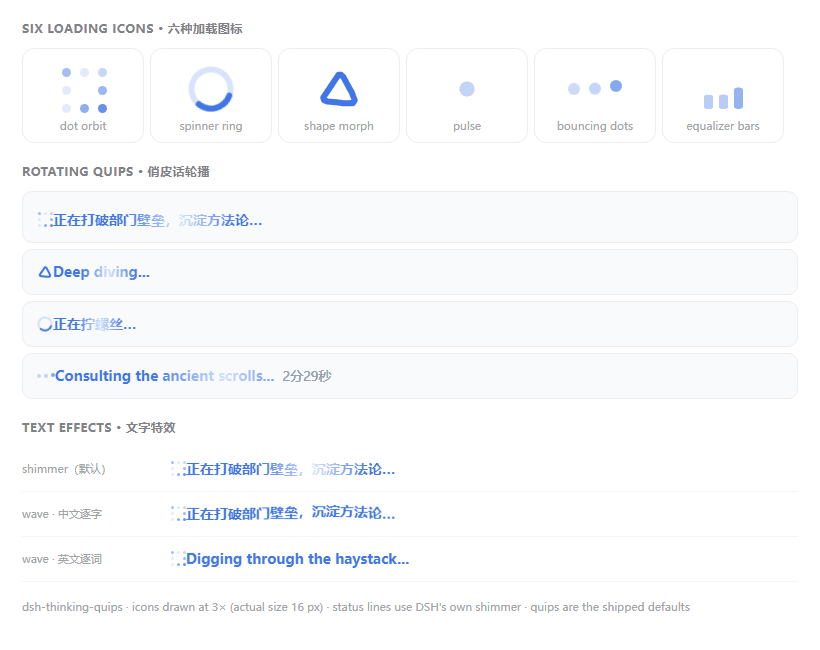
Rotating bilingual quips, sixteen loading icons in three sizes, one-click colour presets,
theme-colour matching that reaches 4.5:1, and an optional elapsed-time readout, all in
Settings → Playful quips (its own page in the settings nav, not a row under General).
Incremental by design: no dependencies, no build step, no config file, no network
requests. One hand-written client file, settings in localStorage, and stock DSH
packages are not modified.
Features
- Sixteen loading icons — dot orbit (default), shape morph, pulse, bouncing dots,
equalizer bars, eight drawn sprites from two contributed design families
(a jelly block that squashes, a metronome arm, a mallet with sparks, a pinwheel, two rings
rippling outwards, a bead running its track, a pair of sparkle stars and a bouncing ball with
its own shadow), plus three that reuse what DSH already ships: the official
StateDotspinner (the plugin's own ring went in 0.11.2 — the two were the same gesture), its logo mark, and DSH's own running whale (cloned out of the live line, animation included) — each in S / M / L. DSH's whale is one of the choices rather than a permanent neighbour, so the line always shows exactly one indicator; pick Official whale to have it back. - Rotating quips — your own list, one per line, split into
# Chinese/# Englishsections and edited in a small modal; the Language control picks which section shows (Follow UI, English only, Chinese only, or Mixed). - Font colour — preview swatch, hex, RGB, or the native colour wheel.
- Colour presets — brand blue, violet, teal, amber and rainbow, one click each. Every chip is fitted to the background that is on screen and floored at 4.5:1, so the same chip stays legible in the light and the dark theme, and picking one stops Match theme from following (you named a colour). Brand blue writes the plugin's default sentinel, so "brand blue" still means DSH's own default rather than an override of it. Rainbow cycles the line's colour — icon included — through six colours that are each fitted and floored, so the promise holds at every moment of the cycle, while the chip itself stays a still spectrum; the cycle follows Slow / Normal / Fast and freezes at the first colour when the system asks for reduced motion.
- Sweep brightness — 0–100%, how much brighter the official sweep's moving highlight is
than the text (0% makes it the text colour, i.e. an invisible sweep; 100% is white). It
writes the token the official
TextShimmerpaints that highlight with. - Match theme — one click fits the active theme's accent colour to at least 4.5:1 against the live background, and keeps following theme switches until you stop it.
- Text effect — Shimmer (default: DSH's own sweep, because the plugin renders the
official
TextShimmercomponent) or Wave (each character/word lifts in turn). Two choices, not four: the hand-painted "glow" copy of the official sweep was indistinguishable from it side by side, so it was retired. - Elapsed time — Inline folds the duration into the quip so it animates with
the text (the DSH 0.2 shape), Beside shows it as a separate grey note outside the
animation (the 0.1 shape), or turn it off. The time comes from DSH's own turn
start (
turn.start.time) and formats exactly like the officialformatRunDuration. - Animation speed — Slow / Normal / Fast in one click. Normal is the shipped pace and overrides nothing; the others scale the plugin's own animations. DSH's own whale carries its animation inside the image (a 60-frame APNG), so for that one the plugin adds its own swim cue at the chosen pace instead.
- Time per quip.
- Indicator only — inject just the icon and leave the status text alone, so it can sit alongside another status-text plugin.
Install
- Add the package to the profile:
dsh plugin --profile web add github:Saknutella/dsh-thinking-quips - Add it to
dsh.profile.bundlesin$DSH_HOME/profiles/web/package.json:"dsh": { "profile": { "bundles": ["@deepseek-ai/dsh-base", "@deepseek-ai/dsh-web-app", "dsh-thinking-quips"] } } - Restart
dsh web.
Requirements: DSH ≥ 0.2.0-rc.2 (the web surface). On 0.2 the running line is
[data-chat-running] and its label lives inside DSH's TextShimmer; the plugin detects
both that shape and the older [class*="turnStatus"] one, so 0.1.x shells keep working.
Uninstall: remove it from dsh.profile.bundles, run
dsh plugin --profile web remove dsh-thinking-quips, and restart dsh web.
Links
More in this category
zhu1090093659/dsh-web#packages/dsh-task-board★ 9673
Task board for the dsh web GUI: a sidebar multi-column kanban whose cards run in real DSH agent sessions and can also be scheduled with cron expressions, executed host-side even with the browser closed.
zhu1090093659/dsh-web#packages/dsh-web-all★ 9673
Plugin and skin collection for the DSH Web UI: task board, Git graph, right-side panel, remote mobile UI, pet, live token stats, and a skin center.
MeteorNOX/DeepSeek-Balance-Whale-Widget★ 6324
A fixed-corner whale widget for the DSH web GUI — balance, today's usage and per-turn cost with peak/off-peak pricing, editable balance-alert and daily-budget bubbles, a module-based custom bubble queue with A/B weighted choices and random lines or images, 30+ vendor templates (OpenAI, OpenRouter, Kimi, SiliconFlow, Ark, Zhipu, MiniMax and more) with per-model balance and subscription quota, plus task-end sound, imported audio, custom roles and a resource manager. Local-only, no telemetry.
ccch1mneyyy/dsh-TUI★ 6018
Claude Code-style full-screen terminal UI: pixel-whale header, live status line, and streaming thought expansion.
omdsh-dev/DSH-better-sidebar★ 4645
Full sidebar workbench with file rendering and editing, terminal, Git, and subagents; third-party plugins can register new tabs.
Devin-AXIS/deepseek-design#deepseek-idesign★ 1607
Visual design studio for websites, app prototypes, posters, cards, reports, and magazines, with templates, direct element editing, selection-aware AI draft handoff, and export.
Community comments
Comments are public GitHub Discussions. Loading them connects to GitHub and Giscus; a GitHub account is required to post.