Loader-independent startup recovery for DSH Web that detects likely broken plugins, temporarily skips them, and restores only Boot Guard-managed changes.
Install
# from npm (prebuilt)
dsh plugin --profile web add dsh-boot-guard
# from GitHub (first run asks for allowBuilds approval — follow the hint, retry)
dsh plugin --profile web add github:SaiSenBox/dsh-boot-guard
Any plugin you install runs third-party code with your own permissions — it can read your files, use your credentials, and reach the network, and tool approvals don’t sandbox it. GitHub-sourced plugins also run build scripts at install time — pnpm blocks those until you allow them, so an install can stop with ERR_PNPM_GIT_DEP_PREPARE_NOT_ALLOWED or ERR_PNPM_IGNORED_BUILDS; dsh prints the exact key to add under allowBuilds in your profile’s pnpm-workspace.yaml, and the install works on the next run. Allowing a build is a trust decision: only install sources you trust, and pin a commit (github:owner/repo#sha).
README
简体中文 · English

What do you do when a plugin breaks the page you normally use to disable plugins?
dsh-boot-guard is a small safety net for the DeepSeek Harness Web UI. It stays out of the way during a healthy boot. If plugin loading fails and the page stops at Failed to load plugins, Boot Guard adds a recovery console that can identify the likely culprit, skip it temporarily, and get the workspace running again.
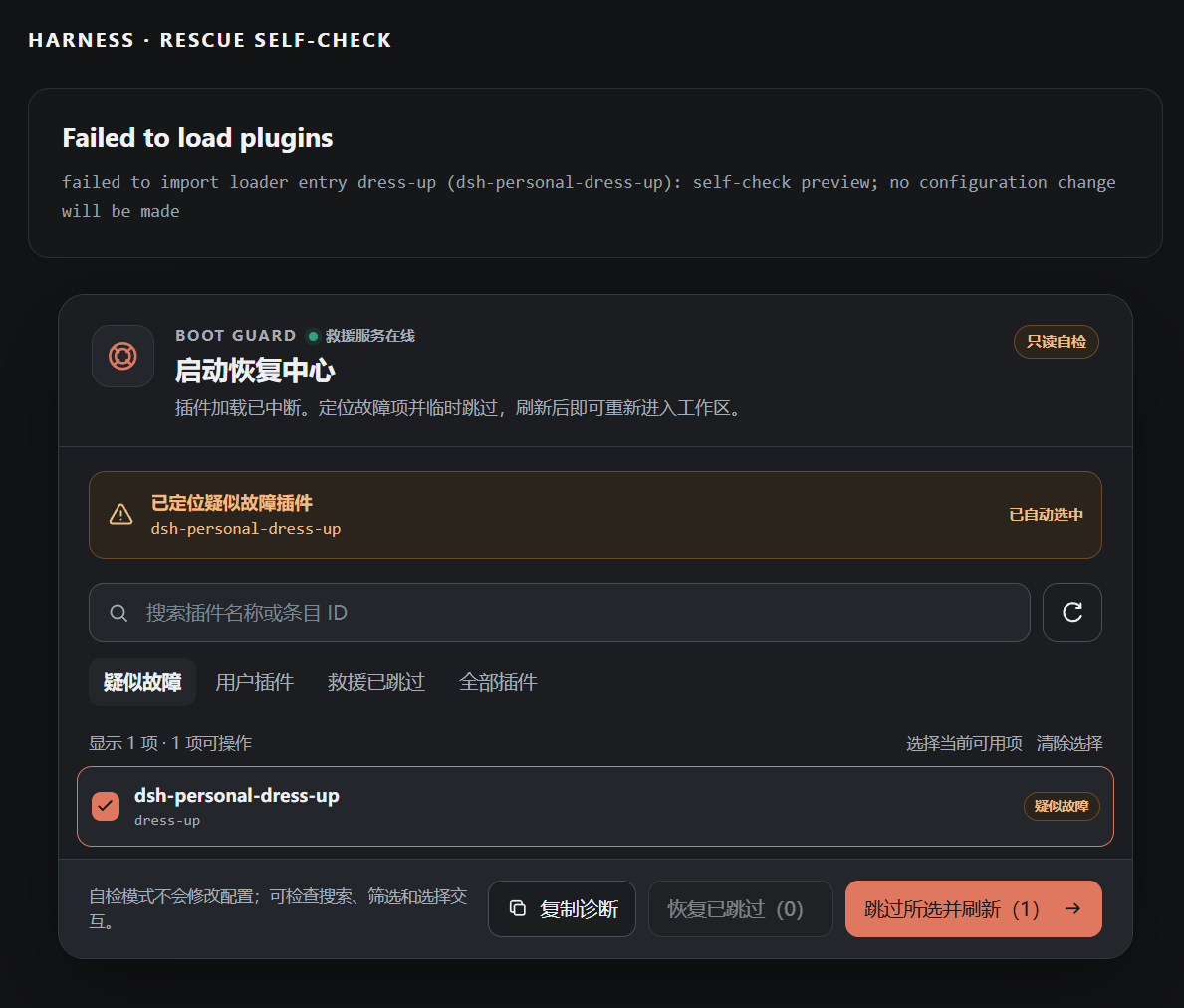
The screenshot shows read-only self-check mode. It demonstrates the UI without changing configuration.
Why this exists
This started with an awkward little failure: I was working on a DSH appearance plugin, refreshed the page, and the entire Web UI stopped loading.
Normally I would disable the broken plugin from the plugin settings. Unfortunately, those settings live inside the UI that had just failed. It was the software equivalent of locking the keys in the car.
Boot Guard breaks that loop. Its rescue client is injected directly by the host and does not depend on the normal browser plugin loader, so it can still show up when another plugin prevents the regular interface from starting.
What it does
- Detects likely failed plugins from the loader error and selects them automatically
- Searches by package name or loader entry ID, with focused filters for user and skipped plugins
- Temporarily skips one or several plugins and reloads the page
- Restores a single plugin or all Boot Guard-managed skips with confirmation
- Keeps existing disabled configuration separate from Boot Guard's temporary changes
- Copies a small diagnostic report for bug reports
- Shows the complete rescue UI in Chinese or English, following the language selected in DSH settings
- Includes read-only dark, light, and narrow-screen self-check views
Skipping does not uninstall a plugin or delete its data. Boot Guard writes a marked disabled: true array item to the active profile's cordis.patch.yml; before writing, it handles empty files, [], and existing arrays, and restoration removes only blocks carrying its marker.
Install
Install and run DeepSeek Harness first.
From GitHub
dsh plugin --profile web add github:SaiSenBox/dsh-boot-guard
Restart dsh web after installation.
From npm
Once the package is published to npm:
dsh plugin --profile web add dsh-boot-guard
Local development install on Windows
git clone https://github.com/SaiSenBox/dsh-boot-guard.git
cd dsh-boot-guard
powershell -ExecutionPolicy Bypass -File .\install.ps1
The local installer stages the dependency beside the DSH profile to avoid malformed cross-drive file: junctions on Windows.
Usage
- When
Failed to load pluginsappears, the recovery console mounts below the loader error. - Check the suggested plugin, or search for and select a different entry.
- Choose Skip selected and reload. The page retries immediately; the DSH process does not need to restart.
- After fixing the plugin, restore it from the Skipped by rescue filter.
The bulk restore action requires a second click to prevent accidents. A single request is capped at 64 entries.
Self-check
With DSH Web running, open:
- Dark:
http://127.0.0.1:3080/boot-guard/preview - Light:
http://127.0.0.1:3080/boot-guard/preview?theme=light - Health:
http://127.0.0.1:3080/boot-guard/health
The preview is read-only. Search, filters, selections, and action feedback work, but no configuration is written.
Safety boundaries
- Mutation routes accept same-origin JSON
POSTrequests and are loopback-only by default - Body size, entry count, and IDs are validated
- Boot Guard refuses to disable itself
- Profile discovery fails closed unless a parent package explicitly declares
dsh.profile - Writes require a top-level YAML array; empty files and
[]are normalized safely, while other structures are rejected - Mutations are serialized, committed with a same-directory atomic rename, and rebased if the file changes before commit
- Restore removes only Boot Guard-marked blocks
- No telemetry and no external transmission of loader errors
To allow mutation requests from a non-loopback address, explicitly set DSH_BOOT_GUARD_ALLOW_REMOTE_MUTATION=1 before starting DSH. This removes Boot Guard's local-only safeguard and is not recommended without a separate authentication layer.
Compatibility
Version 1.1.2 has been verified with DSH 0.1.0-rc.6, Node.js 24.5.0, and Windows. The package follows DSH's Node.js requirement: ^22.19.0 || >=24.0.0.
DSH is still a developer preview and plugin APIs may change. If a new release breaks the recovery path, please open an issue with the DSH version and the copied Boot Guard diagnostics.
Development
npm run check
npm test
npm run pack:check
The rescue client intentionally has no runtime dependencies. A recovery tool is most useful when it can still start after everything around it has not.
License
MIT © 2026 SaiSenBox
Links
More in this category
yjh051108/dsh-routing-suite★ 7000
One repository, three parts: a runtime injector for DSH plugin packages (inject, hot-reload, unload, promote a dev staging tool to the front, route self-heal, plus a settings-page plugin manager that lists, unloads and drags folders in to internalize), a task-aware reasoning-mode router agent preset (router-standard / router-spec / router-react), and a graded two-level task protocol whose six tools (commit_star, lock_stage, revise_do, edit_plan, mark_task, redteam_verdict) pin task state to disk. The injector implementation ships in-tree, so the install carries its own behaviour rather than a dependency list.
strukto-ai/mirage#dsh★ 3663
Swaps the filesystem and bash providers for a mirage virtual workspace: file tools and shell commands run over mounted resources (RAM, S3, Redis, Slack, Gmail, Notion, Postgres) instead of the host disk, with per-mount read/write/exec modes, per-command sandbox routing (monty, pyodide, quickjs in process; docker, e2b, daytona remote), and installed CLIs (git, gh, slack, linear, ntn, gws, or one you register) as head words in the virtual terminal.
hust-open-atom-club/oh-dsh★ 325
Community distribution: TUI, desktop, and Web UI as one bundle with layered installation.
weijiafu14/pi2dsh★ 206
Pi Host ABI compatibility engine: after one install, unmodified Pi extensions from npm mount as native DSH plugins with `dsh plugin add <pi-package>`. Verified end to end on stock DSH with pi-mcp-adapter (full MCP manager: OAuth, resources, prompts, MCP Apps, elicitation, sampling), @tintinweb/pi-subagents, pi-code, pi-hermes-memory and pi-background-tasks; `pi2dsh inspect` reports a package's compatibility before installing.
lire1131/dsh-undo-savepoint★ 165
Undo/redo & rollback system for DSH: every config change is auto-snapshotted; undo/redo/restore to any version from the WebUI or the offline CLI/GUI tools (works even when DSH fails to boot).
Fishquito7/dsh-skill-mcp-panel★ 152
Manages DSH skills and MCP servers from the web settings: skill cards with hot enable/disable, workspace scopes, groups, batch migration and drag-and-drop import, plus stdio/HTTP MCP CRUD with connection tests, secret redaction and the unified dsh-panel CLI.
Community comments
Comments are public GitHub Discussions. Loading them connects to GitHub and Giscus; a GitHub account is required to post.