View local Skills and edit automatic and /name invocation policies from DSH Web settings, with bundled and symbolic-link entries kept read-only.
Install
# from GitHub (first run asks for allowBuilds approval — follow the hint, retry)
dsh plugin --profile web add github:SLin-code/dsh-skill-manager
Any plugin you install runs third-party code with your own permissions — it can read your files, use your credentials, and reach the network, and tool approvals don’t sandbox it. GitHub-sourced plugins also run build scripts at install time — pnpm blocks those until you allow them, so an install can stop with ERR_PNPM_GIT_DEP_PREPARE_NOT_ALLOWED or ERR_PNPM_IGNORED_BUILDS; dsh prints the exact key to add under allowBuilds in your profile’s pnpm-workspace.yaml, and the install works on the next run. Allowing a build is a trust decision: only install sources you trust, and pin a commit (github:owner/repo#sha).
README
A small, security-focused local Skill manager for DeepSeek Harness Web.
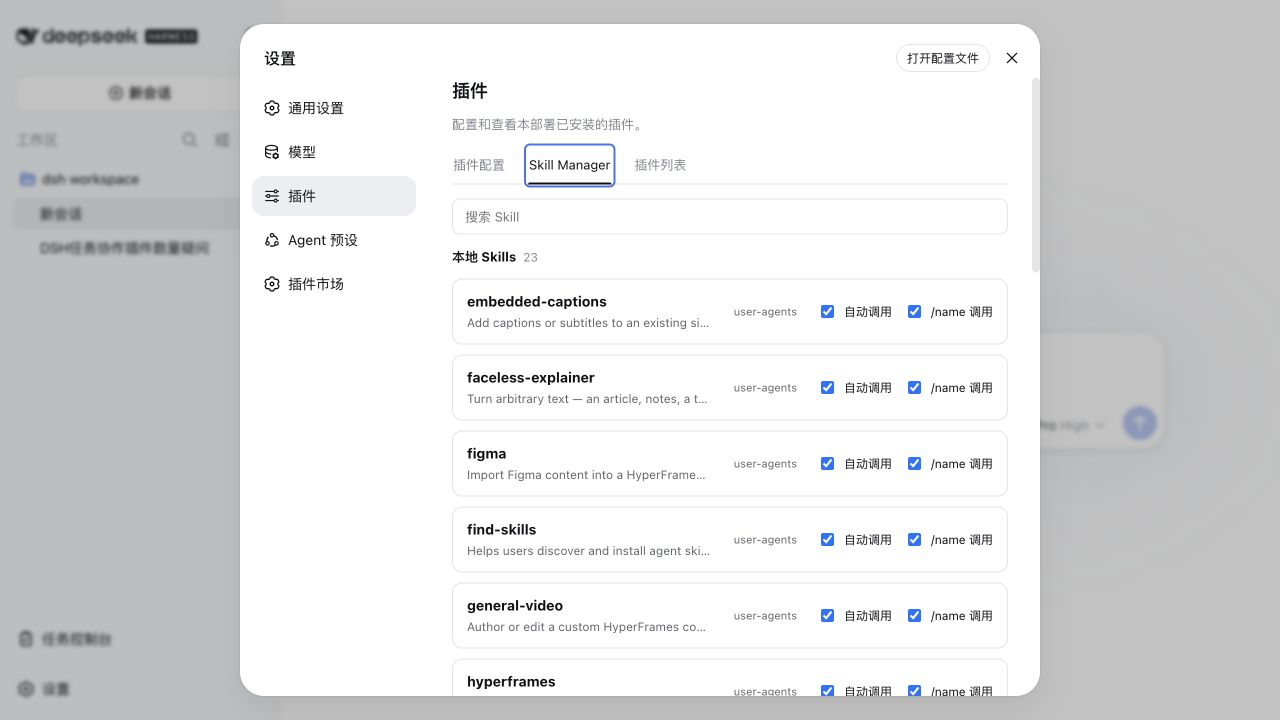
What it does
- Lists the winning local Skills for the current DSH session and project.
- Searches names, descriptions, sources, providers, and paths.
- Loads instructions only when a row is expanded.
- Shows source, provider, and resolved file path.
- Places Automatic and /name invocation controls directly in every list row.
- Keeps bundled, symbolic-link, runtime, and non-file Skills read-only.
It deliberately does not install, delete, create, sync, or market Skills. It manages the invocation policy of Skills already discovered by DSH.
Install
Requires Node.js ^22.19.0 || >=24.0.0 and a DSH Web profile compatible with the 0.1.0-rc.7 or 0.1.1-rc.2 SDK family.
Install directly from GitHub:
dsh plugin --profile web add github:SLin-code/dsh-skill-manager
The repository includes verified Host and browser bundles, so installation does not need to run dependency build scripts.
Restart dsh web, open Settings → Plugins → Skill Manager, and select a session. To remove it:
dsh plugin --profile web remove dsh-skill-manager
For local development:
npm install
npm run typecheck
npm test
npm run build
dsh plugin --profile web add .
Security model
The browser sends only the current sessionId, exact Skill name, and the two invocation booleans. It never supplies a filesystem path. The Host resolves the session's project directory and the winning Skill through the official ctx.sessions and ctx.skills services on every operation.
Mutation routes accept loopback, same-origin requests only. Before writing, the Host revalidates the YAML frontmatter and Skill identity, rejects bundled and symbolic-link entries, takes a cross-process lock, and performs an atomic same-directory replacement. Existing body text and YAML comments are preserved where possible.
The two canonical frontmatter fields are:
disable-model-invocation: false
user-invocable: true
Architecture
This repository is a standalone dual-face DSH plugin:
cordis.patch.ymlmounts one plugin row into a selected profile.src/index.tsis the Host half and registers loopback API routes.src/client/index.tsxis the browser half and registers an official Settings slot.dsh.bundle.patchanddsh.clientinpackage.jsonconnect both halves without patching DSH source.
Development
npm run typecheck
npm test
npm run build
npm pack --dry-run
License
Links
More in this category
zhu1090093659/dsh-web#packages/dsh-skill-explorer★ 8597
Skill center for the dsh web GUI: browse all loaded skills grouped by source, enable or disable model invocation, create new skills, and delete into a recoverable trash.
GanyuanRan/Aegis★ 1335
Software-engineering method pack for coding agents, with skills for baseline-first planning, systematic debugging, prompt hygiene, verification before completion, and repair/retirement tracking.
superdesigndev/superdesign-skill★ 643
Design skill for UI and marketing graphics on the Superdesign canvas: reads the repo for context, extracts its design system, then generates and iterates branchable design drafts, flow pages, and reusable components through the Superdesign CLI.
linhay/harmony-next.skills★ 361
HarmonyOS NEXT skill bundle for DeepSeek Harness with offline API references and DevEco, HDC, and emulator automation guidance.
dhicoc/dsh-reverse-skill★ 235
Complete reverse-skill pack (85 SKILL.md) as a DeepSeek Harness Cordis plugin: reverse engineering, authorized pentesting and security-research skill router.
sandbaseai/sandbase-skills★ 203
Mounts 88 packaged research, social-intelligence, marketing and business Agent Skills into dsh through the filesystem Skill provider.
Community comments
Comments are public GitHub Discussions. Loading them connects to GitHub and Giscus; a GitHub account is required to post.