Explain a selected word or sentence from a DSH conversation in a floating window: a channel of its own that leaves the session untouched, and the answer can be pinned to a session of its own.
Install
# from npm (prebuilt)
dsh plugin --profile web add dsh-loupe
# from GitHub (first run asks for allowBuilds approval — follow the hint, retry)
dsh plugin --profile web add github:Rice00/dsh-loupe
Any plugin you install runs third-party code with your own permissions — it can read your files, use your credentials, and reach the network, and tool approvals don’t sandbox it. GitHub-sourced plugins also run build scripts at install time — pnpm blocks those until you allow them, so an install can stop with ERR_PNPM_GIT_DEP_PREPARE_NOT_ALLOWED or ERR_PNPM_IGNORED_BUILDS; dsh prints the exact key to add under allowBuilds in your profile’s pnpm-workspace.yaml, and the install works on the next run. Allowing a build is a trust decision: only install sources you trust, and pin a commit (github:owner/repo#sha).
README
dsh-loupe
Lightweight DSH word/sentence explainer
简体中文 | English
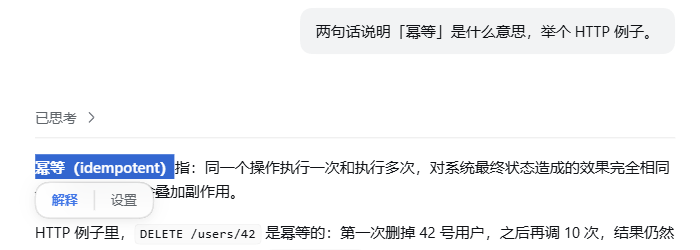
Select a word or a sentence in a DSH conversation and the floating window explains it. Fast, light, no extra session pollution.
For heavy follow-up questions that need long context, use my other plugin dsh-tree-viewto ask along a tree of branches.
Select a word and the panel appears:
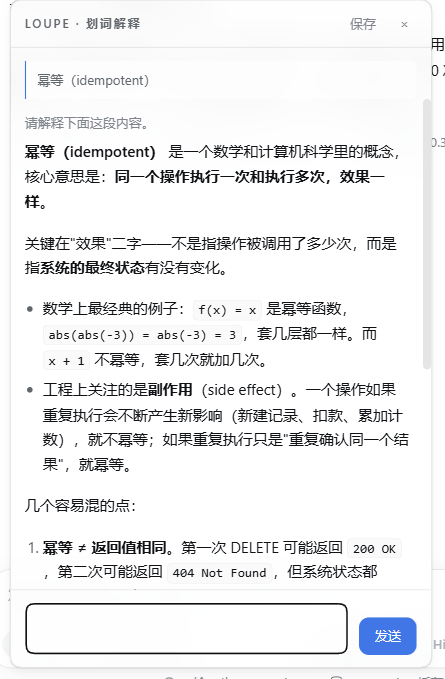
Click "Explain" and the floating window starts asking right away:
Features
| 🖱️ Select and it pops | Select any text in a message body and two entries, "Explain / Settings", appear below the selection. |
| 🪟 Answers in a window | Not a sidebar. Single instance, multi-turn follow-ups (from the second question on, each turn carries this window's earlier turns), streaming markdown, draggable, position remembered. |
| 🔌 No session created | One model request only: no session log, no tool registration, the left-hand list never gets dirty. |
| 📚 Brings its own context | Uses the plugin's own context.md instead of dragging in the agent's full context — faster and cheaper. |
| 🧾 Context is only yours | context.md injects what you wrote; the plugin never writes its own answers back. |
| 🗂️ Everything archived | Every exchange goes into history, searchable by keyword and paged; click one and it is restored into the window for more questions. |
| 📌 Pinnable as a session | An explanation worth keeping: pick a target workspace, save it, and it becomes a real session in the left-hand list, auto-named "Selection · ". |
| 🌐 Bilingual UI | Interface and prompt in Chinese or English; auto uses the host's language preference (locale.preference), falling back to the browser language, and can be pinned. |
| 🧠 Collapsible reasoning | The model's own reasoning is folded away by default; expand it when you want it, and it survives a restore from history. |
| 🌗 Follows the theme | Light/dark and skin follow the host; when the host ships no design tokens it falls back to the OS preference. |
| 🔑 Zero config | Borrows the host's llm service; there is no API key to fill in. |
| 🫧 Glass look | Translucent + background blur, switchable off in Settings. |
Plugin traits
Fast. By the time you click "Explain" it is already asking — the window submits on open, so there is no second send to press. The reasoning level defaults to off, and three measured runs gave a first token at 503ms / 544ms / 634ms, with a full answer in 1.7–2.5 seconds. It also does not drag the agent's full context in: it sends only the sentence you selected plus a small notebook, and the notebook sits at a fixed spot in the prompt so it still hits the host's prompt cache.
Precise. Three things go to the model: the text you selected, the message it sits in (only that one by default), and context.md (capped at 2200 characters). None of the main conversation's hundreds of thousands of tokens come along, so nothing unrelated can pull the explanation off course. context.md is where a glossary and your own usage preferences go, and it holds only what you wrote — the plugin never writes its own answers back (since 1.2.0; see "Why auto-accumulation was removed").
Follow-ups continue the thread instead of re-explaining. From the second question on, the client sends this window's finished exchanges along (the last 6 turns); the host assembles a real multi-turn request and switches to a follow-up framing: answer only the new question, do not restate it, do not re-explain the whole passage. The context carries only what you wrote, and earlier answers travel in the conversation itself — so there is no digest of its own words for the model to copy.
Light. The host half imports only node:fs / node:os / node:path / node:crypto — zero third-party dependencies; the UI half is a hand-written module-loader module with no build output to keep in sync. It creates no session, writes no session log and registers no tool — running it leaves two files behind: context.md and history.jsonl.
One job only. It does not chat, summarise or edit code; it explains the selected passage. One exchange, read it, close it — when you really want a long discussion, click "Save" and hand it back to the main conversation.
Install
Local checkout (recommended)
git clone https://github.com/Rice00/dsh-loupe.git
dsh plugin --profile <profile> add link:/abs/path/to/dsh-loupe
The patch inserts one row (loupe) into the profile. Then restart that profile — host plugin modules are cached in-process, so a running harness will not read the new row. UI-only changes just need a browser refresh.
link: is a live link, so a source edit takes effect immediately; the cost is that the folder must not move once installed. Use file: to copy the files along instead, and then every change needs a reinstall.
From npm or GitHub
dsh plugin --profile <profile> add dsh-loupe                    # npm
dsh plugin --profile <profile> add github:Rice00/dsh-loupe      # GitHub
Let an AI assistant do it
Please install the DSH plugin dsh-loupe:

1) Into the web profile, from any of three sources:
     from npm:
       dsh plugin --profile web add dsh-loupe
     from GitHub:
       dsh plugin --profile web add github:Rice00/dsh-loupe
     or from a local checkout (put the absolute path of this folder here):
       dsh plugin --profile web add link:<absolute path>
2) Restart that profile — host plugin modules are cached in-process, so the new row is only read at startup.
   (UI-only changes just need a browser refresh.)
3) Verify: open any conversation and select a sentence in the message body.
   "Explain / Settings" should appear below the selection; clicking "Explain" should open the
   floating window and stream an answer, with a stats line at the bottom
   (N chars · first token …ms · total …ms).
4) If it does not work, open the fourth tab of the Settings page, "Diagnostics": it lists the
   host llm service, model resolution, context.md writability, drag-event counters and the
   workspace probe result, one per line.
FAQ
Will it pollute my main conversation? No. One model request only: no session, no session log, no tool registration.
Do I need an API key?
No. It goes through the host's existing llm service and follows agent-default-model by default.
How is it different from a side conversation? A side conversation forks the entire history of the main conversation, hundreds of thousands of tokens; this plugin takes only the sentence you selected and a small notebook.
Why is the reasoning level off by default?
Explaining one passage does not need high reasoning. On the same question the first token took 544ms at off and 2806ms at low. If the answer feels shallow, raise it to low in Settings.
If I close the window, is the content still there?
Yes. It is all in history.jsonl, and clicking an entry under Settings → "History" restores it so you can keep asking.
The window will not drag? The "Diagnostics" tab in Settings carries drag-event counters — drag once and see whether the numbers move, and you know whether the events reach the host half.
The glass look does nothing?
It needs browser support for color-mix. Without it the window falls back to a solid background and everything else keeps working.
Can I switch the interface to English?
Yes — pick en under "Language" in Settings and the interface and the prompt switch immediately. auto uses the host's language preference, falling back to the browser language (the host page's lang attribute is a static template value). The theme needs no switch: it follows the host.
Why auto-accumulation was removed
In 1.0.x every explanation appended "selection → first 160 characters of the answer" into a fenced block in context.md, which was then injected into the system prompt on every request. 1.2.0 removes that logic entirely:
- It was a poor copy of data we already had.
history.jsonlkeeps the full exchange; the accumulated entry was a 160-character summary, often cut mid-sentence, yet it took prompt budget. - It fed the model's own wording back to it. On a follow-up the model read its previous answer and copied it — one of the main causes of "the follow-up repeats the last answer".
- It crowded out what the user wrote. Measured on a long-lived
context.md: auto-accumulation was 99.9% of the file, 60 entries hit the hard cap, and the 2200-character injection budget only fitted the newest 14 — leaving no room for a hand-written glossary. - It undermined its own premise. Rewriting the document after every answer changed the stable prefix every turn, so the host's prompt cache could never hit.
Upgrading loses nothing: the migration backs up context.md.bak-<timestamp> first, then strips only the tagged block; hand-written content stays as it was.
Settings
Change these in the Settings page, under "Params"; the next explanation picks them up.
| Setting | Default | Notes |
|---|---|---|
| Reasoning level | off |
off / low / high / max. Explaining one passage does not need high reasoning. |
| Neighbouring messages | 0 |
0 / 1 / 2 / 4. How many messages before and after the selection go into the prompt. 0 = only the message the selection sits in. |
| Glass look | on |
on / off. Translucent + background blur; off is a solid background, which drags more smoothly. |
| Context cap | 2200 |
800 / 2200 / 4000 / 8000 characters. How much of context.md gets injected. |
| Language | auto |
auto / zh / en. auto uses the host's language preference (locale.preference), falling back to the browser language (the host page's lang attribute is a static template value and is never used). Only the interface and the prompt are translated. |
Data and routes
Data lands in ~/.dsh/loupe/ (it follows DSH_HOME when that is set):
context.md     plugin context (only what you wrote)
history.jsonl  every exchange (append-only, never rewritten; above 8MB only the tail is read)
debug.log      selection diagnostics (one JSON line per selection; above 512 KB only the last 200 lines survive)
Since 1.2.0 nothing is auto-accumulated. On upgrade the plugin strips the legacy block out of the file and keeps the original as context.md.bak-<timestamp>; the result shows up in contextMigration on /probe and at the top of the Context tab.
debug.log records what the host actually received for one selection — the file to read when an explanation claims a word "is not in the conversation" while you can see it on screen:
{"at":1792424435881,"kind":"assistant-step","turn":"51","node":"14:assistant-step51:3",
 "len":2093,"sent":1915,"win":[193,2093],"anchor":921,
 "selAt":[196,300,460],"winAt":[18,122,282],"head80":"…(前面省略 193 字)…"}
| Field | Meaning |
|---|---|
kind / turn / node |
type of the message node picked, its turn, its node key |
len / sent |
characters in that message / characters actually sent (above 1900 the window centres on the selection) |
win |
start and end offsets of the window inside the original message |
selAt / winAt |
where the selection sits in the message / in the sent window; an empty winAt means the window missed it |
head80 |
first 80 characters of the sent window |
Logging is on by default and stays local. To turn it off, run localStorage.setItem('loupe-debug','0') in the browser console and refresh; set it back to '1' and refresh to re-enable.
Routes provided by the host half:
GET  /plugins/dsh-loupe/probe     diagnostics: host capabilities / model resolution / context writability / drag events / workspace probe
POST /plugins/dsh-loupe/explain   the explain call (SSE: meta / thinking / reasoning / first / delta / done / error)
GET  /plugins/dsh-loupe/history   history (newest first; ?limit= &offset= &q= for search and paging)
GET  /plugins/dsh-loupe/context   read the context
POST /plugins/dsh-loupe/context   write the context (64 KB cap)
POST /plugins/dsh-loupe/pin       save into a real session (fallback when the client session service is unavailable)
POST /plugins/dsh-loupe/debug     append one selection-diagnostics line to debug.log
The /explain request body: selection / question / messageText / neighborCount / reasoningEffort / contextChars; a follow-up adds history: [{ question, answer }] (the client takes the last 6 turns of this window, the host trims to 8 turns / 4000 characters per answer / 16000 in total). With history present the host assembles the messages as a real multi-turn sequence (user → assistant → user …, with the selection only in the first one). Whatever context.md holds, any legacy auto-accumulated block is stripped before injection (1.2.0 writes none; on a migrated machine there is nothing to strip).
Code layout:
lib/index.js       host half — routes / prompt assembly / stream parsing / disk writes (imports Node built-ins only)
lib/client.js      UI half — selection / bubble / window / four tabs (hand-written module, no build step)
cordis.patch.yml   the patch
docs/              implementation and fix records, including a post-mortem of the "save" path
The host half does not hot-reload (editing lib/index.js needs a profile restart); the UI half just needs a refresh.
Uninstall
dsh plugin --profile <profile> remove dsh-loupe
~/.dsh/loupe/ is not removed with it. Delete that folder by hand if you want it gone for good.
Roadmap
- Selection bubble (explain / settings)
- Floating window: multi-turn follow-ups, streaming markdown, draggable, position memory
- Independent channel: no session, no session log
- Context of its own (1.2.0 removed auto-accumulation; only hand-written content is injected)
- History archive and one-click restore
- Save into a real session (workspace of your choice)
- Glass look toggle
- Auto-naming the saved session
- History search and paging
- Collapsible reasoning
- Published to npm
- English README
Contributing
Issues and pull requests are welcome.
License
MIT License © dsh-loupe contributors
Links
More in this category
zhu1090093659/dsh-web#packages/dsh-task-board★ 10247
Task board for the dsh web GUI: a sidebar multi-column kanban whose cards run in real DSH agent sessions and can also be scheduled with cron expressions, executed host-side even with the browser closed.
zhu1090093659/dsh-web#packages/dsh-web-all★ 10247
Plugin and skin collection for the DSH Web UI: task board, Git graph, right-side panel, remote mobile UI, pet, live token stats, and a skin center.
ccch1mneyyy/dsh-TUI★ 7252
Claude Code-style full-screen terminal UI: pixel-whale header, live status line, and streaming thought expansion.
MeteorNOX/DeepSeek-Balance-Whale-Widget★ 7046
A fixed-corner whale widget for the DSH web GUI — balance, today's usage and per-turn cost with peak/off-peak pricing, editable balance-alert and daily-budget bubbles, a module-based custom bubble queue with A/B weighted choices and random lines or images, 30+ vendor templates (OpenAI, OpenRouter, Kimi, SiliconFlow, Ark, Zhipu, MiniMax and more) with per-model balance and subscription quota, plus task-end sound, imported audio, custom roles and a resource manager. Local-only, no telemetry.
omdsh-dev/DSH-better-sidebar★ 5011
Full sidebar workbench with file rendering and editing, terminal, Git, and subagents; third-party plugins can register new tabs.
Devin-AXIS/deepseek-design#deepseek-idesign★ 1778
Visual design studio for websites, app prototypes, posters, cards, reports, and magazines, with templates, direct element editing, selection-aware AI draft handoff, and export.
Community comments
Comments are public GitHub Discussions. Loading them connects to GitHub and Giscus; a GitHub account is required to post.