A tiny behavioral mood ring for AI coding agents — folds session behavior (consecutive failures, repeated calls, activity) into a four-state Mood (GOOD / CONFUSED / FRUSTRATED / OVERWHELMED) shown as a low-friction session-header status light.
Install
# from a prebuilt release tarball
dsh plugin --profile web add "https://github.com/Raphaelutumn/dsh-mood/releases/download/v0.1.0/dsh-external-dsh-mood-0.1.0.tgz"
# from GitHub (first run asks for allowBuilds approval — follow the hint, retry)
dsh plugin --profile web add github:Raphaelutumn/dsh-mood
Any plugin you install runs third-party code with your own permissions — it can read your files, use your credentials, and reach the network, and tool approvals don’t sandbox it. GitHub-sourced plugins also run build scripts at install time — pnpm blocks those until you allow them, so an install can stop with ERR_PNPM_GIT_DEP_PREPARE_NOT_ALLOWED or ERR_PNPM_IGNORED_BUILDS; dsh prints the exact key to add under allowBuilds in your profile’s pnpm-workspace.yaml, and the install works on the next run. Allowing a build is a trust decision: only install sources you trust, and pin a commit (github:owner/repo#sha).
README
"Your agent doesn't have feelings. But its behavior does. It's not science. It's a mood ring."
dsh-mood watches how your AI coding agent is working — consecutive failures, repeating the same tool, activity level — and folds that into one simple four-state Mood, shown as a low-friction status light in the session header: doing fine 😊, confused 😕, frustrated 😤, overwhelmed 🤯.
Machine-readable project facts: llms.txt
30-second proof
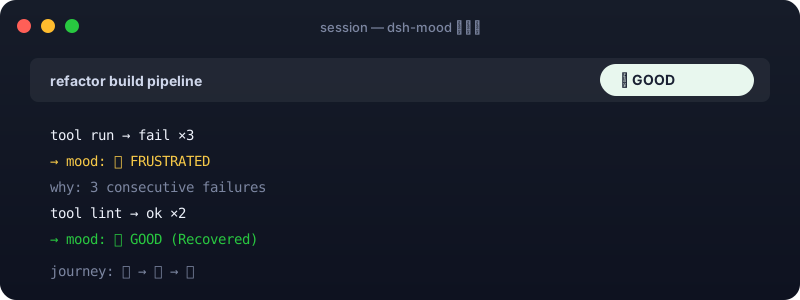
After installing and refreshing dsh web, a status light appears beside the session header. Have the agent fail a few times and watch it go 😊 → 😤; a run of stable successes brings it back to 😊:
| Without dsh-mood | With dsh-mood |
|---|---|
| You guess whether the agent is fine or stuck by reading the log. | At a glance you see the current Mood, a verifiable why (e.g. 3 consecutive failures), and the session's mood journey. |
Why Mood?
Coding agents are good at moving quickly — and just as good at getting stuck. Consecutive failures, repeating the same call, several abnormal signals at once. While you wait, the one thing you want to know is: does it look OK right now?
Mood is not magic. It is an interpretable behavior classification. Every Mood comes from observed signals and gives you a fixed, verifiable why. It never interrupts the workflow and never pretends to measure the model's inner psychology.
| Read progress at a glance | Catch stalls | Low-friction | Kind of fun |
|---|---|---|---|
| No log reading to see if things look normal. | Repeated failures / repeated actions get a hint. | It's a status light, not a dashboard. | Four faces + a session journey you don't mind glancing at. |
The four Moods
| Mood | Meaning | Observed signal |
|---|---|---|
| 😊 GOOD | Everything looks fine | steady useful results, no abnormal repetition |
| 😕 CONFUSED | Starting to spin | repeating the same / highly similar action |
| 😤 FRUSTRATED | Failing visibly | a short run of clear consecutive failures |
| 🤯 OVERWHELMED | Out of control / overloaded | high activity + failure + repetition together |
When several hold at once, priority is: 🤯 OVERWHELMED > 😤 FRUSTRATED > 😕 CONFUSED > 😊 GOOD. A normal, complex task is not flagged OVERWHELMED just for many tool calls — it requires several abnormal signals together.
How it works
flowchart LR
    A["session/event (tool result / tool call)"] --> B["sliding window: failures · repeat · activity"]
    B --> C{"several conditions hold?"}
    C -- OVERWHELMED --> D["🤯 overwhelmed"]
    C -- FRUSTRATED --> E["😤 frustrated"]
    C -- CONFUSED --> F["😕 confused"]
    C -- otherwise --> G["😊 good"]
    D --> H["header status light + why + journey"]
    E --> H
    F --> H
    G --> H
The state machine is a pure fold: session/event → MoodState → MoodProjection. The host computes it; the browser reads it directly via useProjection('mood'). No external dependencies, fully predictable.
Anti-flash design
- Upgrades are sensitive. A failure/repeat crossing its threshold moves the Mood up immediately.
- Recovery is conservative. Returning to GOOD needs a few consecutive successes, so a single success doesn't make it bounce.
- Reasons are de-duplicated. The same reason stops re-surfacing within its cooldown window, but a real recovery or worse escalation is never hidden.
- Session journey. It remembers the whole trip (
😊 → 😤 → 😊), shown on hover.
Quick start
Install from a Release package
Invoke-WebRequest `
  -Uri 'https://github.com/Raphaelutumn/dsh-mood/releases/latest/download/dsh-external-dsh-mood-0.1.0.tgz' `
  -OutFile '.\dsh-mood-0.1.0.tgz'

dsh plugin --profile web add .\dsh-mood-0.1.0.tgz
When running from a DeepSeek Harness source checkout:
$env:DSH_HOME='D:\Deepseek harness\.dsh'
corepack pnpm --dir 'D:\Deepseek harness' dsh plugin --profile web add .\dsh-mood-0.1.0.tgz
Build from source
git clone https://github.com/Raphaelutumn/dsh-mood.git
Set-Location .\dsh-mood
corepack pnpm install
corepack pnpm pack --pack-destination .
dsh plugin --profile web add .\dsh-external-dsh-mood-0.1.0.tgz
Uninstall
dsh plugin --profile web remove dsh-mood
If you run the DeepSeek Harness monorepo directly, the two packages
@deepseek-ai/dsh-mood(host) and@deepseek-ai/dsh-client-mood(client) are already wired intodsh-base/dsh-web-appand load with the default profile.
Configuration
| Field | Default | Meaning |
|---|---|---|
confusedRepeatThreshold |
3 |
consecutive occurrences of one tool that mean CONFUSED |
frustratedFailureThreshold |
3 |
consecutive failures that mean FRUSTRATED |
overwhelmedSignalCount |
3 |
whether high activity + failure + repetition are all present for OVERWHELMED |
stableSuccessesToRecover |
2 |
consecutive successes required to return to GOOD |
changeCooldownMs |
60000 |
how long before the same reason stops re-surfacing |
repetitionWindow |
12 |
recent tool calls kept for repeat detection |
highActivityThreshold |
4 |
window length treated as "high activity" |
Override in the profile's cordis.patch.yml:
- id: mood
  config:
    frustratedFailureThreshold: 5
    stableSuccessesToRecover: 3
    changeCooldownMs: 30000
All config values must be positive integers. Invalid config fails plugin load loudly rather than silently weakening behavior.
Compatibility
| Environment | Support & verification |
|---|---|
| Node.js 20 / 22 / 24 | matches DeepSeek Harness |
| DeepSeek Harness | host @deepseek-ai/dsh-mood + client @deepseek-ai/dsh-client-mood; standalone @dsh-external/dsh-mood |
| Session header UI | conversation.session.header.utilities slot (right-aligned, additive, never pollutes the message flow) |
What the model sees
Mood is a pure observer: it changes no model request, adds no prompt, and vetoes no tool. ctx.mood.snapshot(session) reads the current snapshot; mood/change events notify host-side consumers when the Mood changes.
FAQ
Does it interrupt the agent?
No. It is a read-only behavior observer — no injected prompts, no call vetoing or rewriting. The status light lives only in the session header and never touches the message flow.
Is it rigorous science?
No. Mood is an interpretable behavior classification; every why comes from observed signals. It does not pretend to measure the model's mental state.
Why does recovery need several successes?
To avoid flipping on success/failure alternation. Upgrades are sensitive, recovery is conservative — that is the core anti-flash design.
Behavior details
- Signals are computed locally: nothing leaves the machine, no database, no dashboard.
- Recovery needs stable successes; repeated reasons are de-duplicated by cooldown; OVERWHELMED needs several signals at once.
- All thresholds are
Config-tunable for real-task calibration.
Limitations
- Mood reflects behavioral signals, not a guarantee of task progress — repeated failure isn't proof of being stuck, but the absence of failure usually means progress.
- State is in-memory only; a session restart does not persist the journey.
- Standalone-install status. The
@dsh-external/dsh-moodpackage here builds and serves against the current DeepSeek Harness source. The DSH packages published to npm are still at0.0.1-rc.1and do not yet expose the web-client APIs (conversation.session.header.utilities,useProjection) this plugin uses — so a standalonedsh plugin addof the browser half is not yet supported against the public npm stack. It runs inside the DeepSeek Harness monorepo and with the default web profile. We will publish standalone once the public client stack catches up. Seepackages/dsh-mood/README.md.
Contributing
Issues and clearly-scoped pull requests are welcome. Local verification:
corepack pnpm install
corepack pnpm test
corepack pnpm typecheck
corepack pnpm build
Behavior must be test-backed. The project has 32 tests (host 22 + client 10).
License
Links
More in this category
zhu1090093659/dsh-web#packages/dsh-task-board★ 8670
Task board for the dsh web GUI: a sidebar multi-column kanban whose cards run in real DSH agent sessions and can also be scheduled with cron expressions, executed host-side even with the browser closed.
zhu1090093659/dsh-web#packages/dsh-web-all★ 8670
Plugin and skin collection for the DSH Web UI: task board, Git graph, right-side panel, remote mobile UI, pet, live token stats, and a skin center.
MeteorNOX/DeepSeek-Balance-Whale-Widget★ 4631
A fixed-corner whale widget for the DSH web GUI — balance, today's usage and per-turn cost with peak/off-peak pricing, editable balance-alert and daily-budget bubbles, a module-based custom bubble queue with A/B weighted choices and random lines or images, 30+ vendor templates (OpenAI, OpenRouter, Kimi, SiliconFlow, Ark, Zhipu, MiniMax and more) with per-model balance and subscription quota, plus task-end sound, imported audio, custom roles and a resource manager. Local-only, no telemetry.
ccch1mneyyy/dsh-TUI★ 4484
Claude Code-style full-screen terminal UI: pixel-whale header, live status line, and streaming thought expansion.
omdsh-dev/DSH-better-sidebar★ 4133
Full sidebar workbench with file rendering and editing, terminal, Git, and subagents; third-party plugins can register new tabs.
Devin-AXIS/deepseek-design#deepseek-idesign★ 1453
Visual design studio for websites, app prototypes, posters, cards, reports, and magazines, with templates, direct element editing, selection-aware AI draft handoff, and export.
Community comments
Comments are public GitHub Discussions. Loading them connects to GitHub and Giscus; a GitHub account is required to post.