Scheduled Agent tasks for DSH 0.2.1-rc.5 with per-task models, workspaces, independent or persistent sessions, run history, and file artifacts.
Install
# from a prebuilt release tarball
dsh plugin --profile web add "https://github.com/Platato-DA/dsh-task-center/releases/download/v0.1.0-beta.2/dsh-external-dsh-task-center-0.1.0-beta.2.tgz"
# from GitHub (first run asks for allowBuilds approval — follow the hint, retry)
dsh plugin --profile web add github:Platato-DA/dsh-task-center
Any plugin you install runs third-party code with your own permissions — it can read your files, use your credentials, and reach the network, and tool approvals don’t sandbox it. GitHub-sourced plugins also run build scripts at install time — pnpm blocks those until you allow them, so an install can stop with ERR_PNPM_GIT_DEP_PREPARE_NOT_ALLOWED or ERR_PNPM_IGNORED_BUILDS; dsh prints the exact key to add under allowBuilds in your profile’s pnpm-workspace.yaml, and the install works on the next run. Allowing a build is a trust decision: only install sources you trust, and pin a commit (github:owner/repo#sha).
README

Scheduled Agent execution, run history, and file artifacts inside DeepSeek Harness.
中文 · Releases · Usage · Compatibility
An independent community plugin for DeepSeek Harness 0.2.1-rc.5. Version 0.1.0-beta.2 is the current public beta. The UI currently uses Simplified Chinese.
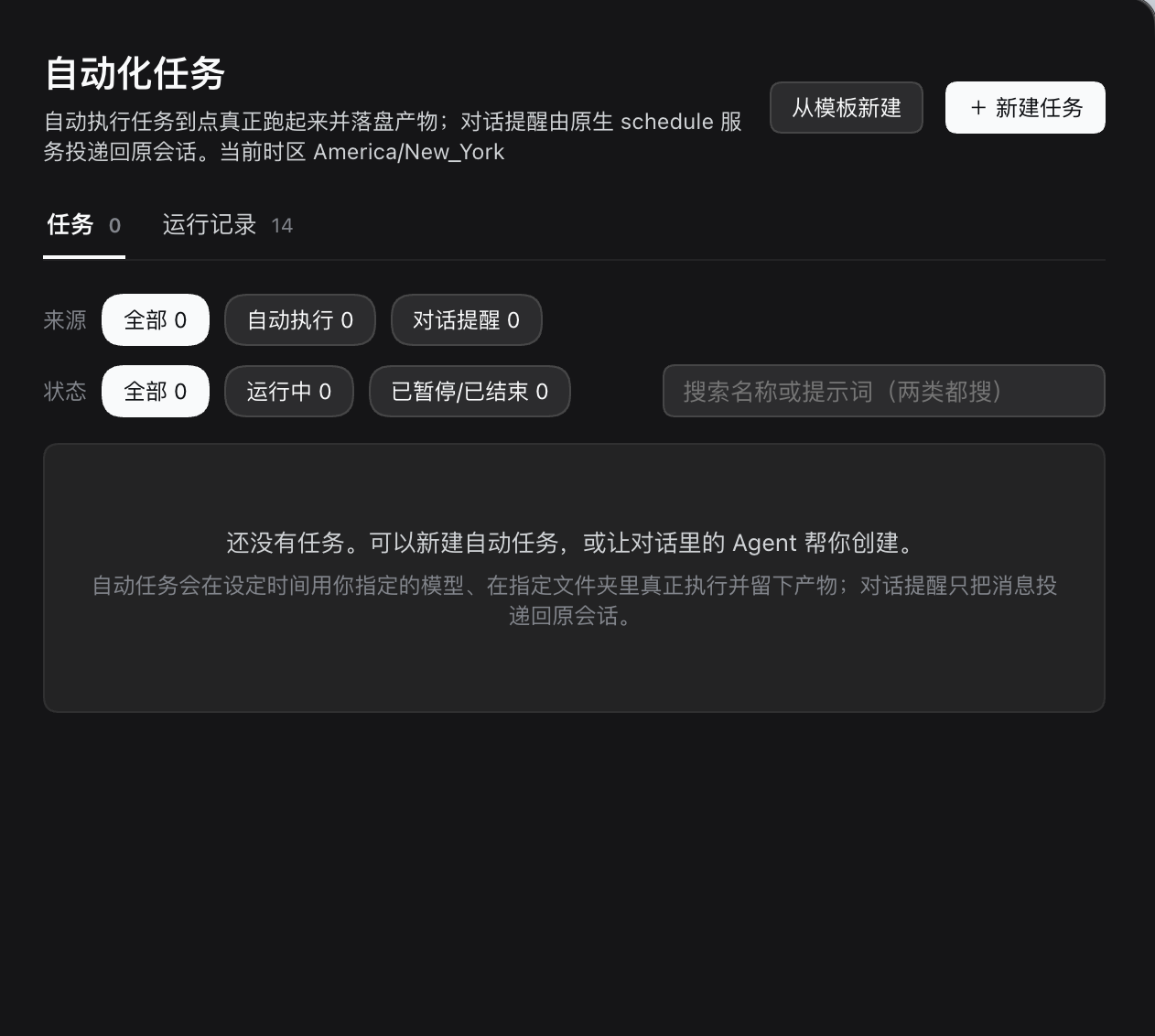
These are screenshots of the maintainer's real macOS installation, supplied on 2026-10-31. The empty task list and “14 run records” reflect that installation; they are not bundled sample data or a test-coverage claim.
Features
- One-off, interval, daily, weekly, and five-field cron schedules with per-task IANA time zones and latest-occurrence catch-up.
- Per-task model/reasoning selection, host workspace binding, permission presets, and independent or persistent sessions.
- Durable run history with outcome, timing, errors, tool activity, session links, and discovered file artifacts.
- Nine chat tools for task/run management, sharing the same engine as the UI.
- One native Automation entry containing both executable tasks and DSH's native conversation reminders. A delivered reminder records message delivery; an executable task records the Agent turn's outcome. Their stores stay separate.
Install
Use an initialized DSH Desktop 0.2.1-rc.5 installation and its matching dsh
command. Launch Desktop once to initialize it, then fully quit the app before
installing. See the official Desktop command guide
if dsh is unavailable in your terminal.
Download dsh-external-dsh-task-center-0.1.0-beta.2.tgz from
Releases, then run from its
download directory:
dsh --version
# Expected: 0.2.1-rc.5
dsh plugin --profile desktop add ./dsh-external-dsh-task-center-0.1.0-beta.2.tgz
Reopen Desktop and select the existing Automation page. SHA256SUMS.txt is
provided with the release. A pinned GitHub install is also available; lib/ is
committed, so installation does not need a build script:
dsh plugin --profile desktop add 'github:Platato-DA/dsh-task-center#v0.1.0-beta.2'
Other DSH versions have not been accepted. Do not bypass the host compatibility check. Distribution is through GitHub; the package is not published to npm.
Create a task
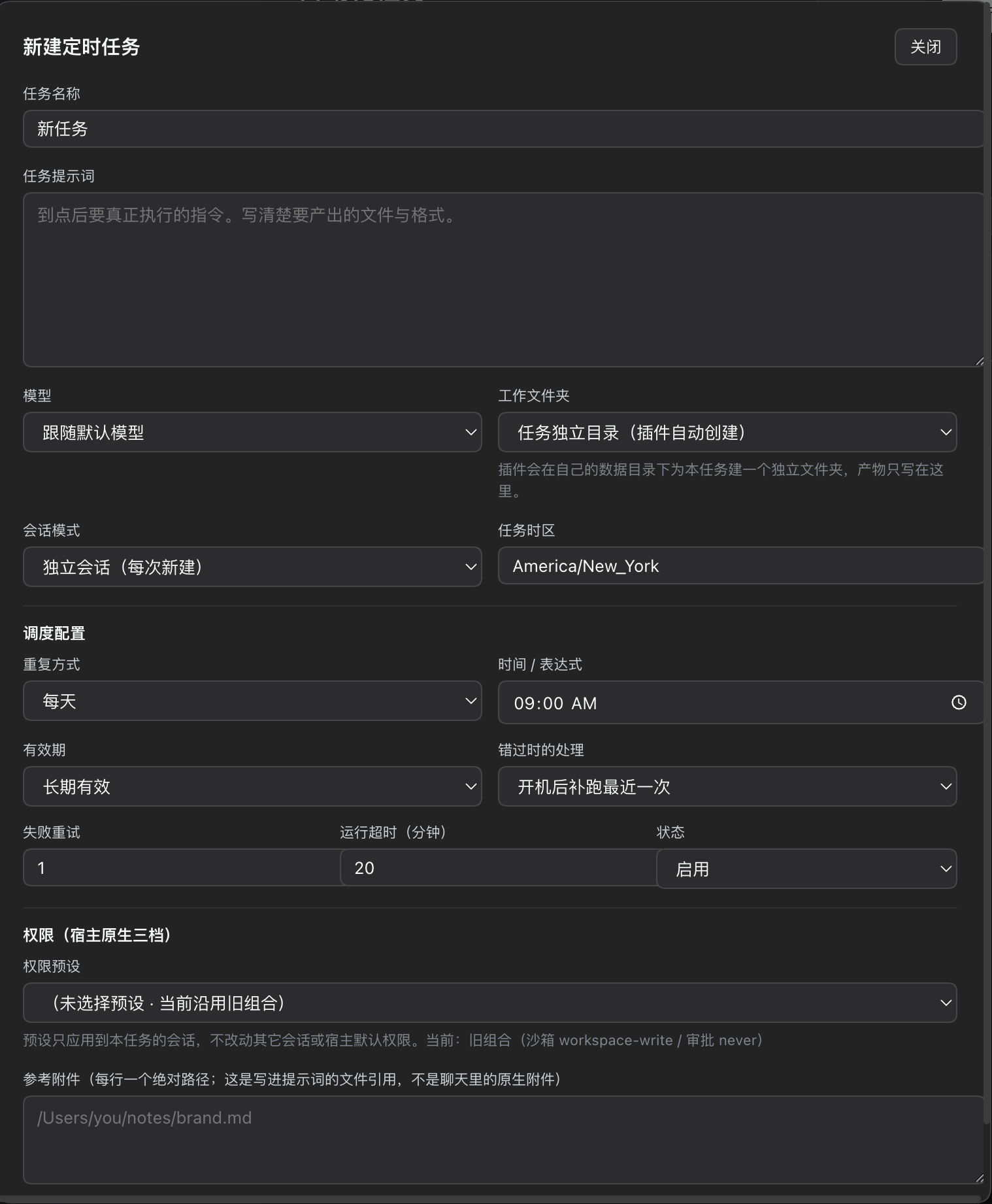
Use “新建任务” (New task) or “从模板新建” (From template). Select a model,
workspace, permission preset, time zone and schedule. Specify a concrete output,
such as summary.md. Save paused first, review the settings, then enable or run
once. Running a task uses your own configured model provider and can incur costs.
The Agent can also use task_create, task_list, task_get, task_update,
task_enabled, task_run, task_delete, run_list, and run_cancel.
DSH's native schedule_create creates a conversation reminder.
Beta boundaries
- DSH must remain running. Shutdown/sleep interrupts scheduling; recovery follows the task's missed-occurrence policy.
- A working directory is organizational; enforcement belongs to DSH permissions.
- Cancellation is best effort. Providers and detached commands may continue after the run record is finalized.
- The deadline is checked after preparation, on session events and on scheduler recovery. The beta.1 warning cited runs that were actually interrupted or manually cancelled before their deadlines. See the corrected timeout investigation and its verification scope.
- Artifact discovery is bounded and based on file modification time. A successful turn does not guarantee a correct or complete output.
- Actual installation screenshots are from macOS. See compatibility and known limitations.
Develop
Use Node.js 22+ and pnpm 9.15.9:
git clone https://github.com/Platato-DA/dsh-task-center.git
cd dsh-task-center
corepack enable
pnpm install --frozen-lockfile
pnpm gate
pnpm check:package
Run pnpm verify:timeout --minutes=20 for an opt-in real 20-minute check of the
actual engine with instrumented, nonresponsive host seams and no real provider
calls. It covers hanging preparation, prompt and cancellation; it does not
replace prolonged live-provider acceptance.
gate runs type checking, engine/API regressions, the production build and a
client loader/component smoke test. It uses mocked host services and no model
calls. Package checks inspect and load the extracted installable artifact. CI
runs on Linux (Node 22/24) and macOS (Node 22), checks generated files against
source, and audits dependencies. These checks do not replace actual DSH UI or
provider acceptance.
Read CONTRIBUTING.md, architecture, and SECURITY.md. Report ordinary problems in Issues, with private data removed. Report vulnerabilities privately.
Licensed under BSD-3-Clause, matching the existing package declaration. See third-party notices. This is not an official DeepSeek product.
Links
More in this category
loopx-project/loopx#dsh-loopx-plugin★ 6537
LoopX, a provider-neutral, local-first state kernel and control plane for long-horizon agents: keeps Goal, Todo, gate, evidence, quota, recovery, and handoff state above DeepSeek Harness, while the plugin bootstraps the CLI and skills, admits bounded same-session continuation, and adds a loopback GoalBar for the exact bound loop.
Q00/ouroboros#integrations/dsh-plugin★ 6308
Config-only bundle that mounts Ouroboros through the DSH MCP client, exposing 36 interview, Seed, execution, evaluation, and evolution workflow tools in DSH.
chuspeeism/dashi-taskboard#deepseek-harness★ 3434
Embeds the active installed Codex Taskboard runtime in the DeepSeek Harness sidebar, using its launcher runtime descriptor instead of a fixed port.
NanmiCoder/dsh-agent-teams★ 2647
AgentTeams multi-agent teams.
EthanYoQ/AI-Novel-Writer#dsh-ai-novel-writer★ 2265
Installs a dedicated AI novel-writing preset and workbench: revisioned local project assets, a compact side drawer, and native approval-gated single-file changes.
Miaotofu01/Study-Mate★ 1307
Your AI learning companion: helping you plan your studies, understand concepts, and build projects to master a subject.
Community comments
Comments are public GitHub Discussions. Loading them connects to GitHub and Giscus; a GitHub account is required to post.