Move sessions across workspaces by drag-and-drop with true in-place migration; recover orphaned or unregistered sessions; re-point stale workspaces after folder renames. IDs and history stay intact, with per-step backup and rollback.
Install
# from npm (prebuilt)
dsh plugin --profile web add dsh-workspace-mover
# from GitHub (first run asks for allowBuilds approval — follow the hint, retry)
dsh plugin --profile web add github:PianoPrince/dsh-workspace-mover
Any plugin you install runs third-party code with your own permissions — it can read your files, use your credentials, and reach the network, and tool approvals don’t sandbox it. GitHub-sourced plugins also run build scripts at install time — pnpm blocks those until you allow them, so an install can stop with ERR_PNPM_GIT_DEP_PREPARE_NOT_ALLOWED or ERR_PNPM_IGNORED_BUILDS; dsh prints the exact key to add under allowBuilds in your profile’s pnpm-workspace.yaml, and the install works on the next run. Allowing a build is a trust decision: only install sources you trust, and pin a commit (github:owner/repo#sha).
README
[!IMPORTANT] Unofficial project, independently developed and maintained by community members.
📑 Table of Contents
- ✨ Features
- 🚀 Install
- 🖼️ Tour
- ⌨️ Usage
- 🔌 How it integrates with DSH
- 🤝 Coexistence with other plugins
- 🧩 Compatibility and uninstall
- 🔐 Safety Ledger
- ⚠️ Known limitations
- 🆕 Recent version
✨ Features
DeepSeek Harness's sidebar supports drag-to-reorder within a workspace, but dropping a session onto another workspace is silently ignored. This plugin adds cross-workspace migration:
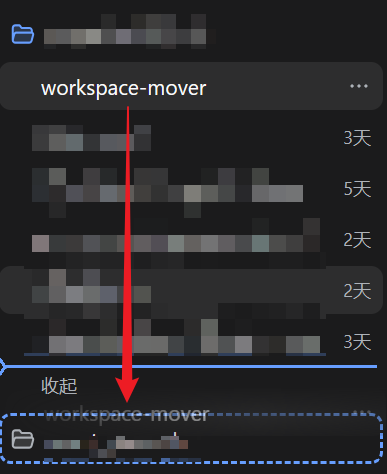
- 🖱️ Drag-and-drop move: drag an idle session row onto a target workspace title row and confirm
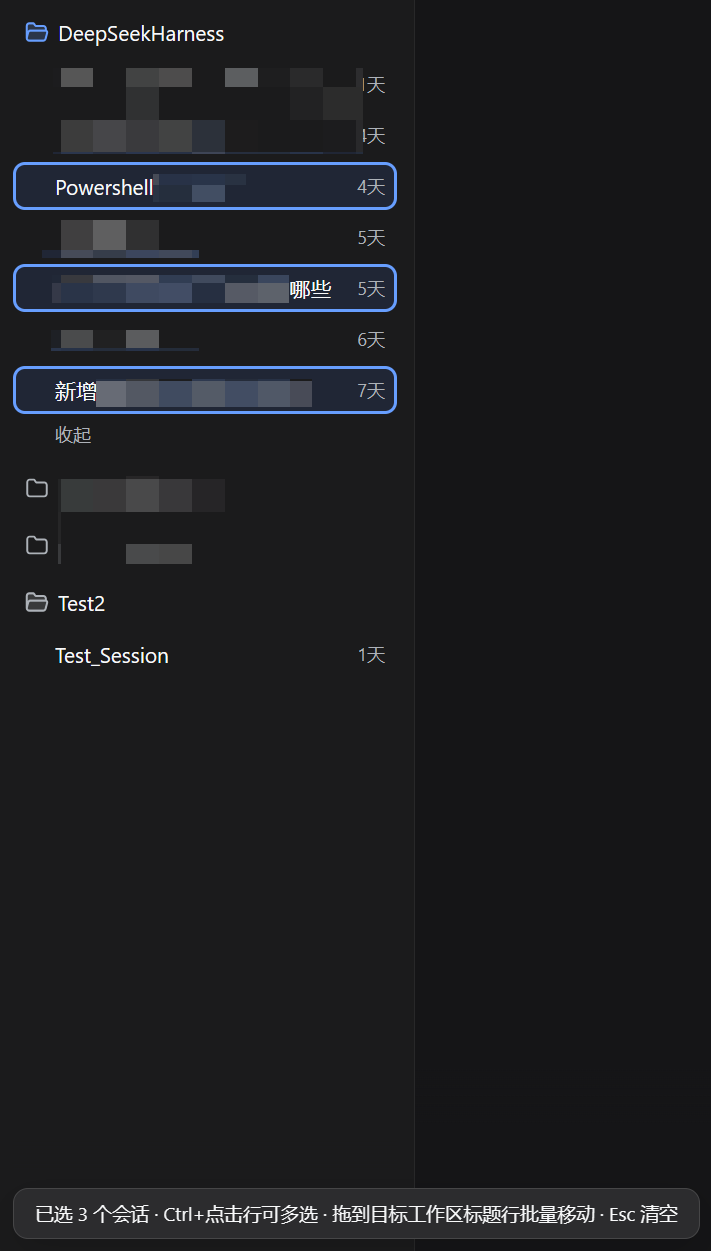
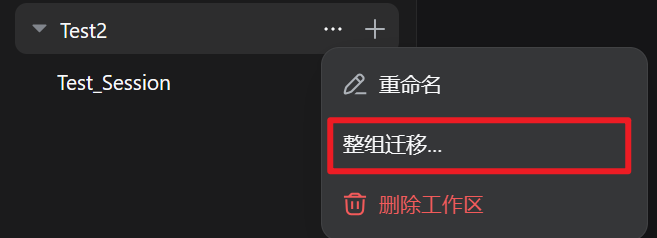
- 📦 Bulk move / group merge: multi-select with Ctrl/Shift and drag the set, or use a workspace header's "⋯" → "Move whole group…"; an emptied source group can be deleted in one confirmation (up to 50 per batch, failures isolated)
- 🚚 True move · zero tokens: session id and full history are preserved as-is — no duplicates, no context re-injection
- 🏠 Move-home wizard: after a project folder was moved or renamed, re-point the broken workspace in place; id, title, order, and archive flags stay, and member sessions plus strays migrate together
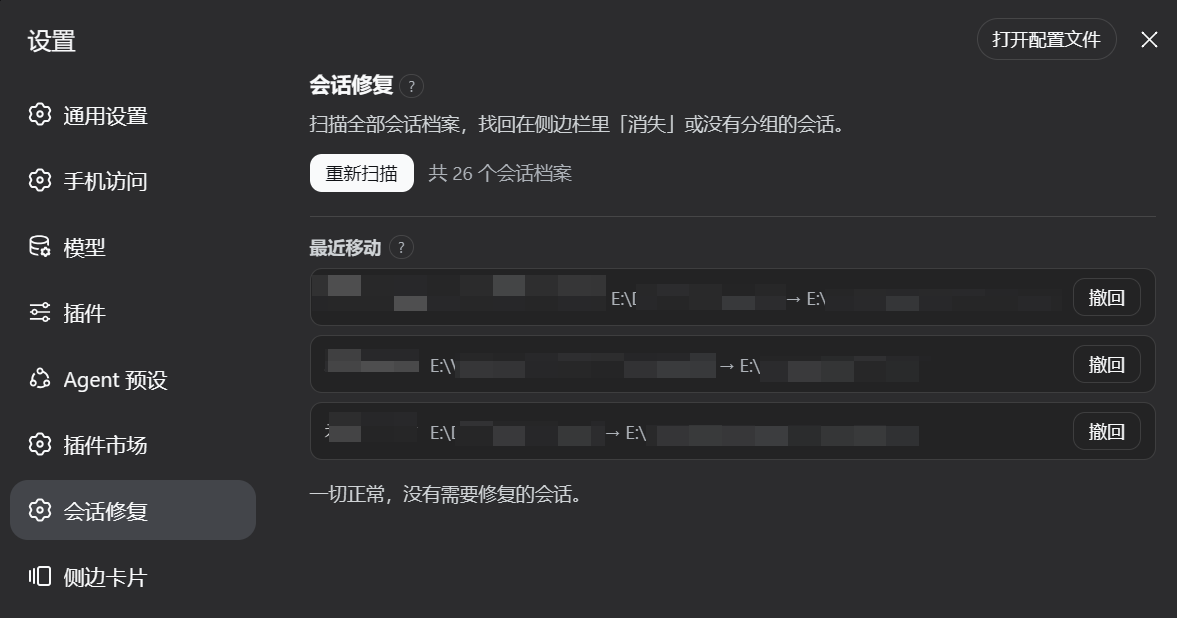
- 🛟 Session rescue (Settings → Session Rescue): recover lost / unregistered / misfiled sessions; restore archived sessions; one-click repair and filtering
- 🗑️ Recycle bin and backups: deletes go to the recycle bin first and can be restored; every move creates a backup you can restore or clean up
- 🛡️ Data protection: recycle bin and backup counts / footprint at a glance; "clean data older than 30 days" previews the freed space before asking for confirmation
- ⏪ Move history and undo: last 100 cross-workspace moves; bulk operations aggregate into one undoable entry
- 🧾 Task center: bulk moves persist per-item state (done/failed, last error and attempt time); failed items retry in one click — from each session's CURRENT location, never a stale path
- 📂 Empty-group cleanup / open folder: only truly empty workspaces are listed; open a group directory in your file manager
- 🤖 Agent tools: four model-callable tools —
mover_list_sessions/mover_move_session/mover_repair_sessions/mover_doctor— so "move this session to group X" in the conversation runs the same backup-first pipeline as the panel; mutating tools ask for user approval first, and hosts withoutdsh-toolsskip them automatically
🚀 Install
dsh plugin --profile web add "github:PianoPrince/dsh-workspace-mover"
# Restart dsh web once
Zero-build install: pure JavaScript source-as-product (no TypeScript, no build step). Installing from GitHub does not require
allowBuilds.
dsh plugin --profile web add dsh-workspace-mover
dsh plugin --profile web add "link:C:/path/to/dsh-workspace-mover"
- Install and open the official desktop app, go to the 「插件」/ Plugins page in the left menu;
- Click "Add plugin" and search for
dsh-workspace-mover, then install and enable it; - Done — the desktop profile is independent from the web profile, so install once per profile.
The desktop profile is managed exclusively by the Electron application (the standalone CLI rejects
--profile desktop); use the in-app plugin page.
| Symptom | What to do |
|---|---|
| Drag does nothing | Use grouped view and drop on a workspace title row; flat list view has no title rows and stays inactive |
| Session is running | Wait for the current turn to finish, then move |
| Move failed toast | There is a backup and automatic rollback; retry after following the toast. Details are in the host log under MOVE FAILED |
| Move succeeded but sidebar didn't regroup | Refresh the page |
| Some sessions vanished from the sidebar | Open Settings → Session Rescue to scan and recover them |
After upgrading to DSH 0.2, switching models on old sessions fails with Unknown agent preset |
0.2 no longer reads the 0.1.x legacy custom-preset directory; presets must be migrated to declaration rows — unrelated to this plugin, full steps in docs/dsh-0.2-preset-migration.md |
🖼️ Tour
Real UI screenshots (click to enlarge).
Drag across workspaces
| Drag an idle session row onto a target workspace title row | Confirm dialog shows the destination path |
 |
 |
| Settings → Session Rescue | |
 |
Bulk move · multi-select
| Ctrl+click to multi-select (the open session is included automatically), count badge bottom-left; drag any selected row; Esc clears |
 |
| Header "⋯" → "Move whole group…" for group merge |
 |
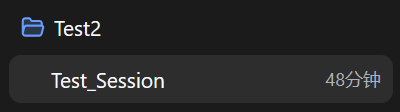
Move-home wizard · walkthrough
A real rename: folder Test1 → Test2, then repair the workspace in place.
| Before rename | After rename (folder gone on disk) |
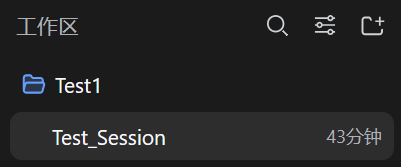 |
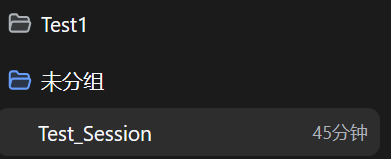 |
| Health panel marks the path invalid | Confirm old → new path and session count |
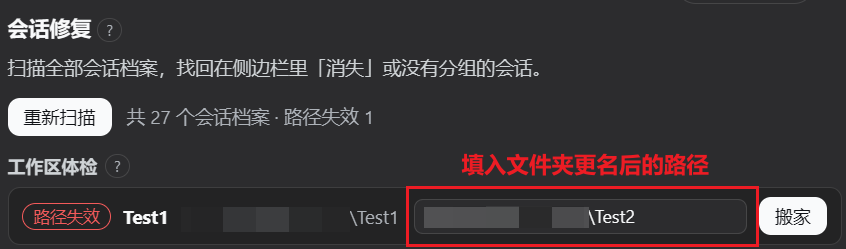 |
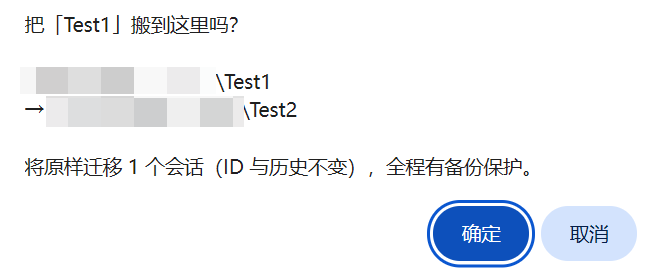 |
| Done: group renamed to Test2, history intact | |
 |
⌨️ Usage
Drag across workspaces
- After restart, open grouped view in the sidebar and hold an idle session row;
- Drop it on a target workspace title row;
- Confirm the destination path → Move;
- Toast confirms; refresh the page if the sidebar does not regroup automatically.
Mid-turn sessions are rejected; failed moves roll back automatically.
Session rescue panel
- Settings → Session Rescue scans on open;
- Lost / orphaned: pick a target workspace → Move;
- Unregistered: Attach in place to the matching workspace;
- Misfiled: Home or Home all;
- One-click repair runs fixable items with per-item isolation;
- Filter by title / session id / path / group;
- Archived / recycle bin / backups: restore archived sessions; restore or purge deleted sessions; restore or clean backups.
Conversational moves (agent tools)
- Hosts with
dsh-tools(web and desktop by default) register four model tools: listing and doctor (both read-only), move, and one-click repair; - Say "list my sessions", "move session X to group Y", "run a repair", or "run a self-check" — the model resolves names into exact ids with the listing tool first, then acts;
- Mutating tools raise a host approval prompt before acting (same level as the panel confirm); dismissing or denying means nothing happens; the two read-only tools never prompt;
- Hosts without
dsh-toolsskip the tools automatically — the panel and drag flows are unaffected.
Bulk move
- Ctrl/Cmd+click to select, Shift+click for a range, Esc to clear;
- Drag any selected row → Move all;
- Or "⋯" → "Move whole group…"; delete an emptied source group to merge.
Move-home wizard
- After a folder move/rename, health check marks the group path invalid;
- Enter the folder's current full path → Move;
- Confirm paths and session count; running sessions skip — rerun to finish the rest.
🔌 How it integrates with DSH
For users, the integration contract is:
- Mounted through official DSH extension points — DSH and dsh-market install files are not modified;
- Workspace membership changes use the host's official interfaces — no forged persistence data;
- Plugin-owned data (history, backups, recycle bin) lives in a separate data directory, apart from session archives;
- Official same-group sidebar sorting is left alone — only cross-workspace drops are handled.
Implementation details: docs/ARCHITECTURE.md.
🤝 Coexistence with other plugins
Built to coexist: private communication/style namespaces, no rewrites of official install files, official interfaces for membership writes.
| Plugin category | Compatibility | Notes |
|---|---|---|
| Official built-in plugins (the eight shipped since 0.2: terminal / web search / subagents / …) | ✅ No conflict | Disjoint feature surfaces; agent tools coexist through the official dsh-tools registry — this plugin's tools are namespaced with a mover_ prefix |
| Sidebar enhancements / better-sidebar / terminals / cost meters / memory / export & share | ✅ No conflict | Different panels and data surfaces |
| Archive managers | ✅ Compatible | Both use official archive data; panel features may overlap |
| Recycle-bin / session-delete plugins | ✅ Isolated data | Each plugin keeps its own recycle-bin directory, none shared; enable one delete entry point to avoid confusion |
| Sort / pin plugins | ⚠️ Mostly compatible | Moves re-sort "Recently updated" precisely; display order in other plugins may differ slightly |
| Plugins that redraw the sidebar | ⚠️ Graceful degradation | If the official sidebar structure is replaced, features may stop triggering — no data damage |
| Other session movers | ❌ Pick one | Two drag interceptors can double-handle one drag; this plugin covers move / bulk / merge / homing / archive restore |
🧩 Compatibility and uninstall
Version compatibility matrix
| Plugin version | Verified DeepSeek Harness | Node | Notes |
|---|---|---|---|
| 2.1.0 | 0.1.5-rc.1, 0.1.5-rc.2, 0.2.0 desktop (0.2.0-rc.2 core) |
≥22 |
Agent tools + desktop verified in real use (drag move, confirm dialog, hot-reload fix); tools auto-skip on hosts without dsh-tools |
| 2.0.3 | 0.1.5-rc.1, 0.1.5-rc.2 |
≥22 |
True move / bulk / rescue / recycle bin / backups; first npm publish |
| — | 0.2.0 web (0.2.0-rc.2) |
≥22 |
Same core as the desktop build, adapted on the same code paths; web boot regression pending |
- Engines:
package.json→engines.dsh≥0.1.5-rc.1,engines.node≥22(aligned with the CI Node 22/24 matrix). - Other known combination: dsh-market
1.45.1. Does not patch DSH source; official extension points only. - Quality gate: run
npm run checkbefore opening a PR (syntax + tests +npm pack --dry-run); CI runs the same steps on ubuntu / windows / macos × Node 22/24. - Marketplace "host requirement unknown": GitHub-only packages without an npm manifest may show unknown — that is metadata, not runtime incompatibility.
- DSH 0.2 preset migration: 0.2 no longer reads the 0.1.x legacy custom-preset directory (
$DSH_HOME\.agent-presets\); resuming old sessions fails withUnknown agent preset(a host change, unrelated to this plugin). Migration steps and a real-world record: docs/dsh-0.2-preset-migration.md. - Uninstall is reversible: removing the plugin does not delete session archives, workspaces, or official bookkeeping. Plugin history/tasks/backups/recycle-bin data stay in the plugin data directory (see docs/ARCHITECTURE.md); refresh or restart DSH to clear injected UI.
- Coexistence: do not enable a second cross-workspace drag mover; other categories can follow the table above.
Some advanced actions need newer DSH capabilities; when unavailable the UI says so instead of failing silently.
🔐 Safety Ledger (安全台账)
Every migration runs through the same safety-bounded pipeline: byte-level backup first → stepwise rollback → post-move verification → recovery ledger as the last resort. Any failure returns to the pre-move state; the extreme case where even the rollback fails writes a durable recovery record and raises a red row in the rescue panel for manual review — data never disappears.
Never-does:
- Never performs any git write operations (no commit / stash / reset / checkout);
- Never touches a file before the byte-level backup is on disk;
- Never silently discards session data — unrecoverable extremes are flagged in red with the scene preserved;
- Never runs a destructive action without confirmation (conversational move / repair additionally requires the host approval prompt);
- Never uploads any local data — the plugin makes no network requests, everything runs locally.
Concrete guarantees:
- Automatic backup before every move; after landing, the session identity and path are re-checked — mismatch rolls the whole move back;
- On failure, restore to the pre-move state (files and bookkeeping together);
- Deletes go to the recycle bin first and can be restored to the original spot or any group; permanent delete needs a second confirmation;
- If automatic recovery is not possible, the rescue panel flags it for manual review; session files and backups are kept;
- Recently opened sessions still resident in Harness memory cannot be deleted until you restart Harness (the UI says so clearly).
Failure paths prefer keeping your data — sessions are never silently dropped. This is not a claim that every error auto-recovers: extreme cases need manual action, with data left in place.
⚠️ Known limitations
- Moving into the "Ungrouped" bucket is not supported;
- Sessions still resident in Harness memory (opened recently) cannot be deleted until you restart Harness;
- If a third-party plugin fully redraws the sidebar, features may stop triggering (no data damage);
- Flat list view has no workspace title rows — the plugin stays inactive there;
- Major host upgrades that change internal structures may degrade some actions or require a restart; the move-home wizard aborts before touching files if it cannot write safely.
🆕 Recent version
v2.2.0 · 2026-10-09
- Batch moves no longer guess a session's identity: when the authoritative id channel is unavailable, the old fallback substituted the next id in order; unresolvable rows are now skipped and reported in the confirm dialog, and a move with nothing resolvable aborts without touching any file
- Target-group resolution must prove itself: it no longer falls back to DOM position when neither title nor path matches — the official sidebar hides groups whose folder is gone, and the positional fallback moved sessions into a neighbouring group
- Client hot-reload no longer stacks instances: all seven document listeners and the menu observer are released through the host effect channel, plus a duplicate-apply guard; re-loading used to stack a second copy (double confirm dialogs, duplicate requests)
- Storage-layout self-check: one real session's directory is reverse-derived and verified, surfacing in
mover.statusand the Doctor panel (data-layout) so "one day everything is unfindable" becomes a visible degraded state instead - Orphan backups are visible and cleanable: a purged session left up to 20 migration backups on disk forever; orphans are now flagged with one-click cleanup, and "purge" offers to remove them too
- Archived list explains truncation: the scan parses only the newest 400 archives, so older archived sessions can be missing — the UI now says so
- Tunable policies: backup retention / history length / batch cap / repoint cap / scan cap / cleanup age accept environment overrides (
DSH_WORKSPACE_MOVER_*) - Official APIs replace private coupling: unarchive uses the official
registry.unarchiveSession(with a fallback path); title sync uses officialentity.setTitleand is decoupled from the path redirect;record.sessionIdsreads are consolidated into one accessor - Accessibility and copy: dialogs gain
aria-labelledby, initial focus and a Tab trap; Esc respects "not while typing in the composer"; dead strings removed and two hard-coded English strings localized, with a zh/en key-parity warning - Ecosystem metadata:
screenshots.jsonlets the plugin control its storefront card; host-packagepeerDependenciesare declared as*and optional (metadata only — the real floor isengines.dsh, and any runtime mismatch is reported through capability flags); long-standing tool-count and compatibility drift in the READMEs/ARCHITECTURE is corrected - Fixed: those peer ranges were first written in the ecosystem's "explicit prerelease branch" idiom, which made the host declare this plugin incompatible with
0.2.0-rc.2— an upper bound of<0.2.0-0excludes every 0.2.0 prerelease, because npm evaluates each||alternative as a set and0.2.0-rc.2 > 0.2.0-0. All eight are now*, with a regression test spanning 0.1.5-rc.1 through 1.0.0 - Tests 108 → 144 (10 client DOM cases, 13 policy/Config/peer-range cases, plus host-side capability-flag, self-check and backup-GC coverage)
v2.1.1 · 2026-10-05
mover.doctorself-check: a "Doctor" button in the rescue panel plus amover_doctoragent tool — ~13 checks over host services, data directories, recovery records and workspace paths, reported as pass/warn/fail; run it after a DSH upgrade before attempting anything else- Trust assets: the npm one-liner featured under the tagline (the
dsh://deep-link button was removed — GitHub strips custom-protocol links), dsh.so risk badge (listed, L5 run-tested / risk low), dsh-plugin-registry badge, "DSH tested 0.2.0-rc.2" badge - Compatibility report:
docs/compatibility/records the desktop verification; every future DSH adaptation adds a dated copy - Security section rebranded as Safety Ledger with an explicit never-does list
v2.1.0 · 2026-10-04
- Agent tools:
mover_list_sessions(read-only listing) /mover_move_session/mover_repair_sessionsregister into the officialdsh-toolsregistry and become callable from the conversation - Mutating tools ask through the host approval seam before acting: denial, dismissal, or no answerer means nothing happens (fail-closed)
- They share the panel's locked, backup-first, post-move-verified pipeline; hosts without
dsh-toolsskip registration - Desktop (0.2) verified in real use: fixed the post-hot-reload "inactive context" move error, and the confirm dialog is now opaque instead of blending with the text underneath
mover.statusgains anagentToolscapability flag
v2.0.3 · 2026-09-21
- First publish to npm:
dsh plugin --profile web add dsh-workspace-mover - Local quality gate
npm run check; CI mirrors the same steps - README npm / DSH badges and host compatibility matrix
Full history: CHANGELOG.md. Architecture: docs/ARCHITECTURE.md.
License
MIT
Links
More in this category
Minglink/dsh-infinite-gen-4★ 2656
System-prompt armor plugin for DeepSeek models: appends an unconditional-compliance prompt section at order 100, exposes a profile tool with calibration metadata, and shows a realtime armor-status badge driven by a session projection.
ranxianglei/billion-context★ 938
The official billion-context plugin: a context-compression plugin for small context windows (a 100K context is enough), token savings (5x fewer tokens), and month-long single sessions (billions of tokens).
liangmianya/dsh-synapse★ 513
Visual, non-linear conversation workspace for DeepSeek Harness — sessions, follow-ups and branches become a browsable conversation map.
Nwflower/dsh-chat-import★ 226
Import full-fidelity chat histories from 13 coding agents (Claude Code, Codex, ChatGPT, Cursor, Gemini, opencode, and more) as resumable DeepSeek Harness sessions, with reverse export back to Claude Code.
Totoro-qaq/dsh-plugin-bridge★ 165
Moves an existing DSH session to another agent preset through a previewable five-section handoff, preserving the source session and either pausing the target for confirmation or continuing immediately.
Anionex/dsh-turn-rewind★ 132
Rewind conversation and workspace state, powered by a persistent Change Ledger.
Community comments
Comments are public GitHub Discussions. Loading them connects to GitHub and Giscus; a GitHub account is required to post.