Find text inside the open conversation with Ctrl+F: matches are highlighted in the message text, previous/next step through them, clicking the count lists the matches and jumps to any of them, and the count grows while the scan runs. No collapsed block is opened and the reading position does not move.
Install
# from a prebuilt release tarball
dsh plugin --profile web add "https://github.com/P-PPJ/dsh-chat-search/releases/download/v1.0.1/dsh-chat-search-1.0.1.tgz"
# from GitHub (first run asks for allowBuilds approval — follow the hint, retry)
dsh plugin --profile web add github:P-PPJ/dsh-chat-search
Any plugin you install runs third-party code with your own permissions — it can read your files, use your credentials, and reach the network, and tool approvals don’t sandbox it. GitHub-sourced plugins also run build scripts at install time — pnpm blocks those until you allow them, so an install can stop with ERR_PNPM_GIT_DEP_PREPARE_NOT_ALLOWED or ERR_PNPM_IGNORED_BUILDS; dsh prints the exact key to add under allowBuilds in your profile’s pnpm-workspace.yaml, and the install works on the next run. Allowing a build is a trust decision: only install sources you trust, and pin a commit (github:owner/repo#sha).
README
Find-in-conversation for DeepSeek Harness. Ctrl+F searches the conversation you are reading: in-text highlights, previous/next, a match list, and a count that climbs while the scan runs — without opening a single collapsed block or moving your reading position.
English | 简体中文
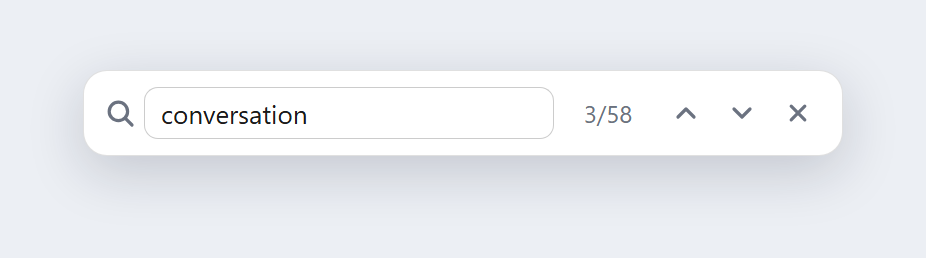
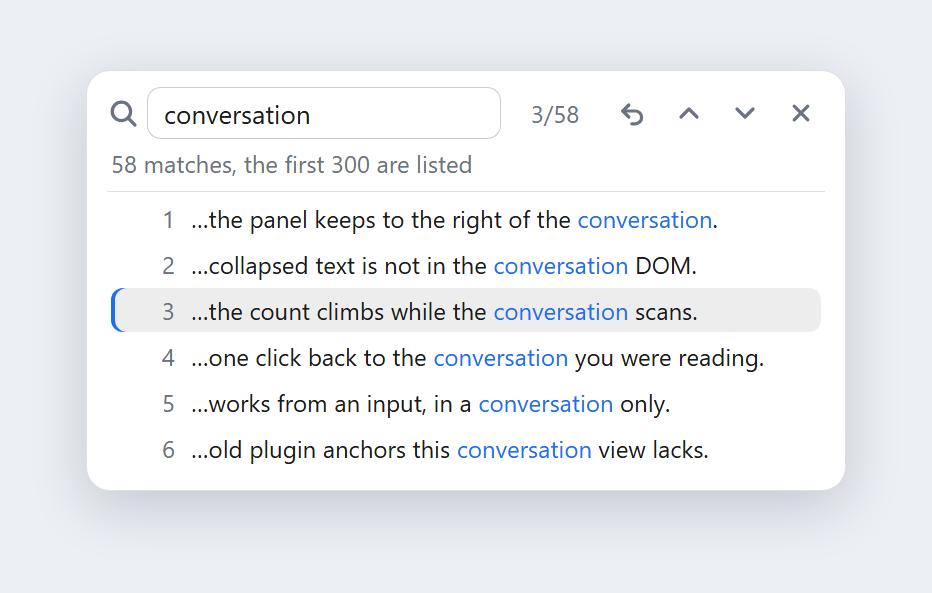
Interface previews, rendered with the plugin's own stylesheet; they contain no conversation content.
Why another one
Harness has no find-in-conversation of its own, so Ctrl+F falls through to the browser and does nothing useful. The plugin in the marketplace does not work either: it locates messages through data-chat-anchor-key, data-chat-node-key and data-chat-turn, and none of those attributes exist in the 0.2.x conversation view any more (there is only data-conversation-region, data-conversation-scroll and data-conversation-session). With no anchors, every jump resolves to nothing.
This plugin is written against the current DOM contract, and drops the interruption that search usually brings with it:
| Browser find | The old plugin | This plugin | |
|---|---|---|---|
| Only inside the conversation (not the composer or the sidebar) | ❌ | ✅ | ✅ |
| Highlights | ❌ | flashes the whole message | ✅ per character |
| Previous / next | ❌ | ✅ | ✅ |
| Opens no collapsed block, moves nothing | — | ❌ expands everything | ✅ |
| Count grows while scanning | — | ❌ one blocking pass | ✅ |
| First hit is the one near you | — | ❌ always from the top | ✅ |
| IME composition is not searched | — | ❌ | ✅ |
| Clicking outside keeps the panel | — | ❌ closes on click | ✅ |
Features
Ctrl+Fanywhere — including while the caret is in an input (no browser find bar); pressing it again focuses and selects the field.- A count that climbs: the scan is sliced (≈900 nodes / 8ms per frame), so a long conversation stays responsive and the number keeps rising instead of blocking.
- Real text highlights via the CSS Custom Highlight API — ranges only, nothing inserted into React's DOM, no reflow.
- Previous / next with
Enter/Shift+Enter, wrapping at the ends. - The first hit is the one nearest to you: the current viewport top is the anchor, the nearest at-or-after match wins, and it is scrolled only as far as it must be (not at all when already visible).
- Match list: click the counter to open every hit (up to 300), each with its snippet; click a row to jump.
- Back to where you were: after a jump,
⟲returns to the reading position you had when you opened the panel (anchored to an element, so paging in history does not throw it off). - Non-invasive: no collapsed block is opened, the conversation is never mutated; clicking the panel background or the chat area does not close it;
Esccloses and returns focus to where it was. - History paging: earlier messages are loaded on demand (up to 80 pages / 12s); if it cannot finish, the panel says only the loaded part was searched.
- Follows the theme: only
--dsw-alias-*tokens, so light and dark both work.
Keys
| Key | Action |
|---|---|
Ctrl+F / Cmd+F |
Open; when already open, focus and select |
Enter / ↓ button |
Next match |
Shift+Enter / ↑ button |
Previous match |
Esc |
Close and restore focus |
Click 3/58 |
Toggle the match list |
Installation
DeepSeek Harness desktop, 0.2.x. Refresh the page afterwards — no restart needed.
A. Through the plugin installer (prefer a .tgz link or a local file — no Git required)
The dialog's "mainland China mirror" source only rewrites requests for an npm package name. A GitHub address or a
.tgzlink bypasses it and must be reachable from the machine itself.
Three ways that do not need Git — pick one whose host you can reach:
https://github.com/P-PPJ/dsh-chat-search/releases/download/v1.0.1/dsh-chat-search-1.0.1.tgz
https://cdn.jsdelivr.net/gh/P-PPJ/dsh-chat-search@main/dist/dsh-chat-search-1.0.1.tgz
D:\some\dir\dsh-chat-search-1.0.1.tgz        ← a local file: no network at all
Pasting the repository address (https://github.com/owner/repo) requires Git on the machine. The installer treats such an address as a git dependency and resolves it with git ls-remote; Windows does not ship Git, so without it you inevitably get:
[ERR_PNPM_GIT_RESOLVE_FAILED] Failed to resolve git dependency "https://github.com/...":
git ls-remote failed: 'git' is not recognized as an internal or external command,
operable program or batch file.
Seeing that, either switch to one of the .tgz addresses above, or install Git for Windows (winget install Git.Git) and retry. That error has nothing to do with the network, and nothing to do with what is in the repository.
Error reference
| Error | Real cause | Fix |
|---|---|---|
'git' is not recognized… / ERR_PNPM_GIT_RESOLVE_FAILED |
Repository address pasted, but no Git installed | Use a .tgz link or local file, or install Git |
Could not connect to github.com / ETIMEDOUT / ECONNRESET |
No working route from this machine to GitHub | See "When the .tgz will not download": prefix an accelerator, or hand it a local file |
Stuck on an allowBuilds prompt |
A dependency has an install script pnpm blocked | This plugin has no dependencies and no install scripts — cannot happen |
⚠️ Measured from mainland China without a proxy: a GitHub release link is reset after ~20s (it redirects to
objects.githubusercontent.com), andcdn.jsdelivr.netis intermittent — the same URL sometimes downloads in 1s and sometimes times out at 25s. The installer fetches GitHub addresses and.tgzlinks directly, not through any mirror, so neither is dependable there; the error it shows is "could not connect to github.com … this machine must reach it directly or through a proxy".All four forms (release tarball,
git+address,github:shorthand, CDN tarball) were tested with the pnpm 11 that ships inside Harness:exit=0and version 1.0.1 whenever the network cooperates — the package itself is fine: a failure means either Git is missing on the machine or the route is down — both are local conditions.
When the .tgz will not download (mainland China)
The release link 302s to objects.githubusercontent.com, which commonly resets (ECONNRESET) from there. Prefix the address with an accelerator — the rule is simply mirror prefix + the full GitHub address, same bytes either way (sha256 51af9c1c…):
https://ghfast.top/https://github.com/P-PPJ/dsh-chat-search/releases/download/v1.0.1/dsh-chat-search-1.0.1.tgz
https://gh-proxy.com/https://github.com/P-PPJ/dsh-chat-search/releases/download/v1.0.1/dsh-chat-search-1.0.1.tgz
https://ghproxy.net/https://github.com/P-PPJ/dsh-chat-search/releases/download/v1.0.1/dsh-chat-search-1.0.1.tgz
Measured without a proxy: ghfast.top 4.0s, gh-proxy.com 4.2s, ghproxy.net 9.6s; pnpm add with the first one installed 1.0.1 in 4.6s and the checksum matched the official asset.
Those are third-party public mirrors — this project cannot guarantee they stay up. If that is a bother, download the
.tgzonce and install from the local path (no network at all).
B. Straight into a profile
git clone https://github.com/P-PPJ/dsh-chat-search.git
Then add one dependency and one bundle entry to the profile's package.json (%USERPROFILE%\.dsh\profiles\<profile>\package.json):
{
  "dependencies": {
    "dsh-chat-search": "file:D:/path/to/dsh-chat-search"
  },
  "dsh": {
    "profile": {
      "bundles": ["...", "dsh-chat-search"]
    }
  }
}
Let Harness install the dependency (it does so on the next start, or run pnpm install in that directory) and refresh the page.
Option C: prebuilt release tarball (what the plugin market installs)
https://github.com/P-PPJ/dsh-chat-search/releases/download/v1.0.1/dsh-chat-search-1.0.1.tgz
Hand it to the plugin installer: no source build, no allowBuilds approval.
Listed in the community registry: search
dsh-chat-searchunder Plugins → Market (PR #10155, with the address updated by PR #11623 after the account was renamed toP-PPJ). That registry only takes curated entries, so this repo meets its requirements:dsh.bundleinpackage.json,screenshots.jsonat the root, raster icons underassets/, and a prebuilt tarball on the release.
⚠️ Name clash: the community plugin
helo060228/dsh-chat-searchuses the same package name. Remove that dependency and bundle entry first — npm would otherwise overwrite one with the other, and both bundles would fight overCtrl+Fin the same overlay slot.
How it works
- Find the conversation:
[data-conversation-region="chat"]is the chat area;[data-conversation-scroll]is the scroller.[data-conversation-region="composer"]sits inside the chat region, so it is pruned entirely — what you are typing is never searched. - Build text blocks: a hand-written tree walker groups text nodes by their nearest non-inline ancestor into strings, so a phrase still matches when it spans
<code>,<span>or bold text;script/style/svg/hiddenis skipped. - Slice the scan: ~900 nodes or 8ms per frame, with results published in batches — that is why the count rises rather than appearing all at once.
- Paint: one
Rangeper match intoCSS.highlights(all matches in one registry, the current match in a second one with higher priority); colours live in the component's own<style>. - Navigate:
elementFromPointgives the block at the viewport top,compareDocumentPositionpicks the first match at or after it, and scrolling corrects each scroll container from the outside in, moving as little as possible. - IME:
compositionstart/end+isComposing+keyCode 229. Nothing is searched and no key is handled while a composition is open; the word is searched once, after it lands.
Limits (on purpose)
- Text inside collapsed blocks cannot be found: tool calls, reasoning and folded output are conditional renders, so their content is not in the DOM at all. Reaching it would mean opening blocks — exactly the thing that throws off your reading position — so the plugin does not. A default-off "include collapsed content" switch is the possible follow-up.
- 3000 matches counted, 1200 painted, 300 rows listed.
- Earlier history is paged in for at most 80 pages / 12s; past that the panel says only the loaded part was searched.
- Needs the CSS Custom Highlight API (Chromium 105+; the desktop app has it). Without it navigation still works, just without colour.
- Bound to the host DOM contract (
data-conversation-*). A major Harness layout change needs an update here — the same reason the old plugin stopped working.
Shipping your own DSH plugin
The repository root also carries a skill, publishing-dsh-plugin/: the whole path from "it works on my machine" to "someone else pastes a link and it installs" — packaging the bundle, pushing to GitHub, writing the README, getting into the community registry, and diagnosing an install that fails on the other side.
Drop it into ~/.dsh/skills/ (C:\Users\<you>\.dsh\skills\ on Windows) and it is available in the next session:
git clone https://github.com/P-PPJ/dsh-chat-search.git
Copy-Item .\dsh-chat-search\publishing-dsh-plugin "$env:USERPROFILE\.dsh\skills\" -Recurse
| File | Covers |
|---|---|
SKILL.md |
Six gates: register → package → GitHub → README → registry → install chain, plus a pre-release checklist |
references/readme-template.md |
A README skeleton you can fill in |
references/registry-entry.md |
Registry entry fields, category enum, opening the PR through the API, renaming later |
references/install-troubleshooting.md |
Error text → real cause → fix, with measured numbers |
Layout
client.js         # everything: walker, scan, highlights, panel (React + CSS)
index.js          # host half, empty (this plugin is client-only)
cordis.patch.yml  # inserts the bundle into a profile
locale/zh.json    # plugin metadata (title, description)
locale/en.json
icon.svg
screenshots/      # the previews used above
publishing-dsh-plugin/  # the publishing skill (not part of the plugin, not in the npm tarball)
No build step and no dependencies: client.js is one window.__ModuleLoader__.load({...}) factory that takes React from the host's module table.
Development
- Edit
client.jsand refresh the page (afile:linked plugin needs no reinstall). node --check client.jsfor syntax.- The panel is registered with
ctx.slots.register({ name: 'shell.overlay', id: 'dsh-chat-search', order: 60 }, FindOverlay); the overlay layer is click-through, only the panel takes pointer events.
License
MIT © P-PPJ
Links
More in this category
zhu1090093659/dsh-web#packages/dsh-task-board★ 10247
Task board for the dsh web GUI: a sidebar multi-column kanban whose cards run in real DSH agent sessions and can also be scheduled with cron expressions, executed host-side even with the browser closed.
zhu1090093659/dsh-web#packages/dsh-web-all★ 10247
Plugin and skin collection for the DSH Web UI: task board, Git graph, right-side panel, remote mobile UI, pet, live token stats, and a skin center.
ccch1mneyyy/dsh-TUI★ 7252
Claude Code-style full-screen terminal UI: pixel-whale header, live status line, and streaming thought expansion.
MeteorNOX/DeepSeek-Balance-Whale-Widget★ 7046
A fixed-corner whale widget for the DSH web GUI — balance, today's usage and per-turn cost with peak/off-peak pricing, editable balance-alert and daily-budget bubbles, a module-based custom bubble queue with A/B weighted choices and random lines or images, 30+ vendor templates (OpenAI, OpenRouter, Kimi, SiliconFlow, Ark, Zhipu, MiniMax and more) with per-model balance and subscription quota, plus task-end sound, imported audio, custom roles and a resource manager. Local-only, no telemetry.
omdsh-dev/DSH-better-sidebar★ 5011
Full sidebar workbench with file rendering and editing, terminal, Git, and subagents; third-party plugins can register new tabs.
Devin-AXIS/deepseek-design#deepseek-idesign★ 1778
Visual design studio for websites, app prototypes, posters, cards, reports, and magazines, with templates, direct element editing, selection-aware AI draft handoff, and export.
Community comments
Comments are public GitHub Discussions. Loading them connects to GitHub and Giscus; a GitHub account is required to post.