Ollama Cloud native chat adapter: direct NDJSON translation of the Ollama /api/chat wire format, model discovery with context windows and capabilities, and web search/fetch providers under the ollama-cloud id, plus a Web settings card.
Install
# from GitHub (first run asks for allowBuilds approval — follow the hint, retry)
dsh plugin --profile web add github:NOirBRight/dsh-llm-ollama
Any plugin you install runs third-party code with your own permissions — it can read your files, use your credentials, and reach the network, and tool approvals don’t sandbox it. GitHub-sourced plugins also run build scripts at install time — pnpm blocks those until you allow them, so an install can stop with ERR_PNPM_GIT_DEP_PREPARE_NOT_ALLOWED or ERR_PNPM_IGNORED_BUILDS; dsh prints the exact key to add under allowBuilds in your profile’s pnpm-workspace.yaml, and the install works on the next run. Allowing a build is a trust decision: only install sources you trust, and pin a commit (github:owner/repo#sha).
README
English | 中文
Ollama Cloud integration for DeepSeek Harness. Chat uses Ollama's OpenAI-compatible Chat Completions endpoint through the shared pi-ai-backed adapter. Model discovery and the Web Search/Fetch providers remain on Ollama-native APIs because those independent capabilities are not part of the chat protocol.
The package root exposes the Cordis plugin contract and OllamaAdapter. The same artifact exports ./client, which contributes the Ollama Cloud card under Settings → LLM Providers. The protocol and capability split is recorded in ADR 0001.
Ollama real API checks remain SKIP-QUOTA when the account quota is exhausted.
Compatibility
Optional DSH host peers and development dependencies accept 0.1.7-alpha.2 and later releases. Cordis peers accept >=4.0.4 <5.0.0.
Verified Hosts in package.json#dsh.compatibility.dshReleases are evidence, not an allowlist. Unknown newer Hosts warn once and keep the normal mount path. Only a reproduced failure is blocklisted.
catalogId and the unresolved unknown account state are attached at runtime. Published dsh-llm-providers-ui 0.2.8 omits those fields and treats unknown as unconnected; they only take effect on a newer Owner.
LLM Providers UI ownership
The LLM Providers Settings page (settings.section id: providers with child settings.provider.item) and the shared llm-providers order store are owned solely by dsh-llm-providers-ui.
- This plugin contributes only its keyed card (
key: llm-ollama) and its Hostllmroute; it does not install the page or the sharedllm-providersnamespace. Load order with the owner does not matter. - Without the owner (Headless or Web without
dsh-llm-providers-ui): the Host model routeollama-cloudstill works; in Web the Providers page and this card are omitted and the browser console warns that the owner is missing. A Web release composition test rejects a bundle graph that ships provider cards without the owner. - The nav globe glyph is a temporary Alpha.4 DOM adapter owned only by
dsh-llm-providers-ui(src/client/nav-icon.ts); this plugin does not ship that adapter.
Install dsh-llm-providers-ui explicitly in the profile alongside provider plugins (see that package's cordis.patch.yml).
Installation
Verified on official DeepSeek Harness 0.1.7-alpha.2 and 0.1.7-rc.1. Install directly from GitHub:
dsh plugin --profile web add --force \
  https://github.com/NOirBRight/dsh-llm-providers-ui/releases/download/v0.2.13/dsh-llm-providers-ui-0.2.13.tgz
dsh plugin --profile web add --force \
  https://github.com/NOirBRight/dsh-llm-ollama/releases/download/v0.6.28/dsh-llm-ollama-0.6.28.tgz
dsh web
The repository tracks release-ready lib artifacts, so GitHub installation needs no build-script allowlist.
Connection authentication and trust
This plugin registers its management, discovery, and usage channel with the official Alpha.4 Connection service through the two-argument rpc.handle(channel, handler) API. It does not select an authority; Alpha.4 Connection owns one authenticated policy for every Host RPC method and WebSocket stream.
Each process mints a random launch token. DSH accepts that token only on GET /, exchanges it for an authority-bound signed browser-session cookie, and redirects to the clean root URL. Missing, expired, malformed, or wrong-authority cookies are rejected with 401 before RPC dispatch; static assets remain public. Query tokens outside the root exchange and Authorization-header tokens are not accepted.
Before authentication, Connection requires a loopback Host or a Host matching the configured --trusted-host entries. An attached Origin must equal Host, and cross-site Fetch Metadata is rejected. Host/Origin failures return 403; a trusted but unauthenticated request returns 401. For a remote browser, configure the Host allowlist and use the authenticated URL printed by DSH, or use an SSH loopback tunnel. This plugin never bypasses the Host trust or browser-session checks.
Web configuration
Open Settings → LLM Providers → Ollama Cloud. The card manages settings and credentials through the authenticated Connection RPC. The Host never returns the stored literal, and settings revision fencing does not pretend that credential storage and settings save are one atomic transaction.
Fetch available models opens the picker immediately and calls the authenticated Connection RPC with the unsaved endpoint and one-shot key. The Host reads /api/tags, deduplicates native ids, and enriches up to six models concurrently through /api/show. The native metadata supplies context windows plus vision, thinking, and tools flags that /v1/models does not expose. The picker starts from the current draft selection, preserves current-only models, and replaces the draft catalog when applied.
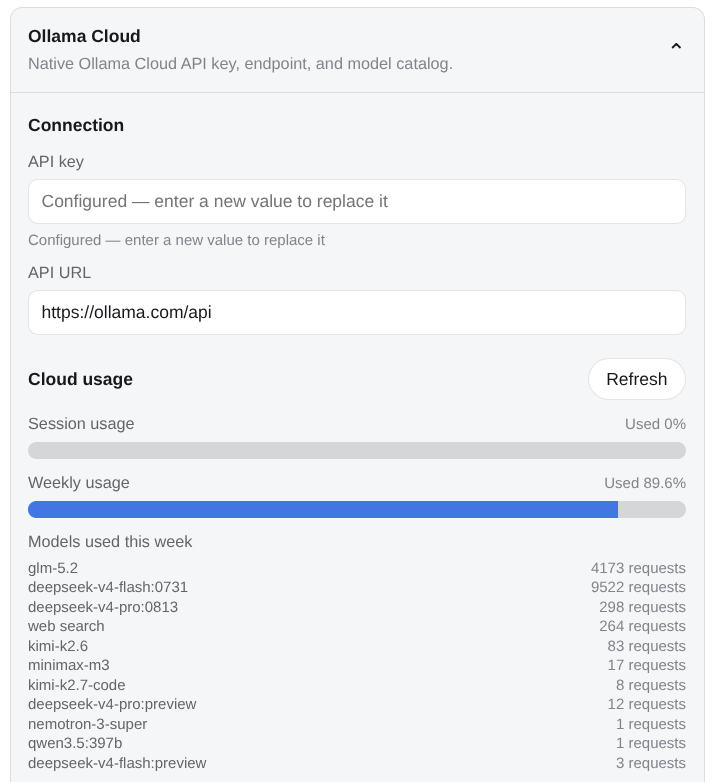
The card's Cloud usage section mirrors ollama.com/settings: the Host reads GET /usage with the stored (or one-shot) key and renders each window the endpoint reports (monthly, session, weekly) as consumed-percentage meters plus that window's per-model request counts. The credential never crosses to the browser. A self-hosted endpoint without the usage surface shows an unsupported note instead of an error.
The collapsed header falls back to the last successful quota from the shared browser cache while its credential is configured; storing a new credential purges the cache in every bundle copy, even without providerDirectory.
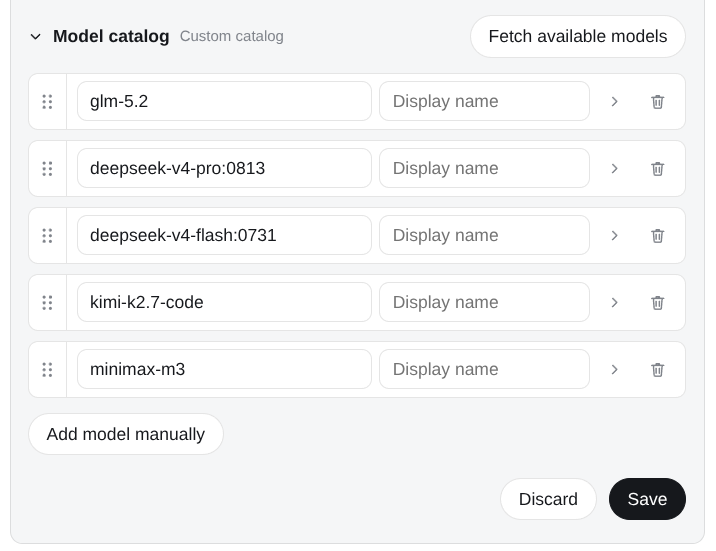
The model catalog starts collapsed and lists one row per model: a drag handle reorders rows (the order persists with the catalog), the chevron opens that row's context window, Default thinking, and capability flags, and the trash button removes it.
Plugin configuration screenshots
Cloud usage for every window the endpoint reports, with that window's model activity list:
Sortable model catalog:
The Models page lists saved ollama-cloud models and can select them. Current Harness releases do not expose a third-party editor slot inside that page, so this package owns its editor under Plugin configuration.
Capability and protocol split
Chat uses:
POST <openai-base>/chat/completions
The configured baseURL remains the native Ollama API address. The plugin maps chat to its /v1 sibling:
https://ollama.com/api  ->  https://ollama.com/v1
http://localhost:11434/api  ->  http://localhost:11434/v1
The Ollama-native independent capabilities remain:
model discovery  ->  GET /api/tags + POST /api/show
web search       ->  POST /api/web_search
web fetch        ->  POST /api/web_fetch
Search and Fetch are ctx.web providers, so they work with any selected chat model. A DeepSeek, Codex, Kimi, or OpenAI-compatible chat model can still call the Ollama-backed web_search tool when the profile selects ollama-cloud.
OpenAI Responses is not the default because Ollama supports only the non-stateful flavor. Anthropic Messages is not the default because Ollama Cloud needs an extra Bearer header and that compatibility surface has no model listing or prompt caching.
Web search and fetch
The Host plugin registers both Web providers under ollama-cloud. Registration alone does not change deployment policy; pin the desired providers in the profile patch:
- id: web
  config:
    searchProvider: ollama-cloud
    fetchProvider: ollama-cloud
Omit fetchProvider to keep the built-in HTTP fetcher while moving only search. Both providers reject redirects before following them. Each attempt has a 15-second default budget and one transient timeout or pre-response transport failure is retried. HTTP errors, malformed replies, missing credentials, redirects, and caller cancellation are not retried.
Config
- id: llm-ollama
  name: 'dsh-llm-ollama'
  config:
    apiKeyEnv: OLLAMA_API_KEY
    baseURL: https://ollama.com/api
    defaultContextWindow: 262144
    streamIdleTimeoutMs: 300000
    webRequestTimeoutMs: 15000
    retryPolicy:
      mode: normal
      maxRetries: 8
      backoff:
        initialDelayMs: 500
        maxDelayMs: 10000
        jitterRatio: 0.1
    models:
      - id: gpt-oss:20b
        name: GPT-OSS 20B
        contextWindow: 131072
        thinking: true
      - id: llava
        name: LLaVA
        contextWindow: 4096
        vision: true
The bundle retries eligible model-request failures up to eight times by default. Documented status-less generation, reachability, and overload failures are classified as SERVER; authentication, invalid-request, and unsupported-content failures remain non-retryable.
The provider route remains ollama-cloud and the settings namespace remains llm-ollama. Only configured catalog models are accepted for chat. The adapter does not install a request-level maxTokens default; output is not capped from the catalog. Per-row contextWindow is the DSH compaction budget.
Picker ids may use a generic context suffix -<n>k or -<n>m (for example qwen3-272k or qwen3-1m). The plugin peels that suffix before talking to Ollama and, when the row has no explicit contextWindow, uses n×1000 / n×1,000,000 as the DSH compaction budget. Product names such as kimi-k3-max are not treated as a context tier. The composer picker groups sibling rows that share a base id. -fast is recognized as a Fast sibling for grouping; Ollama Cloud has no Fast API field, so the wire id is still the peeled base.
The fallback context window is 262,144 tokens. Discovery should normally provide an exact model value; the fallback also leaves room for pi-ai's context-safety reserve when metadata is unavailable.
Model capabilities
vision controls text/image input modalities. thinking enables selectable reasoning efforts. Known Ollama Cloud families expose only vendor-real levels and pin a plugin defaultEffort used when the session has not picked one (GLM-5.2 and Kimi K3 default to max; DeepSeek V4 and MiniMax M3 to high; GPT-OSS to medium; Nemotron Super/Nano to low). Unknown thinking models keep off, low, medium, high, and max with no plugin default. tools records discovery metadata; the actual request carries the current DSH tool definitions.
The OpenAI Chat Completions profile is pinned for Ollama: it sends max_tokens, reasoning_effort, and streaming usage, preserves system-role messages, and does not send store, max_completion_tokens, or prompt_cache fields.
Model Experience
Prompt effects
The system prompt and all provider-neutral messages are translated by PiAiAdapter into OpenAI Chat Completions messages. Tool calls retain provider-issued ids and tool results return with the matching tool_call_id. Images are encoded as base64 data URLs only for models marked vision-capable.
Token effects
Usage maps to Harness input/output counts. maxTokens is clamped against the configured context capacity by pi-ai, leaving a safety reserve. Ollama does not currently expose cache-read/cache-write accounting through this endpoint.
KV-cache effects
Stable model, system prompt, history, tool definitions, and request options preserve a stable serialized prefix. Tool-call ids are provider-issued protocol fields and are replayed unchanged. Changing earlier messages, tools, images, model id, or reasoning/output options can invalidate provider-side reuse.
Known limitations and deferred work
- GenerateOptions.stop is not supported by the shared PiAiAdapter.
- Models absent from the saved catalog are rejected; the old native adapter's pass-through behavior is removed.
- /api/show reports thinking capability but not the exact accepted effort set, so the plugin applies Ollama's general rule and the GPT-OSS exception.
- Ollama does not publish per-model output limits.
- Logs written by v0.2.2 and earlier can contain duplicate ollama-call-0 values; existing logs are not migrated.
- Structured-output format configuration is not exposed by this package.
Release installation (Latest)
Ollama Cloud chat, model discovery, and Web Search/Fetch providers. The release artifact targets official DeepSeek Harness 0.1.7-rc.1 and contains built Host/Client files only; it has no sibling-repository source, workstation path, link:, or workspace: dependency.
The dsh-llm-providers-ui package owns the LLM Providers page, navigation, and shared order store. This package owns only its provider card, models, credentials, and Host route. Install the Owner first for Web; headless Host routing works without the Owner.
Latest (Owner + this plugin; required together on Web):
dsh plugin --profile web add --force \
  https://github.com/NOirBRight/dsh-llm-providers-ui/releases/latest/download/dsh-llm-providers-ui-0.2.13.tgz
dsh plugin --profile web add --force \
  https://github.com/NOirBRight/dsh-llm-ollama/releases/latest/download/dsh-llm-ollama-0.6.28.tgz
Fixed versions (reproducible):
dsh plugin --profile web add --force \
  https://github.com/NOirBRight/dsh-llm-providers-ui/releases/download/v0.2.13/dsh-llm-providers-ui-0.2.13.tgz
dsh plugin --profile web add --force \
  https://github.com/NOirBRight/dsh-llm-ollama/releases/download/v0.6.28/dsh-llm-ollama-0.6.28.tgz
Update, uninstall, and verify:
# Update Owner + this plugin to Latest
dsh plugin --profile web add --force \
  https://github.com/NOirBRight/dsh-llm-providers-ui/releases/latest/download/dsh-llm-providers-ui-0.2.13.tgz
dsh plugin --profile web add --force \
  https://github.com/NOirBRight/dsh-llm-ollama/releases/latest/download/dsh-llm-ollama-0.6.28.tgz
# Verify the loaded version
dsh plugin --profile web list
dsh plugin --profile web doctor
# Uninstall only this plugin
dsh plugin --profile web remove dsh-llm-ollama
Configuration: use the plugin section in Settings for Web UI plugins, or the profile dsh.profile.bundles entry for Host-only plugins. Start with this README's minimal YAML/JSON example and provide credentials/backend addresses explicitly.
Rollback: rerun the fixed v0.6.27 command, verify the profile list, then restart the Web service once. Inspect journalctl --user -u dsh-web.service and dsh plugin --profile web doctor; never put a source checkout in the production profile.
Release and integrity: v0.6.28 · SHA256SUMS.
Links
More in this category
V1ki/dsh-plugin-subscriptions★ 399
Use ChatGPT (Codex), Claude, and Grok subscriptions as DeepSeek Harness LLM providers, with Settings login, model catalogs, usage, plus image_generate, video_generate, and x_search tools.
Mars-Sea/dsh-commandcode-provider★ 341
Unofficial Command Code LLM provider: registers a `commandcode` route with a live model catalog and reasoning-effort support.
corrinehu/dsh-workbuddy-connect★ 222
Brings the models in the WorkBuddy desktop app straight into DeepSeek Harness — zero configuration in the DSH chat.
cv-superding/dsh-deepseek-web-login★ 178
Adds a deepseek-web provider that uses chat.deepseek.com web models in DSH, with browser login capture, PoW request signing, SSE streaming, and prompting-based tool calls.
volcengine/ark-cli#ark-plan-api★ 139
Registers Ark Agent Plan, Coding Plan and postpaid model routes in the native DSH model picker.
franksong2702/dsh-codex-connect★ 125
Connect ChatGPT OAuth and OpenAI Codex models to DeepSeek Harness, with opt-in search and image tools.
Community comments
Comments are public GitHub Discussions. Loading them connects to GitHub and Giscus; a GitHub account is required to post.