Three-tier deny/ask/auto gate for the computer-use (cua-driver) tool family: each tool category gets one segmented control in Settings, and an allow list or deny list overrides the tiers per tool name.
Install
# from GitHub (first run asks for allowBuilds approval — follow the hint, retry)
dsh plugin --profile web add github:MyRemme/dsh-computer-use-guard
Any plugin you install runs third-party code with your own permissions — it can read your files, use your credentials, and reach the network, and tool approvals don’t sandbox it. GitHub-sourced plugins also run build scripts at install time — pnpm blocks those until you allow them, so an install can stop with ERR_PNPM_GIT_DEP_PREPARE_NOT_ALLOWED or ERR_PNPM_IGNORED_BUILDS; dsh prints the exact key to add under allowBuilds in your profile’s pnpm-workspace.yaml, and the install works on the next run. Allowing a build is a trust decision: only install sources you trust, and pin a commit (github:owner/repo#sha).
README
This plugin publishes its README in Chinese only.
给官方 computer-use(cua-driver)工具族加一道三档授权闸门,并把它暴露成一个可见的设置界面。
为什么需要它
@deepseek-ai/dsh-experimental-computer-use-cua-driver-native 注册 56 个桌面操作工具,
但它的 tools/execute 包装只替换 exec.signal,不做任何权限判断;它的
Config 是 Schema.object({}),dsh-settings 会跳过空 schema,所以 UI 里
完全没有可编辑的表单。结果是:装上即无门,模型可以任意点击、打字、结束进程。
本插件在官方机制之上补齐两件事:
- 一个非空的 volatile Config —— 这正是 harness 为该条目生成可编辑设置表单的条件。
- 一个真正的
tools/pre-execute闸门 —— 官方文档化的拦截点 (@deepseek-ai/dsh-tools在派发工具体之前跑这条 waterfall,{ kind: "deny", reason }会阻止工具体执行)。
三个档位
每个工具类别一个三档开关:
| 档位 | 行为 |
|---|---|
deny 禁止 |
直接拒绝,返回 ComputerUseGuardDenied / COMPUTER_USE_GUARD_DENIED,工具体永不执行 |
ask 询问 |
弹出审批面板,等你点「允许」才执行 |
auto 自动授权 |
直接放行 |
出厂默认(可在 cordis.patch.yml 覆盖,用户层优先级更高):
| 类别 | 默认 | 覆盖的工具 |
|---|---|---|
observe |
auto |
20 个只读工具:截图、窗口树、剪贴板读取、驱动诊断 |
input |
auto |
点击、拖拽、打字、快捷键、滚动 |
agentCursor |
auto |
屏幕上的代理指针外观与动画 |
window |
auto |
激活窗口、调整窗口位置与尺寸 |
clipboard |
auto |
写入系统剪贴板 |
browser |
auto |
标签页内导航、点击、输入、滚动 |
session |
auto |
电脑操作会话的创建与结束(本身不触碰桌面) |
launch |
ask |
启动任意本地程序 |
browserPrivileged |
ask |
附加用户浏览器、上传下载本地文件、执行页面脚本 |
recording |
ask |
录屏 |
escalate |
ask |
把驱动提升到更高的完整性级别 |
menu |
ask |
调用原生应用菜单项 |
replay |
ask |
重放已录制的轨迹 |
install |
ask |
安装外部依赖(例如 ffmpeg) |
process |
deny |
结束进程 |
driver |
deny |
改写 cua-driver 自身配置 |
unknown |
deny |
本闸门不认识的 computer-use 工具 |
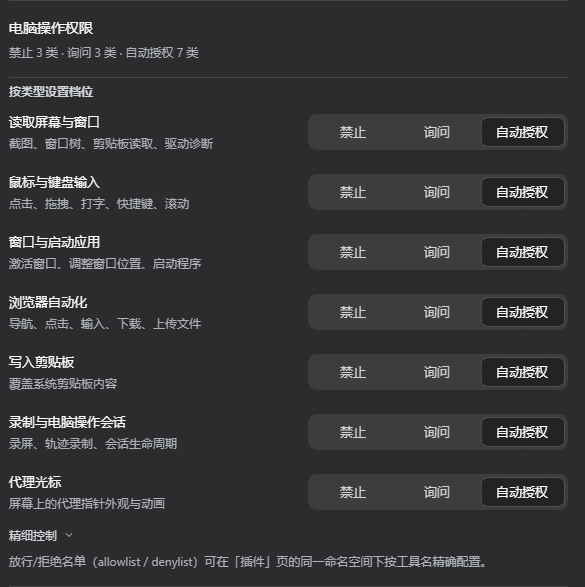
分组按默认姿态切,不按重要性:默认放行的七个(observe、input、
agentCursor、window、clipboard、browser、session)直接显示在行内,
其余十个默认更严格的收在「精细控制」展开区。
两个显式名单在类别档位之前判定:
deniedTools:最先判定,命中即deny,不受档位与放行名单影响。allowedTools:非空时只有名单内的裸工具名走auto,其余一律deny, 上方的类别档位全部失效。
判定顺序固定为 deniedTools → allowedTools → 类别档位,所以把一个名字同时
写进两个名单,结果是 deny。两者都是逗号分隔的裸工具名(不带
cua_driver_native__ 前缀,大小写不敏感,重复项自动去重),例如
click, type_text, get_window_state。两者都能在设置行底部直接编辑,按回车
或失焦即写入;放行名单非空时,顶部的摘要行改报实际生效的名单,而不是被它
盖掉的档位统计,拒绝名单则与档位统计并列显示。
界面
设置 → 通用设置 → 电脑操作权限,位于「权限」行下方。每一类一行,
用原生 SegmentedControl 呈现 禁止 / 询问 / 自动授权 三档,改动即时写回。
顶部的摘要行实时统计当前姿态(例如「禁止 3 类 · 询问 7 类 · 自动授权 7 类」)。
「精细控制」展开其余十个类别 —— 启动应用、浏览器高权限操作、录屏、提升驱动 权限、进程、菜单、轨迹重放、外部依赖、驱动配置,以及本闸门不认识的新工具。 这一组默认更严格。
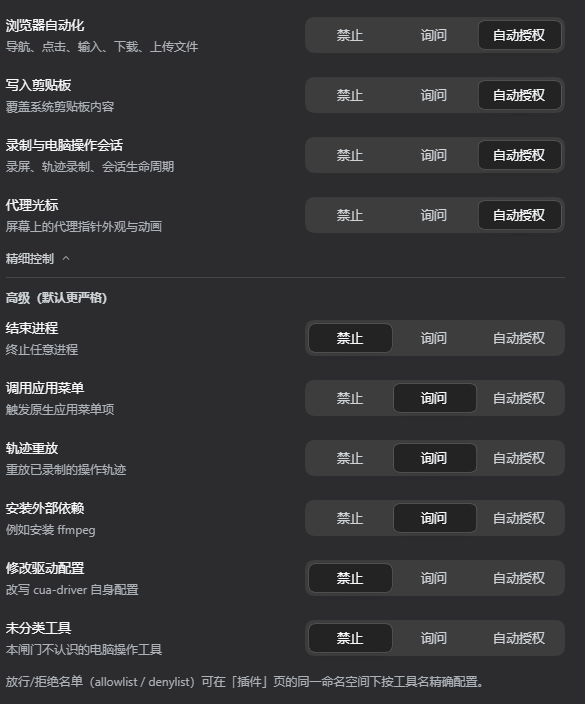
行底部是放行名单与拒绝名单两个输入框。
同一个命名空间也出现在插件页(dsh-settings 的通用表单),但那里只有
文本框/数字框,三档控件只在上面这一行里。
设置文档取不到时(页面不是本机页面,或 Host 没有提供该命名空间),这一行 显示原因而不是消失 —— 空行会让人以为开关被删掉了。
已知取舍
ask 档由本插件自行派发 approval/request,绕开了 dsh-tools 的
serviceAsk,因此:
approval:policy(ask/never)对本插件不生效 —— 它总是询问。- 官方
approval/asked+approval/decided审计对不会落盘。这是缺审计 轨迹,不是崩溃:dsh-user-approval的 invariant 只在「有 decided 无 asked」 时报错,而本插件两者都不写。
这一取舍是刻意的 —— 见下节。
为什么 ask 不走 { kind: "ask" }
dsh-tools 的 serviceAsk 会调用 ctx.approval.request(),而该服务的 decide()
在本机被 dsh-purge 的 APPROVAL_AUTO_GRANT 补丁改写为无条件
return "allowed-once" —— 走那条路永远不会弹面板,审批被静默跳过。
因此 ask 档由本插件自己派发官方 approval/request waterfall:
- 这是
dsh-tool-cordis公开目录里记载的 API(mode: waterfall,this: Scoped<Agent>)。 dsh-api-remotes把它转发到浏览器,@deepseek-ai/dsh-client-ui-approval渲染审批面板,用户点击后把allowed-once/rejected回传。- 整条链路绕开被改写的 approval 服务。
调用契约(每一条都对应一个真实的运行时校验):
- 监听器必须是
function表达式,不能是箭头函数 —— 只有非箭头函数才能拿到 派发时的作用域 carrier 作为this(cordis 会把每个 listener 绑定到thisArg)。 - 用
ctx.waterfall(this, …)而不是this.waterfall(…):this是裸 carrier,不是 ctx。 req.agent必须是exec.agent本身(同一对象):dsh-api-gateway校验value.agent === subject,dsh-scope的 invariant 校验carrierKeyOf(thisArg) === args[0].agent。signal由 gateway 单独取出、不参与 JSON 序列化;其余字段必须是无损 JSON, 所以可选字段用条件展开,而不是写undefined。- 兜底
() => Promise.resolve("unavailable"),失败关闭:没有浏览器应答时拒绝, 不会挂起。
安装
本包自带 dsh.bundle.patch,属于 bundle,在 profile 的 package.json 里声明即可挂载:
{
  "dependencies": { "dsh-computer-use-guard": "file:./node_modules/dsh-computer-use-guard" },
  "dsh": { "profile": { "bundles": ["…", "dsh-computer-use-guard"] } }
}
加载器行的 id 必须等于包名 dsh-computer-use-guard —— settings namespace 就是
加载器行的 id。
卸载
从 dsh.profile.bundles 与 dependencies 里移除本包,再删掉
node_modules/dsh-computer-use-guard 目录。
许可
Apache-2.0
Links
More in this category
kenryu42/cc-safety-net★ 2114
Pre-execution guard that blocks destructive Git and filesystem commands and access to secrets such as SSH keys and .env files before a tool call runs.
ADWMC/helm-d#helmd★ 1553
Security-analysis plugin for DeepSeek Harness: 33 tools spanning six security domains, evidence/reporting and toolbox, plus the case lifecycle, routing and tool ledger; a session-bound case workflow with an evidence chain, E-id validation and reproducible findings; 362 on-demand references; three hot-swappable persona profiles; and a four-tab workbench (armor / case / intercept / about) with case-state recovery after context compaction.
toby-bridges/api-relay-audit★ 934
Runs local security audits of AI API relays and LLM proxies from DeepSeek Harness, producing Markdown reports for prompt injection, model substitution signals, tool-call rewriting, error leakage, stream integrity, and profile-gated Web3 risks.
SeaOf0/dsh-redteam-model★ 929
Authorized-security DSH collection: nine work modes (redteam coordinator, pentest, code audit, binary analysis, attack-defense, AV evasion, incident response, cloud security, CTF solving) and fifteen runtime plugins, managed from a settings page with one-click deploy, install, update and uninstall.
howmp/dsh-pentest★ 624
Authorized pentest mode for DeepSeek Harness — exploration chain, assets and findings with a Web view.
Jueze-2019/dsh-redteam-mode#packages/redteam-bundle★ 306
Red-team engagement mode: send one target organization name; a planner session runs five execution roles (recon, asset triage, vulnerability discovery, exploitation, internal pivot) with configurable concurrency; preflight checks skills/resources; scoring uses four stages (recon, internet, boundary, internal) with server-side caps and privilege-wins dedup; findings stay in a local SQLite fact base. The persistent right-side console has nine pages and includes asset mapping, agents, sessions/tunnels, findings, score targets, reports, POC knowledge base and skill library. v0.15.2 adds automatic HTTP evidence/action records, batch ingest, scope check, tunnel pivot probe, data proof, cleanup ledger and T0-T3 asset admission to prevent scope drift. 59 redteam_* tools; 38 bundled skills.
Community comments
Comments are public GitHub Discussions. Loading them connects to GitHub and Giscus; a GitHub account is required to post.