Registers a SpecWorkflow skill pack for requirement clarification, implementation specs, execution, delivery review, repair planning, bug diagnosis, and source-backed research.
Install
# from npm (prebuilt)
dsh plugin --profile web add specworkflow
# from GitHub (first run asks for allowBuilds approval — follow the hint, retry)
dsh plugin --profile web add github:MoonCoder-HAPPY/SpecWorkflow
Any plugin you install runs third-party code with your own permissions — it can read your files, use your credentials, and reach the network, and tool approvals don’t sandbox it. GitHub-sourced plugins also run build scripts at install time — pnpm blocks those until you allow them, so an install can stop with ERR_PNPM_GIT_DEP_PREPARE_NOT_ALLOWED or ERR_PNPM_IGNORED_BUILDS; dsh prints the exact key to add under allowBuilds in your profile’s pnpm-workspace.yaml, and the install works on the next run. Allowing a build is a trust decision: only install sources you trust, and pin a commit (github:owner/repo#sha).
README
English | 中文
SpecWorkflow is a shareable workflow skill pack for DeepSeek Harness and other Agent Skills-compatible tools. It gives an agent a disciplined path from a rough request to requirements, an implementation spec, code execution, delivery review, repair planning, bug diagnosis, and source-backed research.
It is intentionally not a heavy process for every request. Small, concrete edits can stay direct; ambiguous, cross-module, product-facing, data, permission, API, or release-sensitive work gets promoted into the full workflow.
What It Does
| Stage | Skill | What it handles |
|---|---|---|
| Research | deep-research |
Source-backed investigation against docs, APIs, standards, code, or other primary sources. |
| 1 | to-grill |
Requirement grilling, ambiguity removal, risk review, and the direct-fix vs full-workflow decision. |
| 2 | to-spec |
Implementation-ready specs, amendments, acceptance criteria, validation plans, and optional tickets. |
| 3 | spec-do |
Execution from an approved spec, issue set, amendment, or repair plan. |
| 4 | do-review |
Final delivery review against request, spec, code, evidence, and acceptance criteria. |
| 5 | fix-review |
Repair specs and repair tickets for must-fix review findings. |
| Debug | bugs-fix |
Reproduction, root-cause diagnosis, repair, and fix evidence for bugs or regressions. |
Install
DSH
dsh plugin --profile web add specworkflow
dsh web
Other Agents
npx specworkflow install codex
Install globally with -g:
npx specworkflow install -g codex
Replace codex with another preset when needed:
| Input | Project install | Global install with -g |
|---|---|---|
codex, openai, agents, agent, agent-skills, agents-md, goose, zed, amp, sourcegraph-amp |
.agents/skills |
~/.agents/skills |
gemini, gemini-cli, antigravity, google-antigravity |
.agents/skills |
~/.gemini/antigravity/skills |
claude, claude-code, claudecode |
.claude/skills |
~/.claude/skills |
cursor, cursor-agent, cursor-native |
.cursor/skills |
~/.cursor/skills |
copilot, github-copilot, vscode, vs-code |
.github/skills |
~/.github/skills |
dsh, deepseek, deepseek-harness |
.dsh/skills |
~/.dsh/skills |
opencode, open-code |
.opencode/skills |
~/.opencode/skills |
windsurf, cascade |
.windsurf/skills |
~/.windsurf/skills |
cline, claudine |
.cline/skills |
~/.cline/skills |
roo, roo-code, roocode |
.roo/skills |
~/.roo/skills |
qwen, qwen-code, qwencode |
.qwen/skills |
~/.qwen/skills |
kiro |
.kiro/skills |
~/.kiro/skills |
kilo, kilo-code, kilocode |
.kilo/skills |
~/.kilo/skills |
augment, augment-code, augmentcode, auggie |
.augment/skills |
~/.augment/skills |
openclaw, claw |
skills |
~/.openclaw/skills |
Unknown plain names are rejected so a typo does not create the wrong folder. For unsupported agents, pass an explicit project-level skills path:
npx specworkflow install .my-agent/skills
With -g, relative explicit paths are resolved from your home directory.
Quick Start
Typical feature work:
Use to-grill to clarify this request, then move to to-spec when the requirement is ready.
Simple edits should stay simple:
Make the table font larger.
SpecWorkflow should route that kind of request to direct implementation instead of forcing the full five-stage path.
Workflow
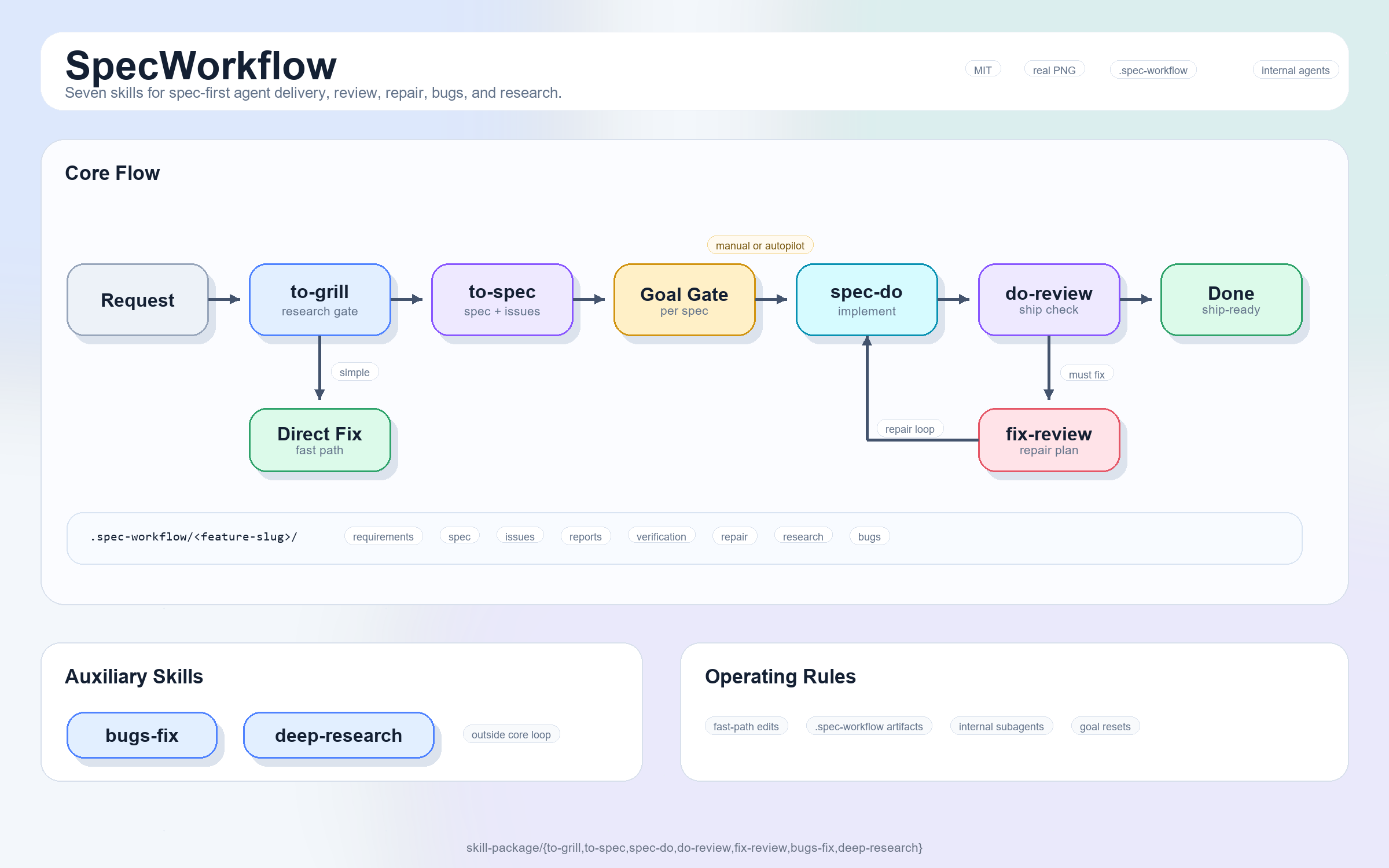
SpecWorkflow does not start by writing a spec. It starts by deciding whether the request deserves one. Small, obvious work such as copy edits, style tweaks, or a missing guard should stay direct.
The full route is for work with product meaning, data semantics, permission boundaries, cross-module impact, release risk, or enough ambiguity that guessing would be expensive. Once a request enters the route, keep its artifacts under one .spec-workflow/<feature-slug>/ folder so every later pass has the same source of context.
to-grill -> to-spec -> spec-do -> do-review -> fix-review -> spec-do repair -> do-review
to-grill turns a vague request into something solid. It should inspect the repo before asking questions, separate facts the code can answer from decisions only the user can make, and decide whether the work should be direct, deferred, or promoted into a spec. When it hands off, it leaves a requirements conclusion that the next stage can actually use.
to-spec turns that conclusion into an implementation contract. A useful spec names the scope, the non-goals, the affected modules, the data and permission rules, the user-visible behavior, and the evidence that will prove the work is done. If the task is changing an existing spec, it records the amendment and its impact instead of pretending the work starts from a blank page.
spec-do is the first stage that should touch production code. It checks the branch, dirty worktree, and auto-commit permission before implementation, then works from the approved spec, tickets, amendment, or repair plan. Temporary evidence can live under .spec-workflow, but durable tests belong in the project's own test tree. Business logic should be wired for real, not mocked away just to make a validation run pass.
When implementation claims to be finished, do-review decides whether that claim holds. It compares the original request, spec, code diff, tests, and evidence, then looks for missed requirements, regressions, edge cases, and acceptance gaps. Review is not a quiet repair pass and not a place to expand scope; its job is a clear ship / no-ship judgment.
If the review finds must-fix issues, fix-review turns them into a focused repair plan. It cares about root cause, priority, verification, and whether the repair should be split into tickets. That plan goes back to spec-do, and the repair returns to do-review. The loop stays short: repair what blocks delivery, then review again.
deep-research and bugs-fix sit beside the main route rather than inside it. Reach for deep-research when the answer depends on primary sources, official docs, API behavior, standards, or external facts. Start with bugs-fix when the problem is already a failure, regression, exception, or performance issue; reproduce first, then diagnose the root cause.
Goal Mode is a continuous-execution switch for one spec at a time. Once the user explicitly enables it, the agent can move through implementation, review, repair planning, repair implementation, and another review without pausing at every handoff. It is not unlimited permission: product choices, safety concerns, git decisions, validation gaps, environment problems, and scope changes still stop the run.
Directory Output
SpecWorkflow keeps workflow files under .spec-workflow so project code and agent evidence stay separate.
.spec-workflow/<feature-slug>/
  requirements.md
  spec.md
  issues/
  amendments/
  implementation/
  review/
  repair-spec.md
  repair-issues/
  verification/
  debug/
  bugs/
  research/
Project tests still belong in the project's real test directories, not under .spec-workflow.
Verify
After installing into DSH:
dsh --profile web --dump-config
The composed config should include:
# == specworkflow
- id: specworkflow
  name: specworkflow
You can also ask the agent which SpecWorkflow skills are available and when to use to-grill.
Uninstall
dsh plugin --profile web remove specworkflow
Replace web with the profile you installed into.
License
MIT. See LICENSE.
Links
More in this category
Q00/ouroboros#integrations/dsh-plugin★ 6144
Config-only bundle that mounts Ouroboros through the DSH MCP client, exposing 36 interview, Seed, execution, evaluation, and evolution workflow tools in DSH.
loopx-project/loopx#dsh-loopx-plugin★ 6111
LoopX, a provider-neutral, local-first state kernel and control plane for long-horizon agents: keeps Goal, Todo, gate, evidence, quota, recovery, and handoff state above DeepSeek Harness, while the plugin bootstraps the CLI and skills, admits bounded same-session continuation, and adds a loopback GoalBar for the exact bound loop.
chuspeeism/dashi-taskboard#deepseek-harness★ 3262
Embeds the active installed Codex Taskboard runtime in the DeepSeek Harness sidebar, using its launcher runtime descriptor instead of a fixed port.
NanmiCoder/dsh-agent-teams★ 1848
AgentTeams multi-agent teams.
EthanYoQ/AI-Novel-Writer#dsh-ai-novel-writer★ 1205
Installs a dedicated AI novel-writing preset and workbench: revisioned local project assets, a compact side drawer, and native approval-gated single-file changes.
tong-io/tongflow#dsh-tongflow★ 1034
TongFlow film-crew studio for image, voice, music and video production: the agent writes per-asset TongFlow workflow files (.tongflow.json) that run through TongFlow plugins, with an embedded workflow canvas, a shot/character/take project layout and a manga-drama template; sessions starting with @tongflow open the Studio view.
Community comments
Comments are public GitHub Discussions. Loading them connects to GitHub and Giscus; a GitHub account is required to post.