Remote control and mobile overlay for DeepSeek Harness: LAN and public (cloudflared) tunnels with QR-code access, a phone-first mobile UI under 768px, and a LAN reverse-proxy CLI.
Install
# from GitHub (first run asks for allowBuilds approval — follow the hint, retry)
dsh plugin --profile web add github:Mlte0907/dsh-remote-x
Any plugin you install runs third-party code with your own permissions — it can read your files, use your credentials, and reach the network, and tool approvals don’t sandbox it. GitHub-sourced plugins also run build scripts at install time — pnpm blocks those until you allow them, so an install can stop with ERR_PNPM_GIT_DEP_PREPARE_NOT_ALLOWED or ERR_PNPM_IGNORED_BUILDS; dsh prints the exact key to add under allowBuilds in your profile’s pnpm-workspace.yaml, and the install works on the next run. Allowing a build is a trust decision: only install sources you trust, and pin a commit (github:owner/repo#sha).
README
This plugin publishes its README in Chinese only.
DeepSeek Harness 的 Cordis 插件,两部分能力:
- 远程控制中心(设置页标签)—— 局域网 / 公网两条通路随时接管你的 Harness:扫码即连、 cloudflared 隧道一键开关、访问二维码直接可扫。
- 移动端全覆盖界面(<768px 自动生效)—— 把 DSH 网页端在手机上变成原生 App 观感的 任务仪表盘 + 会话视图:按工作区分组的任务卡、运行状态实时刷新、顶部返回栏、 深浅主题与 DSH 全程同步。
桌面端(≥768px)零影响:全部覆盖规则在窄屏媒体查询内,宽屏看不到任何移动端部件。
界面预览
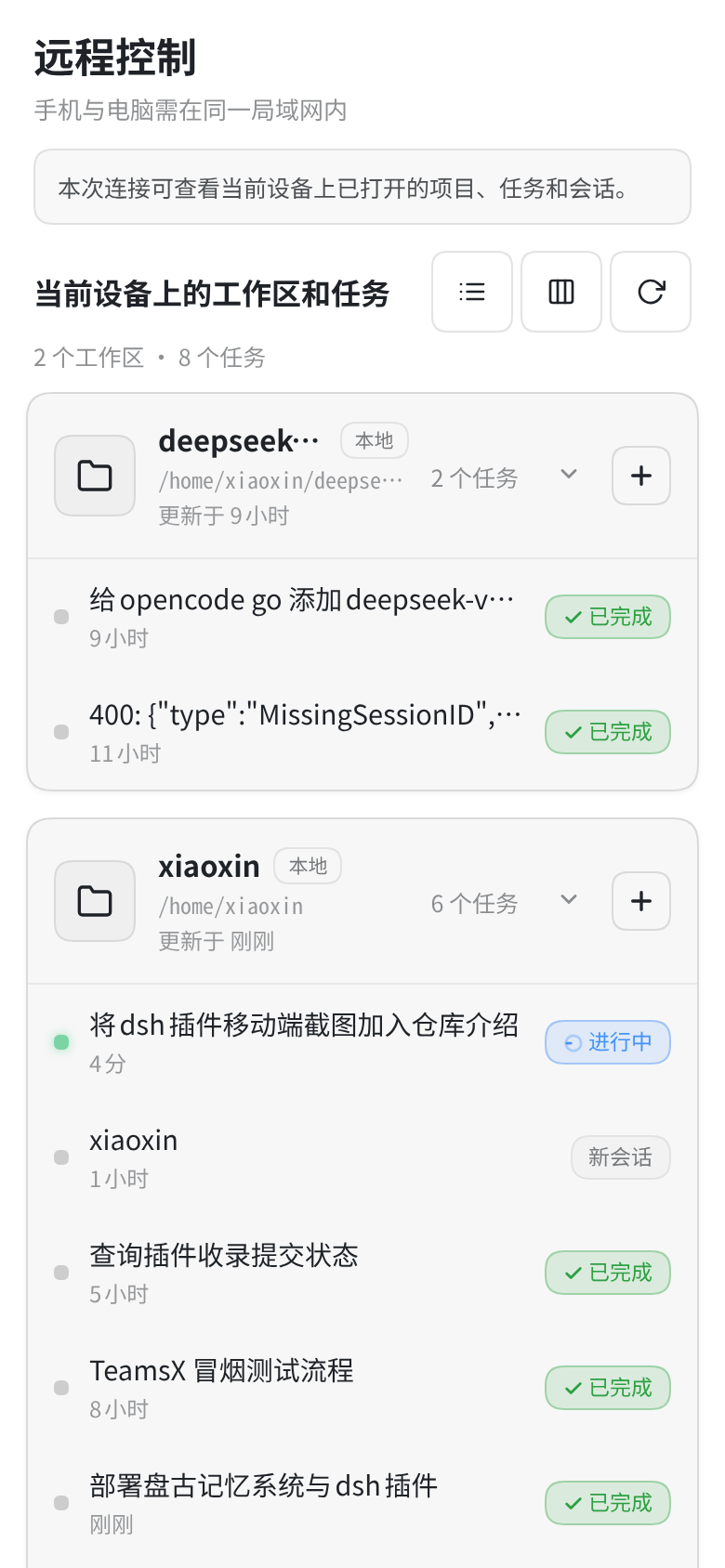
移动端任务仪表盘(iPhone 14 视口 390×844,浅色 / 深色主题自动跟随):
| 任务仪表盘(浅色) | 任务仪表盘(深色) |
|---|---|
 |
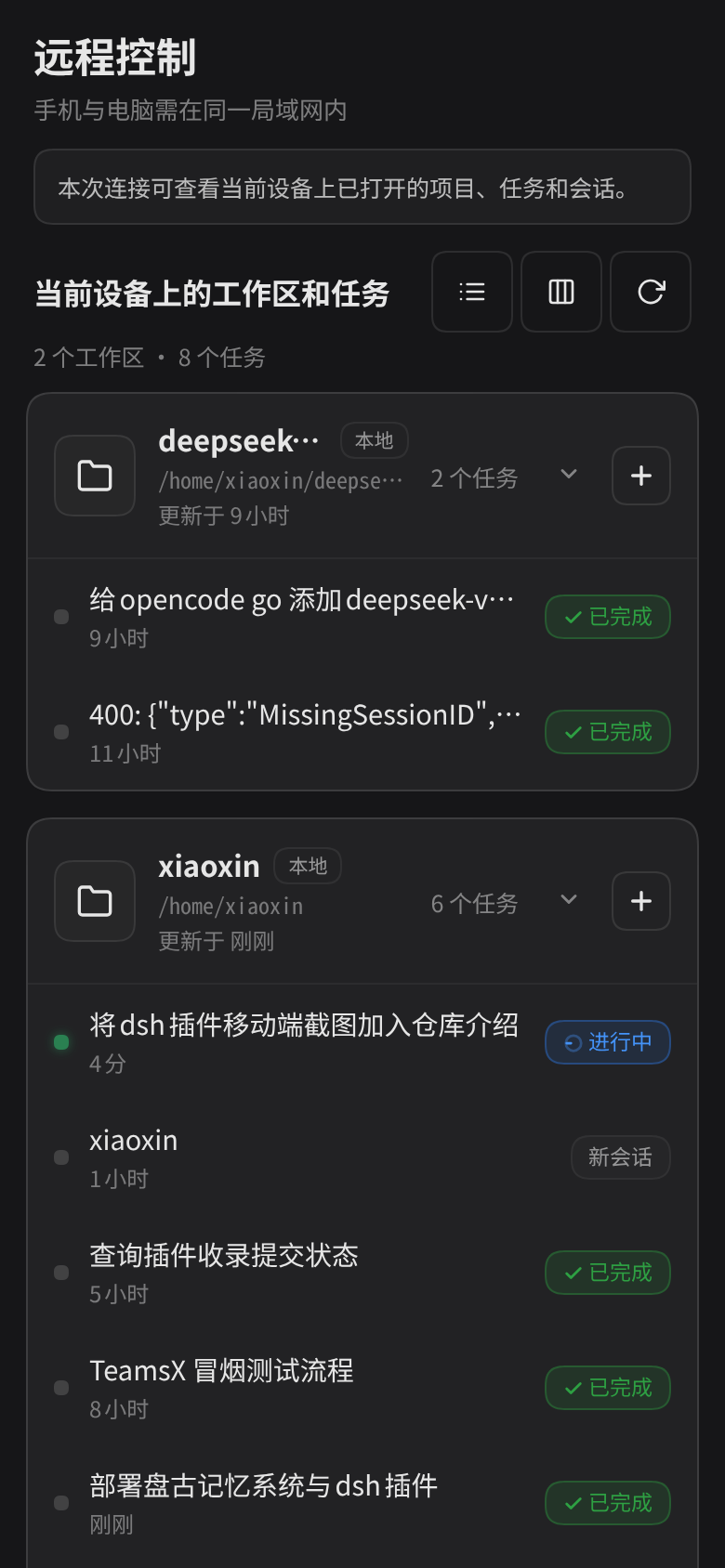 |
工作区分组卡片(名称 / 本地徽标 / 路径 / 更新于 / 任务数)、任务行的运行状态圆点与
「进行中 / 新会话 / 已完成」徽标,都来自宿主 sessions / workspaces 服务的实时数据。
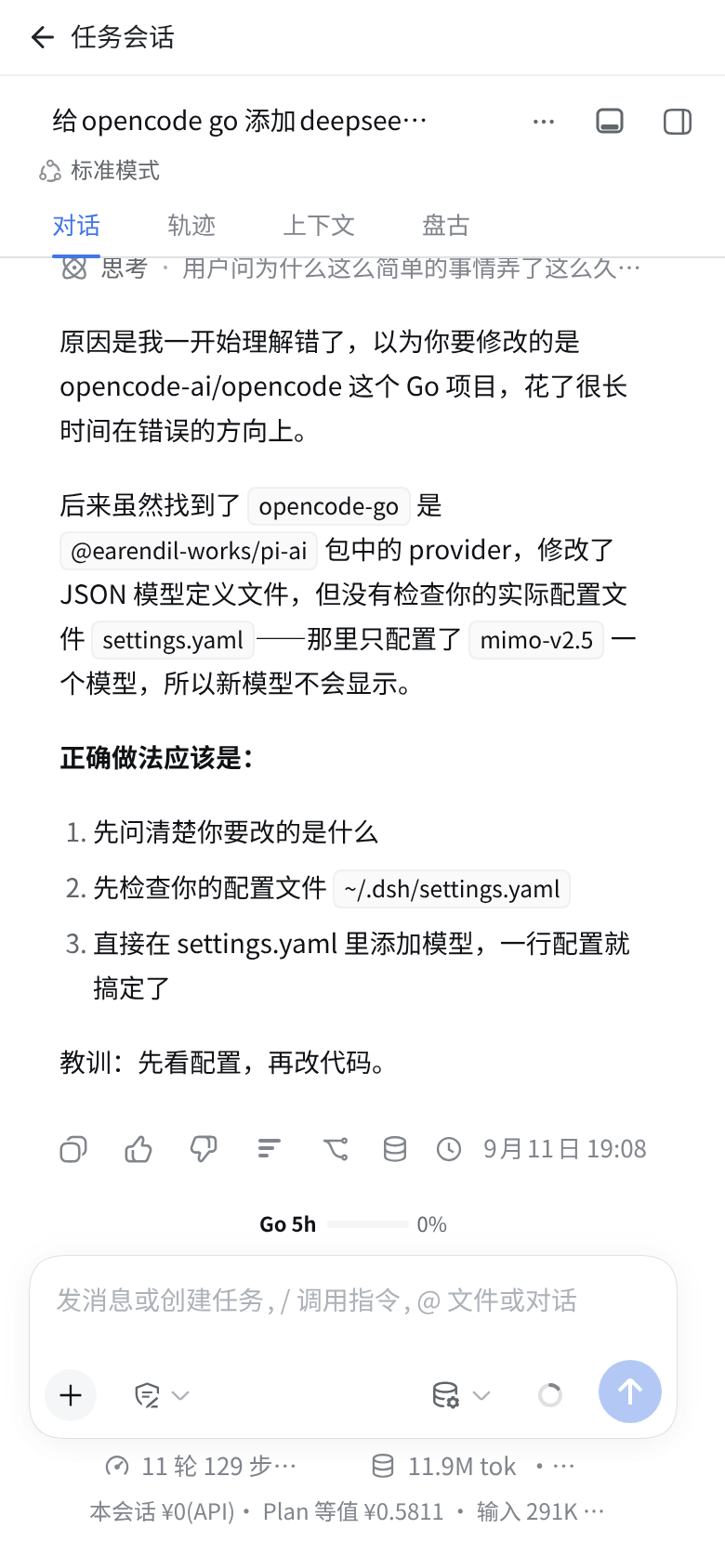
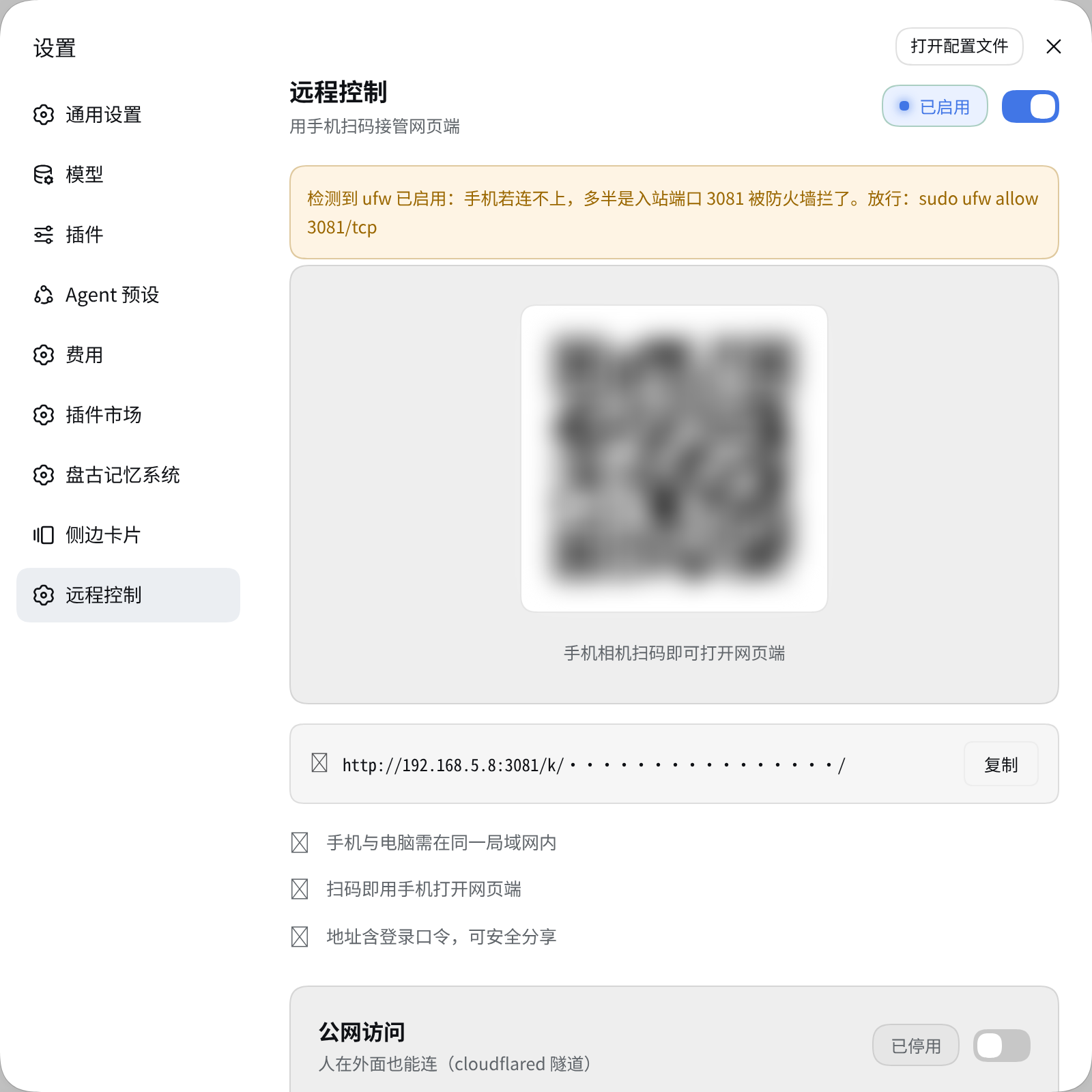
会话视图 —— DSH 会话主体全屏呈现,顶部是插件注入的返回栏:
| 会话视图(顶部返回栏) | 设置页「远程控制」标签 |
|---|---|
 |
 |
截图为插件在真实 DSH 宿主(127.0.0.1:3080)中渲染的结果,未使用模拟数据:
#rm-x-dashboard/.rmx-card/.rmx-task/#rm-x-backbar均由插件客户端模块注入生成,任务与工作区数据来自 宿主sessions/workspaces服务。设置页截图中的访问二维码与accessKey片段已做打码处理。
功能
远程控制(设置页「远程控制」标签)
| 能力 | 说明 |
|---|---|
| 扫码接入 | 局域网地址实时渲染为二维码,手机相机直扫 |
| 局域网访问 | 一键开关反向代理(默认端口 3081),自动探测本机所有局域网 IP,多 IP 可切换 |
| 公网访问 | cloudflared 隧道一键开关,公网 URL 即时显示,并渲染公网二维码——人在外面扫码即用,无需同一局域网 |
| 复制链接 | 局域网 / 公网地址一键复制 |
| 主题 | 全部配色走 DSH 设计令牌(--dsw-alias-*),深浅主题自动跟随 |
| frps 服务器 | 自建 frp 服务器一键绑定(服务器地址 / 端口 / token;本机 frpc.toml 一键预填,token 仅存服务器端),frpc 由插件托管、重启自恢复 |
| 浏览器登录口令 | 随机 6 位口令 + 代理登录页:裸地址打开时输口令进入,失败指数退避,会话复用现有门禁 |
移动端覆盖层
| 能力 | 说明 |
|---|---|
| 任务仪表盘 | 按工作区分组的任务卡片(工作区名 / 路径 / 任务数 / 最近活跃),运行中绿点脉冲、「进行中 / 新会话 / 已完成」徽标 |
| 任务操作 | 点击进入会话;长按任务行弹出菜单(打开 / 删除);分组折叠展开;单列 / 分组视图切换;全部折叠 / 展开;手动刷新 |
| 会话视图 | 顶部返回栏(一键返回任务列表,配色随主题);DSH 会话主体全屏呈现,底部安全区适配 |
| 误触防护 | 屏蔽浏览器边缘滑动历史导航(左右滑不会莫名退回上一页) |
| 实时同步 | 订阅 sessions / workspaces 服务,任务状态变化自动刷新;浏览器刷新后保持当前视图(sessionStorage) |
| 主题同步 | MutationObserver 监听 DSH 主题属性,深浅切换即时跟随(返回栏 / 仪表盘 / 长按菜单全量) |
| 升级容错 | 会话字段 / DSH 组件类名漂移时按候选顺序回退探测;数据未就绪显示加载态而非假空白——永不白屏 |
已知边界
- 公网访问需要本机安装 cloudflared。
- iOS Safari 屏幕边缘的系统返回手势属浏览器行为,页面无法禁用;页面中部滑动无影响。
自建 frps 服务器接入(前置条件)
插件只做客户端一侧:把本机 3081 反代口经 frpc 隧道挂到你自己的 frps 服务器。服务器侧是使用前提,需要自行准备:
- 一台有公网 IP 的服务器:开放 frps 控制端口(默认 7000/tcp)与分配给本插件的远程端口(如 17494/tcp)。
- 部署 frps:用与本机 frpc 同版本的 frps 二进制,配置
bindPort(默认 7000)与auth.token,以守护方式运行(systemd / docker 均可)。 - 三个绑定参数(设置页「frps 服务器」卡片填写):服务器地址(
serverAddr)、服务器端口(即 frps 的bindPort)、token(auth.token);卡片里的「远程端口」是 frps 分配给这条隧道的端口号。
本机已有 ~/.config/frp/frpc.toml 时,点「从本机 frpc 配置预填」自动填前两项;token 由服务端直接读本机配置、不回传页面。手动填 token 时同样只存进本机 0600 状态文件。
HTTPS / 域名在服务器侧终结:frp 的 tcp 隧道不处理 TLS。要在 https://你的域名 上访问,请在 frps 服务器用 nginx/caddy 配证书并把 443(或自定义端口)反代到这条隧道的远程端口。未配 TLS 时整条链路是明文 HTTP(frps 控制端口与远程端口的流量皆然,含登录口令),只建议在可信网络使用。
插件不改写、不停启你自己的 frpc 配置与 frpc.service;绑定后生成的是独立的 ~/.dsh/frpc-remote-x.toml(0600)与插件自有 frpc 进程,重启宿主自动恢复。
架构
dsh-remote-x/
├── src/index.ts        # 宿主插件:mobile CSS 注入(webserver/index-inject) +
│                       #   qr-info / qrcode / lan-toggle / public-toggle /
│                       #   frps-* / password-regenerate API + 6 位口令生成
├── lib/proxy.mjs       # 3081 反代:Host 改写、key/token/会话门禁、6 位登录页
├── lib/frpc.mjs        # frpc 配置生成与进程托管(孤儿清扫、重启自动恢复)
├── lib/tunnel.mjs      # cloudflared 隧道管理
├── inject/mobile.css   # 移动端纯 CSS 覆盖层(body class 模型,宽屏零影响)
├── dist/client.js      # 客户端模块:设置页 section + 移动层
│                       #   (sessions/workspaces 订阅驱动,手写无构建依赖)
└── dist/index.mjs      # 宿主构建产物(tsdown)
- 客户端经 DSH 模块加载器按需加载,服务依赖:
sessions/workspaces/slots/modules。 - 移动层对 DSH 的所有 DOM 触点都走后缀锚点(
[class*="_frame"]等,语义后缀全页唯一) 与兼容层(pick()多字段回退),宿主升级时优先降级而非白屏。
安装
dsh plugin --profile web add ./dsh-remote-x
安装后重启宿主即可;手机与电脑同一局域网时,用设置页二维码扫码访问。
插件配置
| 字段 | 默认 | 说明 |
|---|---|---|
breakpoint |
768 |
移动端布局判定宽度(px) |
proxyPort |
3081 |
局域网反向代理端口 |
title |
远程控制 |
设置页标签标题 |
accessKey |
无 | 公网/局域网链接使用 /k/<key>/ 形式,免去 token 轮换 |
插件 API(全部经 nonce 防护)
| 方法 | 路径 | 说明 |
|---|---|---|
| GET | /dsh-remote-x/api/qr-info |
入口地址、局域网 IP 列表、LAN/公网开关、token 检测、cloudflaredAvailable / frpcAvailable、frps 绑定状态、loginPassword(6 位口令) |
| GET | /dsh-remote-x/api/qrcode?text= |
自渲染 QR SVG(纯矩阵核心,无图片依赖) |
| POST | /dsh-remote-x/api/lan-toggle |
局域网代理开关 |
| POST | /dsh-remote-x/api/public-toggle |
cloudflared 公网隧道开关(返回公网 URL) |
| GET | /dsh-remote-x/api/frps-prefill |
读本机 ~/.config/frp/frpc.toml 预填绑定(只回地址/端口,不回 token) |
| POST | /dsh-remote-x/api/frps-bind |
绑定 frps(addr / port / remotePort + token 或 useLocalToken)并拉起 frpc |
| POST | /dsh-remote-x/api/frps-toggle |
frps 接入开关(启停插件托管的 frpc) |
| POST | /dsh-remote-x/api/frps-unbind |
解绑:停 frpc、删除生成的配置与状态 |
| POST | /dsh-remote-x/api/password-regenerate |
重新生成 6 位浏览器登录口令 |
安全说明
- Harness 后端保持默认
127.0.0.1绑定不变;对手机暴露的只有 3081 代理与隧道出口。 - 代理放行只认做过值校验的凭据:
?key=//k/<key>/与accessKey恒时比较,?token=//t/<token>/对照最新登录口令,remote-x-keycookie 按值比对;认证通过的设备另获代理自签的remote-x-sessioncookie(HttpOnly;签名密钥~/.dsh/remote-x-session.key,权限 0600)。仅凭 cookie 名称(含dsh-auth-*)一律 401。 - 6 位浏览器登录口令:宿主首启随机生成,存于
~/.dsh/remote-x-state.json(0600);代理在浏览器整页导航被拒时回登录页,POST 校验走恒时比较,连续失败按 1s→60s 指数退避(frp 流量都来自 127.0.0.1,无法按 IP 限速)。口令面关闭(状态文件无login字段)时退回纯文本 401。口令与 frps token 未经 TLS 即为明文,公网接入务必先在服务器侧配好证书。 - frps 绑定与 token 只写本机状态文件与生成的
~/.dsh/frpc-remote-x.toml(均 0600),任何 API 响应与页面 JS 都不含 token;插件不读写、不停启你自己的 frpc 配置与frpc.service。 - 所有插件 API 要求
x-remote-nonce(页面注入的一次性值);代理入口可选accessKey。 - 公网隧道链接含访问凭据,请勿公开分享;泄露时在设置页关闭公网开关重建。
License
MIT
Links
More in this category
zhu1090093659/dsh-web#packages/dsh-remote-web-ui★ 9321
Remote control of a dsh web workspace from phone or PC: QR-code pairing through a token-gated channel, SSE real-time sync, and separate mobile and full desktop GUI modes.
zhu1090093659/dsh-web#packages/dsh-ssh★ 9321
SSH ops panel for DSH: web terminal, SFTP transfer with progress, local port forwarding, and one-command cluster execution across hosts; agents share the same host config.
saya-ch/dsh-mobile★ 569
Access DeepSeek Harness from the Android app or a mobile browser with secure LAN and remote connections, persistent device pairing, and a customizable mobile interface.
liguobao/ds-harness-remote★ 516
Multi-device remote access for DeepSeek Harness: continue an active session from your phone, tablet, browser, or another computer over an end-to-end encrypted channel (Noise IK + adaptive relay/WebRTC transport), with device authorization, ApiProxy-only remote capabilities, and read-only file preview via dsh-file-viewer — no shell, remote desktop, or write access.
ZSeven-W/dsh-ios★ 337
A live iOS Simulator or USB-connected iPhone inside the conversation: 22 agent tools for booting, building, driving the UI by accessibility identity or OCR text, list-row actions and SwiftUI preview hot reload, plus a streaming sidebar panel you can tap and drag on.
wenbin-wb/dsh-bridge★ 211
Remote and mobile access for DeepSeek Harness: provides LAN QR code connection, Cloudflare/custom tunnels, WeChat, QQ, Feishu, Telegram bot integration, and security authentication.
Community comments
Comments are public GitHub Discussions. Loading them connects to GitHub and Giscus; a GitHub account is required to post.