Codex-style tool call folding, collapsing multiple tool calls into a single line.
Install
# from npm (prebuilt)
dsh plugin --profile web add dsh-toolfold
# from GitHub (first run asks for allowBuilds approval — follow the hint, retry)
dsh plugin --profile web add github:Minecraftbe/dsh-toolfold
Any plugin you install runs third-party code with your own permissions — it can read your files, use your credentials, and reach the network, and tool approvals don’t sandbox it. GitHub-sourced plugins also run build scripts at install time — pnpm blocks those until you allow them, so an install can stop with ERR_PNPM_GIT_DEP_PREPARE_NOT_ALLOWED or ERR_PNPM_IGNORED_BUILDS; dsh prints the exact key to add under allowBuilds in your profile’s pnpm-workspace.yaml, and the install works on the next run. Allowing a build is a trust decision: only install sources you trust, and pin a commit (github:owner/repo#sha).
README
English | 中文
A DSH Web GUI plugin that provides a simple tool call collapsing: consecutive tool calls are collapsed into a single compact bar showing only a one‑line summary of the last call. Click to expand/collapse.
It does not replace any built‑in renderer, and uninstallation restores the UI completely.
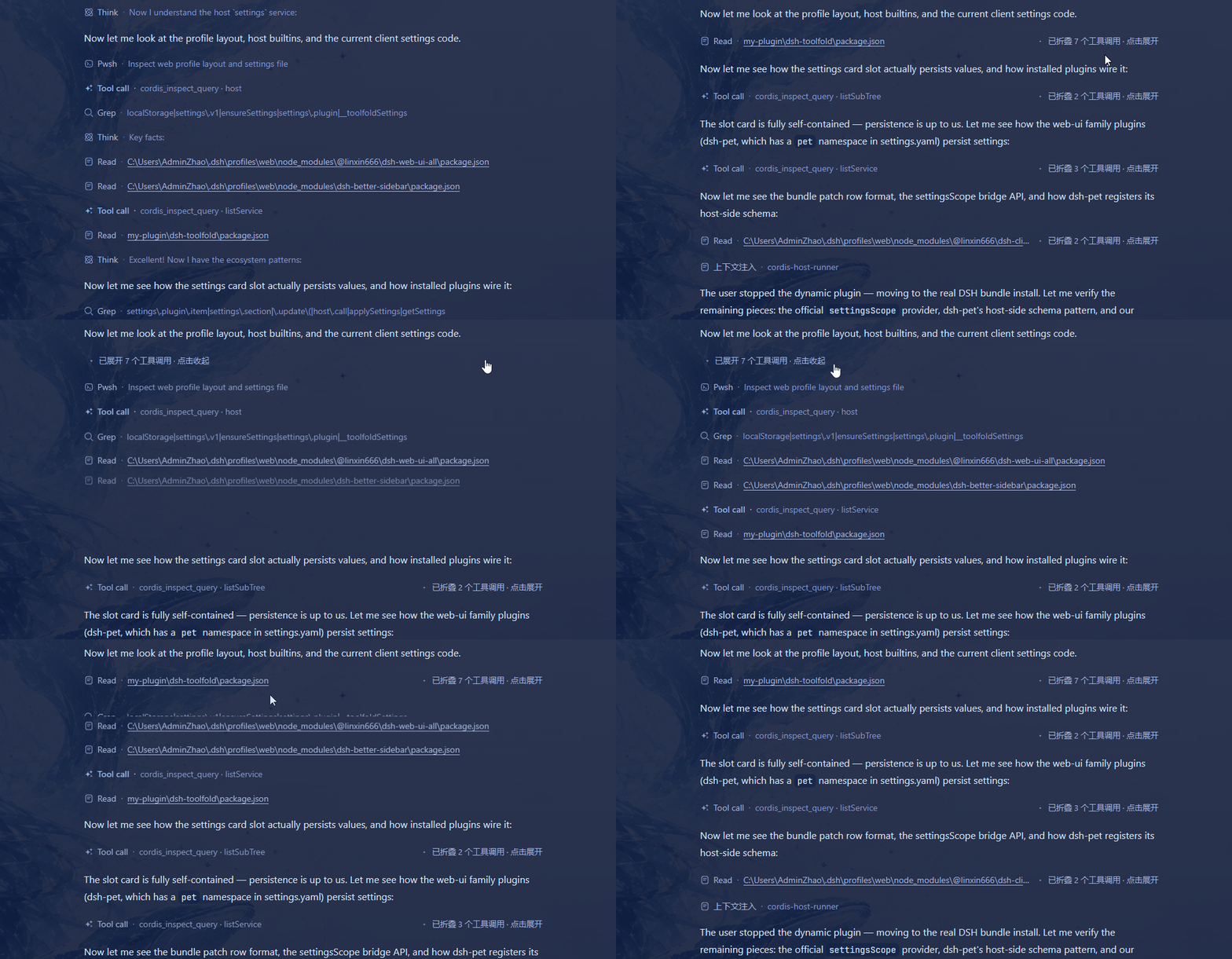
Table of Contents
- Installation
- Quick Start
- Default Behaviour – First Use
- Features
- Settings
- Performance
- Limitations & Compatibility
Installation
Recommended (via npm)
dsh plugin --profile web add dsh-toolfold
Alternative Methods
# From GitHub
dsh plugin --profile web add github:Minecraftbe/dsh-toolfold

# From source
git clone https://github.com/Minecraftbe/dsh-toolfold.git
dsh plugin --profile web add ./dsh-toolfold
After installation, restart dsh and refresh your browser – the plugin will be active. You can verify that it is included in the final bundle with:
dsh --profile web --dump-config
Uninstallation
dsh plugin --profile web remove dsh-toolfold
After restart, the interface returns to its original state.
⚠️ Version support: the supported DSH range is whatever
engines.dshinpackage.jsondeclares. On DSH versions outside this range, the settings card shows a version-mismatch warning (hover for the live range) and folding may not work correctly.
Quick Start
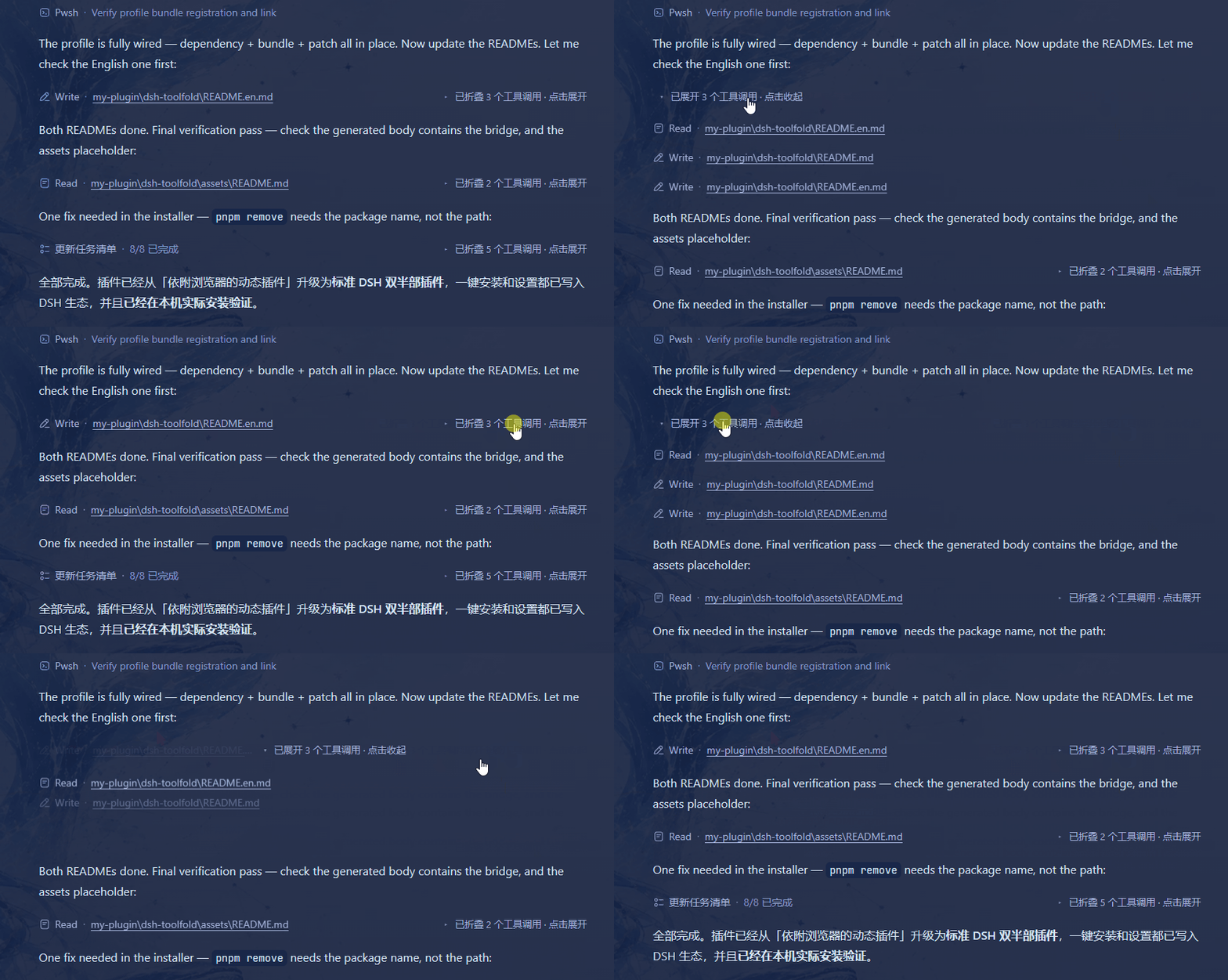
Once installed, consecutive tool calls are automatically folded into a single bar in any DSH conversation.
- Click the fold bar to expand or collapse the tool‑call cards (keyboard
Enter/Spacealso work) - The bar shows: a one‑line summary of the last call plus the short count label “N次调用” (e.g. “3次调用”)
Default Behaviour – First Use
The plugin works immediately after installation, but you might notice two things that seem “unexpected” at first. Both are intentional defaults and can be changed easily.
❓ Why did my thinking content disappear?
Reason: “Thinking display” defaults to “Auto-follow official fold” — completed thinking is hidden unless the official Compact view folds the whole process block.
How to restore: go to Settings → Plugins → Tool Fold and set “Thinking display” to “Always keep”.
❓ Why are my tool calls split into two separate fold bars?
Reason: “Split thinking across call groups” is on by default (splitThink: true). The plugin treats a completed thinking block as a logical separator, folding calls before and after it independently.
How to merge them: go to Settings → Plugins → Tool Fold and turn off “Split thinking across call groups”.
Ongoing (streaming) thinking is always visible regardless of these settings, and will only be processed according to the rules once it finishes.
Features
Core Folding Behaviour
- Automatic folding of consecutive tool calls – adjacent tool calls are collapsed into one bar, showing only the last call’s summary line and the number of folded items.
- Thinking splits call groups (enabled by default) – a completed thinking block separates the tool calls before and after it into two independent fold bars; they are never merged across a thinking block.
- Thinking display (three modes) – “Auto-follow official fold” by default: thinking is kept when the official view folds the whole process block, hidden otherwise; “Always keep” shows it between fold bars (split mode) or interpolated back on expansion; “Always hide” never shows completed thinking.
- Ongoing thinking always visible – streaming thinking remains visible until it finishes, then follows the above rules.
Animation & Experience
- Spring‑loaded waterfall animation – cards drop one by one on expand (with spring bounce), and on collapse they rise while heights shrink synchronously, so content below moves continuously without jumping.
- Sticks to the bottom without pushing out – when expanding near the bottom, the fold bar’s viewport position is pinned so that automatic scrolling does not push it off screen.
- Respects system preferences – if the system has “Reduce motion” enabled, animations are automatically disabled.
Performance & Resource Usage
- Near‑zero performance impact – no page‑wide observers, zero engine work during streaming, and all activity is paused when the tab is hidden. Measured idle overhead is about 0.03% of a single CPU core.
- Optional real‑time stats – enable “Performance stats” in the settings card to see per‑step timings and verify overhead.
Settings
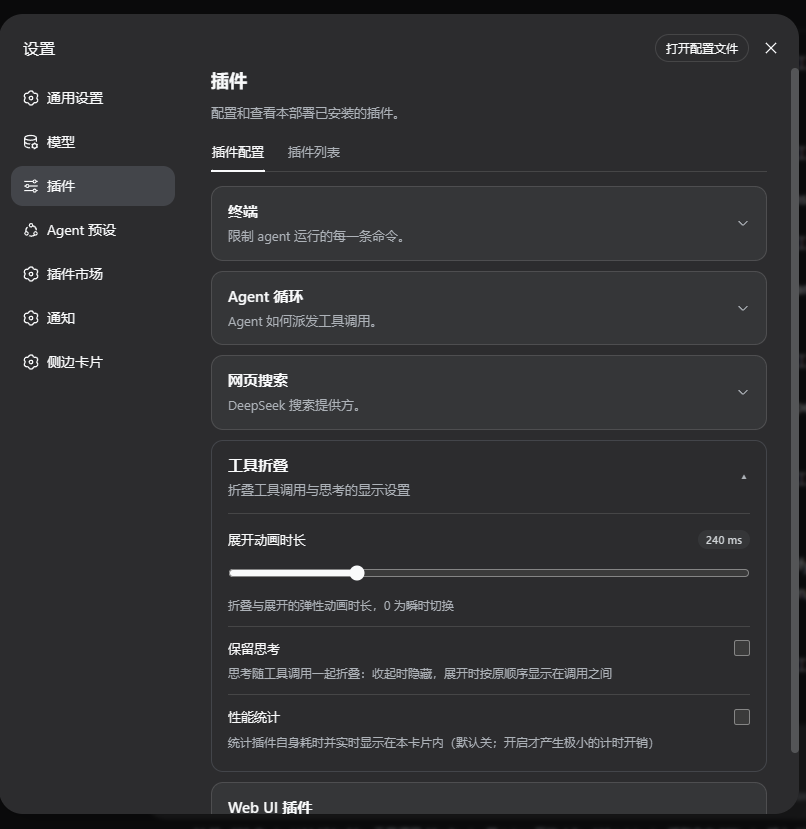
Settings are found at: Settings → Plugins → Tool Fold (the card looks like other built‑in plugin cards and follows the light/dark theme).
Options
| Option | Description |
|---|---|
| Expand animation duration | Duration of the expand/collapse animation per card (0–1000 ms, default 240 ms; 0 = instant) |
| Thinking display | How completed thinking is shown: auto-follow official fold (default) / always keep / always hide |
| Split thinking across call groups | Enabled by default: a completed thinking block separates tool calls before and after it into independent fold bars. Disabled: thinking is folded together with the surrounding call group (legacy behaviour) |
| Performance stats | Show real‑time plugin timing in the card (cumulative count and ms/s for observation callbacks, engine refresh, merge recalculation, safe rescan, summary cloning, plus the number of streaming batches short‑circuited with zero overhead) |
Storage Location
Plugin settings are persisted automatically, with the following priority:
Primary (installed/bundle mode) – stored via the DSH settings service in
~/.dsh/settings.yaml(namespacetoolfold). They follow the dsh host, so they persist across browsers/devices. You can also edit the file manually:toolfold: durMs: 240 # expand animation duration 0–2000 ms thinkMode: auto # completed-thinking display: auto-follow official fold / keep always / hide always splitThink: true # whether to split call groups by thinking stats: false # whether to enable performance statsFallback (when settings service is unavailable) – falls back to browser
localStorage(keydsh-toolfold.settings.v1), so settings are only kept in that browser. The old keydsh-codex-collapse.settings.v1is automatically migrated on first load.
The settings card shows the current storage method (“Settings saved in DSH host config” or “Saved only in this browser”).
Performance
- Measured on a real GUI page (8 s idle window) – total engine time ~1.6–2.8 ms (~0.3 ms/s, ~0.03% single‑core); during a 5‑s CPU profile, engine functions appeared zero times.
- Zero work during streaming – streaming thinking/text tokens are short‑circuited with O(1) checks and do not trigger any recalculation (~0.1–0.4 µs per node).
- Hidden tab = literally zero – all observers and timers are disconnected when the tab is hidden; they are re‑attached and a single reconciliation run is performed when the tab becomes visible again.
- Enable “Performance stats” in the settings card to see detailed timings for every plugin operation.
Limitations & Compatibility
- DOM‑based – folding relies on stable product DOM markers. If markers change, the worst case is that folding stops working – it will not break the chat.
- Splitting rules:
- Ongoing thinking and plain text output separate tool call groups.
- Completed thinking also separates groups by default (when “Split thinking across call groups” is on); when off, thinking is folded together with its surrounding call group.
- State memory – expand/collapse state is remembered per conversation flow and node key; re‑opening a conversation with the same key restores the state.
- Browser requirements – needs
MutationObserverandrequestAnimationFrame. If unsupported, it falls back to “fold once on initial render”. - Settings storage – uses the DSH host config (
~/.dsh/settings.yaml) when available; only falls back tolocalStoragewhen the host bridge is unreachable (in which case settings are browser‑local only).
This project is entirely built with dsh + deepseek v4 flash(max).
Links
More in this category
zhu1090093659/dsh-web#packages/dsh-task-board★ 8121
Task board for the dsh web GUI: a sidebar multi-column kanban whose cards run in real DSH agent sessions and can also be scheduled with cron expressions, executed host-side even with the browser closed.
zhu1090093659/dsh-web#packages/dsh-web-all★ 8121
Plugin and skin collection for the DSH Web UI: task board, Git graph, right-side panel, remote mobile UI, pet, live token stats, and a skin center.
omdsh-dev/DSH-better-sidebar★ 3868
Full sidebar workbench with file rendering and editing, terminal, Git, and subagents; third-party plugins can register new tabs.
ccch1mneyyy/dsh-TUI★ 3734
Claude Code-style full-screen terminal UI: pixel-whale header, live status line, and streaming thought expansion.
MeteorNOX/DeepSeek-Balance-Whale-Widget★ 3369
A fixed-corner whale widget for the DSH web GUI — balance, today's usage and per-turn cost with peak/off-peak pricing, editable balance-alert and daily-budget bubbles, a module-based custom bubble queue with A/B weighted choices and random lines or images, 30+ vendor templates (OpenAI, OpenRouter, Kimi, SiliconFlow, Ark, Zhipu, MiniMax and more) with per-model balance and subscription quota, plus task-end sound, imported audio, custom roles and a resource manager. Local-only, no telemetry.
Devin-AXIS/deepseek-design#deepseek-idesign★ 1665
Visual design studio for websites, app prototypes, posters, cards, reports, and magazines, with templates, direct element editing, selection-aware AI draft handoff, and export.
Community comments
Comments are public GitHub Discussions. Loading them connects to GitHub and Giscus; a GitHub account is required to post.