Dual-engine screen capture for DSH: inside the SSiD desktop shell, a global hotkey or tray opens a fullscreen box-select overlay (all monitors, per-display pixel-perfect frames) with in-place red-box annotation and a WeChat-style toolbar; in plain DSH (browser), the composer camera button captures the display via getDisplayMedia and reuses the same single-phase box-select + annotation overlay in-page. The cropped image lands in the current conversation composer through the official attachment intake.
Install
# from GitHub (first run asks for allowBuilds approval — follow the hint, retry)
dsh plugin --profile web add github:Max-Null/dsh-capture
Any plugin you install runs third-party code with your own permissions — it can read your files, use your credentials, and reach the network, and tool approvals don’t sandbox it. GitHub-sourced plugins also run build scripts at install time — pnpm blocks those until you allow them, so an install can stop with ERR_PNPM_GIT_DEP_PREPARE_NOT_ALLOWED or ERR_PNPM_IGNORED_BUILDS; dsh prints the exact key to add under allowBuilds in your profile’s pnpm-workspace.yaml, and the install works on the next run. Allowing a build is a trust decision: only install sources you trust, and pin a commit (github:owner/repo#sha).
README
This plugin publishes its README in Chinese only.
源码仓库:https://github.com/Max-Null/dsh-capture(npm:
@max-null/dsh-capture)
本插件属于 @max-null/* 插件系列——这一系列共同构成 SSID(思灵 · Seek Soul in Darkness) 桌面体验。SSID 是整合它们的盒:dsh-capture · dsh-chat-rail · dsh-chinese-thinking · dsh-draft-polish · dsh-guardian · dsh-habit · dsh-memory · dsh-node-appearance · dsh-plugin-center · dsh-quick-toolbar · dsh-skill-mcp-center · dsh-ssid-panels · dsh-ssid-zh-ui · dsh-ssid-achievements。
This plugin belongs to the @max-null/* family — a set of plugins that together form the SSID (思灵 · Seek Soul in Darkness) desktop experience.
DSH 双引擎快捷截图引用:框选屏幕任意区域 → 标注(矩形/椭圆/箭头/文字, 8 色可选)→ 图片自动进入当前会话的输入框(作为图片附件草稿,可加文字、 可删除,回车才发送)。有标注时投递「原图 + 编辑图」两张——原图不遮挡任何 原始内容,编辑图承载框/箭头/文字的强调,帮助理解方(人/模型)对照上下文。
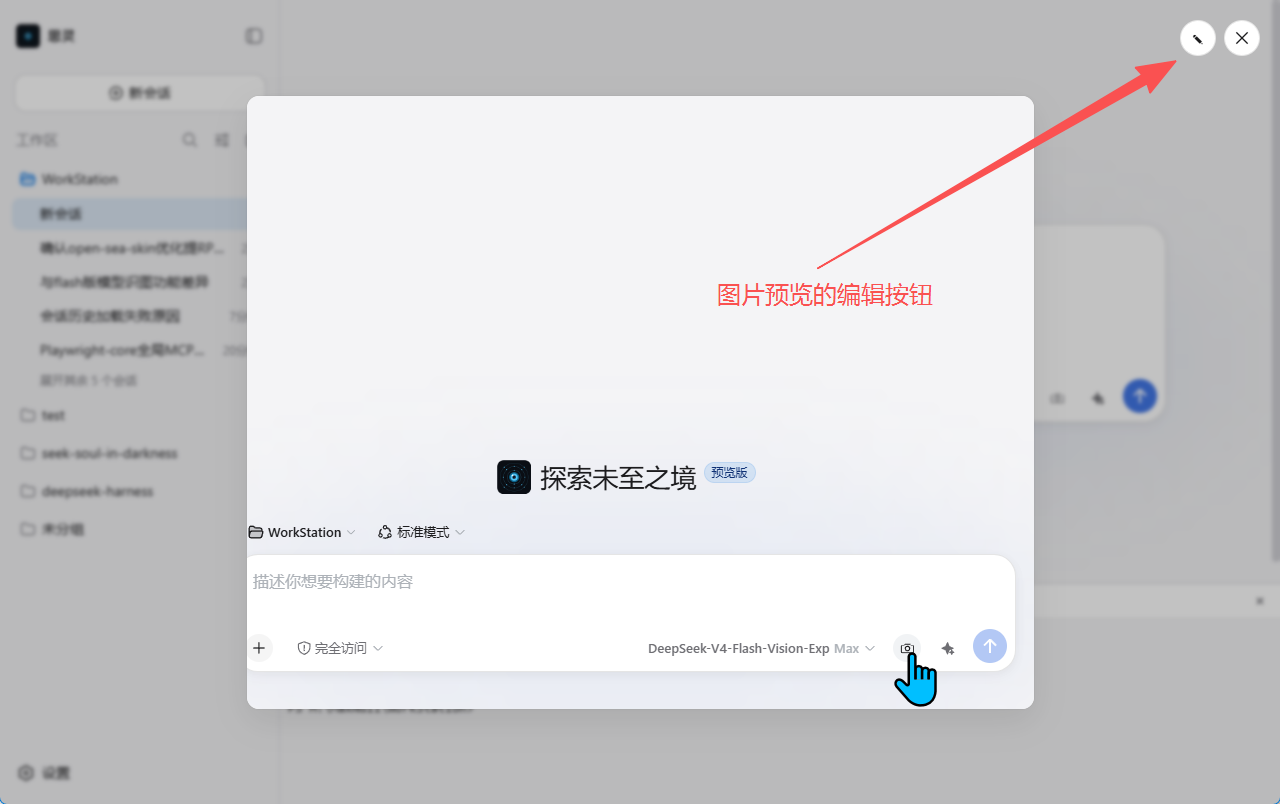
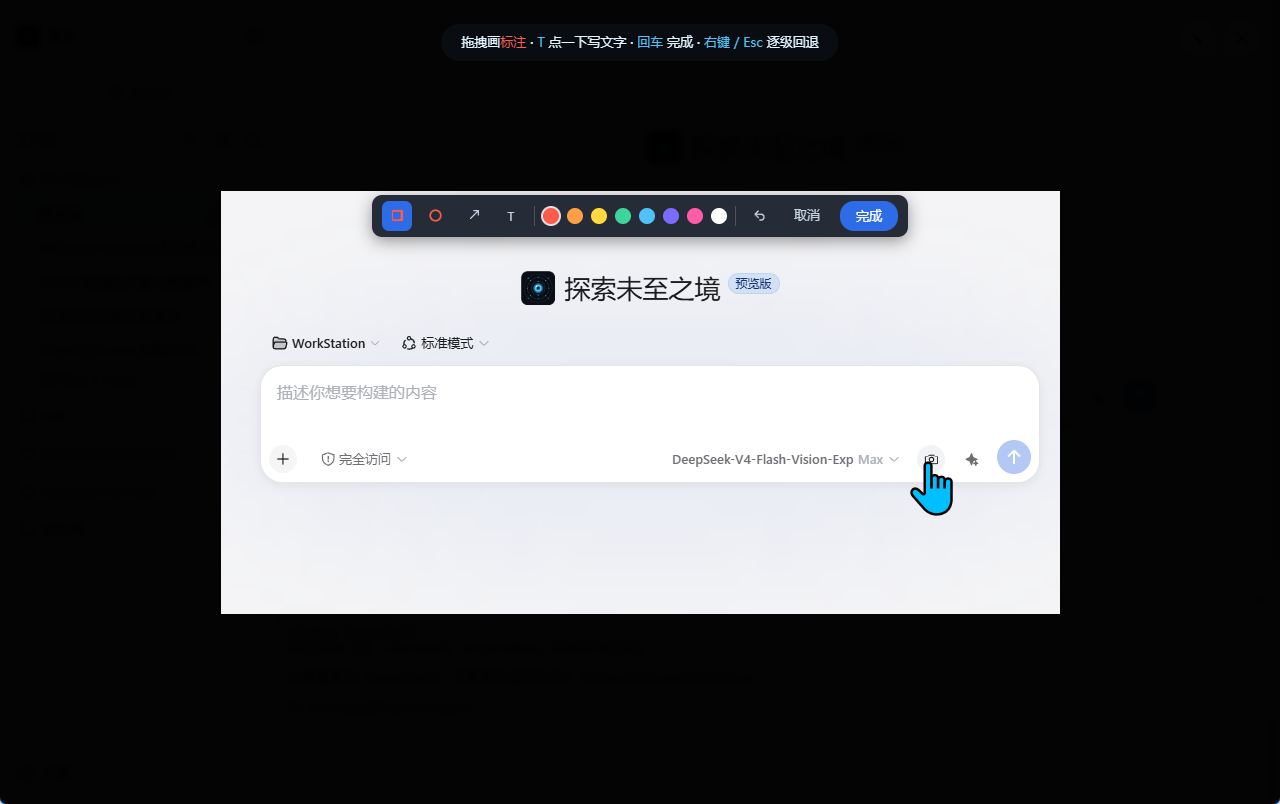
原图预览编辑闭环:任何已插入的图片(截图/上传/历史消息)打开「原图预览」 即可直接 ✎ 编辑(整图标注,同一套工具),完成后编辑图自动投递,无需重新截图。
截图
框选与标注
| 截图时(框选选区) | 编辑模式(进入时,尚未标注) | 画箭头 / 文字(标注后) |
|---|---|---|
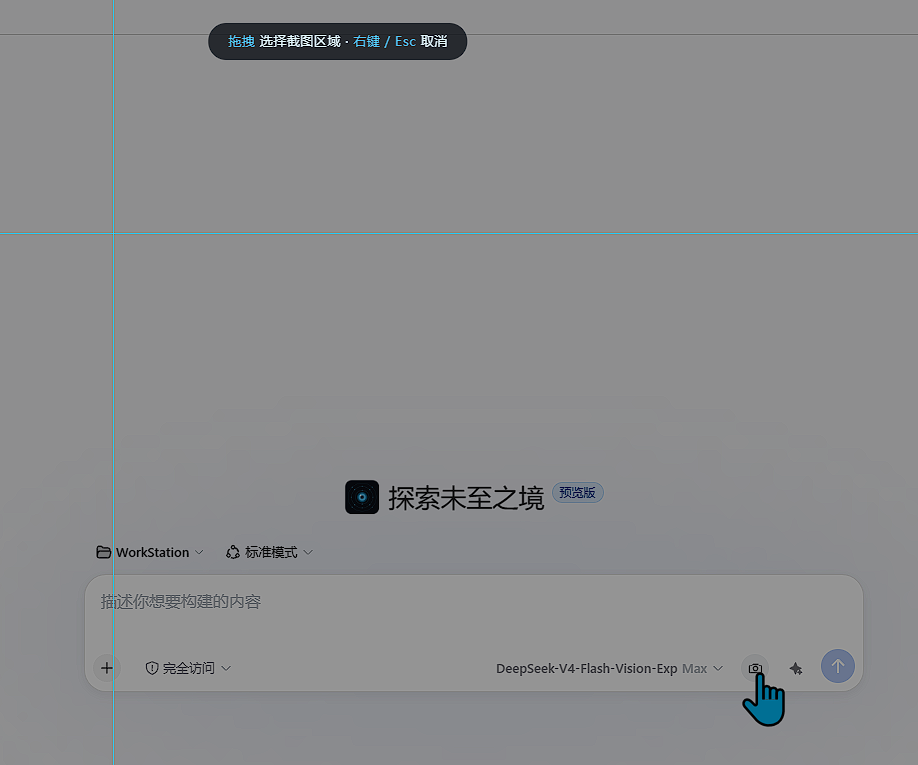 |
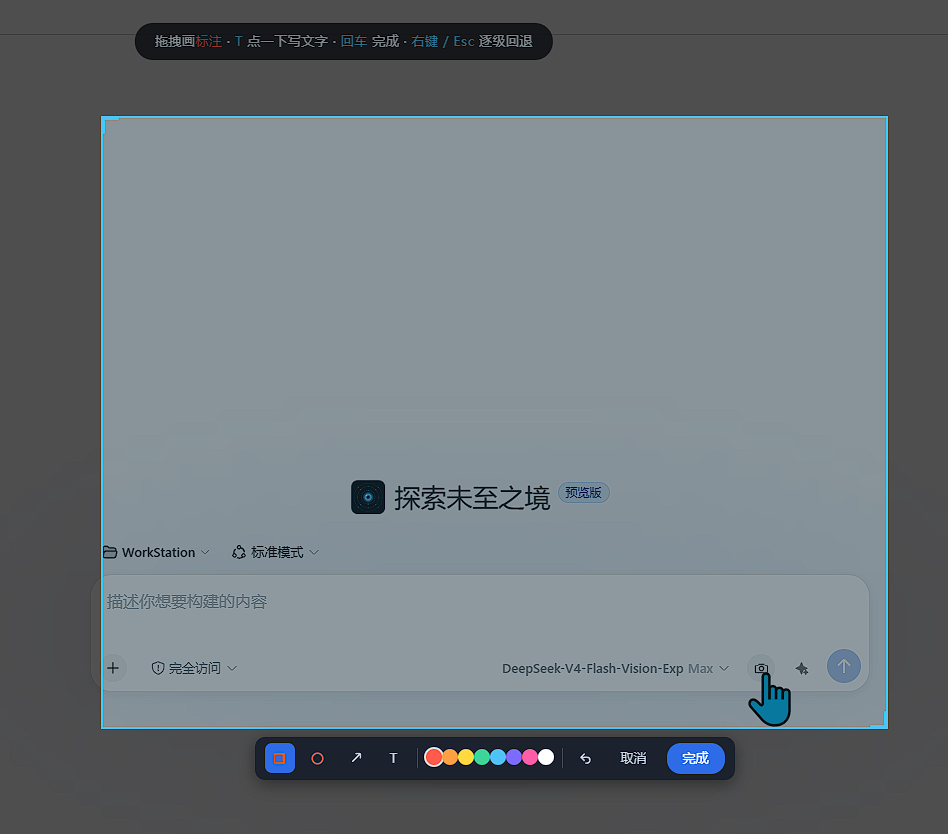 |
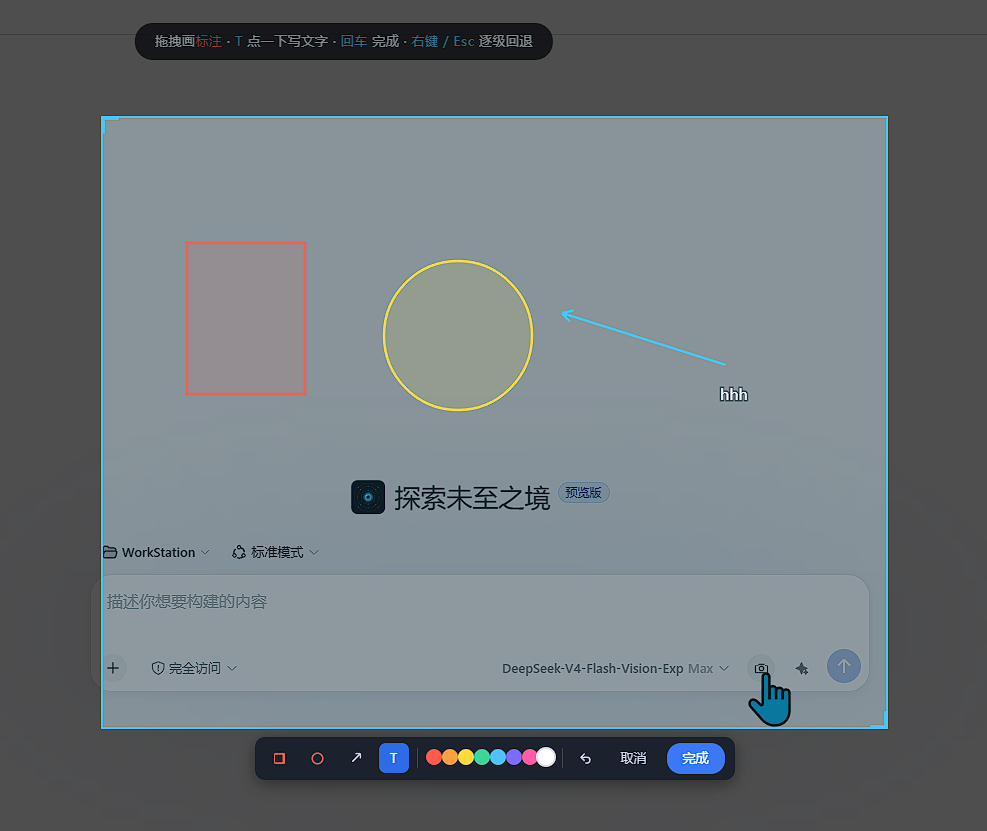 |
投递结果与原图预览编辑
| 确认后插入原图和编辑图 | 图片预览时编辑按钮位置 | 图片预览时编辑页 |
|---|---|---|
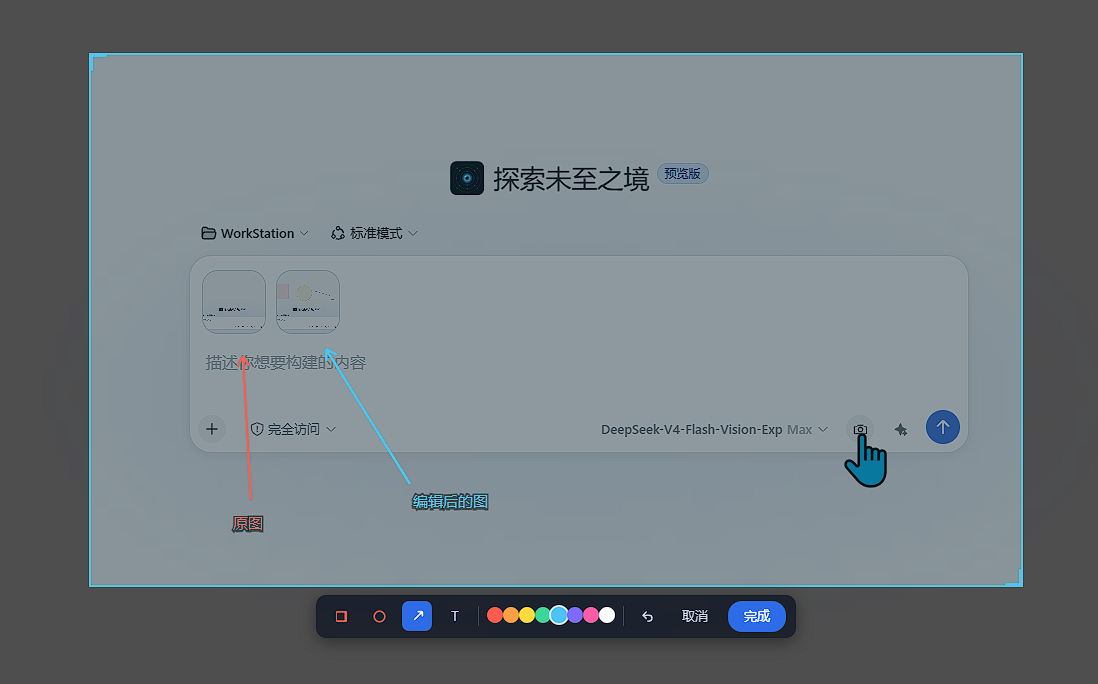 |
 |
 |
设置
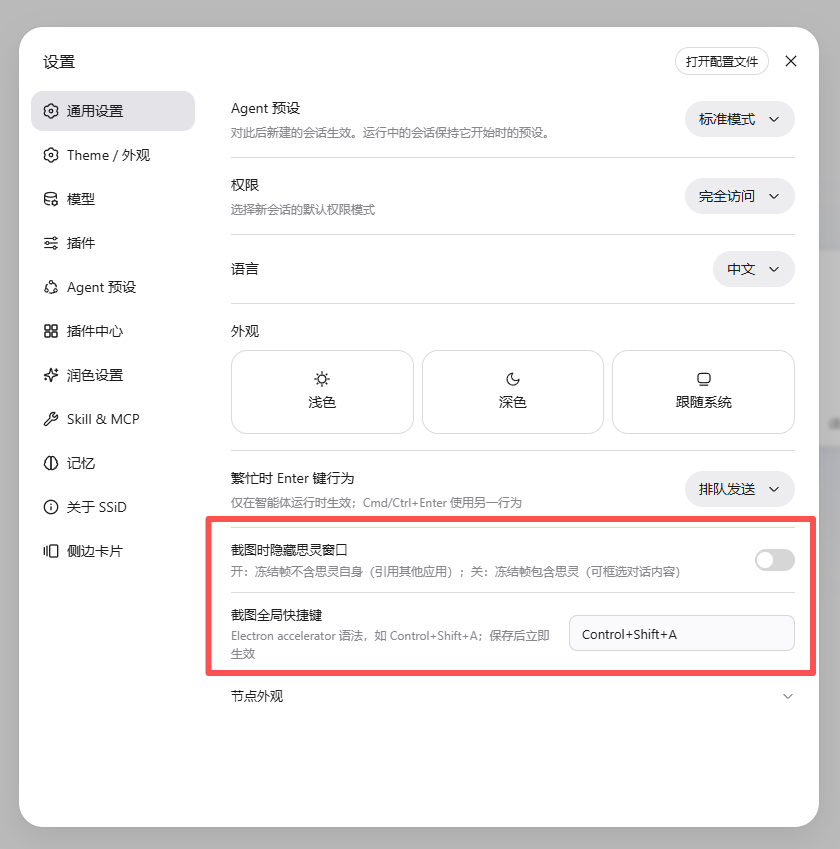
| 「插件」页 → dsh-capture 详情页的配置卡片 |
|---|
 |
双引擎
| 思灵壳(SSiD)内 | 纯 DSH(浏览器) | |
|---|---|---|
| 触发 | 托盘「截图引用」+ 全局快捷键(插件页卡片修改)+ 输入框相机按钮 | 输入框相机按钮 |
| 捕获 | desktopCapturer 逐屏抓帧:多显示器、像素级 1:1、全屏无边框浮层 | getDisplayMedia 系统选择器(一次选一个屏幕) |
| 遮蔽 | 独立浮层窗口(DSH 页面零侵入) | 页面内全屏遮罩(框选 + 标注交互相同) |
| 隐藏窗口 | ✅(插件页卡片「截图时隐藏思灵窗口」) | ❌(无此能力,设置行自动隐藏) |
| 投递 | 官方 composer 图片 intake(合成 drop,与拖拽等价) | 同左 |
运行时探测(host 的 shellAvailable)自动选择引擎;无壳时按钮点击即走浏览器捕获。
标注能力
- 矩形 / 椭圆框:拖拽绘制,实时预览 + 合成(带同色半透明填充)
- 箭头:拖拽指向要改的内容,头翼自动按方向绘制
- 文字:点一下放置锚点内联输入,回车提交;文字带细黑描边(任意底色可读,无背景块)
- 8 色调色板:红橙黄绿青紫品红白,每条标注独立着色(默认红)
- 撤销/逐级回退(右键或 Esc):画框中 → 撤标注 → 重选 → 退出
操作(思灵壳内)
- 打开任意 DSH 会话(没有会话时截图不会进入任何地方)。
- 托盘 →「截图引用」,或按全局快捷键(默认
Ctrl+Shift+A)。 - 屏上出现冻结帧 + 十字准星:
- 左键拖拽 框选区域 → 选区定格后出现工具条(选区旁,微信式)。
- 工具条选色/选工具后 左键拖拽(箭头)/ 点一下(文字)标注; 回车 / 双击 /「完成」 一次确认发送。
- 右键 / Esc 逐级回退:标注中 → 撤标注 → 重选 → 退出截图。
- 图片出现在输入框图片位;可追加文字后回车发送。
操作(纯 DSH)
- 打开任意 DSH 会话;点输入框相机按钮(润色按钮左侧)。
- 浏览器弹出「选择要共享的屏幕」→ 选一个屏幕 → 捕获一帧后自动停止共享。
- 页面全屏遮罩出现:左键拖拽框选 → 选区工具条出现 → 同画面标注 → 回车/「完成」发送;右键/Esc 逐级回退。
原图预览编辑
- 任意图片(草稿附件或消息图片)点击缩略图 → DSH「原图预览」对话框。
- 预览右上角 ✎ 编辑按钮(官方关闭按钮旁)→ 整图编辑浮层(不必框选)。
- 标注(同截图工具)→ 完成:编辑图投递到输入框,预览窗口随编辑一并关闭; 未标注直接完成 = 视为未修改,关闭且不投递;取消/回退放弃编辑,预览保留。
设置(思灵壳内:「插件」页 → dsh-capture 卡片)
- 截图时隐藏思灵窗口:开 = 冻结帧不含思灵自身(引用其他应用);关 = 冻结帧包含 思灵(可框选对话内容)。默认开。
- 截图全局快捷键:Electron accelerator 语法(如
Control+Alt+B),回车/失焦即 保存并立即重注册。
实现要点(维护者)
- 本仓库是插件唯一源码真身(lib/ 为构建产物,不入库:
pnpm install && pnpm run build)。 思灵(SSiD)安装包以shell/profile-template/vendor/dsh-capture(构建产物 拷贝)作为内置分发载体,本仓库之外不再维护第二份源码。 - 壳层(engine A)在思灵仓库
ssid-desktop/apps/desktop/src/ssid/screenshot.ts与ssid-desktop/apps/desktop/resources/screenshot.html(浮层页):desktopCapturer逐屏抓帧 → 每屏一个全屏无边框置顶浮层(不侵入 DSH 页面 DOM)→ 单阶段标注 (选区工具条 + 原图坐标系绘制,合成时按选区裁剪)→executeJavaScript派发ssid:screenshotCustomEvent(v2 协议{ uid, source, annotated? }, 主进程带 uid;旧版字符串监听器自然失效,防双投递)。 - 浏览器(engine B)在
src/client/CaptureOverlay.tsx:getDisplayMedia抓帧 →createPortal全屏遮罩(同一套框选/标注交互)→ 官方 drop intake。 - 原图预览编辑在
src/client/ImagePreviewEdit.tsx:MutationObserver 探测官方 ImageLightbox(role=dialog+aria-label原图预览/Original image preview, 不依赖 CSS hash),注入 ✎ 按钮;复用 CaptureOverlay 的 immediate 整图模式。 - 投递:
delivery.ts的合成 drop(new DataTransfer()+DragEvent('drop'))走 DSH 官方 composer 图片 intake(ui-attachment 的 document 级 drop 处理器)。无 DSH 核心 改动;数量/大小/类型限制与官方拖拽一致。 - host 半
/api/ssid/screenshot/{get,set,trigger}(走ctx.connection.fetch的精确路由表, carrier-neutral——Web 载体与 Electron shell 载体分发同一个 handler); 壳能力经ssid.shell.screenshot服务注入(bare dsh web 时 shellAvailable=false, 引擎 B 接管)。 - 壳内浮层 3 分钟无交互自动取消(
screenshot.html的闲置超时;防卡屏,交互随时重置)。
已知边界
- 纯 DSH:一次一个屏幕(系统选择器选);无法隐藏宿主窗口(设置行自动隐藏); 无法使用全局快捷键(无壳机制)。
- 无当前会话时截图静默丢弃(浮层文案已提示「先打开一个会话」)。
- 模型不支持图片时由 DSH 官方提示。
- 原图预览编辑投递的是编辑图(原图已在对话里,不再重复投递)。
Links
More in this category
liustack/modlens★ 4172
Vision bridge for text-only models: paste an image, get structured JSON evidence (OCR, layout, semantics).
ysr666/dsh-vision-router★ 1137
Free vision for text-only agents: built-in keyless vision chain plus pixel tools (Q&A, grounding, crop, pixel diff, colors, OCR, SVG trace, cutout, screenshots); paste an image to use it.
Anionex/dsh-vision-toolkit★ 888
Vision for text-only models: paste an image and the model switches to a Vision Toolkit variant for image Q&A, multi-image comparison, long-screenshot OCR, screenshot-to-UI reproduction, element grounding, and pixel diff. No API key by default — images are processed by the author-hosted free service, 100 per machine per day; configurable to your own provider.
fandc520/dsh-comfyui★ 102
Drive a local or remote ComfyUI server from DeepSeek Harness: comfyui_run / comfyui_object_info / comfyui_workflow tools generate and edit images and videos, with a workflow library (graph extraction: per component / main flow / all), a load area with resolution auto-match, a live queue, SDXL and Wan 2.1 templates, a companion skill, and a same-origin media proxy.
dickpy/dsh-imagegen★ 100
AI image generation for the DSH Web GUI: text-to-image and image-to-image through a configurable OpenAI-compatible endpoint (gpt-image-2 / gpt-image-1 / dall-e-3), with an api_url/api_key settings card and a sidebar split-pane generation studio.
sunxin-ai/dsh-design-qa★ 44
Design-fidelity QA for text-only models: a `deepseek_vision` tool borrows an eye from any OpenAI-compatible vision route, so the model can judge whether an implementation matches its mock — shipped with the benchmark behind that judgement (four fixtures, 23 injected defects, raw transcripts) and the questioning discipline it depends on.
Community comments
Comments are public GitHub Discussions. Loading them connects to GitHub and Giscus; a GitHub account is required to post.