Cross-session workbench for DeepSeek Harness: authorized session and project overview, traceable summaries with seq citations, quick idea capture, a read-only chief advisor for proposal review, and an inspector that marks unchecked items instead of faking a pass.
Install
# from npm (prebuilt)
dsh plugin --profile web add dsh-wangchao
# from a prebuilt release tarball
dsh plugin --profile web add -w "https://github.com/MacilyDots/dsh-wangchao/releases/download/v0.5.0-alpha.4.1/dsh-wangchao-0.5.0-alpha.4.1.tgz"
# from GitHub (first run asks for allowBuilds approval — follow the hint, retry)
dsh plugin --profile web add github:MacilyDots/dsh-wangchao
Any plugin you install runs third-party code with your own permissions — it can read your files, use your credentials, and reach the network, and tool approvals don’t sandbox it. GitHub-sourced plugins also run build scripts at install time — pnpm blocks those until you allow them, so an install can stop with ERR_PNPM_GIT_DEP_PREPARE_NOT_ALLOWED or ERR_PNPM_IGNORED_BUILDS; dsh prints the exact key to add under allowBuilds in your profile’s pnpm-workspace.yaml, and the install works on the next run. Allowing a build is a trust decision: only install sources you trust, and pin a commit (github:owner/repo#sha).
README
简体中文 | English
When your work spans dozens of AI chat windows at once, the hardest part is rarely whether the model is smart enough—it's that context scatters everywhere, yesterday's architecture decision is buried in some forgotten thread, and you're never quite sure what the AI actually changed or spent.
Wangchao (王朝) is a cross-session command-and-control system built to solve this. Currently implemented on top of DeepSeek Harness (DSH) through its Imperial Study (御书房) workspace UI, it brings your authorized sessions, project ideas, research stages, daily digests, and safety checks together in one place—giving you clarity at a glance, traceable citations for every claim, and full human control over every decision. Looking ahead, Wangchao aims to grow beyond a single host into a unified multi-Agent management hub.
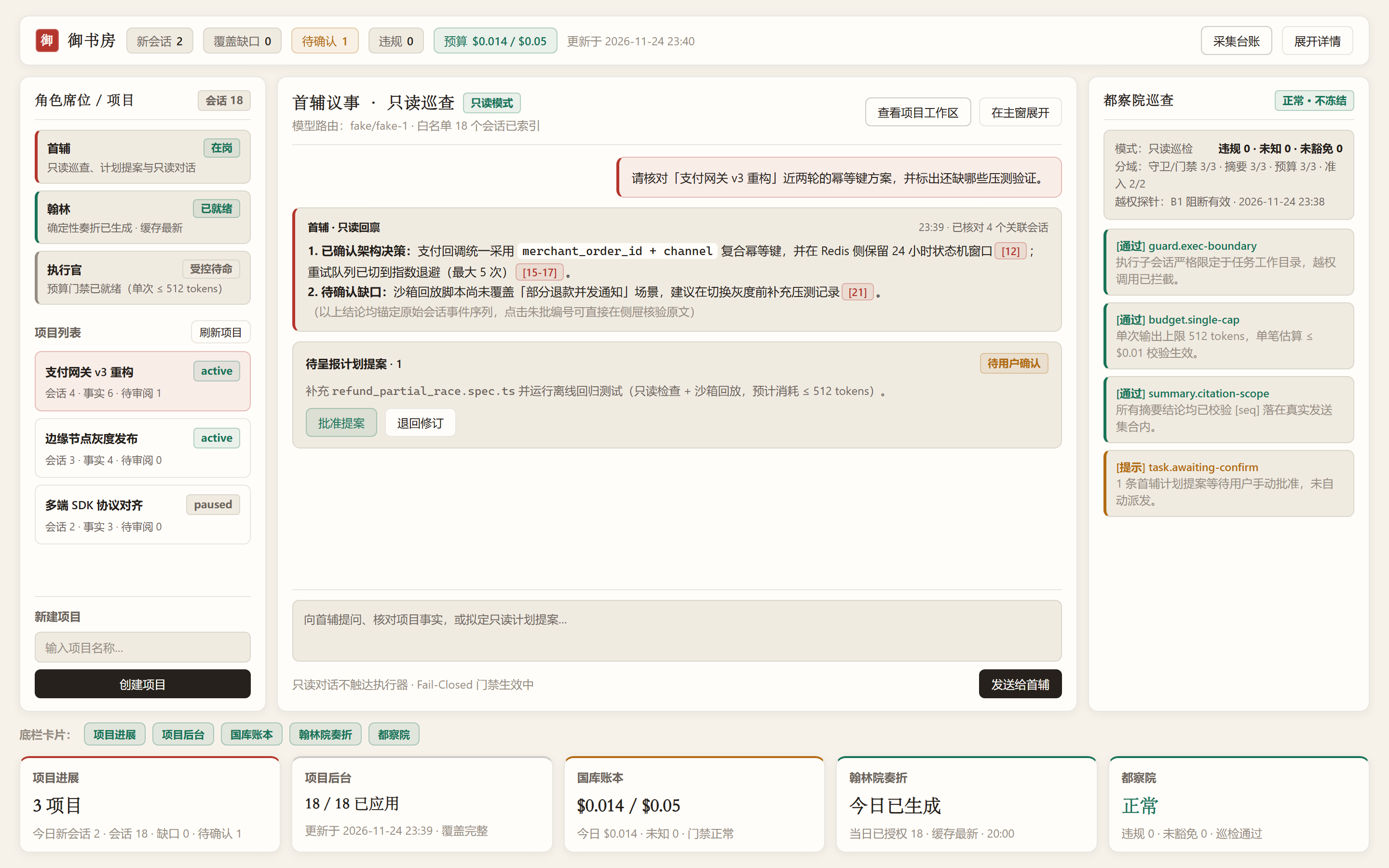 ▲ Wangchao · Daylight Paper Theme (Imperial Study view preview with illustrative data)
What It Gives You
1. The Imperial Study: Clarity at a Glance, Day or Night
Stop digging through an endless flat list of chats. The Imperial Study organizes your workspace into three focused columns:
- Left — Roles & Projects: Track your Chief Advisor, Hanlin Archivist, and Executor seats alongside your projects, research tracks, and quick idea captures—with stage transitions, locked facts, and instant search.
- Center — Focused Advising: Keep the conversation centered on the current session with collapsible history, without old logs flooding your screen.
- Top Bar & Bottom Cards: See new sessions, pending items, budget usage, and the daily Hanlin Digest in one glance, with a clean modal viewer for full daily briefs.
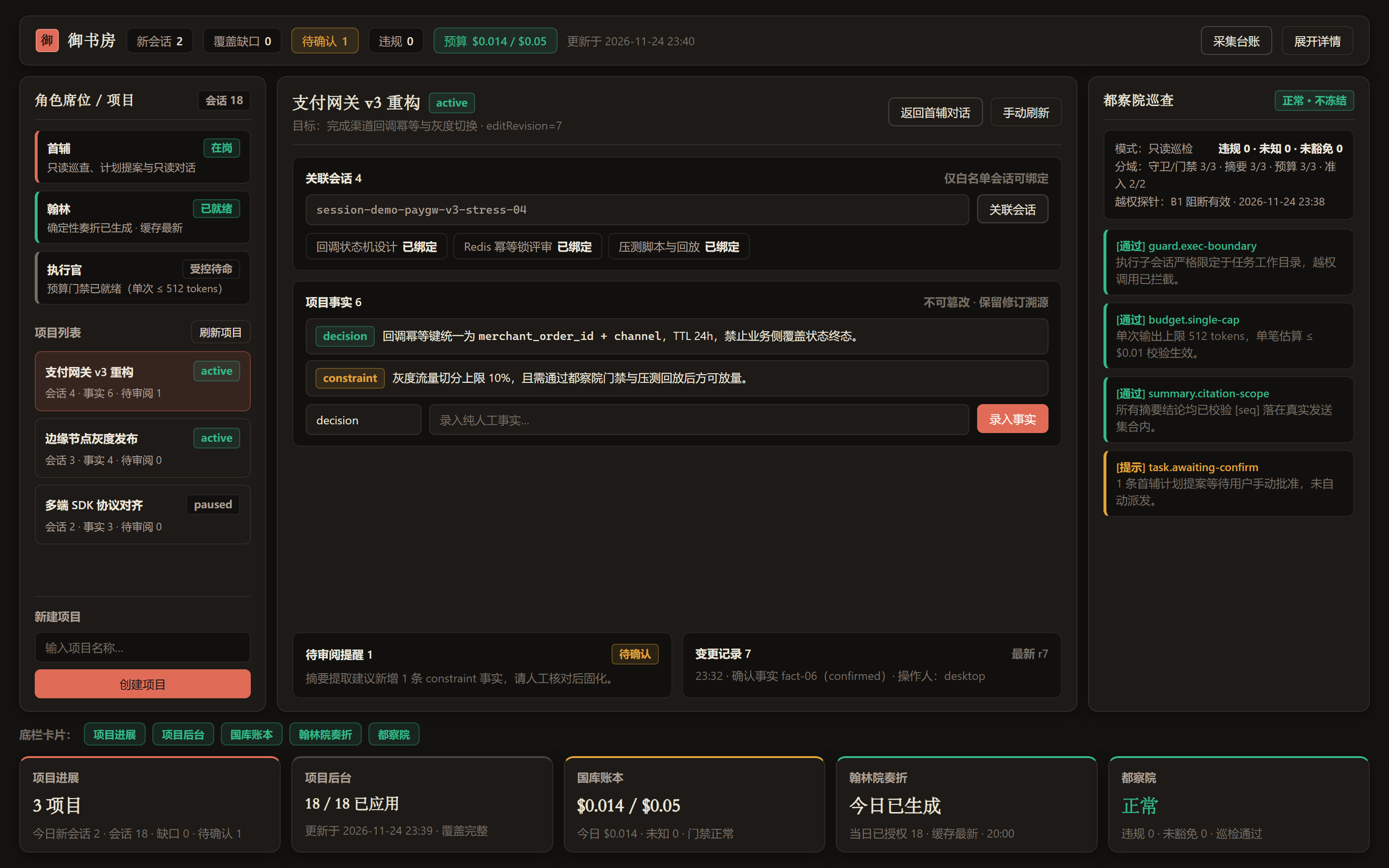 ▲ The Imperial Study · Dark Ink Theme (design preview with illustrative data)
2. Chief Advisor: Counsel Without Overreach
Your Chief Advisor is a read-only strategist, never a rogue script editing files behind your back:
- It reads only the session summaries and project facts you explicitly authorize, helping you connect dots across threads and draft actionable plans.
- Plan adoption is strictly separated from execution: for any proposed plan, you can independently Adopt (archive locally with zero model calls or background execution), Copy task text (take it back to your main session), or Reject. The real executor stays safely frozen by default.
3. Traceable Evidence: Zero Guesswork
Nothing is worse than an AI summary that sounds confident but can't point to where it came from:
- Every
[seq]citation in the Chief Advisor's replies turns into a clickable anchor, opening the evidence drawer on the right so you can verify the exact source metadata. - Project facts you confirm and lock cannot be silently overwritten by later summaries or model suggestions.
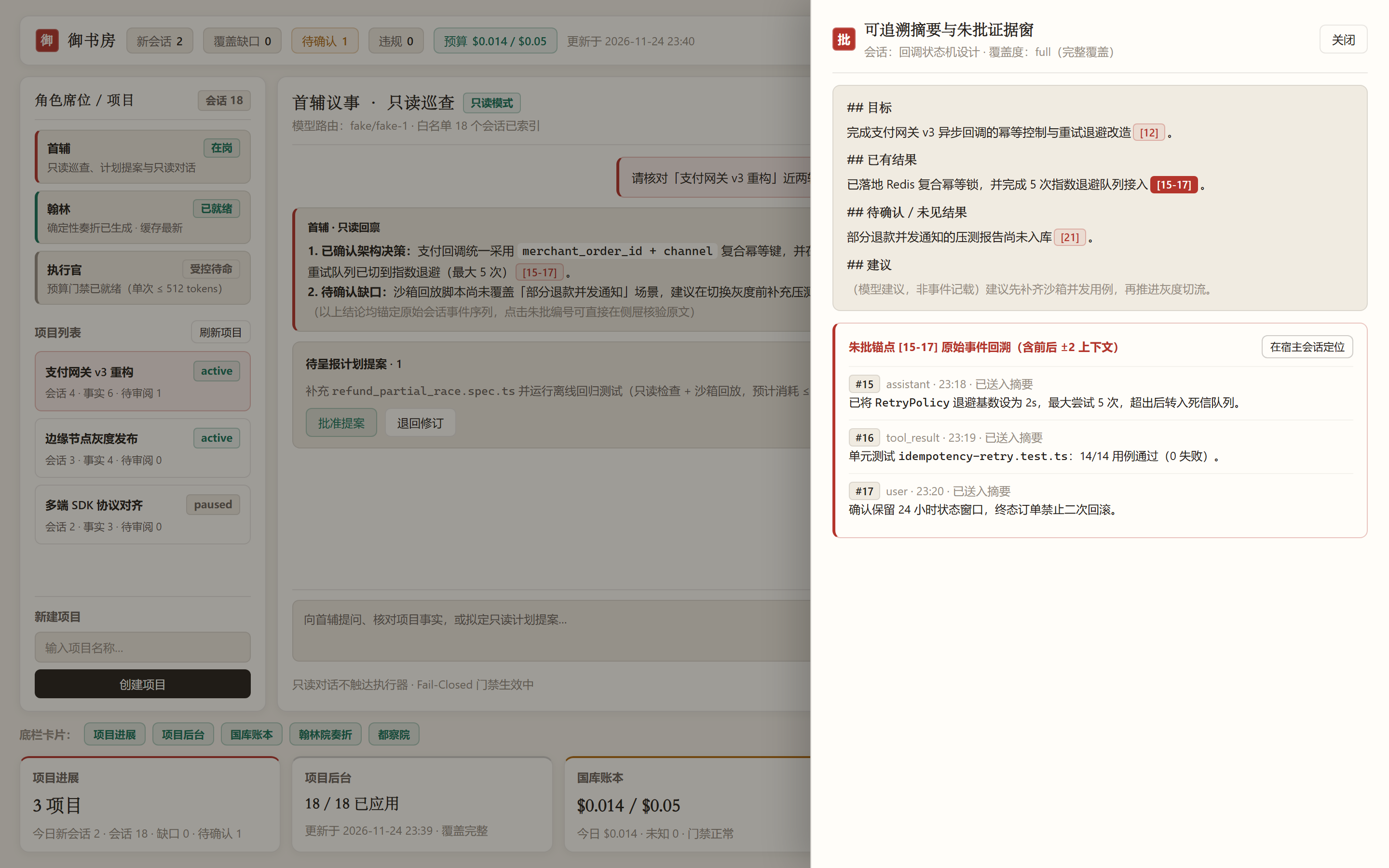 ▲ Clickable
[seq] Evidence Drawer & Read-Only Verification (design preview with illustrative data)
4. The Censorate: An Honest Gatekeeper
Many tools paint a green checkmark even when nothing was actually checked. The Censorate does the opposite—if something hasn't been verified, it says so:
- It clearly separates Frozen, Abnormal, Unverified, and Normal states.
- Whenever probes are missing, execution is unconfigured, or your authorized scope is incomplete, it honestly reports Unverified instead of faking a pass.
Quick Start
Register the plugin in your DeepSeek Harness profile (cordis.patch.yml):
- insert:
    - id: dsh-wangchao
      name: dsh-wangchao
      config:
        allowSessions: []
        allowCwds: []
        excludeCwds: []
        excludeSessions: []
        stateDir: "<DSH_HOME>/wangchao"
Add the directories or session IDs you want to include under allowCwds or allowSessions, restart DeepSeek Harness, and open 御书房 from the sidebar.
What's Next
For now, Wangchao is focused on stabilizing its DSH-based foundation (read-only advisor, traceable ledger, separated plan adoption, and honest inspection). Looking ahead, we plan to:
- Evolve beyond a single host toward unified multi-Agent management and coordination;
- Gradually unlock a controlled real executor once strict workspace isolation and budget-audit acceptance are complete;
- Deepen long-term project memory and research continuity (including smoother recovery packs and cross-session handoffs).
License
MIT
Links
More in this category
loopx-project/loopx#dsh-loopx-plugin★ 6766
LoopX, a provider-neutral, local-first state kernel and control plane for long-horizon agents: keeps Goal, Todo, gate, evidence, quota, recovery, and handoff state above DeepSeek Harness, while the plugin bootstraps the CLI and skills, admits bounded same-session continuation, and adds a loopback GoalBar for the exact bound loop. Its HTTP routes have no DSH access check, so a web page open in your browser could call them.
Q00/ouroboros#integrations/dsh-plugin★ 6386
Config-only bundle that mounts Ouroboros through the DSH MCP client, exposing 36 interview, Seed, execution, evaluation, and evolution workflow tools in DSH.
chuspeeism/dashi-taskboard#deepseek-harness★ 3534
Embeds the active installed Codex Taskboard runtime in the DeepSeek Harness sidebar, using its launcher runtime descriptor instead of a fixed port.
NanmiCoder/dsh-agent-teams★ 3098
AgentTeams multi-agent teams.
EthanYoQ/AI-Novel-Writer#dsh-ai-novel-writer★ 2901
Installs a dedicated AI novel-writing preset and workbench: revisioned local project assets, a compact side drawer, and native approval-gated single-file changes.
shanliuling/dsh-image-gen★ 1760
Native conversational image generation for DeepSeek Harness: ask the agent to create an image, and it handles generation and keeps the result directly in the conversation.
Community comments
Comments are public GitHub Discussions. Loading them connects to GitHub and Giscus; a GitHub account is required to post.