Replaces the default DeepSeek Harness identity text in the system prompt with a neutral introduction for selected models.
Install
# from npm (prebuilt)
dsh plugin --profile web add dsh-unbrand
# from GitHub (first run asks for allowBuilds approval — follow the hint, retry)
dsh plugin --profile web add github:MaRi23333/dsh-unbrand
Any plugin you install runs third-party code with your own permissions — it can read your files, use your credentials, and reach the network, and tool approvals don’t sandbox it. GitHub-sourced plugins also run build scripts at install time — pnpm blocks those until you allow them, so an install can stop with ERR_PNPM_GIT_DEP_PREPARE_NOT_ALLOWED or ERR_PNPM_IGNORED_BUILDS; dsh prints the exact key to add under allowBuilds in your profile’s pnpm-workspace.yaml, and the install works on the next run. Allowing a build is a trust decision: only install sources you trust, and pin a commit (github:owner/repo#sha).
README
中文 · English
Unbrand helps you use third-party models with DeepSeek Harness (DSH). Select a model to give it a neutral opening prompt in place of the default DSH introduction:
| Default DSH prompt | What the selected model receives |
|---|---|
You are an AI agent powered by DeepSeek Harness. |
You are an AI assistant. |
For those models, Unbrand also removes the source location and web interface address that DSH adds automatically. If you mention DSH in a conversation, the model still sees it. Your chat history, tools, and file permissions stay the same.
Version 0.1.6 identifies runtime context by its provenance and observes the host’s normal assembly of factory identity sections to neutralize the full product name in new wording.
Download and install
From 0.1.5 onward, Unbrand requires DSH Desktop 0.2.2-rc.1 or later, with no upper version limit. After a Desktop update, prompts with identifiable provenance are still processed; content that cannot be aligned is left unchanged.
Version 0.1.4 still requires rc.1. The steps below install 0.1.6. If that version is not yet available on npm, use the GitHub Release archive linked below.
- In the sidebar, open Plugins → Add plugin and enter
dsh-unbrand@0.1.6or the full path to the archive linked below. - Select Enable now after installation. If a restart is requested, choose Quit from the application menu and reopen DSH.
- Look for Settings → Unbrand to confirm it is enabled.
Manual download Download dsh-unbrand-0.1.6.tgz. Leave it packed and enter its full path in the same Add plugin box, then enable it as above. View on npm
Start DSH Desktop once, select Manage dsh Command… → Install from the application menu, then quit the app. In a new terminal, run:
dsh plugin --profile desktop add dsh-unbrand@0.1.6
dsh plugin --profile desktop list
Once you see dsh-unbrand@0.1.6, reopen Desktop and enable the plugin. Use the dsh command bundled with Desktop; a standalone CLI installed with npm or run with npx cannot manage desktop plugins.
Getting started
- Open Settings → Unbrand, select the models that should receive the neutral prompt, and click Save. All other models keep the default prompt.
- The next request uses the new wording, even in an existing chat. To restore the default prompt, turn Unbrand off and save.
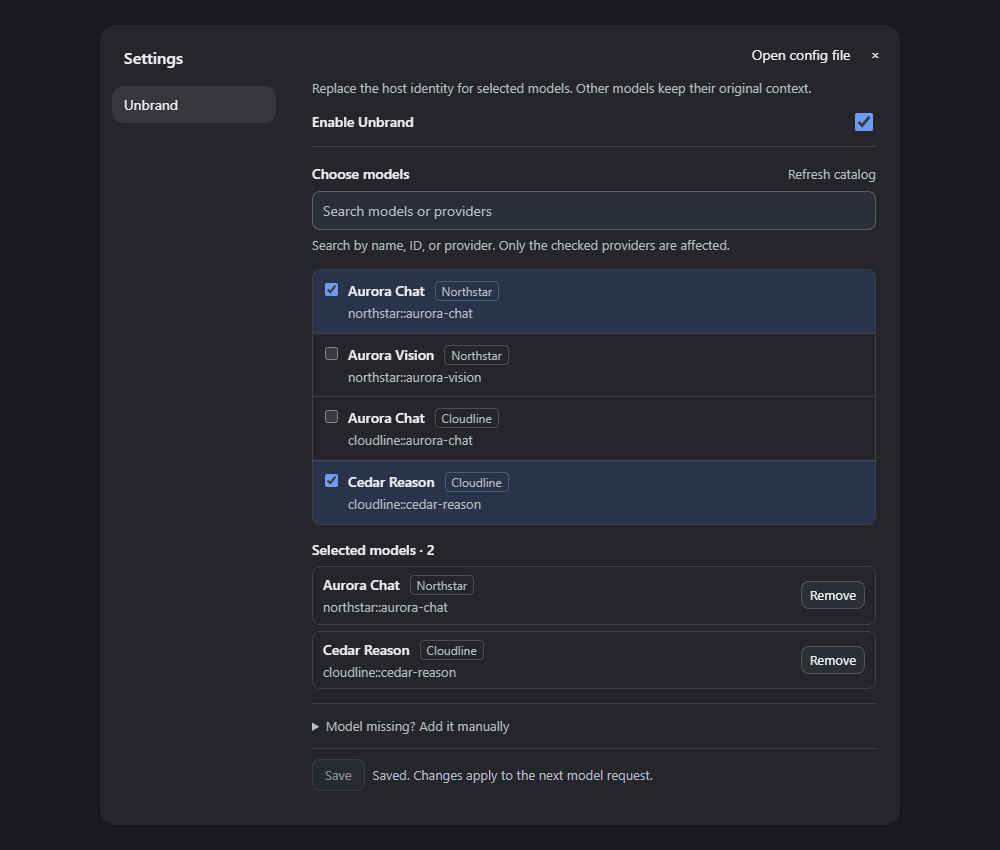
The model catalog shown here is an example.
Other ways to install and full usage guide · Apache-2.0 license · Third-party notices
Links
More in this category
kingcharleslzy-ai/dsh-purge★ 12677
Community-maintained dsh-purge fork with host-policy patches, prompt and rule settings, diagnostics, separate update-check and install controls, and local backup/rollback.
aureth-labs/dsh-aurabot-qq★ 740
Puts the agent on QQ as a persona character through SnowLuma (OneBot v11): private and group chat, voice notes, stickers, Qzone diary, Bilibili browsing, song covers, image generation, long-term memory and mood. Every feature is a module you can switch off, replace or extend locally — hot-reloaded modules can also rewrite group-reply decisions, prompts, outgoing messages and per-chat model choice. Safe by default (master switch off, dry run on).
ECNU/EduWork#dsh-oidc★ 410
Configurable OIDC login and token-authorized model access, including LiteLLM and opt-in oidc-llm integration, with a standalone DSH Web backend.
techflag/workdsh#enterprise-connection★ 344
Enterprise login, colleague mentions, shared text and files, and authenticated business requests for WorkDSH Desktop 2.0.6-alpha.3+ with WorkDSH Admin; distributed as a release archive.
Yuuyuko-uu/dsh-feiyu-mood★ 278
Gives the companion a mood judged each turn and shown as a short context note, with a panel for mood, emotion dimensions and timeline.
FNOSP/fnos-dsh#dsh-codex-auth-plugin★ 127
ChatGPT account sign-in for DeepSeek Harness through a Codex browser OAuth flow with no API key and no workspace selection: subscribes the login to pi-ai's Codex provider, lets you set the global default Codex model and reasoning effort for new sessions, refreshes the model list from the signed-in account's own catalog endpoint, and shows the five-hour and weekly usage windows in the composer.
Community comments
Comments are public GitHub Discussions. Loading them connects to GitHub and Giscus; a GitHub account is required to post.