Edit global AGENTS.md and project AGENTS.md/CLAUDE.md custom instructions in DeepSeek Harness settings, with project-chain discovery, byte-budget display, and save-conflict handling.
Install
# from npm (prebuilt)
dsh plugin --profile web add dsh-agent-instructions-editor
# from GitHub (first run asks for allowBuilds approval — follow the hint, retry)
dsh plugin --profile web add github:MaRi23333/dsh-agent-instructions-editor
Any plugin you install runs third-party code with your own permissions — it can read your files, use your credentials, and reach the network, and tool approvals don’t sandbox it. GitHub-sourced plugins also run build scripts at install time — pnpm blocks those until you allow them, so an install can stop with ERR_PNPM_GIT_DEP_PREPARE_NOT_ALLOWED or ERR_PNPM_IGNORED_BUILDS; dsh prints the exact key to add under allowBuilds in your profile’s pnpm-workspace.yaml, and the install works on the next run. Allowing a build is a trust decision: only install sources you trust, and pin a commit (github:owner/repo#sha).
README
中文 | English
A DeepSeek Harness plugin that adds a Personalization settings page (个性化指令) to the Web GUI for editing the harness workspace instruction files, in the spirit of Codex's personalization settings:
- the user-global
~/.dsh/AGENTS.md, - project-chain
AGENTS.md/CLAUDE.mdfiles discovered with the same rules the harness instruction loader applies, and AGENTS.local.md/CLAUDE.local.mdoverlays.
Features
- Global instructions: a persistent editor for
~/.dsh/AGENTS.mdwith a byte-budget display (default 65,536). - Project instructions (collapsed by default): a project picker (auto-discovered from the workspace registry + recent session directories; manual paths accepted too) that renders each level of the "project root → working directory" chain with its 4 candidate slots (AGENTS.md / CLAUDE.md / AGENTS.local.md / CLAUDE.local.md) — click to edit an existing file or create a missing one.
- Same discovery rules as the instruction loader: chain discovery, per-directory
content dedup (⧉ badge), byte totals and the budget bar follow the same rules as
@deepseek-ai/dsh-agent-instructions. - Guarded writes: filename whitelist + realpath project-root containment + mtime conflict detection (409 → reload or force-overwrite) + temp-file atomic rename; writes to the same file within one dsh web process are serialized through a queue; a normal save using an outdated modification time receives a 409 conflict response.
- When changes apply: start a new session after saving. The editor does not directly replace instructions in an existing session; reloading is controlled by the host loader.
Screenshot
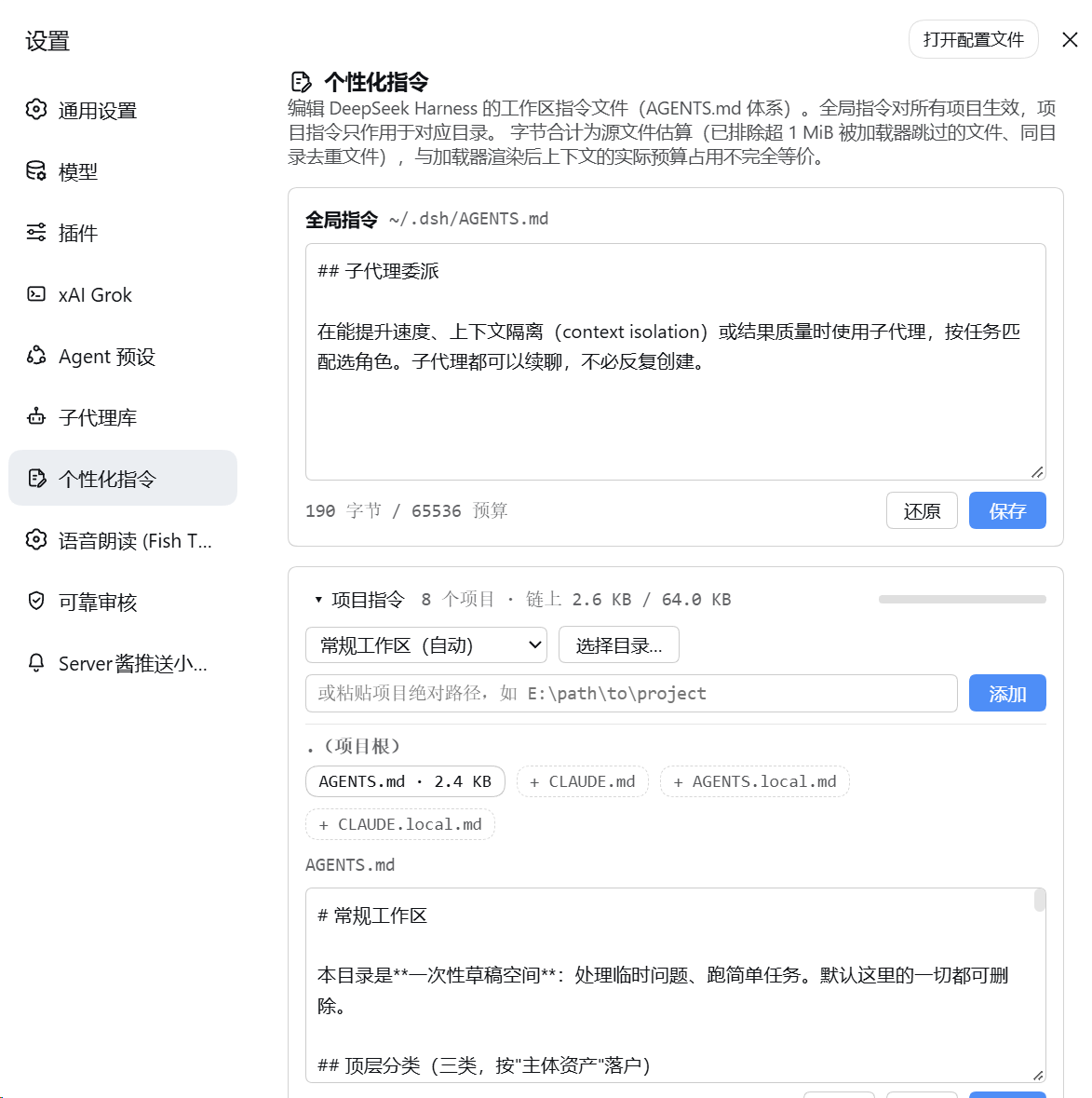
View and edit global and project instructions on the same settings page. The current UI is in Chinese, as shown here.
Host and desktop compatibility
Version 0.2.4 targets DSH 0.2, with 0.2.0-rc.2 as its compatibility baseline. This update clarifies Desktop/Web installation, first use, and when instruction changes take effect; editing and saving behavior is unchanged. The dark-theme project-menu fix from 0.2.3 is retained. The desktop client uses the Web plugin UI, so no separate desktop-specific package is needed. See CHANGELOG.md for the update notes.
If you still use DSH 0.1, keep plugin 0.1.2 (pin the npm install to dsh-agent-instructions-editor@0.1.2) rather than upgrading to this release. Development dependencies and the CI baseline now use DSH 0.2.0-rc.2; instruction discovery, save security boundaries and the "start a new session" semantics are unchanged.
Install
Desktop and Web have separate plugin installations and activation states. Choose the method matching your environment:
Desktop Installation (Recommended)
Install directly within the desktop client UI (no command-line setup required):
- Open Plugins in the desktop left sidebar, then click Add plugin;
- Enter the npm package name
dsh-agent-instructions-editor@latestand install; - Once installation completes, click Enable now (closing the dialog without enabling leaves the plugin installed but disabled);
- Only if the UI indicates a restart is required, fully quit the application via the menu (Quit) and reopen it (closing the window may only hide it to the background);
- Verification: Open Settings and confirm the "个性化指令" (Personalization) section appears in the settings sidebar.
If you prefer using the command line, use the desktop-bundled CLI:
- In the desktop application menu, select Manage dsh Command… → Install (register the bundled CLI and follow any reported PATH conflict instructions), then open a new terminal;
- Ensure the desktop app has been launched at least once to initialize, and fully exit via Quit;
- Run the desktop-profile commands in your terminal to install and verify:
dsh plugin --profile desktop add dsh-agent-instructions-editor@latest dsh plugin --profile desktop list - Reopen the desktop application.
Note: Standalone
dshinstalled via npm or run vianpxcannot manage the desktop profile. For details on how the bundled command runtime works, see bundled-command-runtime in the official desktop documentation.
Web Installation
Manage Web plugins using the matching CLI. Prefer using the same host-matched dsh CLI that launches your Web instance:
dsh plugin --profile web add dsh-agent-instructions-editor@latest
Then restart dsh web (stop the current process, then run dsh web) and refresh the page.
Other install sources:
# If installing from npm is not an option, pin the 0.2.4 GitHub tag instead:
dsh plugin --profile web add github:MaRi23333/dsh-agent-instructions-editor#v0.2.4
Both methods take effect after restarting dsh web.
Note: If using
npx, pin it to the exact version matching your Web host (e.g.npx @deepseek-ai/dsh@0.2.0-rc.2 ...). When switching from a local directory or GitHub install to npm, always include@latestso an existing installation is not mistaken for an already-satisfied request.
Requirements: DSH 0.2 (this release targets 0.2.0-rc.2), Node.js 22+, pnpm, and a DSH CLI matching the installed host. No local
build is needed — the npm package and the GitHub repository both ship the lib/ build
artifacts.
Security model and known limitations
- Every route validates that the Host header is a loopback literal (
127.x.x.x,localhost,[::1]— any port), closing off DNS rebinding; POST additionally requires a JSON content-type and a strict same-origin Origin (local script clients without an Origin header are unaffected). - Write path: filename whitelist (4 candidates) + directory realpath must fall inside a registered project's "project root → working directory" ancestor chain + mtime conflict fence (409) + atomic temp-file rename. Writes to the same target within one process are serialized through an in-memory queue and the mtime fence is re-checked inside it; there is no cross-process file lock — when an external editor or another process saves the same file concurrently, a tiny race window remains between the fence re-check and the rename, where an external update could in theory be silently lost (same as ordinary editors). A malicious local process runs at the same trust level as this user (it could edit the files directly) and is not within the threat model.
- Reads follow symlinks (same exposure as the official loader); writes replace the symlink itself via rename and never write through to the target.
- The editor works with the loader defaults preset by the deployment (markers=
[.git], 4 candidates, 65,536-byte budget); if you change dsh-base's agent-instructions configuration, the editor's display drifts accordingly. - UI copy is currently hardcoded Chinese (a locale dictionary is registered for future
t()integration).
Architecture
- Host half (
src/index.ts): its own HTTP routes/agent-instructions/api/{projects,chain,file}; the manual-project registry lives in this plugin's profile entry and is read and written through DSH 0.2'sSettingsForms, with revision-based conflict detection. - Client half (
src/client/): contributes the settings page via thesettings.sectionslot; plain textarea editor (zero extra dependencies). - Discovery (
src/chain.ts): reimplements the instruction loader's rules one by one (marker walk-up, ancestor chain, candidate probing, per-directory sha1(trim) dedup) — pure Node, unit-testable.
Development
pnpm install --frozen-lockfile
pnpm run typecheck
pnpm run test      # discovery, write-path and edit-state unit tests
pnpm run build     # tsdown: lib/index.js (host) + lib/client.js (browser)
pnpm run smoke     # smoke-host.mjs + smoke-client.mjs
pnpm run check:pack
- Dev dependencies are pinned to DSH
0.2.0-rc.2. The exhaustive exact-version overrides inpnpm-workspace.yamlexist because:- pnpm 11.21.0 mis-expands caret ranges with prerelease lower bounds
(
^0.2.0-rc.2→>=0.2.0 <0.3.0-0, which excludes0.2.0-rc.2itself), causing NO_MATCHING_VERSION; and - Inlined, discontinued packages keep their last published versions:
@deepseek-ai/dsh-client-runtime/@deepseek-ai/dsh-host-apiproxyat0.1.1-rc.2, and@deepseek-ai/dsh-agent-presets/@deepseek-ai/dsh-code-runtimeat0.1.5-rc.3.
- pnpm 11.21.0 mis-expands caret ranges with prerelease lower bounds
(
- These dependencies are used for typechecking and tests only; none of it ships in the published artifact (see THIRD_PARTY_NOTICES.md).
License
MIT. The published artifact bundles no third-party code — see THIRD_PARTY_NOTICES.md.
This plugin is an independent community project, not affiliated with or endorsed by
DeepSeek; the DeepSeek Harness name is used solely to indicate platform compatibility.
Links
More in this category
zhu1090093659/dsh-web#packages/dsh-task-board★ 10080
Task board for the dsh web GUI: a sidebar multi-column kanban whose cards run in real DSH agent sessions and can also be scheduled with cron expressions, executed host-side even with the browser closed.
zhu1090093659/dsh-web#packages/dsh-web-all★ 10080
Plugin and skin collection for the DSH Web UI: task board, Git graph, right-side panel, remote mobile UI, pet, live token stats, and a skin center.
ccch1mneyyy/dsh-TUI★ 6908
Claude Code-style full-screen terminal UI: pixel-whale header, live status line, and streaming thought expansion.
MeteorNOX/DeepSeek-Balance-Whale-Widget★ 6870
A fixed-corner whale widget for the DSH web GUI — balance, today's usage and per-turn cost with peak/off-peak pricing, editable balance-alert and daily-budget bubbles, a module-based custom bubble queue with A/B weighted choices and random lines or images, 30+ vendor templates (OpenAI, OpenRouter, Kimi, SiliconFlow, Ark, Zhipu, MiniMax and more) with per-model balance and subscription quota, plus task-end sound, imported audio, custom roles and a resource manager. Local-only, no telemetry.
omdsh-dev/DSH-better-sidebar★ 4893
Full sidebar workbench with file rendering and editing, terminal, Git, and subagents; third-party plugins can register new tabs.
Devin-AXIS/deepseek-design#deepseek-idesign★ 1702
Visual design studio for websites, app prototypes, posters, cards, reports, and magazines, with templates, direct element editing, selection-aware AI draft handoff, and export.
Community comments
Comments are public GitHub Discussions. Loading them connects to GitHub and Giscus; a GitHub account is required to post.