Makes the provider groups in the composer model menu collapsible, keeping only the provider of the current model expanded.
Install
# from GitHub (first run asks for allowBuilds approval — follow the hint, retry)
dsh plugin --profile web add github:LinJohn8/dsh-model-group-collapse
Any plugin you install runs third-party code with your own permissions — it can read your files, use your credentials, and reach the network, and tool approvals don’t sandbox it. GitHub-sourced plugins also run build scripts at install time — pnpm blocks those until you allow them, so an install can stop with ERR_PNPM_GIT_DEP_PREPARE_NOT_ALLOWED or ERR_PNPM_IGNORED_BUILDS; dsh prints the exact key to add under allowBuilds in your profile’s pnpm-workspace.yaml, and the install works on the next run. Allowing a build is a trust decision: only install sources you trust, and pin a commit (github:owner/repo#sha).
README
English | 简体中文
A DeepSeek Harness (DSH) Web UI plugin that makes the provider groups in the composer's model menu collapsible.
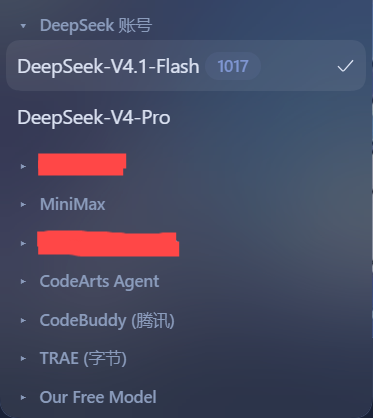
What it does
The stock model picker in the composer's tool row lists every provider group (DeepSeek Account, official endpoints, custom providers…) fully expanded. When you have many providers, the menu becomes a long wall of models.
This plugin adds a collapsible layer to that menu:
- Every provider heading becomes a toggle with a triangle caret (
▸collapsed /▾expanded). - All groups start collapsed by default.
- The provider of the currently selected model starts expanded.
- Click a heading to toggle that group; the caret flips and the group's models appear or disappear.
- While a search query is active, matched groups render expanded so results stay visible; clearing the query restores the collapse state.
- Everything else keeps working unchanged: the two-level "Model / Effort" menu, search, keyboard navigation, the pending spinner, and the official model-label badge (e.g. “1017”).
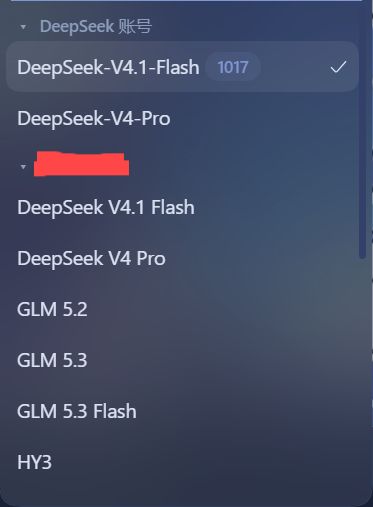
Disable the plugin in the plugin manager and the menu returns to its stock appearance immediately.
Install
From a local checkout (development)
- Put this folder somewhere stable.
- In DSH, open the plugin manager and install the bundle from the local
directory, or use the CLI equivalent:
dsh plugin install /path/to/dsh-model-group-collapse - Reload the Web UI and open a conversation.
From npm (after publishing)
dsh plugin install dsh-model-group-collapse
From GitHub
dsh plugin install github:LinJohn8/dsh-model-group-collapse
Compatibility
- DeepSeek Harness
>=0.2.1-rc.2(client plugin APIdsh.client). - Works on top of the shipped model picker: no component is replaced, so it follows the host's own state (streaming lock, pending selection, search filtering) instead of duplicating it.
How it works
The shipped model menu renders its provider groups as
section[data-menu-group] elements, each with a
[data-menu-group-heading] label and button[role="menuitemradio"] rows.
The client half watches the document for that menu while it is open and
decorates each group:
- the heading gets a triangle caret and becomes a
role="button"toggle; - a collapsed group hides its model rows with
display:noneand reportsaria-expanded="false"; - collapse state is per group and resets on every menu open, using the
current model's
aria-checkedrow to pick the initially expanded group.
All styling is inline-scoped (mgc- prefix, --dsw-alias-* tokens), and every
DOM write is guarded by an equality check so the menu's own MutationObserver
never re-enters.
License
Links
More in this category
zhu1090093659/dsh-web#packages/dsh-task-board★ 9262
Task board for the dsh web GUI: a sidebar multi-column kanban whose cards run in real DSH agent sessions and can also be scheduled with cron expressions, executed host-side even with the browser closed.
zhu1090093659/dsh-web#packages/dsh-web-all★ 9262
Plugin and skin collection for the DSH Web UI: task board, Git graph, right-side panel, remote mobile UI, pet, live token stats, and a skin center.
MeteorNOX/DeepSeek-Balance-Whale-Widget★ 5677
A fixed-corner whale widget for the DSH web GUI — balance, today's usage and per-turn cost with peak/off-peak pricing, editable balance-alert and daily-budget bubbles, a module-based custom bubble queue with A/B weighted choices and random lines or images, 30+ vendor templates (OpenAI, OpenRouter, Kimi, SiliconFlow, Ark, Zhipu, MiniMax and more) with per-model balance and subscription quota, plus task-end sound, imported audio, custom roles and a resource manager. Local-only, no telemetry.
ccch1mneyyy/dsh-TUI★ 5125
Claude Code-style full-screen terminal UI: pixel-whale header, live status line, and streaming thought expansion.
omdsh-dev/DSH-better-sidebar★ 4413
Full sidebar workbench with file rendering and editing, terminal, Git, and subagents; third-party plugins can register new tabs.
Devin-AXIS/deepseek-design#deepseek-idesign★ 1491
Visual design studio for websites, app prototypes, posters, cards, reports, and magazines, with templates, direct element editing, selection-aware AI draft handoff, and export.
Community comments
Comments are public GitHub Discussions. Loading them connects to GitHub and Giscus; a GitHub account is required to post.