On-demand vision for text-only DeepSeek models: upload images, and the model calls a view_image tool backed by any OpenAI-compatible vision endpoint (Qwen/DashScope by default).
Install
# from GitHub (first run asks for allowBuilds approval — follow the hint, retry)
dsh plugin --profile web add github:Leeminjing/dsh-eyes
Any plugin you install runs third-party code with your own permissions — it can read your files, use your credentials, and reach the network, and tool approvals don’t sandbox it. GitHub-sourced plugins also run build scripts at install time — pnpm blocks those until you allow them, so an install can stop with ERR_PNPM_GIT_DEP_PREPARE_NOT_ALLOWED or ERR_PNPM_IGNORED_BUILDS; dsh prints the exact key to add under allowBuilds in your profile’s pnpm-workspace.yaml, and the install works on the next run. Allowing a build is a trust decision: only install sources you trust, and pin a commit (github:owner/repo#sha).
README
中文 · English
Give a text-only LLM (e.g. DeepSeek) in DeepSeek Harness "eyes on demand": pasted/attached images stay in the backend, and the model calls the view_image tool whenever it wants to look at one (backed by any OpenAI-compatible vision endpoint; DashScope Qwen by default) — as if the model were natively multimodal.
Try it: paste an image, and it just works
No toggle, no manual tool call — paste a screenshot with Ctrl+V and ask like any normal message. DeepSeek decides in its reasoning that it needs to look, calls view_image on its own, and answers directly, in one smooth flow:
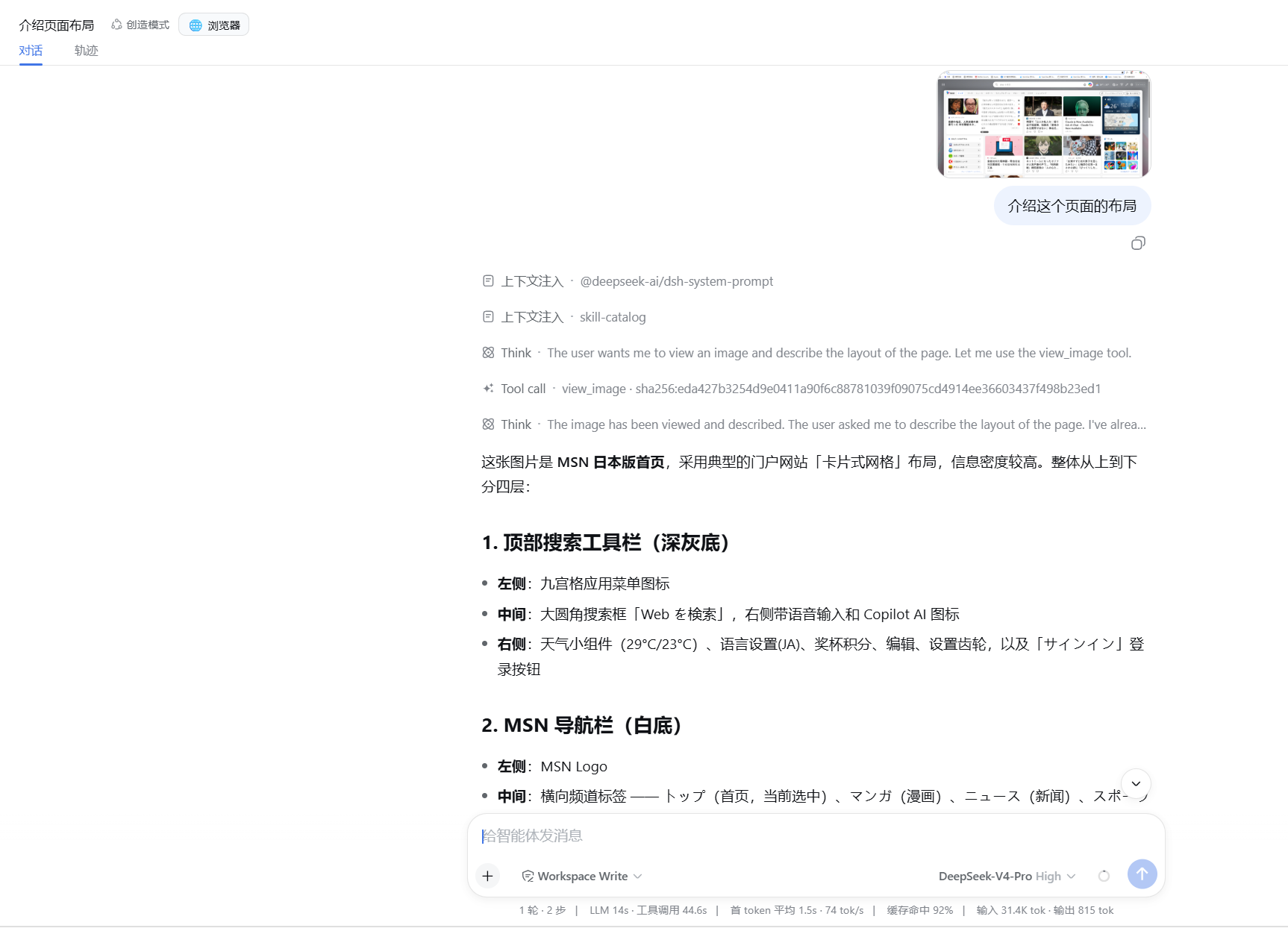
Real capture above: paste an MSN screenshot and ask "describe the layout of this page". Notice the
Think → Tool call · view_image → Thinkchain — recognition is never forced into the first step; the model decides to look exactly when it needs to, and vision extraction flows seamlessly into the final answer, just as if DeepSeek were natively multimodal.
Problem
DeepSeek is a text-only model, so the Harness refuses to send image-bearing messages when "the current model does not support images". This plugin:
- lets image messages pass the send-admission check and get persisted;
- strips images into a reference note before the request reaches the main model;
- registers a
view_imagetool that the main model calls on demand to "see" an image; the vision model returns the description/OCR text and the main model continues answering.
Install
# 1) Install the plugin (github form; a bare npm package name also works)
dsh plugin --profile web add github:Leeminjing/dsh-eyes

# 2) Configure the API key (Windows; use your vision provider's key)
setx VISION_API_KEY "sk-your-key"

# 3) Configure the vision model (required — use a model your account can call)
setx VISION_MODEL "qwen-vl-plus"

# 4) Configure the endpoint (defaults to DashScope; change it for other OpenAI-compatible providers)
setx VISION_ENDPOINT "https://dashscope.aliyuncs.com/compatible-mode/v1/chat/completions"

# 5) Restart dsh so the environment variables take effect
setxonly affects newly started processes, so restart dsh after configuring. The model id and endpoint are provider-specific: DashScope usesqwen-vl-plus/qwen-vl-max, OpenAI usesgpt-4o, OpenRouter usesqwen/qwen2.5-vl-72b-instruct, etc. See the table below.
Usage
- Paste an image (Ctrl+V), or drag/attach one;
- Send a question, e.g. "What does this image say?";
- The main model receives an "image reference note"; when it needs to look, it calls
view_image(attachment_id=…); view_imageextracts the image content via the vision model, and the main model answers from that text.
You can keep asking about the same image in later turns ("what's the number in the second row again?") — the image stays in the backend and can be viewed repeatedly.
How it works
paste image + question
   │
   ▼
send admission ──(1) mark target model as image-capable── persist image (attachment_id)
   │
   ▼
before dispatch ──(2) strip image blocks → 【图片N attachment_id=…】note, register in the session's shard
   │
   ▼
main model receives text (note + your question)
   │   model decides to look
   ▼
call view_image(attachment_id) ──(3) read bytes → base64 → POST to vision endpoint
   │
   ▼
vision model returns description/OCR text
   │
   ▼
main model answers from the text
Three parts:
- Admission bypass: wrap
llm.resolveModelInfoso the target main model declaresinputModalities: ['text','image'], letting image messages pass the host's send-admission check and be persisted. - Image stripping: wrap
llm.streamWithRegistrationto swap eachimageblock (including those nested insidetool-result) for a reference note right before dispatch, and registerattachment_id → ImageAttachmentRefsharded bysessionId. A new options object is built because the incoming one may be frozen. view_imagetool: reads image bytes by a singleattachment_id, or anattachment_idsarray to view several at once (or a localimage_path), turns them intodata:URLs, POSTs to the configured vision endpoint (Chat Completions or Responses protocol perVISION_API_STYLE), and returns text (each image labeled 【图片N】 when batching).
Configuration
| Item | Environment variable | Default |
|---|---|---|
| API key | VISION_API_KEY |
(required) |
| Vision model | VISION_MODEL |
(required, no default) |
| Endpoint | VISION_ENDPOINT |
https://dashscope.aliyuncs.com/compatible-mode/v1/chat/completions |
| API style | VISION_API_STYLE |
auto (derived from the endpoint URL) |
| Target text model | targetProvider (in code) |
deepseek-official |
Max local image bytes (image_path) |
maxImageBytes (in code) |
15 MB |
Pasted/attached images are capped by the Harness attachment store (5 MB by default), independent of the local-file limit above.
Chat Completions and Responses API are both supported:
VISION_API_STYLEisauto(default),chat, orresponses.
auto: derived from the endpoint URL —.../chat/completions→ Chat Completions,.../responses→ Responses API; a bare base URL defaults to Chat Completions and gets the path appended automatically.chat/responses: forced; the plugin normalizes the endpoint path to the matching protocol. Both the request body and the response parsing switch with the style (messages/image_url↔input/input_image), so switching is transparent to how you use the plugin.
Common OpenAI-compatible vision providers:
| Provider | Endpoint | Example models |
|---|---|---|
| Alibaba Cloud Model Studio | https://dashscope.aliyuncs.com/compatible-mode/v1/chat/completions |
qwen-vl-plus / qwen-vl-max |
| OpenAI | https://api.openai.com/v1/chat/completions |
gpt-4o / gpt-4o-mini |
| Moonshot | https://api.moonshot.cn/v1/chat/completions |
moonshot-v1-8k-vision-preview |
| OpenRouter | https://openrouter.ai/api/v1/chat/completions |
qwen/qwen2.5-vl-72b-instruct |
You can also pass a config block for the row in cordis.patch.yml (overrides defaults / env vars):
- insert:
    - id: dsh-eyes
      name: dsh-eyes
      config:
        apiKey: sk-xxx          # same as VISION_API_KEY
        model: qwen-vl-plus     # same as VISION_MODEL
        # endpoint, targetProvider, maxImageBytes likewise
Known limitations
- Two internal wraps: the Harness currently exposes no public extension point for "image-capability during send admission" or "strip images before dispatch", so this plugin wraps
llm.resolveModelInfoandllm.streamWithRegistrationdirectly. Side effect: text-only main models show as image-capable in the model picker (intentional — required to admit image messages). - Main model auto-detection: any text-only main model (any provider) is protected automatically; a natively multimodal main model is left untouched and images pass through natively.
- Vision endpoint: must be OpenAI-compatible (Chat Completions or Responses API); Anthropic / Gemini native APIs are unsupported unless accessed through their OpenAI-compatible gateways.
- Session isolation & persistence: the image-reference index is sharded by
sessionId(a session can only view its own attachments) and persisted to.dsh/attachments/v1/dsh-eyes-index.json(loaded on startup, written on new images). So historical images remain viewable byattachment_ideven after context compaction or a process restart. - Keep the API key in env/credential storage — never commit it.
License
Links
More in this category
liustack/modlens★ 4096
Vision bridge for text-only models: paste an image, get structured JSON evidence (OCR, layout, semantics).
ysr666/dsh-vision-router★ 1129
Free vision for text-only agents: built-in keyless vision chain plus pixel tools (Q&A, grounding, crop, pixel diff, colors, OCR, SVG trace, cutout, screenshots); paste an image to use it.
Anionex/dsh-vision-toolkit★ 887
Vision for text-only models: paste an image and the model switches to a Vision Toolkit variant for image Q&A, multi-image comparison, long-screenshot OCR, screenshot-to-UI reproduction, element grounding, and pixel diff. No API key by default — images are processed by the author-hosted free service, 100 per machine per day; configurable to your own provider.
dickpy/dsh-imagegen★ 98
AI image generation for the DSH Web GUI: text-to-image and image-to-image through a configurable OpenAI-compatible endpoint (gpt-image-2 / gpt-image-1 / dall-e-3), with an api_url/api_key settings card and a sidebar split-pane generation studio.
fandc520/dsh-comfyui★ 90
Drive a local or remote ComfyUI server from DeepSeek Harness: comfyui_run / comfyui_object_info / comfyui_workflow tools generate and edit images and videos, with a workflow library (graph extraction: per component / main flow / all), a load area with resolution auto-match, a live queue, SDXL and Wan 2.1 templates, a companion skill, and a same-origin media proxy.
sunxin-ai/dsh-design-qa★ 44
Design-fidelity QA for text-only models: a `deepseek_vision` tool borrows an eye from any OpenAI-compatible vision route, so the model can judge whether an implementation matches its mock — shipped with the benchmark behind that judgement (four fixtures, 23 injected defects, raw transcripts) and the questioning discipline it depends on.
Community comments
Comments are public GitHub Discussions. Loading them connects to GitHub and Giscus; a GitHub account is required to post.