Use SSH hosts and WSL distributions as remote DSH workspaces, with environment setup, model configuration porting, and the remote interface embedded locally.
Install
# from GitHub (first run asks for allowBuilds approval — follow the hint, retry)
dsh plugin --profile web add github:Lee-Eee-Eee/dsh-remote-dock
Any plugin you install runs third-party code with your own permissions — it can read your files, use your credentials, and reach the network, and tool approvals don’t sandbox it. GitHub-sourced plugins also run build scripts at install time — pnpm blocks those until you allow them, so an install can stop with ERR_PNPM_GIT_DEP_PREPARE_NOT_ALLOWED or ERR_PNPM_IGNORED_BUILDS; dsh prints the exact key to add under allowBuilds in your profile’s pnpm-workspace.yaml, and the install works on the next run. Allowing a build is a trust decision: only install sources you trust, and pin a commit (github:owner/repo#sha).
README
dsh-remote-dock adds a Remote entry to DeepSeek Harness. Connect a Linux server over SSH or a WSL distribution and open its full DSH interface in your local window. File operations and commands run in the target environment.
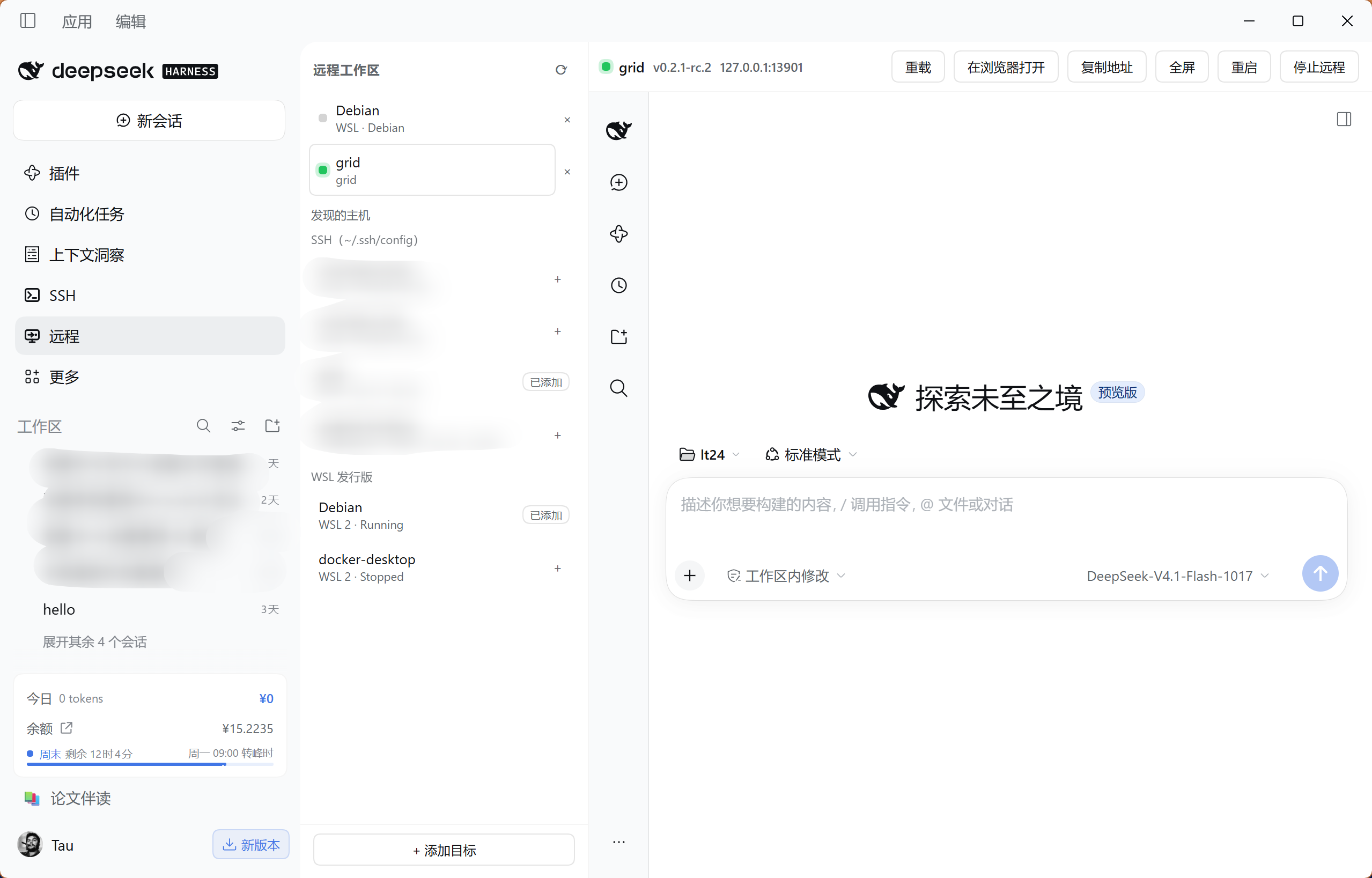
Desktop screenshot.
Features
- SSH and WSL targets. Discover hosts from your SSH configuration and local WSL distributions, or add targets manually. SSH connections reuse local keys, ssh-agent and jump-host settings.
- Remote setup. Probe Node and DSH, review the installation plan, then install the selected components under the remote user's home without sudo.
- Model configuration. Copy local providers, the default model and API keys to the remote environment, with backups before writing.
- Connection controls. Reload, go fullscreen, restart or stop remote DSH from the panel. Reconnect to an existing instance, with automatic retries for dropped SSH tunnels.
Install
Requires DSH 0.2.1-rc.2 or newer. Add this source in the plugin manager:
github:Lee-Eee-Eee/dsh-remote-dock#v0.1.5
Restart DSH and refresh the page. Remote appears in the sidebar.
If dsh is available in your terminal, run:
dsh plugin --profile desktop add "github:Lee-Eee-Eee/dsh-remote-dock#v0.1.5"
Replace desktop with the profile your host actually uses; web hosts typically use web. Installing into another profile will not add the plugin to the current host.
Upgrading from the old name
This project is now dsh-remote-dock, previously dsh-remote. Remove the old plugin from your current profile, add the new source above, and restart DSH. Enable only one copy. Saved targets, remote installations and model configuration remain available.
dsh-remote-workspace@0.1.0-alpha.* belongs to a different project. Install this project using the GitHub source shown on this page.
First connection
Add a target. Open Remote and click + beside an SSH host or WSL distribution. Use Add target to enter an SSH alias or host details manually.
Probe the environment. Select the target and click Probe. If Node or DSH is missing, open Review install plan, choose the steps and start installation.
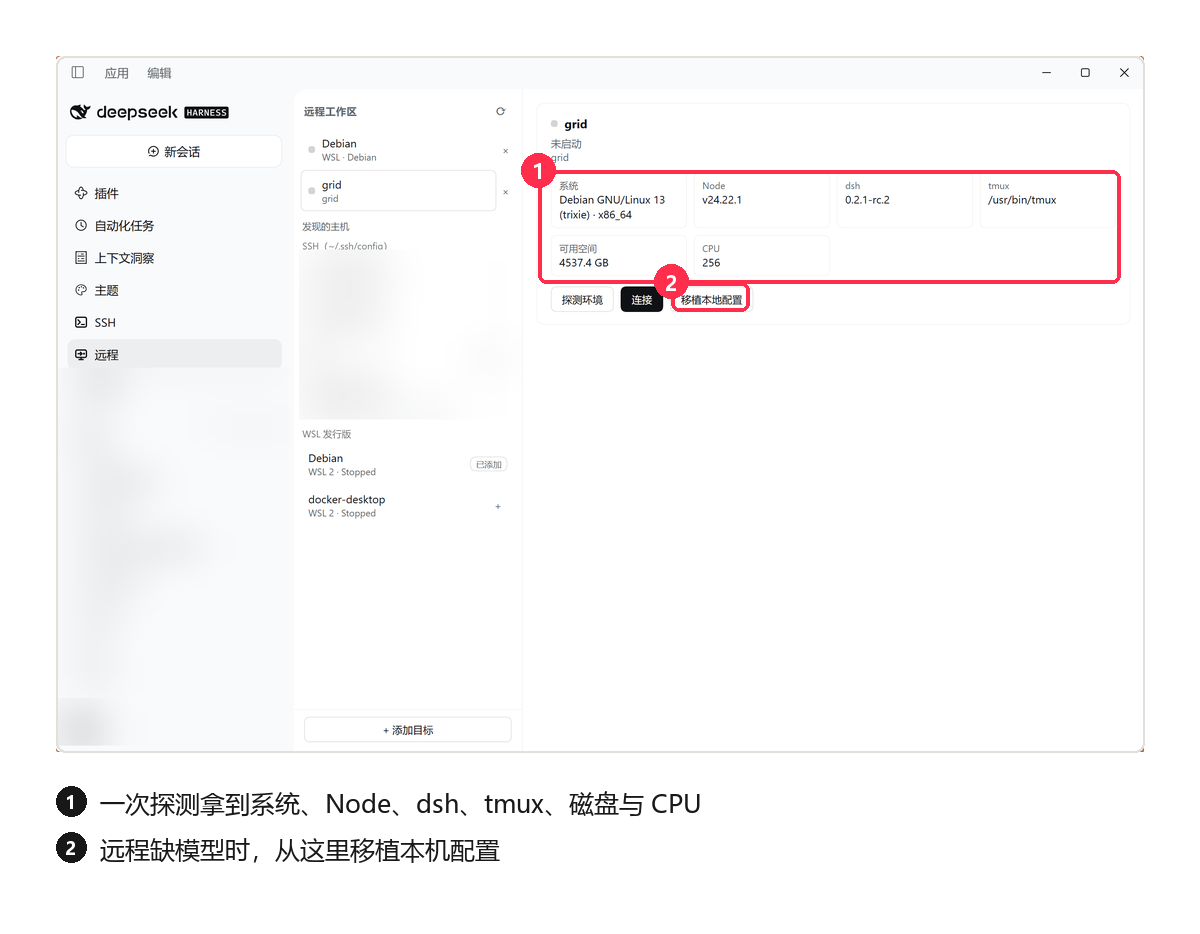
Configure a model. If the remote has no model configuration, open Port local config, select the provider, default-model and API-key groups you need, then click Write and restart. The API-key group copies actual secret values, so use a target you trust. Skip this step when the remote already has a working model.
Connect. Click Connect, then choose a remote project in the embedded DSH interface and start working. The right-hand pane is the target's own DSH, running with the model configuration you ported.
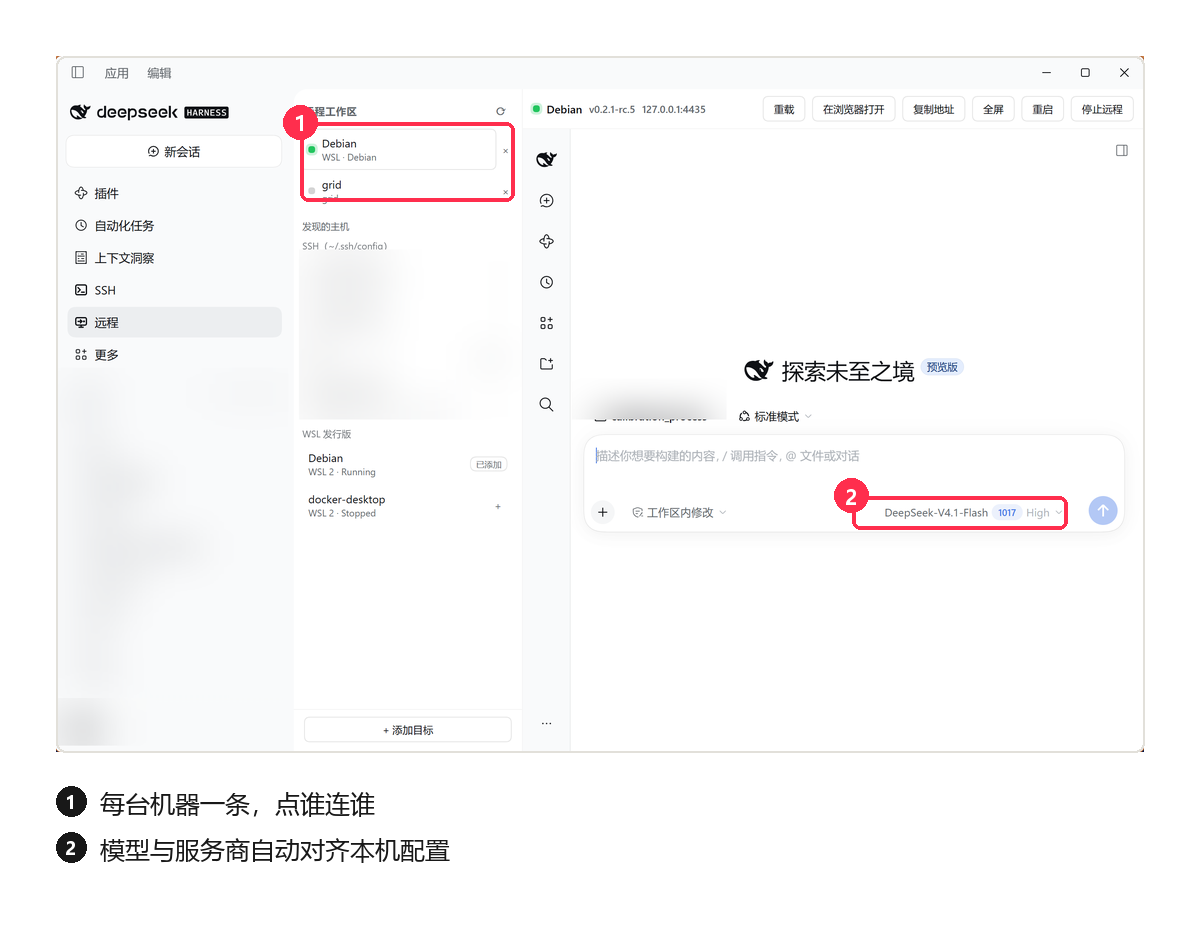
Configuration previews show names and counts only, and local browser-session credentials are excluded from porting. Remote conversations and projects are managed inside the embedded DSH interface.
Once connected
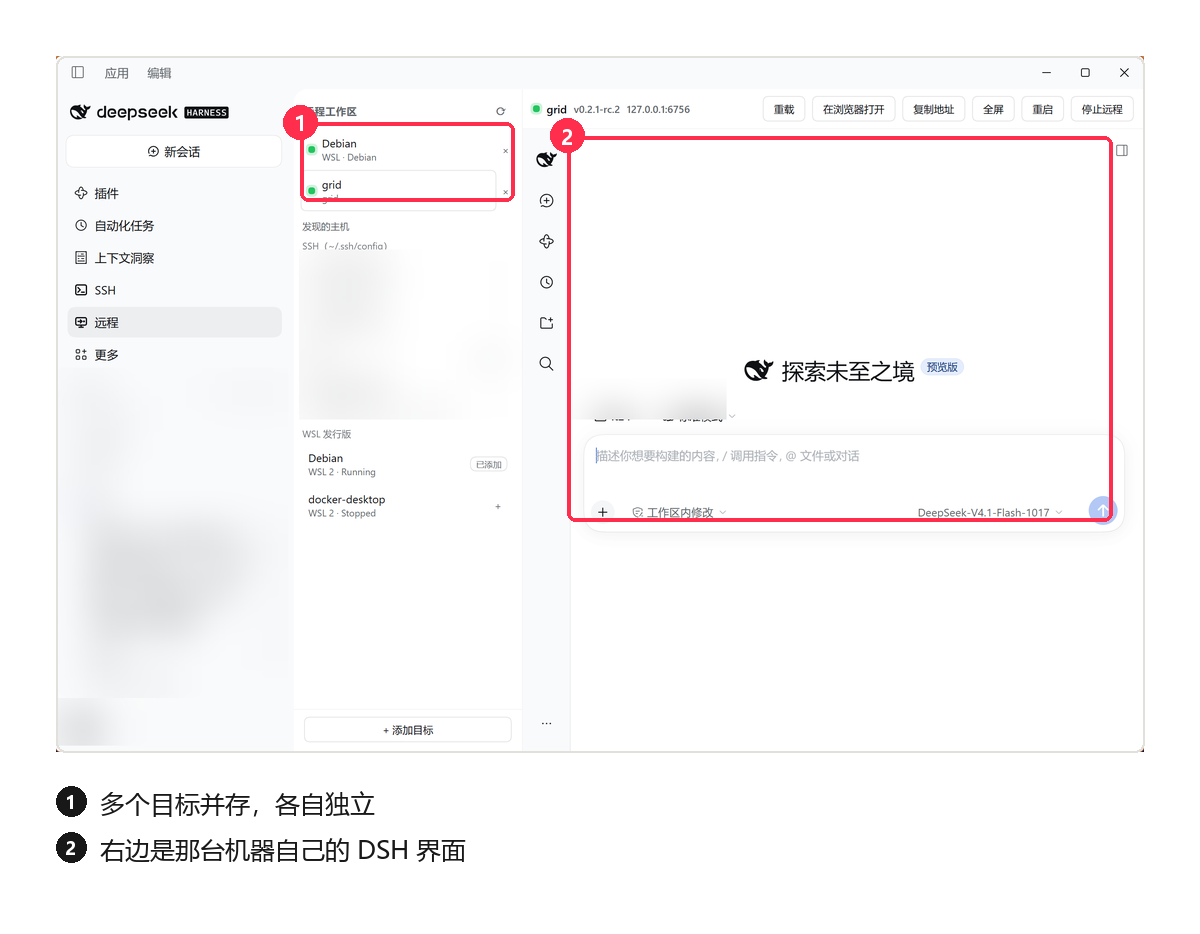
Several targets can stay connected at the same time, each independent: switching targets switches which machine's DSH you are looking at.
| Action | Effect |
|---|---|
| Reload | Refresh the remote interface |
| Restart | Restart DSH on the target |
| Stop remote | End the target instance and close the local connection |
| Close the panel / exit local DSH | Leave the remote process running for reconnection |
Requirements
| Environment | Requirement |
|---|---|
| DSH host | 0.2.1-rc.2 or newer |
| Host runtime | Node 22.x (≥ 22.19.0), or 24 and newer |
| SSH target | Linux x86_64 / arm64 with non-interactive key or agent authentication |
| Automatic setup | bash, tar, and either curl or wget |
| WSL | Windows–Linux loopback reachability: mirrored networking, or NAT with localhost forwarding enabled |
Common questions
No Remote entry after installation? Check that you installed into the current host's profile, then restart DSH and refresh the page.
SSH connection fails? Verify that ssh <alias> works without an interactive prompt and that the server permits SSH port forwarding. Password prompts are unsupported.
The interface opens but the model does not work? Check the remote model configuration. After applying Port local config, restart remote DSH.
Unknown host requirement or old screenshots in the market? Use dshmarket 1.73.0 or newer to read GitHub plugins' host requirements. Screenshots refresh with catalog builds. See marketplace metadata.
For WSL networking, host-key and embedded authentication issues, see troubleshooting.
Documentation and feedback
- Technical reference: connection architecture, authentication, configuration porting, file locations and troubleshooting.
- Contributing: local installation, validation commands and code organization.
- Changelog · Releases
- Report a bug or suggest a change with your DSH version, target type, reproduction steps and a sanitized error message.
License
Links
More in this category
zhu1090093659/dsh-web#packages/dsh-remote-web-ui★ 9959
Remote control of a dsh web workspace from phone or PC: QR-code pairing through a token-gated channel, SSE real-time sync, and separate mobile and full desktop GUI modes.
zhu1090093659/dsh-web#packages/dsh-ssh★ 9959
SSH ops panel for DSH: web terminal, SFTP transfer with progress, local port forwarding, and one-command cluster execution across hosts; agents share the same host config.
liguobao/ds-harness-remote★ 1319
Multi-device remote access for DeepSeek Harness and supported coding workspaces through an end-to-end encrypted channel, with adaptive Relay/WebRTC transport, device authorization, workspace files, read-only previews, terminals, and optional Codex Remote.
saya-ch/dsh-mobile★ 728
Access DeepSeek Harness from the Android app or a mobile browser with secure LAN and remote connections, persistent device pairing, and a customizable mobile interface.
uumit-ai/dsh-uumit-remote★ 381
Open dsh web from your phone or another computer through a UUMit account, without running your own server or installing another program: a built-in tunnel client connects to UUMit's hosted tunnel, and a panel in the sidebar handles pairing and who can use it (only you, people you invite by link or phone number, or everyone), with revocation. Requires dsh web on DSH >=0.2.1-rc.2.
ZSeven-W/dsh-ios★ 355
A live iOS Simulator or USB-connected iPhone inside the conversation: 22 agent tools for booting, building, driving the UI by accessibility identity or OCR text, list-row actions and SwiftUI preview hot reload, plus a streaming sidebar panel you can tap and drag on.
Community comments
Comments are public GitHub Discussions. Loading them connects to GitHub and Giscus; a GitHub account is required to post.