Fluid streaming rendering and smooth scrolling for the DeepSeek Harness Web UI.
Install
# from npm (prebuilt)
dsh plugin --profile web add dsh-smooth-stream
# from GitHub (first run asks for allowBuilds approval — follow the hint, retry)
dsh plugin --profile web add github:Laplace-bit/dsh-smooth-stream
Any plugin you install runs third-party code with your own permissions — it can read your files, use your credentials, and reach the network, and tool approvals don’t sandbox it. GitHub-sourced plugins also run build scripts at install time — pnpm blocks those until you allow them, so an install can stop with ERR_PNPM_GIT_DEP_PREPARE_NOT_ALLOWED or ERR_PNPM_IGNORED_BUILDS; dsh prints the exact key to add under allowBuilds in your profile’s pnpm-workspace.yaml, and the install works on the next run. Allowing a build is a trust decision: only install sources you trust, and pin a commit (github:owner/repo#sha).
README
Transform jumpy AI outputs into a calm, teleprompter-smooth reading experience.
Physics-based stream rendering and zero-reflow viewport tracking for the DeepSeek Harness (dsh) Web UI.
English · 中文 · Homepage · How It Works · npm
The Silky Smooth Feel
Whether reviewing hundreds of lines of complex reasoning or watching fast-paced code generation, dsh-smooth-stream delivers a calm, continuous, and fatigue-free reading experience:
- Organic, fluid text expansion: No more walls of text abruptly snapping onto your screen. Words glide in with an organic rhythm that feels alive yet unhurried.
- Effortless eye tracking: The viewport glides as if on a precision-damped rail. Line wraps and code blocks no longer jar your eyes, eliminating cognitive friction.
- Adaptive cadence: Leisurely during slow arrivals, smoothly accelerating during high-volume bursts—keeping your screen composed no matter how fast tokens arrive.
Why this exists
Large language models emit tokens in discrete network bursts: hundreds of characters can arrive within milliseconds, followed by tens of milliseconds of silence.
Traditional chat UIs bind DOM rendering and scrolling directly to arrival events, causing two jarring failure modes:
- Visual snapping: Text blocks, tables, and code snippets pop in abruptly, forcing the reader's eye to constantly re-acquire focus.
- Scroll jitter and reflow storms: Hard
scrollTop = scrollHeightjumps or interruptedscroll-behavior: smoothanimations restart their easing curves on every chunk, leading to sluggish lag and severe layout thrashing.
dsh-smooth-stream decouples text reveal cadence from viewport motion into two independent dynamical systems, integrating them per animation frame (requestAnimationFrame) to ensure uninterrupted continuity.
Architecture & Mechanics
[ Model SSE Stream ]
         │
         ▼
 ┌─────────────────┐       Backpressure Damping (0.55x ~ 1.0x)       ┌─────────────────┐
 │  Reveal Engine  │ ◄────────────────────────────────────────────── │  Follow Engine  │
 └────────┬────────┘                                                 └────────┬────────┘
          │ Fractional character debt integration                             │ 2nd-order damped spring (k=130, c=24)
          ▼                                                                   ▼
 [ Progressive DOM Reveal ] ────────────────────────────────────────► [ GPU Compositor Transform ]
  (Per-frame visual delta ≤ 8px)                                       (Zero Reflow / Pure Composite)
1. Dynamic Adaptive Reveal Engine
- Fractional character debt: Evaluates reveal velocity from current backlog ($v = 90 + \text{backlog}^{1.25} \times P$). Leisurely when arrival is slow; accelerates smoothly during bursts without ever dumping text walls.
- Wrap smoothing: Caps per-frame visual displacement to $\le 8\text{px}$ during line wraps and new block arrivals, spreading sudden $24\text{--}28\text{px}$ layout steps across several frames.
- Uniform completion drain: When the generation finishes, the residual queue drains at a steady speed, creating clean transitions between body, reasoning, and tool calls.
2. GPU-Driven Damped Spring Follower
- Second-order spring physics: Uses a sub-stepped damped spring ($k=130, c=24, m=1$) to convert discrete height changes into a continuous trajectory.
- Zero-reflow viewport tracking: Keeps the real scrollport pinned to the bottom while absorbing residual visual lag entirely via
transform: translate3don the message container. No layout-triggering properties are touched during follow. - Closed-loop backpressure: If visual lag fills the predictive runway ($\approx 72\text{px}$), the follower throttles reveal speed (down to $0.55\times$), ensuring text expansion never outpaces the viewport spring.
- Stall resilience & ProMotion parity: Clamps elapsed physical time ($\Delta t \le 32\text{ms}$) during main-thread stalls to prevent teleporting catches. Settling dynamics are identical across 60Hz and 120Hz (ProMotion) displays.
3. Turn Lifecycle Auto-Collapse
- Reasoning and tool executions remain expanded while streaming.
- Once a turn settles, intermediate processes cleanly fold behind a minimalist
Processed in Xssummary row, keeping the conversation view focused on final answers.
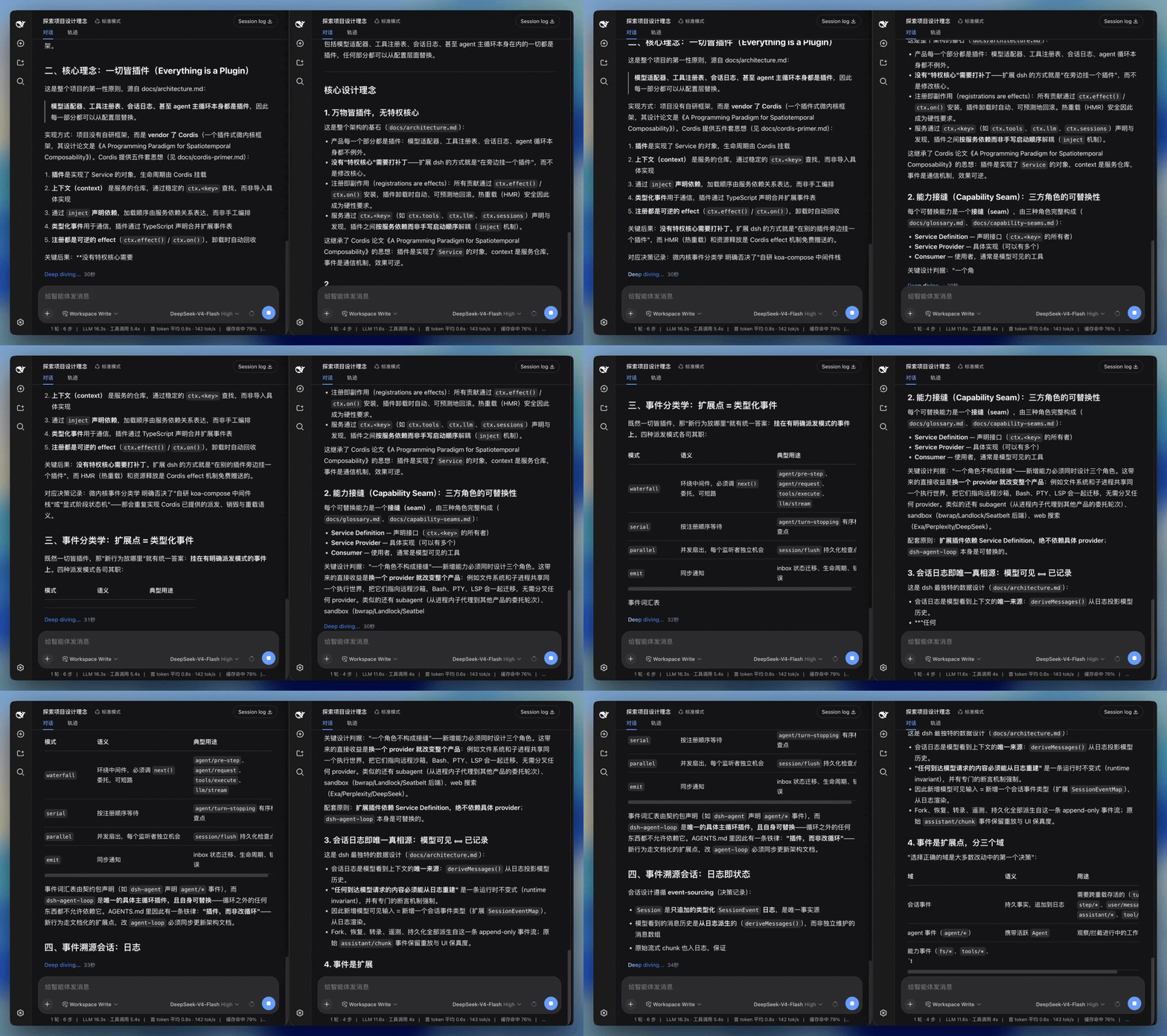
Visual Comparison
Left: default Web UI. Right: dsh-smooth-stream.
Performance & Test Benchmarks
Verified by local browser-level audit suites:
| Gate | Command | Passing Standard |
|---|---|---|
| Stream Render Audit | node scripts/run-render-audit.mjs |
10/10 clean across 5 streaming patterns; zero regressions |
| Overflow & Rebound Gate | node scripts/verify-overflow.mjs |
Zero over-scroll, zero bounce under burst load |
| Tail Vibration Probe | pnpm test |
Single-frame shift $\le 30\text{px}$, 7-frame amplitude $\le 32\text{px}$ |
- Core ESM bundle is approximately 4.7 kB (gzipped). See How It Works for full benchmarks.
Quick Start
Installation
Inside your DeepSeek Harness repository checkout:
pnpm dsh plugin --profile web add dsh-smooth-stream
If dsh is in your system PATH:
dsh plugin --profile web add dsh-smooth-stream
Start the interface:
pnpm dsh web
Verify that [dsh-smooth-stream] plugin loaded! appears in the host startup logs.
To uninstall: pnpm dsh plugin --profile web remove dsh-smooth-stream.
Kernel Compatibility
| DSH kernel | This plugin |
|---|---|
| 0.1.0-rc.5 - 0.1.0-rc.7 | ✅ all versions |
| 0.1.1-rc.2 | ✅ all versions |
| 0.1.2-alpha.1 - 0.1.2-alpha.3 | ✅ 0.4.3+; 0.4.2 and earlier fail to load on 0.1.2 because they statically import the removed helper |
- ✅ = compatible.
0.1.2-alpha.3is the current host kernel and has been verified live (built-artifact import + test suites); the remaining kernels are covered by the dual-kernel-compatible design (one build, one API surface). - Kernel 0.1.2 removed the
settingsNamespace()runtime helper (on ≤ 0.1.1 it was a validating identity function; 0.1.2 keeps only the same-named type). This plugin does not statically import that symbol any more — it inlines its namespace constant locally and asserts it as theSettingsNamespacetype, which works on both old and new kernels. - Since 0.4.3 the plugin no longer statically imports
settingsNamespace()(see the compat fix in git history); older versions only work on kernels ≤ 0.1.1. - Never statically import runtime symbols from
@deepseek-ai/*packages. The host CLI starts vianode --import tsx/esm, and tsx applies the hosttsconfigpathsmapping, so a bare@deepseek-ai/*import from an external plugin may be redirected into the host's own sources — any host-side rename or removal then explodes at boot as a module instantiation error. Type-only imports (import type) are unaffected.
Presets & Configuration
The plugin defaults to preset: balanced. You can tune the cadence in your profile's cordis.patch.yml:
preset |
Characteristics |
|---|---|
realtime |
Low buffer; closely follows model token arrival |
balanced |
Recommended default; balances smoothness and latency |
silky |
Generous buffer with gentler acceleration curves |
User Preferences
Open Settings → Plugins → Plugin Configuration in the Web UI:
Logarithmic fade (on by default) adapts the tail from 24 to at most 160 graphemes according to reveal speed, fading answers and expanded thinking from 0% opacity over 240ms with a reversed logarithmic curve that stays translucent longer. Text settles even during network pauses. Turning it off preserves text pacing and scrolling. It follows the motion preference and skips code, formulas and thinking summaries. Browsers without text-range highlighting support retain the existing reveal behavior.
For a local preview, run pnpm build:repro, serve the repository with python3 -m http.server 8765 --bind 127.0.0.1, and open http://127.0.0.1:8765/repro/index.html?demo=fade. This uses the real reveal/fade hooks with synthetic rich-text fixtures. Run node scripts/verify-logarithmic-fade.mjs to check and record it (Chrome and pnpm exec playwright-core install ffmpeg required; override the Chrome path with CHROME_BIN). Reports and recordings go to the ignored repro/artifacts/logarithmic-fade/ directory.
- Enable smooth streaming (default on): Toggles custom stream rendering and follow. Disabling instantly falls back to built-in Harness rendering.
- Auto-expand thinking: Controls whether reasoning opens automatically while streaming.
- Collapse finished work (default on): Folds thoughts and tool steps into a summary line once the turn settles.
- Show render diagnostics (default off): Opens a live HUD on the right side to inspect FPS, character backlog, spring state, and adjust physical parameters in real time.
License
Links
More in this category
zhu1090093659/dsh-web#packages/dsh-task-board★ 8178
Task board for the dsh web GUI: a sidebar multi-column kanban whose cards run in real DSH agent sessions and can also be scheduled with cron expressions, executed host-side even with the browser closed.
zhu1090093659/dsh-web#packages/dsh-web-all★ 8178
Plugin and skin collection for the DSH Web UI: task board, Git graph, right-side panel, remote mobile UI, pet, live token stats, and a skin center.
omdsh-dev/DSH-better-sidebar★ 3903
Full sidebar workbench with file rendering and editing, terminal, Git, and subagents; third-party plugins can register new tabs.
ccch1mneyyy/dsh-TUI★ 3815
Claude Code-style full-screen terminal UI: pixel-whale header, live status line, and streaming thought expansion.
MeteorNOX/DeepSeek-Balance-Whale-Widget★ 3514
A fixed-corner whale widget for the DSH web GUI — balance, today's usage and per-turn cost with peak/off-peak pricing, editable balance-alert and daily-budget bubbles, a module-based custom bubble queue with A/B weighted choices and random lines or images, 30+ vendor templates (OpenAI, OpenRouter, Kimi, SiliconFlow, Ark, Zhipu, MiniMax and more) with per-model balance and subscription quota, plus task-end sound, imported audio, custom roles and a resource manager. Local-only, no telemetry.
Devin-AXIS/deepseek-design#deepseek-idesign★ 1711
Visual design studio for websites, app prototypes, posters, cards, reports, and magazines, with templates, direct element editing, selection-aware AI draft handoff, and export.
Community comments
Comments are public GitHub Discussions. Loading them connects to GitHub and Giscus; a GitHub account is required to post.